SJoyBring 7-inch Double Din Car Stereo User Manual
Model: B0DX1QS87N | Brand: SJOYBRING
ആമുഖം
This manual provides comprehensive instructions for the SJoyBring 7-inch Double Din Car Stereo. It covers installation, operation, maintenance, and troubleshooting to ensure optimal performance and user experience. Please read this manual thoroughly before using the product.
ബോക്സിൽ എന്താണുള്ളത്
ഇൻസ്റ്റാളേഷൻ ആരംഭിക്കുന്നതിന് മുമ്പ് എല്ലാ ഘടകങ്ങളും ഉണ്ടെന്ന് ഉറപ്പാക്കുക.
Car Stereo Unit
ബാക്കപ്പ് ക്യാമറ
സ്ക്രൂകൾ
ISO Stereo Harness
ഡിസ്അസംബ്ലിംഗ് ടൂൾ
റിമോട്ട് കൺട്രോൾ
AUX കേബിൾ
Frames (2) - for use when needed
ബ്രാക്കറ്റുകൾ
ഉപയോക്തൃ മാനുവൽ
Image: Package contents of the SJoyBring car stereo, showing the main unit, backup camera, remote control, wiring harness, mounting brackets, and other accessories.
പ്രധാന സവിശേഷതകൾ
വയർലെസ് കാർപ്ലേയും ആൻഡ്രോയിഡ് ഓട്ടോയും
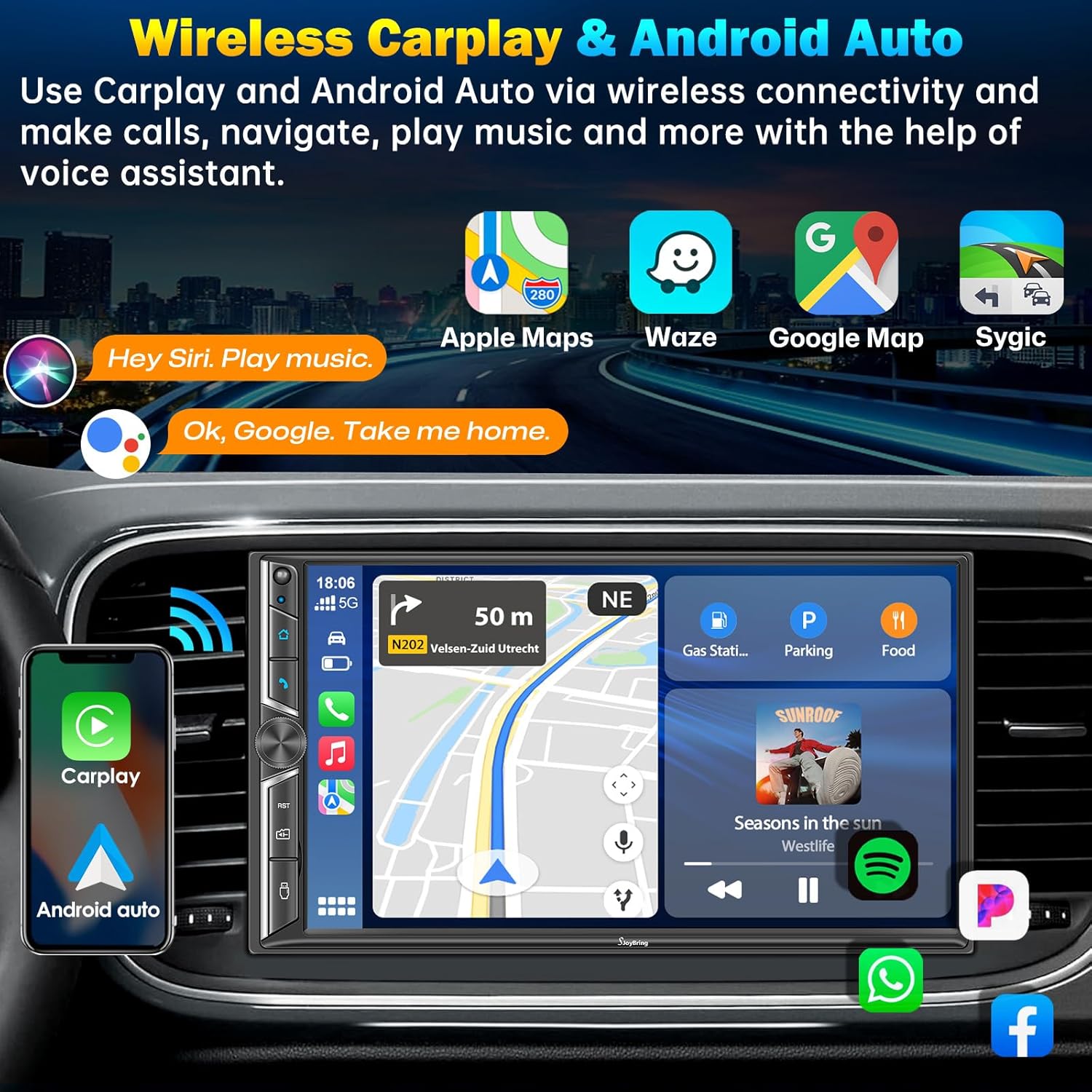
Connect your iPhone or Android phone wirelessly to the car stereo. This feature allows for seamless integration of calls, navigation, music, and more, displayed on the 7-inch HD touchscreen. Voice control via Siri or Google Assistant is supported for hands-free operation.
Image: The car stereo displaying the CarPlay interface, with a smartphone illustrating wireless CarPlay and Android Auto connectivity.
Image: A car dashboard featuring the SJoyBring stereo, demonstrating wireless CarPlay and Android Auto functionality with voice command exampലെസ്.
4.2-ചാനൽ ഓഡിയോ ഔട്ട്പുട്ട്
Experience enhanced sound quality with 4.2-channel RCA audio output and dual subwoofer ports. This system supports connection to aftermarket amplifiers and includes rear/front right/left speaker outputs, providing a rich audio experience.
Image: A visual representation of the 4.2-channel audio output system, highlighting the RCA connections for speakers and subwoofers, indicating enhanced sound quality.
Image: An illustration detailing the upgraded 4.2-channel audio output with 60W*4 power and dual subwoofer outputs, showing speaker distribution within a car.
Bluetooth 5.0 Function
Equipped with Bluetooth 5.0 for stable, faster, and clearer wireless connections for music streaming and calls. The built-in ultra-clear microphone ensures crystal-clear calls, enhancing voice control accuracy and promoting safer driving.
Image: Visual representation of the upgraded Bluetooth 5.0 feature, highlighting the noise-cancelling microphone and external MIC jack for improved call clarity.
മിറർ ലിങ്ക്
Connect your iOS or Android phone via USB to mirror apps like Google Maps, Spotify, and YouTube directly onto the 7-inch HD touchscreen. Enjoy 1920x1080P video playback and intuitive controls.
Image: The car stereo screen mirroring a smartphone display, showcasing the Mirror Link feature for apps like YouTube.
പിന്നിലും മുന്നിലും View ക്യാമറ പിന്തുണ
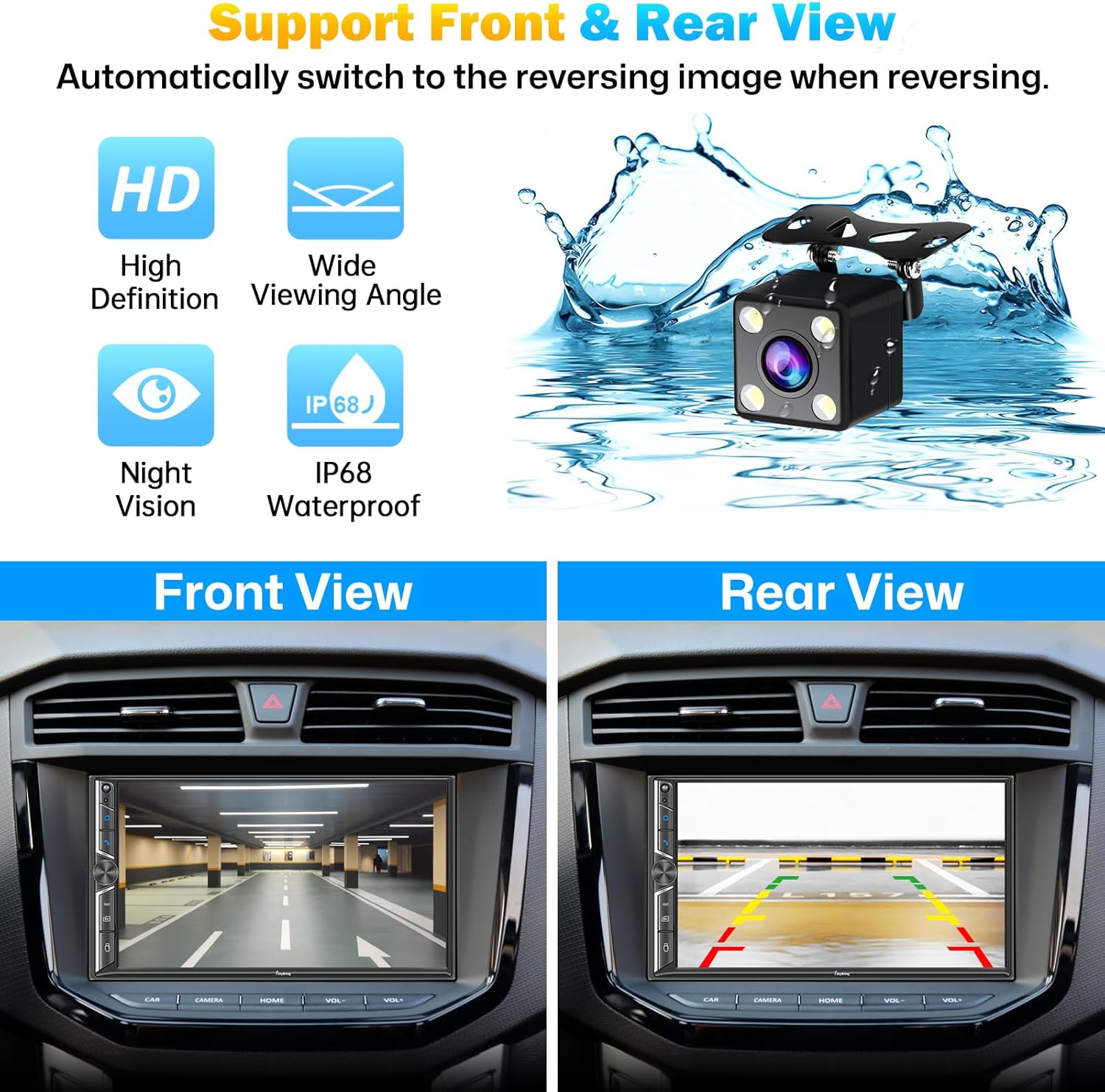
The stereo supports both rear and front view camera displays. When reversing, the screen automatically switches to the HD night vision rear view camera for safer and easier parking. The camera is waterproof and performs well in low-light conditions.
Image: A split image demonstrating the car stereo's capability to display both front and rear camera views, aiding in parking and navigation.
സജ്ജീകരണവും ഇൻസ്റ്റാളേഷനും
പ്രധാന നുറുങ്ങ്: Before installation, verify that your car’s dashboard opening size fits this double din radio. If not, you may need a suitable dash kit. Professional installation is recommended for optimal results. Some cars may require additional accessories such as wire harness adapters or radio antenna adapters for full functionality.
വയറിംഗ് ഡയഗ്രം
Refer to the following diagrams for proper wiring connections. Ensure all connections are secure to prevent malfunction.
Image: The SJoyBring 7-inch Double Din Car Stereo, showing the main unit, backup camera, and remote control.
ചിത്രം: പിൻഭാഗം view of the car stereo, detailing the various input and output ports for audio, video, and power connections.
Image: A diagram showing the 4.2-channel audio output connections, including front, rear, and subwoofer outputs.
Image: Comprehensive installation diagram, including unit dimensions and detailed wiring schematics for power, speakers, and camera inputs.
പ്രവർത്തന നിർദ്ദേശങ്ങൾ
വയർലെസ് കാർപ്ലേയും ആൻഡ്രോയിഡ് ഓട്ടോയും
To connect, ensure Bluetooth is enabled on your phone and the stereo. Pair your device. Once paired, the CarPlay or Android Auto interface will appear on the screen. Navigate using the touchscreen or voice commands.
വീഡിയോ: ഒരു ഓവർview of the SJoyBring Double Din Car Stereo, demonstrating its wireless CarPlay and Android Auto features, sound capabilities, and connectivity options.
ബ്ലൂടൂത്ത് പ്രവർത്തനം
Access the Bluetooth menu to pair new devices, manage connected devices, and stream audio. The built-in microphone allows for hands-free calling. Use the touchscreen to answer, end, or dial calls.
Mirror Link Operation
Connect your smartphone to the stereo via a USB cable. Select the "Mirror Link" option on the stereo. Follow the on-screen prompts to establish the connection and mirror your phone's display.
FM/AM റേഡിയോ
Select the "Radio" application. Use the scan function to find available stations or manually tune to a specific frequency. Save your favorite stations for quick access.
ഓഡിയോ ഇക്വലൈസർ (EQ)
Adjust the audio settings using the built-in 10-band EQ. Customize sound profiles for different music genres or personal preferences. The system also allows for subwoofer output adjustments and sound field optimization.
Image: The car stereo's display showing the adjustable 10-band equalizer and sound field settings for audio customization.
സ്റ്റിയറിംഗ് വീൽ നിയന്ത്രണം
If your vehicle supports steering wheel controls, connect the appropriate wires during installation. The stereo can be configured to recognize and respond to your vehicle's steering wheel buttons for volume, track changes, and call management.
മെയിൻ്റനൻസ്
വൃത്തിയാക്കൽ: Use a soft, dry cloth to clean the touchscreen and unit. Avoid abrasive cleaners or solvents.
താപനില: യൂണിറ്റിനെ ദീർഘനേരം തീവ്രമായ താപനിലയിലോ നേരിട്ടുള്ള സൂര്യപ്രകാശത്തിലോ തുറന്നുകാട്ടരുത്.
ഈർപ്പം: Keep the unit dry. Avoid contact with liquids.
ട്രബിൾഷൂട്ടിംഗ്
പ്രശ്നം
സാധ്യമായ കാരണം
പരിഹാരം
പവർ ഇല്ല
തെറ്റായ വയറിംഗ്; ഫ്യൂസ് പൊട്ടി.
Check power connections (ACC, B+); Inspect and replace fuses if necessary.
ശബ്ദമില്ല
Speaker wiring issue; Volume too low; Mute activated
Ensure phone is within range; Restart Bluetooth on both devices; Check phone's Bluetooth settings.
കാർപ്ലേ/ആൻഡ്രോയിഡ് ഓട്ടോ കണക്റ്റ് ചെയ്യുന്നില്ല
Incorrect USB cable; Phone software issue; Stereo software issue
Use a high-quality USB cable; Restart phone and stereo; Check for software updates.
ബാക്കപ്പ് ക്യാമറ പ്രദർശിപ്പിക്കുന്നില്ല
Camera wiring issue; Reverse trigger not connected
Check camera power and video connections; Ensure reverse trigger wire is correctly connected to the vehicle's reverse light circuit.
സ്പെസിഫിക്കേഷനുകൾ
ഡിസ്പ്ലേ: 7-inch HD Touchscreen (1920x1080P video playback)
കണക്റ്റിവിറ്റി: Wireless CarPlay, Wireless Android Auto, Bluetooth 5.0, USB, RCA
ഓഡിയോ ഔട്ട്പുട്ട്: 4.2-Channel RCA, Dual Subwoofer Ports
പവർ ഔട്ട്പുട്ട്: 240 വാട്ട്സ്
റേഡിയോ: FM / AM ട്യൂണർ
പ്രത്യേക സവിശേഷതകൾ: Mirror Link, Backup Camera Support (HD Night Vision), Front View Camera Support, Steering Wheel Control, Adjustable 10-Band EQ
അളവുകൾ: 9.17 x 6.42 x 5.98 ഇഞ്ച് (പാക്കേജ് അളവുകൾ)
ഇനത്തിൻ്റെ ഭാരം: 2.75 പൗണ്ട്
നിർമ്മാതാവ്: സ്ജോയ്ബ്രിംഗ്
മോഡൽ: B0DX1QS87N
വാറൻ്റി & പിന്തുണ
For warranty information and technical support, please refer to the warranty card included with your product or visit the official SJOYBRING webസൈറ്റ്. സഹായത്തിനായി നിങ്ങൾക്ക് വിൽപ്പനക്കാരനെ നേരിട്ട് ബന്ധപ്പെടാനും കഴിയും.
Ask about setup, troubleshooting, compatibility, parts, safety, or missing instructions. Manuals+ will review the question and use this page’s manual context to help answer it.