
1. ആമുഖം
This manual provides essential instructions for the safe assembly, operation, and maintenance of your isinwheel M10 Electric Bike. Please read this manual thoroughly before your first ride to ensure proper usage and to maximize the lifespan of your e-bike. Retain this manual for future reference.
സുരക്ഷാ മുന്നറിയിപ്പ്: Always wear a helmet and appropriate safety gear when riding. Familiarize yourself with local traffic laws and regulations. Regular maintenance is crucial for safe operation.
2. പാക്കേജ് ഉള്ളടക്കം
Upon unpacking, verify that all components listed below are present and undamaged. If any items are missing or damaged, please contact customer support.
- isinwheel M10 Electric Bike Frame (partially assembled)
- ഫ്രണ്ട് വീൽ
- Removable Lithium-Ion Battery (36V 10.4AH)
- 42V 2A Fast Charger
- പെഡലുകൾ (ഇടത്തും വലത്തും)
- Seat with Seatpost
- മുൻവശത്തെ ഹെഡ്ലൈറ്റ്
- പിൻ റിഫ്ലക്റ്റർ
- Toolkit (including Allen wrenches and spanner)
- ടയർ പമ്പ്
- ഉപയോക്തൃ മാനുവൽ

Image: All components included in the isinwheel M10 Electric Bike package.
3. സജ്ജീകരണവും അസംബ്ലിയും
The isinwheel M10 Electric Bike comes 85% pre-assembled. Follow these steps to complete the assembly:
- അൺബോക്സിംഗ്: Carefully remove all components from the packaging. Keep the packaging materials until assembly is complete and you are satisfied with the product.
- ഹാൻഡിൽബാർ ഇൻസ്റ്റലേഷൻ: Attach the handlebar to the stem using the provided Allen wrenches. Ensure the handlebar is centered and tightened securely.
- ഫ്രണ്ട് വീൽ ഇൻസ്റ്റാളേഷൻ: Secure the front wheel to the front fork. Ensure the brake rotor aligns correctly with the caliper and the quick-release skewer is properly tightened.
- ഹെഡ്ലൈറ്റ് ഇൻസ്റ്റാളേഷൻ: Mount the front headlight onto the designated bracket on the front fork or handlebar, and connect its cable.
- പെഡൽ ഇൻസ്റ്റാളേഷൻ: Identify the left (L) and right (R) pedals. The left pedal tightens counter-clockwise, and the right pedal tightens clockwise. Use the spanner to secure them firmly.
- സീറ്റ് ഇൻസ്റ്റാളേഷൻ: Insert the seatpost into the frame's seat tube. Adjust the height for comfortable riding and secure it with the quick-release lever.
- Rear Reflector Installation: Attach the rear reflector to the seatpost or rear rack (if applicable) for increased visibility.
- ബാറ്ററി ഇൻസ്റ്റാളേഷൻ: Slide the battery into its designated slot on the frame and lock it with the key.
- കേബിൾ മാനേജുമെന്റ്: Ensure all cables are neatly routed and secured, away from moving parts.

Image: Installing the handlebar.
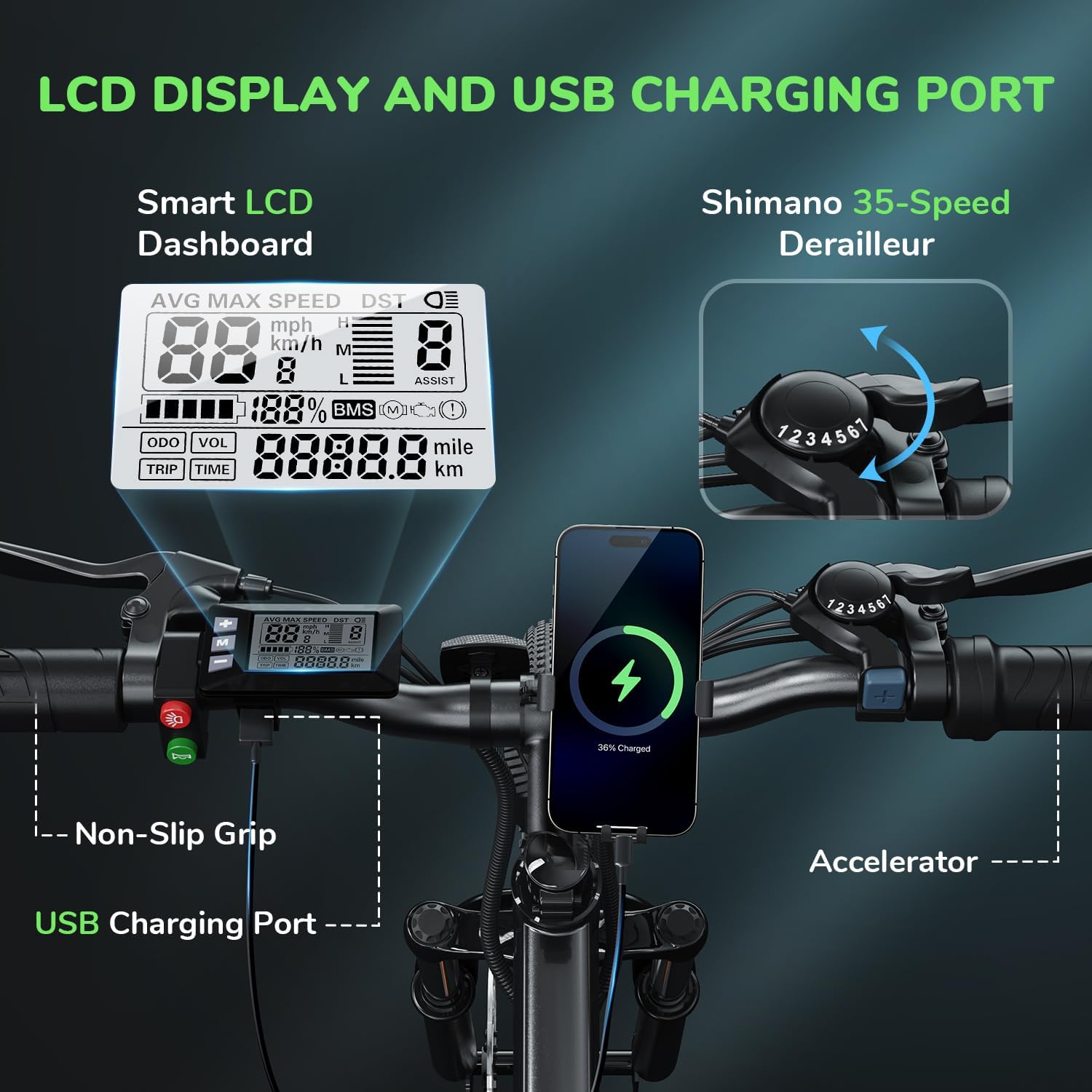
Image: Attaching the front wheel.

Image: Installing the pedals.

Image: Adjusting and securing the seat.

Image: Installing the removable battery.
അസംബ്ലി വീഡിയോ ഗൈഡ്
Video: A comprehensive guide demonstrating the assembly process of the isinwheel M10 Electric Bike, including handlebar, wheel, pedal, and battery installation.
4. പ്രവർത്തന നിർദ്ദേശങ്ങൾ
4.1 പവർ ഓൺ/ഓഫ്
- To power on the bike, press and hold the power button on the LCD display for a few seconds until the screen illuminates.
- പവർ ഓഫ് ചെയ്യാൻ, ഡിസ്പ്ലേ ഓഫാകുന്നതുവരെ പവർ ബട്ടൺ വീണ്ടും അമർത്തിപ്പിടിക്കുക.
4.2 റൈഡിംഗ് മോഡുകൾ
The M10 Electric Bike offers multiple riding modes:
- പെഡൽ അസിസ്റ്റ് മോഡ് (PAS): Provides motor assistance as you pedal. Adjust the assist level (1-5) using the '+' and '-' buttons on the control panel. Higher levels provide more assistance.
- Full Electric Mode (Throttle): Engage the throttle for motor power without pedaling. This mode is typically used for quick acceleration or when you need a break from pedaling.
- മാനുവൽ മോഡ്: മോട്ടോർ സഹായമില്ലാതെ ഒരു പരമ്പരാഗത സൈക്കിൾ പോലെ ബൈക്ക് ഓടിക്കുക.
4.3 Shimano 7-Speed Gear System
The bike is equipped with a Shimano 7-speed transmission system. Use the gear shifter on the handlebar to change gears according to terrain and desired speed. Lower gears are for uphill climbing, and higher gears are for flat terrain or downhill riding.
4.4 LCD ഡിസ്പ്ലേ ഫംഗ്ഷനുകൾ
സ്മാർട്ട് എൽസിഡി ഡിസ്പ്ലേ തത്സമയ റൈഡിംഗ് ഡാറ്റ നൽകുന്നു:
- വേഗത: Current, average, and maximum speed.
- സവാരി സമയം: Duration of your ride.
- മൈലേജ്: യാത്രാ ദൂരവും ആകെ ഓഡോമീറ്ററും.
- ബാറ്ററി നില: ശേഷിക്കുന്ന ബാറ്ററി ചാർജ്.
- സഹായ നില: നിലവിലെ പെഡൽ അസിസ്റ്റ് ലെവൽ (1-5).
Power On Operation Video
Video: Demonstrates how to power on the isinwheel M10 Electric Bike and navigate the LCD display functions.
5. ബാറ്ററി മാനേജ്മെന്റ്
5.1 ബാറ്ററി നീക്കംചെയ്യലും ഇൻസ്റ്റാളേഷനും
The 36V 10.4AH Lithium-Ion battery is removable for convenient charging or storage.
- നീക്കം ചെയ്യൽ: Unlock the battery with the provided key, then slide it out from the frame.
- ഇൻസ്റ്റലേഷൻ: Align the battery with the frame slot and slide it in until it clicks into place. Lock it with the key to secure.
5.2 ചാർജിംഗ് നിർദ്ദേശങ്ങൾ
Use only the provided 42V 2A Fast Charger.
- ബൈക്ക് ഓഫ് ചെയ്തിട്ടുണ്ടെന്ന് ഉറപ്പാക്കുക.
- Locate the charging port on the battery.
- ചാർജിംഗ് പോർട്ടിലേക്ക് ചാർജർ ബന്ധിപ്പിക്കുക.
- ഒരു സാധാരണ മതിൽ ഔട്ട്ലെറ്റിലേക്ക് ചാർജർ പ്ലഗ് ചെയ്യുക.
- The charger indicator light will show red during charging and turn green when fully charged.
- പൂർണ്ണമായി ചാർജ് ചെയ്യാൻ സാധാരണയായി 3-4 മണിക്കൂർ എടുക്കും.
- ചാർജിംഗ് പൂർത്തിയായിക്കഴിഞ്ഞാൽ ചാർജർ വിച്ഛേദിക്കുക.
Battery Removal and Charging Video
Video: Instructions for removing and installing the battery, and connecting the charger to the isinwheel M10 Electric Bike.
6. പരിപാലനം
പതിവ് അറ്റകുറ്റപ്പണികൾ നിങ്ങളുടെ ഇ-ബൈക്കിന്റെ ദീർഘായുസ്സും സുരക്ഷിതമായ പ്രവർത്തനവും ഉറപ്പാക്കുന്നു.
- വൃത്തിയാക്കൽ: പരസ്യം ഉപയോഗിച്ച് ബൈക്ക് തുടയ്ക്കുകamp തുണി. ഉയർന്ന മർദ്ദത്തിൽ ഇലക്ട്രിക്കൽ ഘടകങ്ങളിൽ നേരിട്ട് കഴുകുന്നത് ഒഴിവാക്കുക.
- ടയർ മർദ്ദം: Check tire pressure before each ride. Maintain recommended pressure (usually indicated on the tire sidewall) using the included pump.
- ബ്രേക്കുകൾ: Regularly inspect brake pads and rotors for wear. Ensure brake levers engage smoothly and provide adequate stopping power. Adjust or replace as needed.
- ചെയിൻ: തുരുമ്പ് തടയുന്നതിനും സുഗമമായ ഗിയർ മാറ്റങ്ങൾ ഉറപ്പാക്കുന്നതിനും ചെയിൻ വൃത്തിയുള്ളതും ലൂബ്രിക്കേറ്റ് ചെയ്തതുമായി സൂക്ഷിക്കുക.
- ഫാസ്റ്റനറുകൾ: Periodically check all bolts and nuts for tightness, especially on the handlebars, seatpost, and wheels.
- ബാറ്ററി കെയർ: ബാറ്ററി തണുത്തതും വരണ്ടതുമായ സ്ഥലത്ത് സൂക്ഷിക്കുക. കൂടുതൽ നേരം സൂക്ഷിക്കുകയാണെങ്കിൽ, ഓരോ 2-3 മാസത്തിലും 50-70% വരെ ചാർജ് ചെയ്യുക.
Air Inflation Instructions Video
Video: Demonstrates how to properly inflate the tires of the isinwheel M10 Electric Bike using the provided pump.
7. പ്രശ്നപരിഹാരം
If you encounter issues with your isinwheel M10 Electric Bike, refer to the following common problems and solutions:
| പ്രശ്നം | സാധ്യമായ കാരണം | പരിഹാരം |
|---|---|---|
| ബൈക്ക് പവർ ഓൺ ആയില്ല. | Battery not installed correctly or discharged; loose electrical connection. | Ensure battery is fully inserted and locked. Check battery charge level and charge if necessary. Verify all visible electrical connections are secure. |
| മോട്ടോർ സഹായിക്കുന്നില്ല | Low battery; assist level set to 0; brake lever engaged; motor cable disconnected. | Charge battery. Increase assist level on the display. Release brake levers. Check motor cable connection. |
| ബാറ്ററി ചാർജ് ചെയ്യുന്നില്ല | Charger not connected properly; faulty charger/battery; power outlet issue. | Ensure charger is securely plugged into battery and outlet. Check if the outlet is working. Contact support if issues persist. |
| ബ്രേക്കുകൾക്ക് ബലക്കുറവ് തോന്നുന്നു | തേഞ്ഞ ബ്രേക്ക് പാഡുകൾ; അയഞ്ഞ ബ്രേക്ക് കേബിൾ; ഹൈഡ്രോളിക് സിസ്റ്റത്തിലെ വായു (ബാധകമെങ്കിൽ). | Inspect and replace worn brake pads. Adjust brake cable tension. For hydraulic brakes, professional service may be required. |
If you cannot resolve an issue using the troubleshooting guide, please contact isinwheel customer support for assistance.
8 സ്പെസിഫിക്കേഷനുകൾ
Key technical specifications for the isinwheel M10 Electric Bike:
| ഫീച്ചർ | സ്പെസിഫിക്കേഷൻ |
|---|---|
| മോഡൽ | M10 |
| മോട്ടോർ | 500W പീക്ക് ബ്രഷ്ലെസ് മോട്ടോർ |
| ടോപ്പ് സ്പീഡ് | Up to 32 KM/H (20 MPH) |
| ബാറ്ററി | 36V 10.4AH (375WH) Removable Li-ion, IPX5 waterproof |
| ചാർജിംഗ് സമയം | 3-4 hours (with 42V 2A Fast Charger) |
| റേഞ്ച് (പൂർണ്ണ ഇലക്ട്രിക്) | 39-43 miles (63-70 KM) |
| റേഞ്ച് (പെഡൽ അസിസ്റ്റ്) | 50-60 miles (80-96 KM) |
| പകർച്ച | ഷിമാനോ 7-സ്പീഡ് |
| ഫ്രെയിം മെറ്റീരിയൽ | അലുമിനിയം അലോയ് |
| ബൈക്ക് ഭാരം | 21.3 KG (47 പൗണ്ട്) |
| ചക്രത്തിൻ്റെ വലിപ്പം | 26 ഇഞ്ച് |
| സസ്പെൻഷൻ | ഫ്രണ്ട് ഫോർക്ക് സസ്പെൻഷൻ |
| ബ്രേക്കുകൾ | Front and Rear Mechanical Disc Brakes |
| പ്രത്യേക സവിശേഷതകൾ | Digital LCD Display, Height Adjustable Seat, Lightweight & Portable |
| സർട്ടിഫിക്കേഷനുകൾ | UL 2271 (Li-ion battery), UL 2789 (whole e-bike) |

Image: isinwheel M10 Electric Bike dimensions and rider height guide.
9. വാറൻ്റിയും പിന്തുണയും
The isinwheel M10 Electric Bike comes with a 12-month warranty from the date of purchase. This warranty covers manufacturing defects in materials and workmanship. It does not cover damage caused by misuse, accidents, unauthorized modifications, or normal wear and tear.
For warranty claims, technical support, or any questions regarding your e-bike, please contact isinwheel customer service. Provide your purchase details and a description of the issue for prompt assistance.
ബന്ധപ്പെടാനുള്ള വിവരങ്ങൾ: Please refer to your purchase documentation or the official isinwheel webഏറ്റവും കാലികമായ ഉപഭോക്തൃ പിന്തുണാ കോൺടാക്റ്റ് വിശദാംശങ്ങൾക്കായി സൈറ്റ്.