1. ഉൽപ്പന്നം കഴിഞ്ഞുview
The KUAIQU SPPS-K3010 is a high-precision variable DC power supply designed for laboratory, R&D, and industrial applications. It features a 5-digit TFT color display, offering both numerical and graphical (curve) representations of output voltage and current. This unit provides precise control over voltage (0-30V) and current (0-10A) with microampere-level resolution (0.01mA), ensuring accurate power delivery for sensitive electronic equipment.
Key features include advanced safety protections (Over-Voltage Protection - OVP, Over-Current Protection - OCP, Short-Circuit Protection - SCP), a memory function for storing and recalling up to four sets of parameters, and a user-friendly lock function to prevent accidental adjustments. It also incorporates USB-A and USB-C charging ports for convenience and an intelligent temperature-controlled cooling fan for stable, quiet operation.

ചിത്രം 1.1: മുൻഭാഗം view of the KUAIQU SPPS-K3010 DC Power Supply, showcasing അതിന്റെ ഒതുക്കമുള്ള രൂപകൽപ്പനയും വ്യക്തമായ ഡിസ്പ്ലേയും.
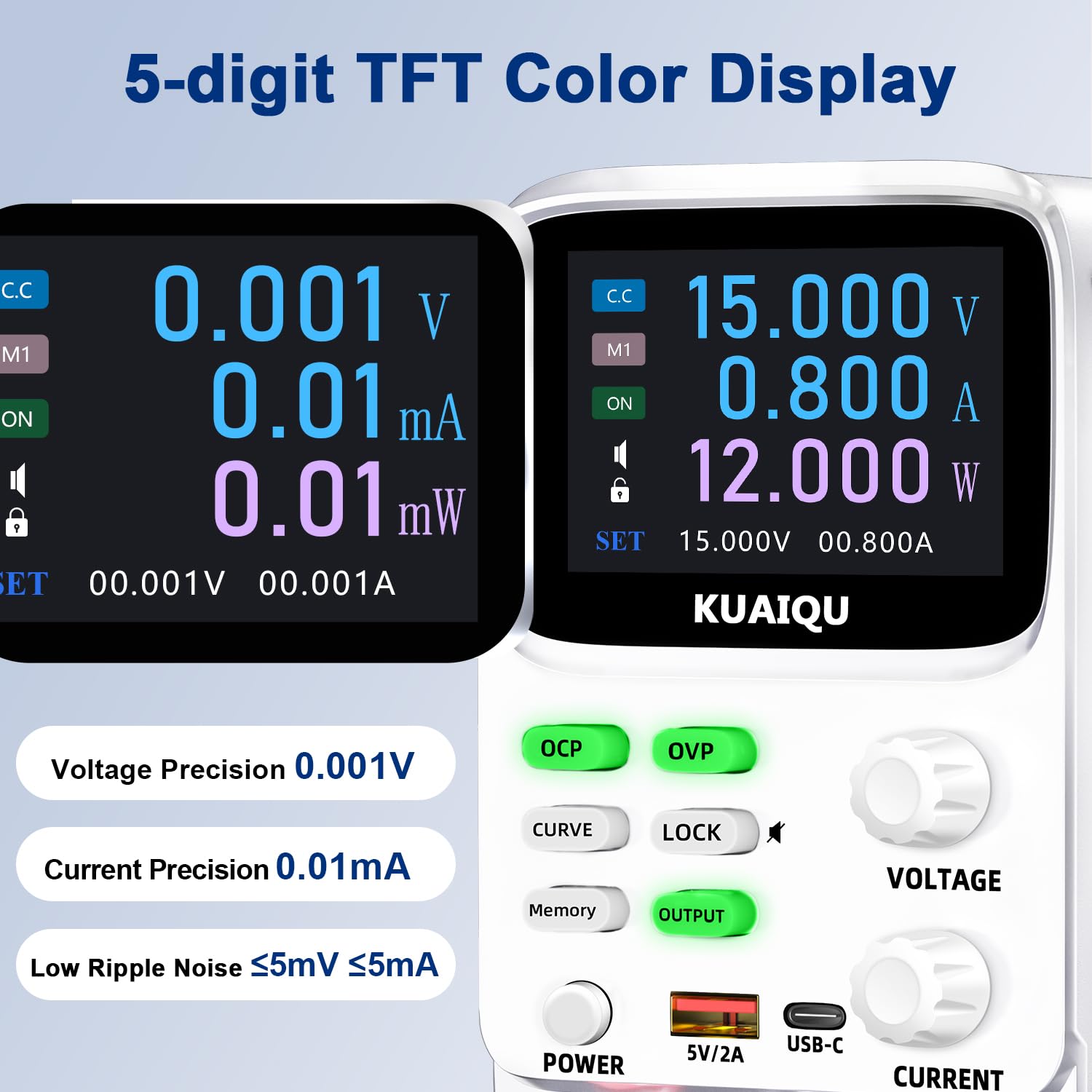
Figure 1.2: The 5-digit TFT color display provides high-precision readings, including 0.001V voltage precision and 0.01mA current precision.
2. സുരക്ഷാ നിർദ്ദേശങ്ങൾ
To ensure safe operation and prolong the lifespan of your device, please read and adhere to the following safety guidelines:
- എല്ലായ്പ്പോഴും വൈദ്യുതി വിതരണം ഒരു ഗ്രൗണ്ടഡ് ഇലക്ട്രിക്കൽ ഔട്ട്ലെറ്റിലേക്ക് ബന്ധിപ്പിക്കുക.
- വെറ്റ് അല്ലെങ്കിൽ ഡിയിൽ ഉപകരണം പ്രവർത്തിപ്പിക്കരുത്amp വ്യവസ്ഥകൾ.
- അമിതമായി ചൂടാകുന്നത് തടയാൻ യൂണിറ്റിന് ചുറ്റും ശരിയായ വായുസഞ്ചാരം ഉറപ്പാക്കുക. വെന്റിലേഷൻ ദ്വാരങ്ങൾ തടയരുത്.
- വോളിയം പ്രയോഗിക്കുന്നത് ഒഴിവാക്കുകtage or current exceeding the specified maximum ratings.
- Before making any connections or disconnections, ensure the output is turned off and the power supply is disconnected from the main power source.
- സി തുറക്കരുത്.asing of the power supply. There are no user-serviceable parts inside. Refer all servicing to qualified personnel.
- Keep the device away from flammable materials and explosive gases.
- Use only the provided power cable and output cables.
3. ഉൽപ്പന്ന ഘടകങ്ങൾ
Familiarize yourself with the various components and controls of your KUAIQU SPPS-K3010 DC Power Supply.

ചിത്രം 3.1: മുൻവശത്തെ പാനൽ മുകളിൽview. This image displays the front panel of the power supply, highlighting the TFT display, control buttons (OCP, OVP, CURVE, LOCK, Memory, OUTPUT), rotary encoder knobs for Voltage and Current, Power button, USB-A and USB-C charging ports, and output terminals (+, -, GND).
3.1 ഫ്രണ്ട് പാനൽ നിയന്ത്രണങ്ങളും സൂചകങ്ങളും
- TFT കളർ ഡിസ്പ്ലേ: വോളിയം കാണിക്കുന്നുtage, current, power, and curve displays.
- OCP ബട്ടൺ: Over-Current Protection setting and activation.
- OVP ബട്ടൺ: ഓവർ-വോളിയംtage Protection setting and activation.
- CURVE Button: Toggles the real-time voltage and current curve display.
- ലോക്ക് ബട്ടൺ: Locks/unlocks the control panel to prevent accidental changes.
- മെമ്മറി ബട്ടൺ: Accesses and saves preset voltage/current values (M1-M4).
- ഔട്ട്പുട്ട് ബട്ടൺ: Enables or disables the power output.
- VOLTAGE Knob: Rotary encoder for adjusting output voltage. Press to switch digit selection.
- CURRENT Knob: Rotary encoder for adjusting output current. Press to switch digit selection.
- പവർ ബട്ടൺ: യൂണിറ്റിനുള്ള പ്രധാന പവർ സ്വിച്ച്.
- USB-A / USB-C Ports: ബാഹ്യ ഇലക്ട്രോണിക് ഉപകരണങ്ങൾ ചാർജ് ചെയ്യുന്നതിന്.
- Output Terminals (+, -, GND): Connect positive, negative, and ground leads to the load.
3.2 പിൻ പാനൽ
The rear panel typically includes the AC power input socket, a fuse holder, and the cooling fan exhaust.
4. സജ്ജീകരണം
4.1 അൺപാക്കിംഗും പരിശോധനയും
- പാക്കേജിംഗിൽ നിന്ന് വൈദ്യുതി വിതരണവും എല്ലാ അനുബന്ധ ഉപകരണങ്ങളും ശ്രദ്ധാപൂർവ്വം നീക്കം ചെയ്യുക.
- Verify that all items listed in the "What's in the Box" section are present: 1x DC power supply, 1x output power cord, 1x power cord, 1x user manual.
- Inspect the unit for any signs of physical damage. If damage is found, contact your supplier immediately.
4.2 പവർ കണക്ഷൻ
- Ensure the power supply's main power switch is in the OFF position.
- Connect the provided AC power cord to the power input socket on the rear panel of the power supply.
- Plug the other end of the AC power cord into a grounded electrical outlet (110V AC).
4.3 ലോഡ് ബന്ധിപ്പിക്കുന്നു
- Ensure the power supply's output is OFF (the OUTPUT button LED should be off).
- Connect the red output cable to the positive (+) terminal and the black output cable to the negative (-) terminal on the front panel.
- Connect the other ends of the output cables to your load device, ensuring correct polarity. For safety, connect the green ground (GND) terminal to the chassis of your load if required.
5. പ്രവർത്തന നിർദ്ദേശങ്ങൾ
5.1 പവർ ഓണും ഓഫും
- പവർ ഓണാക്കാൻ, അമർത്തുക പവർ ബട്ടൺ. ഡിസ്പ്ലേ പ്രകാശിക്കും.
- പവർ ഓഫ് ചെയ്യാൻ, അമർത്തുക പവർ വീണ്ടും ബട്ടൺ.
5.2 വോളിയം ക്രമീകരിക്കൽtagഇയും കറൻ്റും

Figure 5.1: Precision adjustment using encoder knobs. This image illustrates how to use the rotary encoder knobs for precise voltage and current adjustments, showing the process of pressing the knob to select digits and rotating to change values.
- പാരാമീറ്റർ തിരഞ്ഞെടുക്കുക: തിരിക്കുക VOLTAGE or നിലവിലെ knob to highlight the desired parameter on the display.
- Select Digit: അമർത്തുക VOLTAGE or നിലവിലെ knob to move the cursor to the digit you wish to adjust. Repeated presses cycle through the digits.
- മൂല്യം ക്രമീകരിക്കുക: Rotate the knob to increase or decrease the value of the selected digit.
- സ്ഥിരീകരിക്കുക: Once the desired value is set, stop rotating. The value will be applied.
5.3 Enabling/Disabling Output
ആവശ്യമുള്ള വോളിയം സജ്ജീകരിച്ചതിനുശേഷംtage ഉം കറന്റും അമർത്തുക, ഔട്ട്പുട്ട് button to enable the power output to your load. The LED on the button will illuminate. Press it again to disable the output.
5.4 Memory Function (4 Groups of Storage)

Figure 5.2: Intelligent 4-group data storage. This image details the steps for using the memory function to store and recall up to four sets of voltage and current parameters (M1-M4).
- ക്രമീകരണങ്ങൾ നൽകുക: അമർത്തുക മെമ്മറി ബട്ടൺ.
- Select Memory Slot: തിരിക്കുക VOLTAGE knob to select a memory slot (M1-M4).
- Set Values: ദീർഘനേരം അമർത്തുക VOLTAGE knob to enter setting mode. Short press and rotate the VOLTAGE/നിലവിലെ knobs to set the desired voltage and current values for the selected slot.
- ക്രമീകരണങ്ങൾ സംരക്ഷിക്കുക: ദീർഘനേരം അമർത്തുക VOLTAGE knob again to save the settings to the chosen memory slot.
- ഓർമ്മപ്പെടുത്തൽ ക്രമീകരണങ്ങൾ: To use a saved setting, rotate and short press the VOLTAGE knob to select the desired memory group (M1-M4) and then short press it again to apply.
5.5 Curve Display and Battery Simulation

Figure 5.3: Curve display and battery simulation. This image shows the real-time voltage and current curve display, useful for observing output stability and for applications like battery simulation and testing standby power consumption.
അമർത്തുക വളവ് button to toggle the real-time voltage and current curve display. This feature allows for visual monitoring of output stability and transient behavior, which is particularly useful for tasks such as battery simulation and testing standby power consumption.
5.6 Intelligent A/mA Conversion
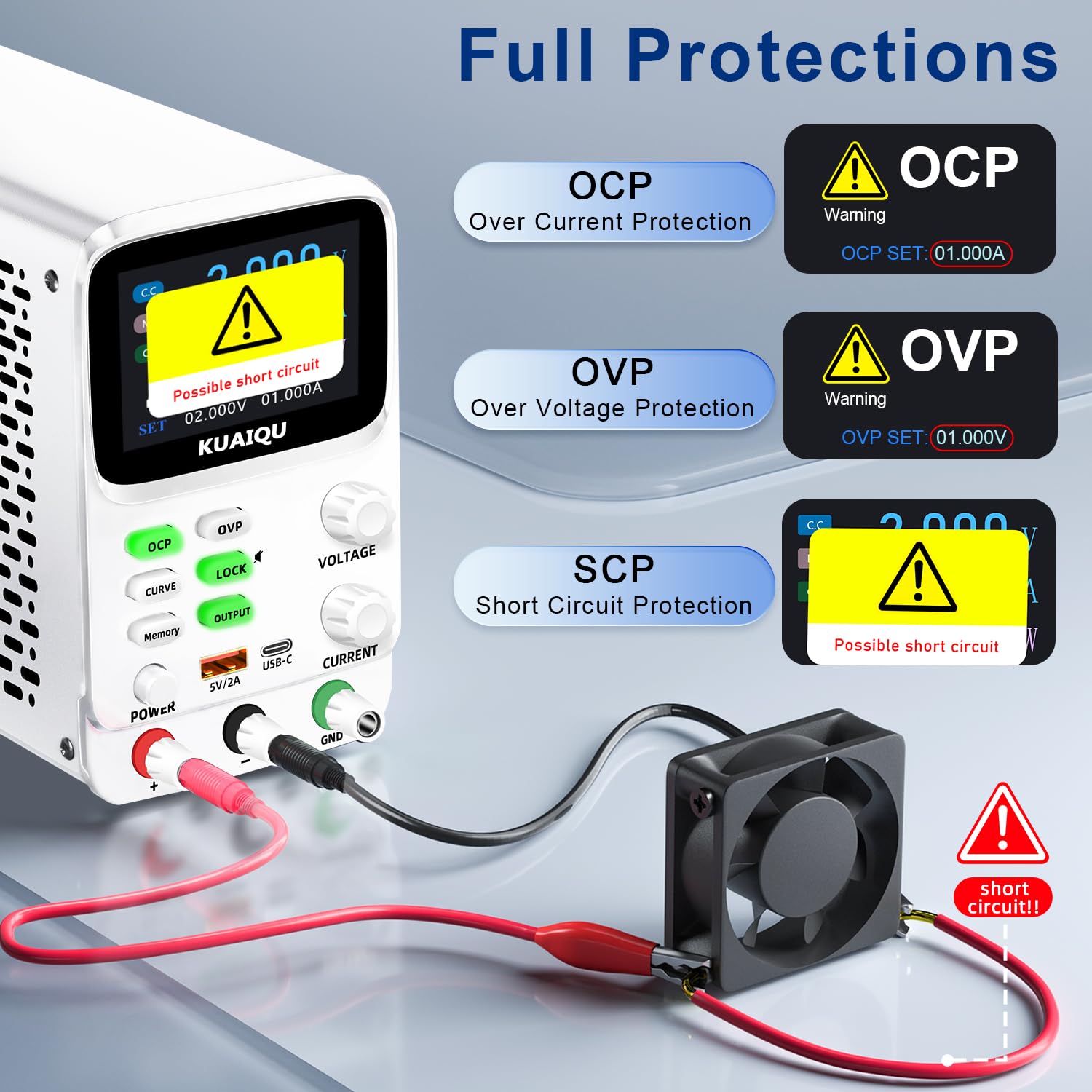
Figure 5.4: Intelligent A/mA Conversion. The display automatically switches to milliampere (mA) readings when the current value drops below 0.1A, providing enhanced precision for low-current applications.
The power supply automatically switches its current display from Amperes (A) to milliamperes (mA) when the output current drops below 0.1A. This intelligent conversion ensures optimal readability and precision for microampere-level measurements.
5.7 Protection Functions (OVP, OCP, SCP)
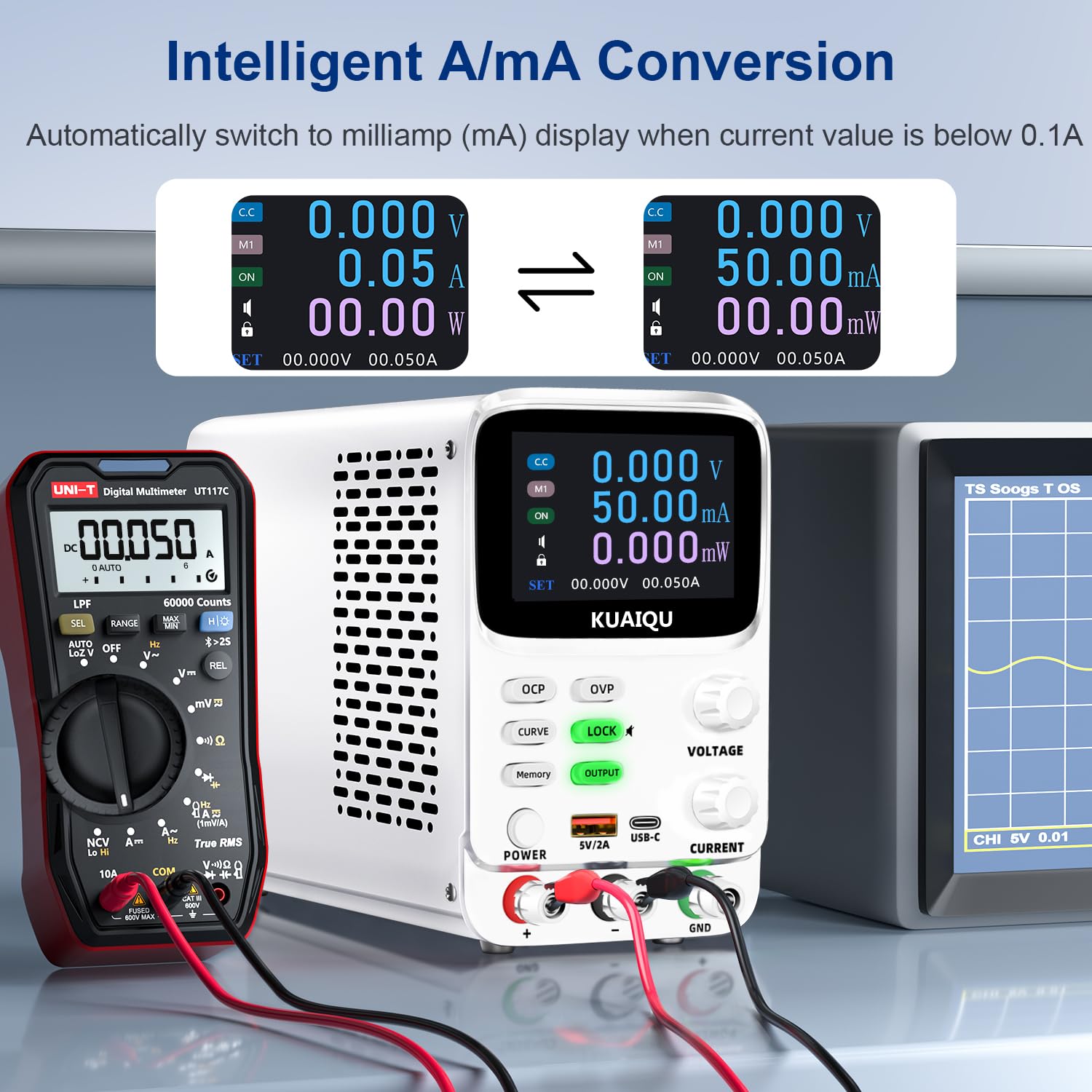
Figure 5.5: Full protection alarms. This image illustrates the Over-Current Protection (OCP), Over-Voltage Protection (OVP), and Short-Circuit Protection (SCP) features, showing how the device alerts and cuts off power when limits are exceeded or a short circuit is detected.
The power supply includes built-in protection mechanisms:
- ഓവർ-വോളിയംtagഇ സംരക്ഷണം (OVP): Prevents output voltage from exceeding a preset limit.
- ഓവർ-കറന്റ് പ്രൊട്ടക്ഷൻ (OCP): Prevents output current from exceeding a preset limit.
- Short-Circuit Protection (SCP): Automatically cuts off output in case of a short circuit.
To set OVP/OCP limits:
- ദീർഘനേരം അമർത്തുക ഒ.വി.പി or ഒ.സി.പി ക്രമീകരണ മോഡിൽ പ്രവേശിക്കാൻ ബട്ടൺ.
- ഉപയോഗിക്കുക VOLTAGE or നിലവിലെ knob to adjust the protection limit.
- ഷോർട്ട് അമർത്തുക ഒ.വി.പി or ഒ.സി.പി ക്രമീകരണം സംരക്ഷിക്കാൻ വീണ്ടും ബട്ടൺ.
If a protection is triggered, the output will be cut off, and an alarm will be displayed (e.g., "OVP", "OCP", or "Possible short circuit"). Address the issue and then press the ഔട്ട്പുട്ട് button to re-enable output.
5.8 ലോക്ക് പ്രവർത്തനം
അമർത്തുക ലോക്ക് ചെയ്യുക button to lock the control panel, preventing accidental changes to settings. The lock icon will appear on the display. Press it again to unlock. Long pressing the ലോക്ക് ചെയ്യുക button will toggle the encoder knob adjustment beeping sound.
5.9 യുഎസ്ബി ചാർജിംഗ് പോർട്ടുകൾ
The front panel includes USB-A and USB-C ports (5V/2A) for convenient charging of compatible electronic devices. These ports operate independently of the main power output settings.
6. പരിപാലനം
6.1 വൃത്തിയാക്കൽ
- Before cleaning, ensure the power supply is turned off and disconnected from the main power source.
- യൂണിറ്റിൻ്റെ പുറംഭാഗം തുടയ്ക്കാൻ മൃദുവായതും ഉണങ്ങിയതുമായ തുണി ഉപയോഗിക്കുക.
- അബ്രാസീവ് ക്ലീനറുകൾ, ലായകങ്ങൾ, കഠിനമായ രാസവസ്തുക്കൾ എന്നിവ ഉപയോഗിക്കരുത്.
- Periodically check the ventilation openings for dust accumulation and clean gently with a soft brush or compressed air.
6.2 സംഭരണം
- Store the power supply in a cool, dry environment, away from direct sunlight and extreme temperatures.
- പൊടിയിൽ നിന്നും ഈർപ്പത്തിൽ നിന്നും അകറ്റി നിർത്തുക.
- If storing for an extended period, it is recommended to place it back in its original packaging.
7. പ്രശ്നപരിഹാരം
നിങ്ങൾ നേരിട്ടേക്കാവുന്ന പൊതുവായ പ്രശ്നങ്ങളെ ഈ വിഭാഗം അഭിസംബോധന ചെയ്യുന്നു. പ്രശ്നം നിലനിൽക്കുകയാണെങ്കിൽ, ദയവായി ഉപഭോക്തൃ പിന്തുണയുമായി ബന്ധപ്പെടുക.
7.1 No Power / Display Off
- പവർ കേബിൾ പരിശോധിക്കുക: എസി പവർ കേബിൾ പവർ സപ്ലൈയിലേക്കും വാൾ ഔട്ട്ലെറ്റിലേക്കും സുരക്ഷിതമായി ബന്ധിപ്പിച്ചിട്ടുണ്ടെന്ന് ഉറപ്പാക്കുക.
- വാൾ ഔട്ട്ലെറ്റ് പരിശോധിക്കുക: മറ്റൊരു ഉപകരണം പ്ലഗ് ഇൻ ചെയ്ത് വാൾ ഔട്ട്ലെറ്റ് പ്രവർത്തനക്ഷമമാണെന്ന് ഉറപ്പാക്കുക.
- പവർ സ്വിച്ച് പരിശോധിക്കുക: Ensure the main പവർ button on the front panel is pressed.
- ഫ്യൂസ് പരിശോധിക്കുക: The fuse located on the rear panel might be blown. Replace it with a fuse of the same type and rating (refer to specifications).
7.2 No Output Voltagഇ/കറന്റ്
- Check OUTPUT Button: ഉറപ്പാക്കുക ഔട്ട്പുട്ട് button is pressed and its LED is illuminated.
- കണക്ഷനുകൾ പരിശോധിക്കുക: Verify that the output cables are correctly and securely connected to both the power supply and the load.
- Check OVP/OCP: If OVP or OCP is triggered, the output will be disabled. Check the display for "OVP" or "OCP" warnings. Adjust the voltage/current settings or protection limits as needed, then press ഔട്ട്പുട്ട് to re-enable.
- Check Short Circuit: If "Possible short circuit" is displayed, disconnect the load and check for any short circuits in your circuit.
- വാല്യംtage/Current Settings: സെറ്റ് വോള്യം ഉറപ്പാക്കുകtage and current values are not zero.
7.3 ഡിസ്പ്ലേ പ്രശ്നങ്ങൾ
- ഡിസ്പ്ലേ ഇല്ല: Refer to "No Power / Display Off" section.
- തെറ്റായ വായനകൾ: Ensure proper connections and calibration. If readings are consistently inaccurate, contact support.
8 സ്പെസിഫിക്കേഷനുകൾ
| ഫീച്ചർ | സ്പെസിഫിക്കേഷൻ |
|---|---|
| മോഡലിൻ്റെ പേര് | SPPS-K3010 |
| ബ്രാൻഡ് | കുഐക്യു |
| Putട്ട്പുട്ട് വോളിയംtagഇ റേഞ്ച് | 0-30V |
| ഔട്ട്പുട്ട് നിലവിലെ ശ്രേണി | 0-10എ |
| ഔട്ട്പുട്ട് വാട്ട്tage | 300 വാട്ട്സ് |
| വാല്യംtagഇ റെസല്യൂഷൻ | 0.001V (1mV) |
| നിലവിലെ റെസല്യൂഷൻ | 0.01mA (10µA) |
| പ്രദർശിപ്പിക്കുക | 2.8-inch TFT Color LCD (5-digit) |
| സംരക്ഷണ സവിശേഷതകൾ | OVP (ഓവർ-വോളിയംtage Protection), OCP (Over-Current Protection), SCP (Short-Circuit Protection) |
| മെമ്മറി സ്റ്റോറേജ് | 4 groups of editable parameters |
| USB ചാർജിംഗ് പോർട്ടുകൾ | USB-A, USB-C (5V/2A) |
| തണുപ്പിക്കൽ രീതി | Intelligent temperature-controlled cooling fan |
| ഉൽപ്പന്ന അളവുകൾ (L x W x H) | 7.6 x 3.4 x 5.5 ഇഞ്ച് |
| ഇനത്തിൻ്റെ ഭാരം | 2.5 പൗണ്ട് |
| യു.പി.സി | 768351108799 |
9. വാറണ്ടിയും ഉപഭോക്തൃ പിന്തുണയും
KUAIQU is committed to providing high-quality products and excellent customer service. This product undergoes thorough inspection before shipment to ensure its quality.
- ഗുണമേന്മ: All KUAIQU lab power supplies and accessories are inspected to ensure good quality upon receipt.
- സാങ്കേതിക സഹായം: If you have any questions regarding the operation, troubleshooting, or any other aspect of your KUAIQU SPPS-K3010 DC Power Supply, please do not hesitate to contact our customer service team.
- ബന്ധപ്പെടാനുള്ള വിവരങ്ങൾ: Refer to the contact details provided with your purchase or visit the official KUAIQU webപിന്തുണയ്ക്കുള്ള സൈറ്റ്.


