
DOOGEE Tab E3
DOOGEE Tab E3 Android 15 Tablet User Manual
Model: Tab E3 | Brand: DOOGEE
1. ആമുഖം
This manual provides essential information for setting up, operating, and maintaining your DOOGEE Tab E3 Android 15 Tablet. Please read this manual thoroughly before using your device to ensure proper functionality and safety.
2. ബോക്സിൽ എന്താണുള്ളത്?
നിങ്ങളുടെ പാക്കേജിൽ എല്ലാ ഇനങ്ങളും ഉണ്ടെന്ന് ഉറപ്പാക്കുക:
- 1 x TAB E3 Android 15 Tablet
- 1 x ചാർജർ
- 1 x ടൈപ്പ്-സി യുഎസ്ബി കേബിൾ
- 1 x മാനുവൽ
- 1 x വാറൻ്റി കാർഡ്
- 1 x Card Removal Needle

Image: Contents of the DOOGEE Tab E3 retail package, including the tablet, charger, USB cable, manual, warranty card, and SIM ejector tool.
3. സജ്ജീകരണം
3.1 പ്രാരംഭ ചാർജിംഗ്
Before first use, fully charge your DOOGEE Tab E3. Connect the provided Type-C USB cable to the tablet's charging port and the charger to a power outlet. The tablet supports 18W fast charging.

Image: The DOOGEE Tab E3 tablet being charged via its USB-C port, illustrating the 18W fast charging capability.
3.2 പവർ ഓൺ/ഓഫ്
- To power on: Press and hold the Power button until the DOOGEE logo appears.
- പവർ ഓഫ് ചെയ്യാൻ: പവർ ബട്ടൺ അമർത്തിപ്പിടിക്കുക, തുടർന്ന് ഓപ്ഷനുകളിൽ നിന്ന് "പവർ ഓഫ്" തിരഞ്ഞെടുക്കുക.
- പുനരാരംഭിക്കാൻ: പവർ ബട്ടൺ അമർത്തിപ്പിടിക്കുക, തുടർന്ന് ഓപ്ഷനുകളിൽ നിന്ന് "പുനരാരംഭിക്കുക" തിരഞ്ഞെടുക്കുക.
3.3 പ്രാരംഭ സജ്ജീകരണ വിസാർഡ്
Upon first power-on, the tablet will guide you through the initial setup process. This includes selecting your language, connecting to Wi-Fi, setting up your Google account, and configuring security options like Face ID.
3.4 SIM Card and Storage Expansion
The DOOGEE Tab E3 supports dual SIM cards for 4G LTE connectivity and expandable storage up to 2TB via a TF card (sold separately). Use the provided card removal needle to open the SIM tray.

Image: Illustration of the dual card slots on the DOOGEE Tab E3, showing options for two SIM cards or one SIM card and one TF (microSD) card for storage expansion.
4. നിങ്ങളുടെ ടാബ്ലെറ്റ് പ്രവർത്തിപ്പിക്കൽ
4.1 ഡിസ്പ്ലേ സവിശേഷതകൾ
The DOOGEE Tab E3 features an 11-inch FHD+ IPS display with a 90Hz refresh rate for smooth visuals. It includes eye-care and dark modes to reduce eye fatigue.
- Eye-Caring Mode: Reduces blue light emission to protect your eyes, especially during prolonged use.
- ഡാർക്ക് മോഡ്: Softens screen light for comfortable night-time viewing.

Image: A split image demonstrating the visual difference between standard display mode and Dark Mode on the DOOGEE Tab E3, highlighting eye comfort features.
4.2 പ്രകടനവും സോഫ്റ്റ്വെയറും
Powered by the Helio G100 Octa-Core processor and running Android 15, the tablet offers efficient performance for multitasking and various applications.
- ആൻഡ്രോയിഡ് 15: The latest operating system provides an intelligent, seamless, and secure user experience.
- ജെമിനി AI: Integrated AI features for real-time translation, smart text suggestions, and enhanced multitasking.
- മൾട്ടിടാസ്കിംഗ്: Utilize the efficient split-screen feature to run two applications simultaneously.
- WPS Office: Pre-installed for convenient document editing and review.

Image: The DOOGEE Tab E3 displaying two applications side-by-side in split-screen mode, demonstrating its multitasking capabilities.
വീഡിയോ: ഒരു ഔദ്യോഗിക ഉൽപ്പന്ന വീഡിയോ പ്രദർശനംasing the features of the DOOGEE Tab E3 Android 15 Tablet, including its design, display, performance, and software capabilities.
4.3 കണക്റ്റിവിറ്റി
- 4G LTE & Dual SIM: Stay connected on the go with cellular data and manage two numbers simultaneously.
- Dual-Band Wi-Fi (2.4G/5G): Ensures stable and fast internet connection.
- ബ്ലൂടൂത്ത് 5.2: For connecting wireless accessories like keyboards, mice, and headphones.
- ജിപിഎസ്: Built-in precise navigation system supporting GPS, Glonass, Galileo, and Beidou.

Image: The DOOGEE Tab E3 displaying a navigation map, highlighting its precise GPS, Glonass, Galileo, and Beidou navigation capabilities.
4.4 ക്യാമറ സവിശേഷതകൾ
The tablet is equipped with a 13MP main camera and a 5MP front camera for photos and video calls.
- 13MP പ്രധാന ക്യാമറ: For capturing sharp photos.
- 5MP മുൻ ക്യാമറ: സെൽഫികൾക്കും വീഡിയോ കോളുകൾക്കും അനുയോജ്യം.
- 2K വീഡിയോ റെക്കോർഡിംഗ്: ഉയർന്ന മിഴിവുള്ള വീഡിയോകൾ റെക്കോർഡുചെയ്യുക.
- Anti-Flicker Mode: Enhances visual comfort during camera use.

Image: The DOOGEE Tab E3 showcasing its 13MP main camera, with a view of the tablet's rear and a sample photo.
Image: The DOOGEE Tab E3 displaying a video call with multiple participants, illustrating the clarity of its 5MP front camera.
4.5 Audio and Battery
- ഇരട്ട സ്പീക്കറുകൾ: Premium 1217 BOX dual speakers deliver crisp, room-filling sound.
- 3.5 എംഎം ഹെഡ്ഫോൺ ജാക്ക്: For wired audio connections with zero latency.
- 8800mAh ബാറ്ററി: Provides long-lasting usage, up to 14.2 hours of video playback.
- OTG റിവേഴ്സ് ചാർജിംഗ്: Allows the tablet to act as a power bank for other devices.
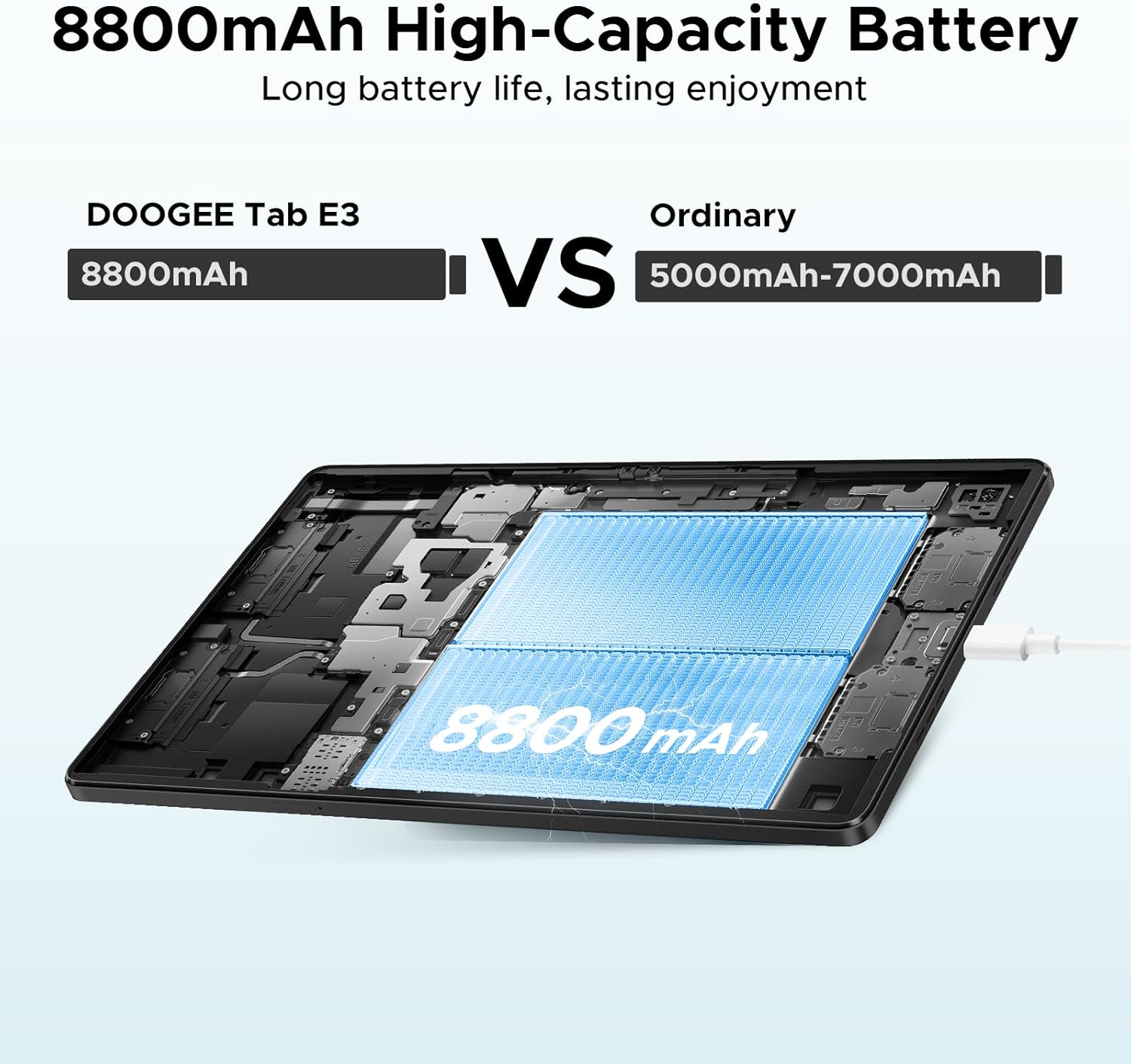
ചിത്രം: ഒരു ആന്തരികം view of the DOOGEE Tab E3 highlighting its large 8800mAh battery, emphasizing long battery life.
4.6 സുരക്ഷ
- Facial Recognition Unlock: Effortless and secure access to your device.
- Fortified Privacy Shield: Android 15 offers precision permission control, robust data encryption, timely security patches, and proactive app screening.

Image: A visual representation of the facial recognition unlock feature on the DOOGEE Tab E3, showing a user's face being scanned for access.
5. പരിപാലനം
- Keep the tablet clean using a soft, lint-free cloth. Avoid abrasive materials or harsh chemicals.
- Protect the screen with a screen protector and use a protective case to prevent scratches and damage from drops.
- ടാബ്ലെറ്റ് തീവ്രമായ താപനിലയിലോ, നേരിട്ടുള്ള സൂര്യപ്രകാശത്തിലോ, ഉയർന്ന ആർദ്രതയിലോ ഏൽക്കുന്നത് ഒഴിവാക്കുക.
- Regularly back up your data to cloud storage or an external device.
- Keep the operating system and applications updated to ensure optimal performance and security.
- Avoid overcharging the battery; disconnect the charger once the tablet is fully charged.
6. പ്രശ്നപരിഹാരം
| ഇഷ്യൂ | സാധ്യമായ കാരണം | പരിഹാരം |
|---|---|---|
| ടാബ്ലെറ്റ് ഓണാകുന്നില്ല | ബാറ്ററി ചാർജ് കുറവാണ്; സോഫ്റ്റ്വെയർ ക്രാഷ് | ടാബ്ലെറ്റ് കുറഞ്ഞത് 30 മിനിറ്റെങ്കിലും ചാർജ് ചെയ്യുക. റീസ്റ്റാർട്ട് ചെയ്യാൻ നിർബന്ധിക്കുന്നതിന് പവർ ബട്ടൺ 10-15 സെക്കൻഡ് അമർത്തിപ്പിടിക്കുക. |
| ആപ്പുകൾ മന്ദഗതിയിലാണ് അല്ലെങ്കിൽ ക്രാഷാകുന്നു | Too many apps running; insufficient RAM; outdated app | Close background apps. Clear app cache. Update apps from Google Play Store. Restart the tablet. |
| Wi-Fi കണക്ഷൻ പ്രശ്നങ്ങൾ | Incorrect password; router issue; tablet Wi-Fi bug | Forget the network and reconnect. Restart your Wi-Fi router. Toggle Wi-Fi off and on on the tablet. |
| ബാറ്ററി പെട്ടെന്ന് തീരുന്നു | High screen brightness; background apps; poor signal | Reduce screen brightness. Close unused apps. Disable unnecessary features like GPS or Bluetooth when not in use. |
| ടാബ്ലെറ്റ് ചാർജ് ചെയ്യുന്നില്ല | Faulty cable/charger; dirty charging port | Try a different USB-C cable and charger. Clean the charging port gently with a dry, soft brush. |
7 സ്പെസിഫിക്കേഷനുകൾ
| ഫീച്ചർ | വിശദാംശങ്ങൾ |
|---|---|
| ബ്രാൻഡ് | ഡോഗി |
| മോഡലിൻ്റെ പേര് | Tab E3 |
| ഓപ്പറേറ്റിംഗ് സിസ്റ്റം | ആൻഡ്രോയിഡ് 15 |
| പ്രോസസ്സർ | Helio G100 Octa-Core |
| റാം | 32GB (8GB Basic + 24GB Extended) |
| ആന്തരിക സംഭരണം | 256 ജിബി |
| വികസിപ്പിക്കാവുന്ന സംഭരണം | 2TB വരെ (TF കാർഡ്) |
| സ്ക്രീൻ വലിപ്പം | 11 ഇഞ്ച് |
| പരമാവധി സ്ക്രീൻ റെസല്യൂഷൻ | 1920*1200 Pixels (FHD+) |
| പുതുക്കിയ നിരക്ക് | 90Hz |
| ബാറ്ററി ശേഷി | 8800mAh |
| ചാർജിംഗ് | 18W ഫാസ്റ്റ് ചാർജിംഗ് |
| പ്രധാന ക്യാമറ | 13എംപി |
| മുൻ ക്യാമറ | 5എംപി |
| കണക്റ്റിവിറ്റി | 4G LTE, Dual SIM, Wi-Fi 2.4G/5G, Bluetooth 5.2, GPS |
| അളവുകൾ (LxWxH) | 9.66 x 6.43 x 0.39 ഇഞ്ച് |
| ഇനത്തിൻ്റെ ഭാരം | 1.05 പൗണ്ട് |
| നിറം | കറുപ്പ് |
8. വാറൻ്റിയും പിന്തുണയും
Your DOOGEE Tab E3 comes with a standard manufacturer's warranty. Please refer to the included Warranty Card for specific terms and conditions regarding coverage and duration.
For technical support, troubleshooting assistance, or warranty claims, please contact DOOGEE customer service through their official webസൈറ്റ് അല്ലെങ്കിൽ നിങ്ങളുടെ വാറന്റി കാർഡിൽ നൽകിയിരിക്കുന്ന ബന്ധപ്പെടാനുള്ള വിവരങ്ങൾ.
You can also visit the official DOOGEE store on Amazon for product information and updates: DOOGEE Store
Ask a question about this manual
Ask about setup, troubleshooting, compatibility, parts, safety, or missing instructions. Manuals+ will review the question and use this page’s manual context to help answer it.