
DOOGEE Tab E3 Pro
DOOGEE Tab E3 Pro Android Tablet User Manual
Model: Tab E3 Pro
1. ആമുഖം
Welcome to the user manual for your new DOOGEE Tab E3 Pro Android Tablet. This guide provides detailed instructions on how to set up, operate, maintain, and troubleshoot your device. Please read this manual thoroughly to ensure optimal performance and longevity of your tablet.
The DOOGEE Tab E3 Pro is designed for a seamless and powerful user experience, featuring a large display, robust processor, and long-lasting battery, making it ideal for entertainment, productivity, and communication.
2. പാക്കേജ് ഉള്ളടക്കം
Please check the contents of your package. If any items are missing or damaged, contact your retailer or DOOGEE support.
- DOOGEE Tab E3 Pro Tablet
- USB-C ചാർജിംഗ് കേബിൾ
- പവർ അഡാപ്റ്റർ
- സിം എജക്റ്റ് ടൂൾ (ബാധകമെങ്കിൽ)
- ദ്രുത ആരംഭ ഗൈഡ്
- വാറൻ്റി കാർഡ്
3. ഡിവൈസ് ഓവർview
Familiarize yourself with the physical components of your DOOGEE Tab E3 Pro.

ചിത്രം 3.1: ഫ്രണ്ട് view of the DOOGEE Tab E3 Pro tablet, showcasing its large 13-inch display with key features like Android 15, Helio G100 processor, Gemini AI, and 11000mAh battery capacity highlighted on the screen.
3.1. ബട്ടണുകളും പോർട്ടുകളും
- പവർ ബട്ടൺ: ടാബ്ലെറ്റ് ഓൺ/ഓഫ് ചെയ്യുന്നതിനോ സ്ക്രീൻ ഉണർത്തുന്നതിനോ/ഉറങ്ങുന്നതിനോ ഉപയോഗിക്കുന്ന വശത്ത് സ്ഥിതിചെയ്യുന്നു.
- വോളിയം ബട്ടണുകൾ: ഓഡിയോ വോളിയം ക്രമീകരിക്കുക.
- യുഎസ്ബി-സി പോർട്ട്: ചാർജിംഗിനും ഡാറ്റ കൈമാറ്റത്തിനും.
- 3.5 എംഎം ഹെഡ്ഫോൺ ജാക്ക്: വയർഡ് ഹെഡ്ഫോണുകൾ ബന്ധിപ്പിക്കുന്നതിന്.
- സിം/മൈക്രോഎസ്ഡി കാർഡ് സ്ലോട്ട്: Insert your SIM card for cellular connectivity or a MicroSD card for expandable storage.

ചിത്രം 3.2: An illustration highlighting the Android 15 operating system, indicating its intelligent, seamless, and secure features, which is the core software of the DOOGEE Tab E3 Pro.
3.2. ക്യാമറകൾ
- പിൻ ക്യാമറ: 13MP main camera for high-quality photos and videos.
- മുൻ ക്യാമറ: വീഡിയോ കോളുകൾക്കും സെൽഫികൾക്കുമായി 8MP ക്യാമറ.

ചിത്രം 3.3: A visual representation of the DOOGEE Tab E3 Pro's camera capabilities, showing the 13MP main camera and 8MP front camera, along with example photos taken by the tablet.
4. പ്രാരംഭ സജ്ജീകരണം
4.1. ടാബ്ലെറ്റ് ചാർജ് ചെയ്യുന്നു
Before first use, fully charge your tablet. Connect the USB-C cable to the tablet's charging port and the other end to the power adapter. Plug the adapter into a wall outlet.
The DOOGEE Tab E3 Pro features an 11000mAh high-capacity battery with 18W fast charging support for extended usage.
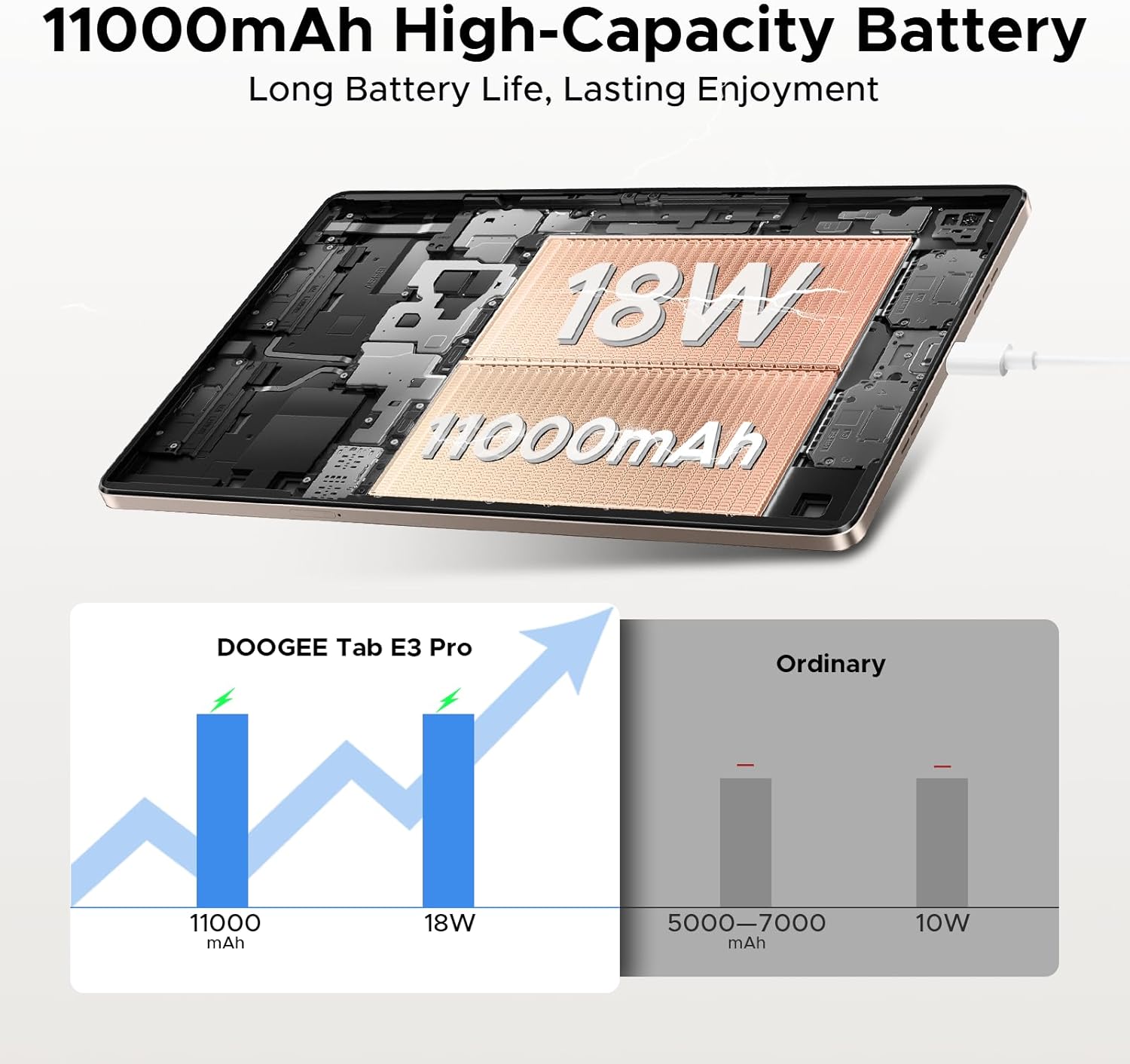
ചിത്രം 4.1: An illustration demonstrating the 11000mAh high-capacity battery of the DOOGEE Tab E3 Pro, highlighting its long battery life and 18W charging capability compared to ordinary tablets.
4.2. പവർ ഓൺ/ഓഫ്
- പവർ ഓണാക്കാൻ: Press and hold the Power button until the DOOGEE logo appears.
- പവർ ഓഫ് ചെയ്യാൻ: Press and hold the Power button until a power menu appears, then select "Power off".
- പുനരാരംഭിക്കാൻ: പവർ മെനുവിൽ നിന്ന്, "പുനരാരംഭിക്കുക" തിരഞ്ഞെടുക്കുക.
4.3. പ്രാരംഭ കോൺഫിഗറേഷൻ
ആദ്യമായി പവർ-ഓൺ ചെയ്യുമ്പോൾ, ടാബ്ലെറ്റ് പ്രാരംഭ സജ്ജീകരണ പ്രക്രിയയിലൂടെ നിങ്ങളെ നയിക്കും:
- നിങ്ങൾ ഇഷ്ടപ്പെടുന്ന ഭാഷ തിരഞ്ഞെടുക്കുക.
- ഒരു Wi-Fi നെറ്റ്വർക്കിലേക്ക് കണക്റ്റുചെയ്യുക.
- നിങ്ങളുടെ Google അക്കൗണ്ട് ഉപയോഗിച്ച് സൈൻ ഇൻ ചെയ്യുക അല്ലെങ്കിൽ പുതിയൊരെണ്ണം സൃഷ്ടിക്കുക.
- സ്ക്രീൻ ലോക്ക് (പിൻ, പാറ്റേൺ, പാസ്വേഡ് അല്ലെങ്കിൽ മുഖം തിരിച്ചറിയൽ) സജ്ജമാക്കുക.
- Review നിബന്ധനകളും വ്യവസ്ഥകളും അംഗീകരിക്കുക.
5. നിങ്ങളുടെ ടാബ്ലെറ്റ് പ്രവർത്തിപ്പിക്കൽ
5.1. ആൻഡ്രോയിഡ് 15 ഓപ്പറേറ്റിംഗ് സിസ്റ്റം
Your DOOGEE Tab E3 Pro runs on the latest Android 15 system, offering an intelligent, seamless, and secure user experience with enhanced privacy features and improved performance.
5.2. ഡിസ്പ്ലേയും ദൃശ്യങ്ങളും
Experience vibrant visuals on the 13-inch FHD+ 90Hz display. With a 1920x1200 resolution, 16:10 aspect ratio, and 84.6% screen-to-body ratio, content comes to life with 16.7 million screen colors.

ചിത്രം 5.1: A graphic illustrating the 13-inch FHD+ 90Hz display of the DOOGEE Tab E3 Pro, detailing its 1920x1200 resolution, 16:10 aspect ratio, 84.6% screen-to-body ratio, and 16.7 million screen colors.
5.3. പ്രകടനവും സംഭരണവും
Powered by the Helio G100 Octa-Core Processor, the tablet delivers boosted speed and efficiency with a 2.2GHz ultimate frequency and 6nm advanced process technology.

ചിത്രം 5.2: എ വിശദമായി view of the MediaTek Helio G100 Octa-Core Processor, emphasizing its 2.2GHz ultimate frequency and 6nm advanced process technology, which powers the DOOGEE Tab E3 Pro.
The tablet comes with 8GB of basic RAM, expandable up to 32GB Max RAM, and 256GB of internal ROM, which can be expanded up to 2TB with a TF card (sold separately).
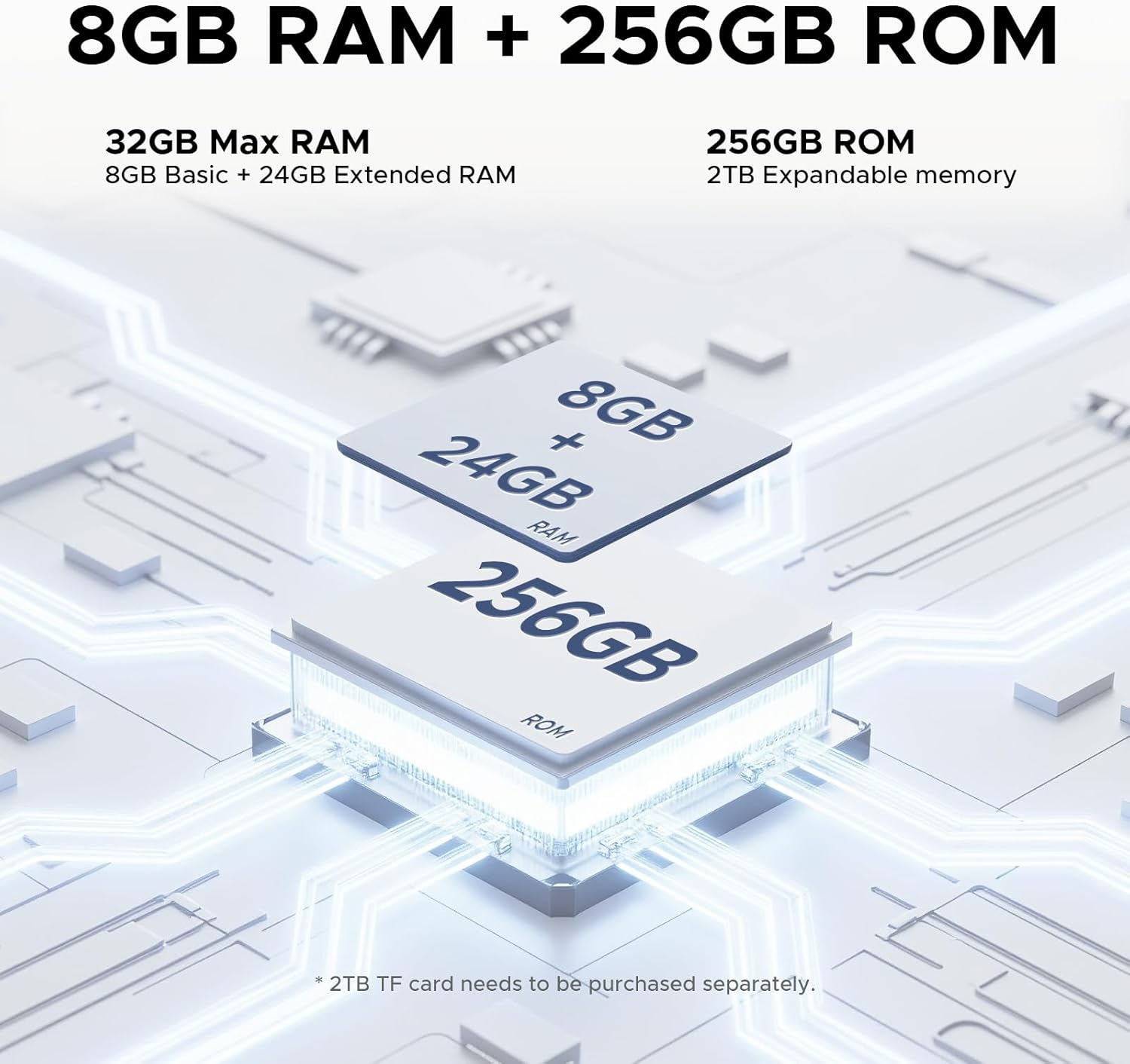
ചിത്രം 5.3: An illustration detailing the memory configuration of the DOOGEE Tab E3 Pro, showing 8GB Basic RAM + 24GB Extended RAM for a total of 32GB Max RAM, and 256GB ROM with 2TB expandable memory support.
5.4. Built-in Gemini AI
Leverage the built-in Gemini AI for enhanced productivity and convenience. Features include content creation, information retrieval & summarization, image analysis, code development, smart assistant functions, language learning, Gemini Live, and Gemini Deep Research.

ചിത്രം 5.4: ഒരു ഡയഗ്രം കാണിക്കുന്നുasing the various functionalities of the Built-in Gemini AI on the DOOGEE Tab E3 Pro, including content creation, information retrieval, image analysis, and smart assistant features.
5.5. ഓഡിയോ നിലവാരം
Enjoy premium sound quality with the 1217 BOX Quad Speakers, housed within a stylish and sleek metal case, providing an immersive audio experience.

ചിത്രം 5.5: An image highlighting the sound quality and aesthetics of the DOOGEE Tab E3 Pro, featuring its Premium 1217 BOX Quad Speakers and stylish metal case.
6. പരിപാലനവും പരിചരണവും
- വൃത്തിയാക്കൽ: സ്ക്രീനും ബോഡിയും വൃത്തിയാക്കാൻ മൃദുവായ, ലിന്റ് രഹിത തുണി ഉപയോഗിക്കുക. ഉരച്ചിലുകൾ ഉള്ള ക്ലീനറുകളോ ലായകങ്ങളോ ഉപയോഗിക്കുന്നത് ഒഴിവാക്കുക.
- സോഫ്റ്റ്വെയർ അപ്ഡേറ്റുകൾ: നിങ്ങളുടെ ടാബ്ലെറ്റിൽ ഏറ്റവും പുതിയ സവിശേഷതകൾ, സുരക്ഷാ പാച്ചുകൾ, പ്രകടന മെച്ചപ്പെടുത്തലുകൾ എന്നിവ ഉറപ്പാക്കാൻ സിസ്റ്റം അപ്ഡേറ്റുകൾ പതിവായി പരിശോധിച്ച് ഇൻസ്റ്റാൾ ചെയ്യുക. പോകുക ക്രമീകരണങ്ങൾ > സിസ്റ്റം > സിസ്റ്റം അപ്ഡേറ്റ്.
- ബാറ്ററി കെയർ: Avoid extreme temperatures. Do not let the battery fully drain frequently. For long-term storage, charge the battery to about 50%.
- സംഭരണം: Keep your tablet in a cool, dry place away from direct sunlight and extreme temperatures.
- സംരക്ഷണം: Consider using a protective case and screen protector to prevent scratches and damage.
7. പ്രശ്നപരിഹാരം
This section addresses common issues you might encounter with your DOOGEE Tab E3 Pro.
7.1. ടാബ്ലെറ്റ് ഓണാകില്ല
- ബാറ്ററി ചാർജ്ജ് ചെയ്തിട്ടുണ്ടെന്ന് ഉറപ്പാക്കുക. ചാർജർ കണക്റ്റ് ചെയ്ത് പവർ ഓൺ ചെയ്യാൻ ശ്രമിക്കുന്നതിന് മുമ്പ് കുറച്ച് മിനിറ്റ് കാത്തിരിക്കുക.
- പുനരാരംഭിക്കാൻ നിർബന്ധിക്കുന്നതിന് പവർ ബട്ടൺ കുറഞ്ഞത് 10-15 സെക്കൻഡ് അമർത്തിപ്പിടിക്കുക.
7.2. വൈഫൈ കണക്റ്റിവിറ്റി പ്രശ്നങ്ങൾ
- വൈ-ഫൈ പ്രവർത്തനക്ഷമമാക്കിയിട്ടുണ്ടെന്ന് ഉറപ്പാക്കുക ക്രമീകരണങ്ങൾ > നെറ്റ്വർക്കും ഇന്റർനെറ്റും > വൈ-ഫൈ.
- നിങ്ങളുടെ വൈഫൈ റൂട്ടർ പുനരാരംഭിക്കുക.
- നെറ്റ്വർക്ക് മറന്ന് പാസ്വേഡ് വീണ്ടും നൽകി വീണ്ടും കണക്റ്റുചെയ്യുക.
- മറ്റ് ഉപകരണങ്ങൾക്ക് ഒരേ വൈഫൈ നെറ്റ്വർക്കിലേക്ക് കണക്റ്റ് ചെയ്യാൻ കഴിയുമോ എന്ന് പരിശോധിക്കുക.
7.3. മന്ദഗതിയിലുള്ള പ്രകടനം
- പശ്ചാത്തലത്തിൽ പ്രവർത്തിക്കുന്ന ഉപയോഗിക്കാത്ത ആപ്ലിക്കേഷനുകൾ അടയ്ക്കുക.
- Clear cache data for apps that are frequently used (ക്രമീകരണങ്ങൾ > ആപ്പുകൾ > [ആപ്പ് നാമം] > സംഭരണവും കാഷെയും > കാഷെ മായ്ക്കുക).
- നിങ്ങൾക്ക് സൗജന്യമായി മതിയായ സംഭരണ സ്ഥലം ഉണ്ടെന്ന് ഉറപ്പാക്കുക.
- ടാബ്ലെറ്റ് ഇടയ്ക്കിടെ പുനരാരംഭിക്കുക.
- പ്രശ്നങ്ങൾ നിലനിൽക്കുകയാണെങ്കിൽ, ഫാക്ടറി റീസെറ്റ് പരിഗണിക്കുക (ക്രമീകരണങ്ങൾ > സിസ്റ്റം > റീസെറ്റ് ഓപ്ഷനുകൾ > എല്ലാ ഡാറ്റയും മായ്ക്കുക (ഫാക്ടറി റീസെറ്റ്)). Warning: This will erase all data on your tablet. Back up important data first.
7.4. ആപ്പുകൾ ക്രാഷാകുന്നു അല്ലെങ്കിൽ പ്രതികരിക്കുന്നില്ല
- Force stop the app (Settings > Apps > [App Name] > Force stop).
- ആപ്പിന്റെ കാഷെയും ഡാറ്റയും മായ്ക്കുക.
- ഗൂഗിൾ പ്ലേ സ്റ്റോറിൽ നിന്ന് ആപ്പ് അപ്ഡേറ്റ് ചെയ്യുക.
- ആപ്പ് അൺഇൻസ്റ്റാൾ ചെയ്ത് വീണ്ടും ഇൻസ്റ്റാൾ ചെയ്യുക.
8 സ്പെസിഫിക്കേഷനുകൾ
Detailed technical specifications for the DOOGEE Tab E3 Pro.
| ഫീച്ചർ | സ്പെസിഫിക്കേഷൻ |
|---|---|
| മോഡൽ | DOOGEE Tab E3 Pro |
| ഓപ്പറേറ്റിംഗ് സിസ്റ്റം | ആൻഡ്രോയിഡ് 15 |
| ഡിസ്പ്ലേ വലിപ്പം | 13 ഇഞ്ച് |
| ഡിസ്പ്ലേ റെസല്യൂഷൻ | 1920 x 1200 (FHD+) |
| പുതുക്കിയ നിരക്ക് | 90Hz |
| പ്രോസസ്സർ | Helio G100 Octa-Core (2.2GHz) |
| റാം | 8GB (expandable up to 32GB Max RAM) |
| ആന്തരിക സംഭരണം (ROM) | 256 ജിബി |
| വികസിപ്പിക്കാവുന്ന സംഭരണം | Up to 2TB (TF card, sold separately) |
| പിൻ ക്യാമറ | 13 എം.പി |
| മുൻ ക്യാമറ | 8 എം.പി |
| ബാറ്ററി ശേഷി | 11000 mAh (ലിഥിയം പോളിമർ) |
| ചാർജിംഗ് | 18W ഫാസ്റ്റ് ചാർജിംഗ് |
| അളവുകൾ (LxWxH) | 11.89 x 7.78 x 0.31 ഇഞ്ച് |
| ഇനത്തിൻ്റെ ഭാരം | 14.7 ഔൺസ് (418 ഗ്രാം) |
| കണക്റ്റിവിറ്റി | Wi-Fi, Bluetooth, Cellular (if applicable) |
| ഓഡിയോ | 1217 BOX Quad Speakers, 3.5mm Headphone Jack |
9. വാറൻ്റിയും പിന്തുണയും
Your DOOGEE Tab E3 Pro is covered by a limited warranty. Please refer to the warranty card included in your package for specific terms and conditions, including warranty period and coverage details.
For technical support, troubleshooting assistance, or warranty claims, please contact DOOGEE customer service through their official webസൈറ്റ് അല്ലെങ്കിൽ നിങ്ങളുടെ വാറന്റി ഡോക്യുമെന്റേഷനിൽ നൽകിയിരിക്കുന്ന ബന്ധപ്പെടാനുള്ള വിവരങ്ങൾ.
You can visit the official DOOGEE store on Amazon for more information and support: DOOGEE Amazon Store
Ask a question about this manual
Ask about setup, troubleshooting, compatibility, parts, safety, or missing instructions. Manuals+ will review the question and use this page’s manual context to help answer it.