
ആമുഖം
Thank you for choosing the TINGUT L011B Corded Landline Telephone. This manual provides detailed instructions for setting up, operating, and maintaining your new telephone. Please read this manual carefully to ensure proper use and to maximize the features of your device.
പാക്കേജ് ഉള്ളടക്കം
പാക്കേജിൽ ഇനിപ്പറയുന്ന ഇനങ്ങൾ ഉണ്ടോ എന്ന് പരിശോധിക്കുക:
- TINGUT L011B Corded Landline Telephone Unit
- ഹാൻഡ്സെറ്റ്
- കോയിൽഡ് ഹാൻഡ്സെറ്റ് കോർഡ്
- ടെലിഫോൺ ലൈൻ കോർഡ്
- ഉപയോക്തൃ മാനുവൽ (ഈ പ്രമാണം)
സജ്ജമാക്കുക
ടെലിഫോൺ ബന്ധിപ്പിക്കുന്നു
- Connect one end of the coiled handset cord to the handset and the other end to the handset jack on the side of the telephone base.
- ടെലിഫോൺ ലൈൻ കോഡിന്റെ ഒരറ്റം ടെലിഫോൺ ബേസിന്റെ പിൻഭാഗത്തുള്ള LINE ജാക്കുമായി ബന്ധിപ്പിക്കുക.
- ടെലിഫോൺ ലൈൻ കോഡിന്റെ മറ്റേ അറ്റം നിങ്ങളുടെ വാൾ ടെലിഫോൺ ജാക്കുമായി ബന്ധിപ്പിക്കുക.

പ്രവർത്തന നിർദ്ദേശങ്ങൾ
ഒരു കോൾ ചെയ്യുന്നു
- ഹാൻഡ്സെറ്റ് ഉയർത്തുക അല്ലെങ്കിൽ അമർത്തുക സ്പീക്കർഫോൺ button to get a dial tone.
- കീപാഡ് ഉപയോഗിച്ച് ആവശ്യമുള്ള ടെലിഫോൺ നമ്പർ ഡയൽ ചെയ്യുക.
- കോൾ കണക്റ്റുചെയ്യുന്നതിനായി കാത്തിരിക്കുക.
- കോൾ അവസാനിപ്പിക്കാൻ, ഹാൻഡ്സെറ്റ് മാറ്റിസ്ഥാപിക്കുക അല്ലെങ്കിൽ അമർത്തുക സ്പീക്കർഫോൺ button again if in hands-free mode.
ഒരു കോൾ സ്വീകരിക്കുന്നു
- When the telephone rings, lift the handset or press the സ്പീക്കർഫോൺ കോളിന് മറുപടി നൽകാനുള്ള ബട്ടൺ.
- കോൾ അവസാനിപ്പിക്കാൻ, ഹാൻഡ്സെറ്റ് മാറ്റിസ്ഥാപിക്കുക അല്ലെങ്കിൽ അമർത്തുക സ്പീക്കർഫോൺ ബട്ടൺ.
കോളർ ഐഡി ഡിസ്പ്ലേ
The L011B telephone features a real-time caller display on its large, backlit screen. When a call comes in, the caller's number and other relevant information will be shown on the display, allowing you to identify calls quickly before answering.

സ്പീക്കർഫോൺ പ്രവർത്തനം
To use the hands-free speakerphone function, press the സ്പീക്കർഫോൺ button during a call. This allows you to converse without holding the handset, enabling multitasking. Press the button again to switch back to the handset or to end the call.
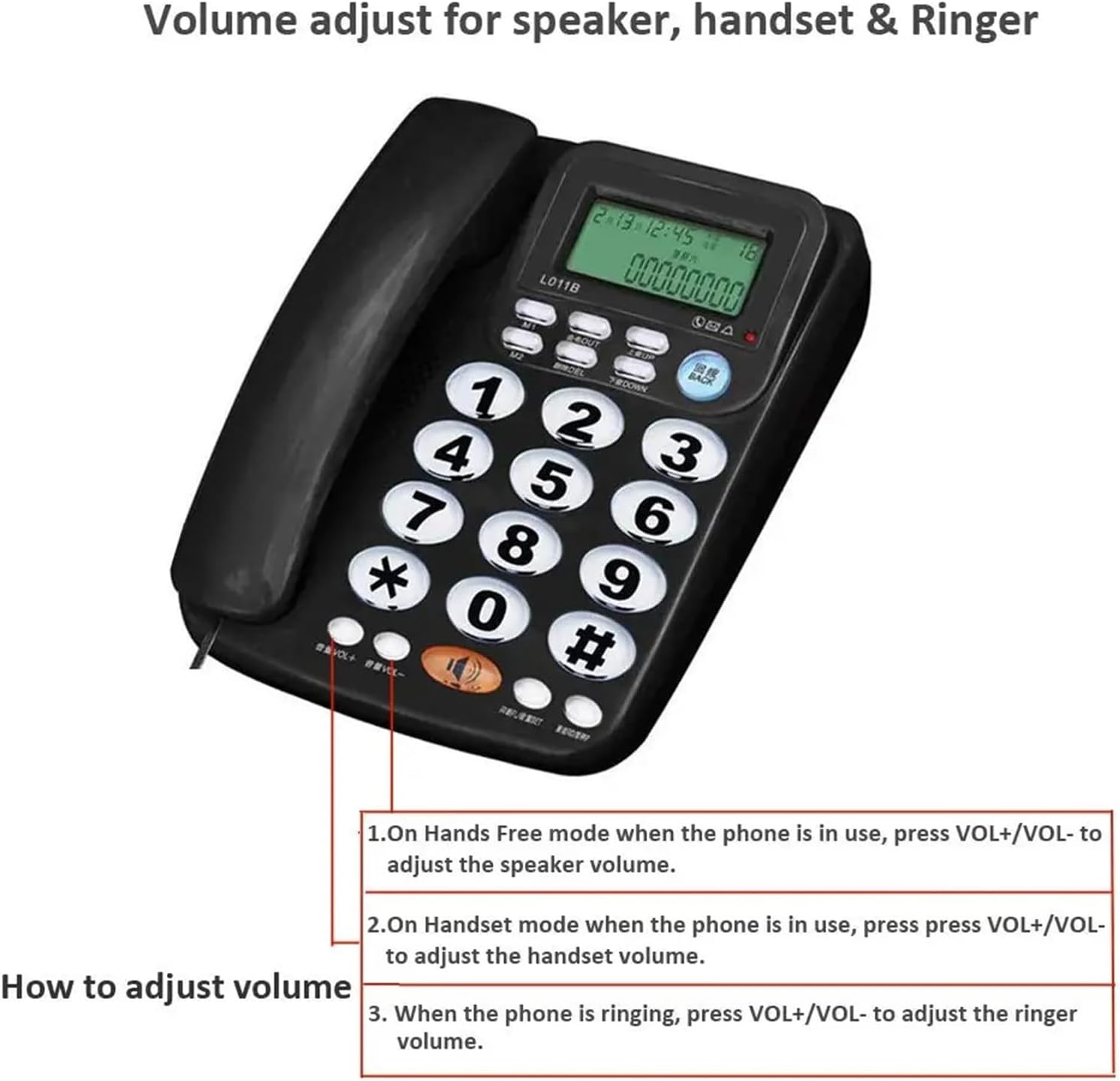
വോളിയം ക്രമീകരിക്കുന്നു
The L011B telephone allows you to adjust the volume for the speaker, handset, and ringer:
- സ്പീക്കർ വോളിയം: When the phone is in hands-free mode, press VOL+ or വോൾ- സ്പീക്കർ വോളിയം ക്രമീകരിക്കുന്നതിന്.
- ഹാൻഡ്സെറ്റ് വോളിയം: When in handset mode during a call, press VOL+ or വോൾ- to adjust the handset volume.
- റിംഗർ വോളിയം: When the phone is ringing, press VOL+ or വോൾ- റിംഗർ വോളിയം ക്രമീകരിക്കാൻ.
മെയിൻ്റനൻസ്
വൃത്തിയാക്കൽ
To keep your telephone in optimal condition:
- Wipe the telephone unit with a soft, damp തുണി.
- ഉരച്ചിലുകളോ ലായകങ്ങളോ ഉപയോഗിക്കരുത്, കാരണം അവ ഉപരിതലത്തിന് കേടുവരുത്തും.
- Ensure the telephone is unplugged from the wall jack before cleaning.
ട്രബിൾഷൂട്ടിംഗ്
If you encounter any issues with your TINGUT L011B telephone, please refer to the following table for common problems and solutions:
| പ്രശ്നം | സാധ്യമായ കാരണം | പരിഹാരം |
|---|---|---|
| ഡയൽ ടോൺ ഇല്ല | ടെലിഫോൺ ലൈൻ കോഡ് അയഞ്ഞിരിക്കുന്നു അല്ലെങ്കിൽ വിച്ഛേദിക്കപ്പെട്ടിരിക്കുന്നു. | Ensure the telephone line cord is securely connected to both the phone and the wall jack. |
| വിളിക്കുന്നയാൾക്ക് കേൾക്കാൻ കഴിയുന്നില്ല / വിളിക്കുന്നയാൾക്ക് എന്നെ കേൾക്കാൻ കഴിയുന്നില്ല. | ശബ്ദം വളരെ കുറവാണ് അല്ലെങ്കിൽ മ്യൂട്ട് ചെയ്തിരിക്കുന്നു. | Adjust the handset or speaker volume using the VOL+ ബട്ടൺ. |
| കോളർ ഐഡി പ്രദർശിപ്പിക്കുന്നില്ല | Caller ID service not activated by your telephone provider. | നിങ്ങളുടെ ലൈനിൽ കോളർ ഐഡി സേവനം സജീവമാണെന്ന് ഉറപ്പാക്കാൻ നിങ്ങളുടെ ടെലിഫോൺ സേവന ദാതാവിനെ ബന്ധപ്പെടുക. |
| ഡിസ്പ്ലേ മങ്ങിയതോ വായിക്കാൻ കഴിയാത്തതോ ആണ് | Low light environment. | The display has a backlighting function for low light conditions. Ensure the phone is receiving power if applicable (some Caller ID phones require batteries for display, though not specified for L011B). |
സ്പെസിഫിക്കേഷനുകൾ
- മോഡൽ: L011B
- ബ്രാൻഡ്: TINGUT
- തരം: കോർഡഡ് ലാൻഡ്ലൈൻ ടെലിഫോൺ
- മെറ്റീരിയൽ: പ്ലാസ്റ്റിക്
- നിറം: As Pictures (typically Black)
- ഡിസ്പ്ലേ: Large, Backlit LCD with Caller ID
- ഫീച്ചറുകൾ: Real-time Caller Display, Speakerphone Function, Adjustable Volume (Speaker, Handset, Ringer)