
ആമുഖം
Thank you for choosing the DWVO Queen Size Bed Frame with Charging Station. This manual provides essential information for the safe assembly, operation, and maintenance of your new bed frame. Please read all instructions carefully before beginning assembly and retain this manual for future reference.
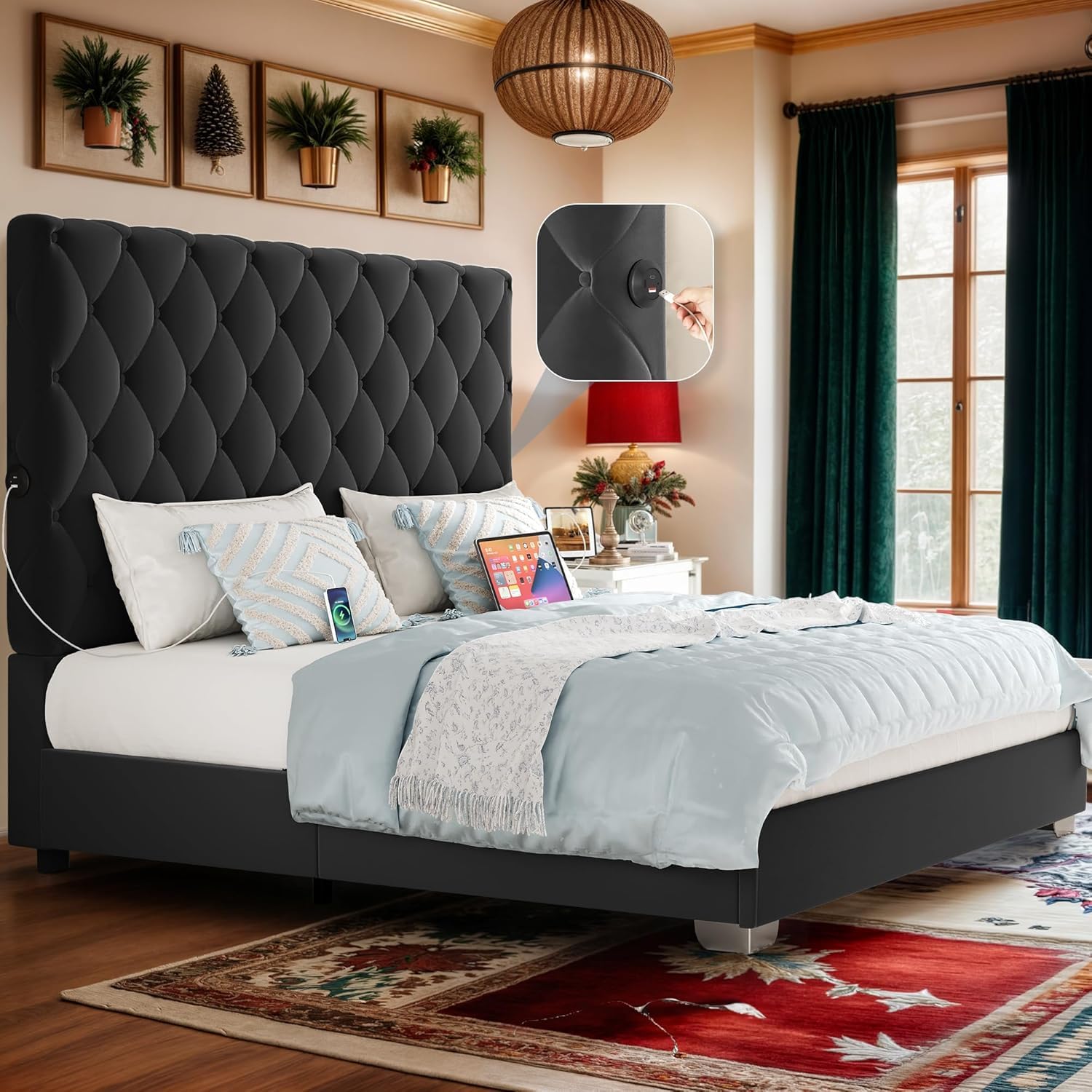
Image: The DWVO Queen Size Bed Frame, featuring a tall, button-tufted velvet headboard and a sturdy platform design. This image illustrates the overall appearance of the assembled product.
സുരക്ഷാ വിവരങ്ങൾ
നിങ്ങളുടെ സുരക്ഷയാണ് പരമപ്രധാനം. ഇനിപ്പറയുന്ന സുരക്ഷാ മാർഗ്ഗനിർദ്ദേശങ്ങൾ പാലിക്കുക:
- സ്ഥിരത ഉറപ്പാക്കാൻ, നൽകിയിരിക്കുന്ന നിർദ്ദേശങ്ങൾക്കനുസൃതമായി എല്ലായ്പ്പോഴും ബെഡ് ഫ്രെയിം കൂട്ടിച്ചേർക്കുക.
- Be cautious when using the charging ports to prevent electrical hazards. Ensure devices are compatible and cables are not damaged.
- Secure the bed frame to the wall to prevent tipping, especially if you have pets or children. Wall anchoring hardware may be required and is often sold separately.
- Do not exceed the weight capacity of the bed frame. Refer to the specifications section for details.
- ശ്വാസംമുട്ടൽ ഉണ്ടാകുന്നത് തടയാൻ ചെറിയ ഭാഗങ്ങളും പാക്കേജിംഗ് സാമഗ്രികളും കുട്ടികളിൽ നിന്ന് അകറ്റി നിർത്തുക.
- Periodically check all bolts and screws to ensure they remain tight.
സജ്ജീകരണവും അസംബ്ലിയും
Assembly of this bed frame requires careful attention to detail. It is recommended that two adults perform the assembly. Please ensure you have sufficient space and all components before starting.
ഉൾപ്പെടുത്തിയ ഘടകങ്ങൾ:
- ഹെഡ്ബോർഡ്
- സൈഡ് റെയിലുകൾ
- ഫുട്ബോർഡ്
- Slats and Support Legs
- ചാർജിംഗ് സ്റ്റേഷൻ യൂണിറ്റ്
- Hardware Pack (bolts, screws, washers, Allen wrench)
- ഇൻസ്റ്റലേഷൻ മാനുവൽ (ഈ പ്രമാണം)
Note: A separate, detailed installation manual with diagrams is included in the packaging. Refer to that manual for step-by-step visual instructions.
പൊതുസമ്മേളന ഘട്ടങ്ങൾ:
- ഭാഗങ്ങൾ അൺപാക്ക് ചെയ്ത് തിരിച്ചറിയുക: Carefully remove all components from the packaging. Lay them out on a clean, soft surface (like a carpet) to prevent scratches. Compare all parts against the component list in the separate installation manual to ensure nothing is missing or damaged.
- ഹെഡ്ബോർഡ് കൂട്ടിച്ചേർക്കുക: Attach any necessary support legs or decorative elements to the headboard as per the specific instructions.
- സൈഡ് റെയിലുകൾ ഘടിപ്പിക്കുക: Connect the side rails to the headboard and footboard using the provided hardware. Ensure all connections are secure but do not fully tighten bolts until the frame is fully assembled.
- സെന്റർ സപ്പോർട്ട് ഇൻസ്റ്റാൾ ചെയ്യുക: Assemble and install any central support beams and legs to provide adequate mattress support.
- സ്ലാറ്റുകൾ സ്ഥാപിക്കുക: Position the bed slats across the frame. Secure them according to the instructions, ensuring even spacing and firm attachment.
- ചാർജിംഗ് സ്റ്റേഷൻ സ്ഥാപിക്കുക: Integrate the charging station unit into the designated slots on the headboard or side rails. Connect any necessary power cables.
- അന്തിമ മുറുക്കൽ: Once the entire frame is assembled and aligned, go back and securely tighten all bolts and screws. Do not overtighten.
- പ്ലേസ്മെൻ്റ്: Position the bed frame in its desired location, ensuring it is level and stable.
Important: If any parts are damaged, missing, or do not fit correctly, do not proceed with assembly. Contact customer support immediately.
പ്രവർത്തന നിർദ്ദേശങ്ങൾ
മെത്ത സ്ഥാപിക്കൽ:
Once assembled, carefully place your Queen size mattress directly onto the bed slats. No box spring is needed for this platform bed frame. Ensure the mattress is centered and sits securely within the frame.
ചാർജിംഗ് സ്റ്റേഷൻ ഉപയോഗിക്കുന്നു:
Your DWVO bed frame is equipped with convenient charging ports on both sides of the headboard. These ports allow you to easily charge your electronic devices while in bed.
- പവർ കണക്ഷൻ: Ensure the bed frame's power cord for the charging station is securely plugged into a functional wall outlet.
- ഉപകരണ കണക്ഷൻ: Insert your device's charging cable into the appropriate USB port on the charging station.
- സുരക്ഷ: Avoid overloading the charging ports. Do not use damaged cables or adapters. Disconnect devices when not in use.
Text Description: The charging station is integrated into the headboard, offering accessible USB ports on both sides for convenient device charging. This feature eliminates the need for extension cords or reaching for distant wall outlets.
മെയിൻ്റനൻസ്
പതിവ് അറ്റകുറ്റപ്പണികൾ നിങ്ങളുടെ കിടക്ക ഫ്രെയിമിന്റെ ആയുസ്സും രൂപവും വർദ്ധിപ്പിക്കാൻ സഹായിക്കും.
- Cleaning Velvet Upholstery:
- For light dust, use a soft brush or vacuum cleaner with an upholstery attachment.
- ചോർച്ച ഉണ്ടായാൽ, വൃത്തിയുള്ളതും ഉണങ്ങിയതുമായ തുണി ഉപയോഗിച്ച് ഉടൻ തുടയ്ക്കുക. തിരുമ്മരുത്.
- For stubborn stains, consult a professional upholstery cleaner or use a mild, water-free cleaning solvent specifically designed for velvet, testing on an inconspicuous area first.
- മെറ്റൽ ഫ്രെയിം വൃത്തിയാക്കൽ: ലോഹ പ്രതലങ്ങൾ മൃദുവായ, d തുണി ഉപയോഗിച്ച് തുടയ്ക്കുക.amp തുണി. ഫിനിഷിന് കേടുവരുത്തുന്ന ഉരച്ചിലുകൾ നിറഞ്ഞ ക്ലീനറുകളോ കഠിനമായ രാസവസ്തുക്കളോ ഒഴിവാക്കുക.
- ഹാർഡ്വെയർ പരിശോധന: Periodically (every 3-6 months) inspect all bolts, screws, and connections. Tighten any loose hardware to maintain stability and prevent noise.
- ചാർജിംഗ് പോർട്ടുകൾ: Keep charging ports free of dust and debris. Do not force plugs into the ports.
ട്രബിൾഷൂട്ടിംഗ്
നിങ്ങളുടെ കിടക്ക ഫ്രെയിമിൽ എന്തെങ്കിലും പ്രശ്നങ്ങൾ നേരിടുകയാണെങ്കിൽ, ദയവായി ഇനിപ്പറയുന്ന പൊതുവായ പരിഹാരങ്ങൾ പരിശോധിക്കുക:
- Bed Frame is Wobbly or Noisy:
- Ensure all bolts and screws are securely tightened. Loose connections are the most common cause of wobbling and noise.
- Verify that all slats are properly seated and secured.
- Check if the bed frame is on an even surface. Adjust if necessary.
- Parts Do Not Fit During Assembly:
- Double-check the separate installation manual to ensure you are using the correct parts for each step and that they are oriented correctly.
- Do not force parts together. If a part appears bent or damaged, contact customer support for replacement.
- ചാർജിംഗ് പോർട്ടുകൾ പ്രവർത്തിക്കുന്നില്ല:
- Confirm the bed frame's power cord is firmly plugged into a live wall outlet.
- Test the outlet with another device to ensure it is functional.
- Try a different charging cable and device to rule out issues with your accessories.
- Inspect the charging ports for any visible damage or debris.
If these steps do not resolve the issue, please contact DWVO Customer Support.
സ്പെസിഫിക്കേഷനുകൾ
| മോഡൽ നമ്പർ | MADWViEH8i |
| വലിപ്പം | രാജ്ഞി |
| ഉൽപ്പന്ന അളവുകൾ (L x W x H) | 86.6" x 79.9" x 52.8" |
| മെറ്റീരിയൽ | Metal frame, Velvet upholstered headboard |
| പ്രത്യേക സവിശേഷതകൾ | Integrated Charging Station, No Box Spring Needed, Noise-Free Design |
| ഇനത്തിൻ്റെ ഭാരം | 101.4 പൗണ്ട് |
| അസംബ്ലി ആവശ്യമാണ് | അതെ |
| നിറം | ഇരുണ്ട കറുപ്പ് |
വാറൻ്റിയും പിന്തുണയും
For warranty information, please refer to the documentation included with your purchase or contact DWVO Customer Support directly. Warranty terms and conditions may vary.
If you require assistance with assembly, have questions about your product, or need to report a damaged/missing part, please contact DWVO Customer Support. Have your model number (MADWViEH8i) and purchase details ready for faster service.
ഉപഭോക്തൃ പിന്തുണ: Refer to the contact information provided on the DWVO official webസൈറ്റ് അല്ലെങ്കിൽ നിങ്ങളുടെ വാങ്ങൽ രസീത്.