
1. ആമുഖം
Thank you for choosing the Speediance Smart Body Fat Scale FG2211LB. This device is designed to provide comprehensive body composition analysis, including weight, BMI, and body fat percentage, using advanced sensor technology and a dedicated mobile application. Please read this manual carefully before use to ensure proper operation and to maximize the benefits of your new scale.
2 സുരക്ഷാ വിവരങ്ങൾ
- നിങ്ങൾക്ക് ഒരു പേസ്മേക്കറോ മറ്റ് ആന്തരിക മെഡിക്കൽ ഉപകരണമോ ഉണ്ടെങ്കിൽ ഈ ഉപകരണം ഉപയോഗിക്കരുത്.
- നിങ്ങൾ ഗർഭിണിയാണെങ്കിൽ ഈ ഉപകരണം ഉപയോഗിക്കരുത്.
- Place the scale on a hard, flat surface. Using it on soft surfaces like carpet may affect accuracy.
- Keep the scale dry. Avoid contact with water to prevent damage to electronic components.
- നനഞ്ഞാൽ സ്കെയിൽ പ്രതലം വഴുക്കലുള്ളതായിരിക്കും. ശ്രദ്ധാപൂർവ്വം കയറുകയും ഇറങ്ങുകയും ചെയ്യുക.
- ശരീര അളവെടുപ്പ് ഒഴികെയുള്ള ആവശ്യങ്ങൾക്ക് സ്കെയിലിൽ ചാടുകയോ അത് ഉപയോഗിക്കുകയോ ചെയ്യരുത്.
- കുട്ടികൾക്ക് ലഭ്യമാകാതെ സൂക്ഷിക്കുക.
- The maximum weight capacity is 180 kg (396 lbs). Do not exceed this limit.
3. പാക്കേജ് ഉള്ളടക്കം
പാക്കേജിൽ ഇനിപ്പറയുന്ന ഇനങ്ങൾ ഉണ്ടോ എന്ന് പരിശോധിക്കുക:
- Speediance Smart Body Fat Scale FG2211LB
- ഉപയോക്തൃ മാനുവൽ
4. ഉൽപ്പന്ന സവിശേഷതകൾ
- Smart Body Fat Scale with Voice Assistant: Features a built-in voice assistant to guide you step-by-step during measurement, ensuring proper posture and accurate results.
- Offline Mode for Convenience: After the initial setup and app connection, you can measure weight, body fat, and BMI offline without connecting to the app each time. Data is automatically synced with the app for seamless tracking.
- LED ഡിസ്പ്ലേ മായ്ക്കുക: Equipped with an 86x36mm LED display to clearly show weight, body fat percentage, and BMI in real-time, making it easy to track your progress.
- Compatibility with APP: Supports devices allowing easy synchronization with your smartphone for detailed health insights.

ചിത്രം 1: വശം view of the Speediance Smart Body Fat Scale, showcasing its compact and sleek design with electrode pads.
5. സജ്ജീകരണം
5.1 ബാറ്ററി ഇൻസ്റ്റാളേഷൻ
- സ്കെയിലിൻ്റെ അടിഭാഗത്തുള്ള ബാറ്ററി കമ്പാർട്ട്മെൻ്റ് തുറക്കുക.
- Insert the required batteries (typically AAA, not included unless specified) according to the polarity indicators (+/-).
- ബാറ്ററി കമ്പാർട്ട്മെൻ്റ് സുരക്ഷിതമായി അടയ്ക്കുക.
5.2 സ്കെയിൽ പ്ലേസ്മെൻ്റ്
Place the scale on a hard, flat, and stable surface. Uneven or soft surfaces can lead to inaccurate measurements.
5.3 App Download and Initial Pairing
- Download the Speediance app from your smartphone's app store (iOS or Android).
- ഒരു അക്കൗണ്ട് സൃഷ്ടിച്ച് നിങ്ങളുടെ സ്വകാര്യ പ്രൊഫഷണലിനെ സജ്ജമാക്കുകfile ആപ്പിനുള്ളിൽ.
- നിങ്ങളുടെ സ്മാർട്ട്ഫോണിൽ ബ്ലൂടൂത്ത് പ്രവർത്തനക്ഷമമാക്കിയിട്ടുണ്ടെന്ന് ഉറപ്പാക്കുക.
- Open the Speediance app and follow the on-screen instructions to pair your scale. The app will guide you through the connection process.

Figure 2: User preparing to measure on the scale, demonstrating app integration for tracking progress.
6. പ്രവർത്തന നിർദ്ദേശങ്ങൾ
6.1 ഒരു അളവ് എടുക്കുന്നു
- സ്കെയിൽ കട്ടിയുള്ളതും പരന്നതുമായ പ്രതലത്തിലാണെന്ന് ഉറപ്പാക്കുക.
- Step onto the scale barefoot, placing your feet on the electrode pads. Stand still and maintain good posture.
- The built-in voice assistant will guide you through the measurement process, providing instructions for proper posture and indicating when the measurement is complete.
- നിങ്ങളുടെ ഭാരം, ശരീരത്തിലെ കൊഴുപ്പ് ശതമാനംtage, and BMI will be displayed on the LED screen.
- If the app is open and connected, the data will automatically sync to your profile.
6.2 Using Offline Mode
After the initial setup and pairing with the Speediance app, you can use the scale in offline mode. The scale will store your measurements (weight, body fat, BMI) locally. The next time you open the app and the scale is within Bluetooth range, the stored data will automatically synchronize to your app profile.
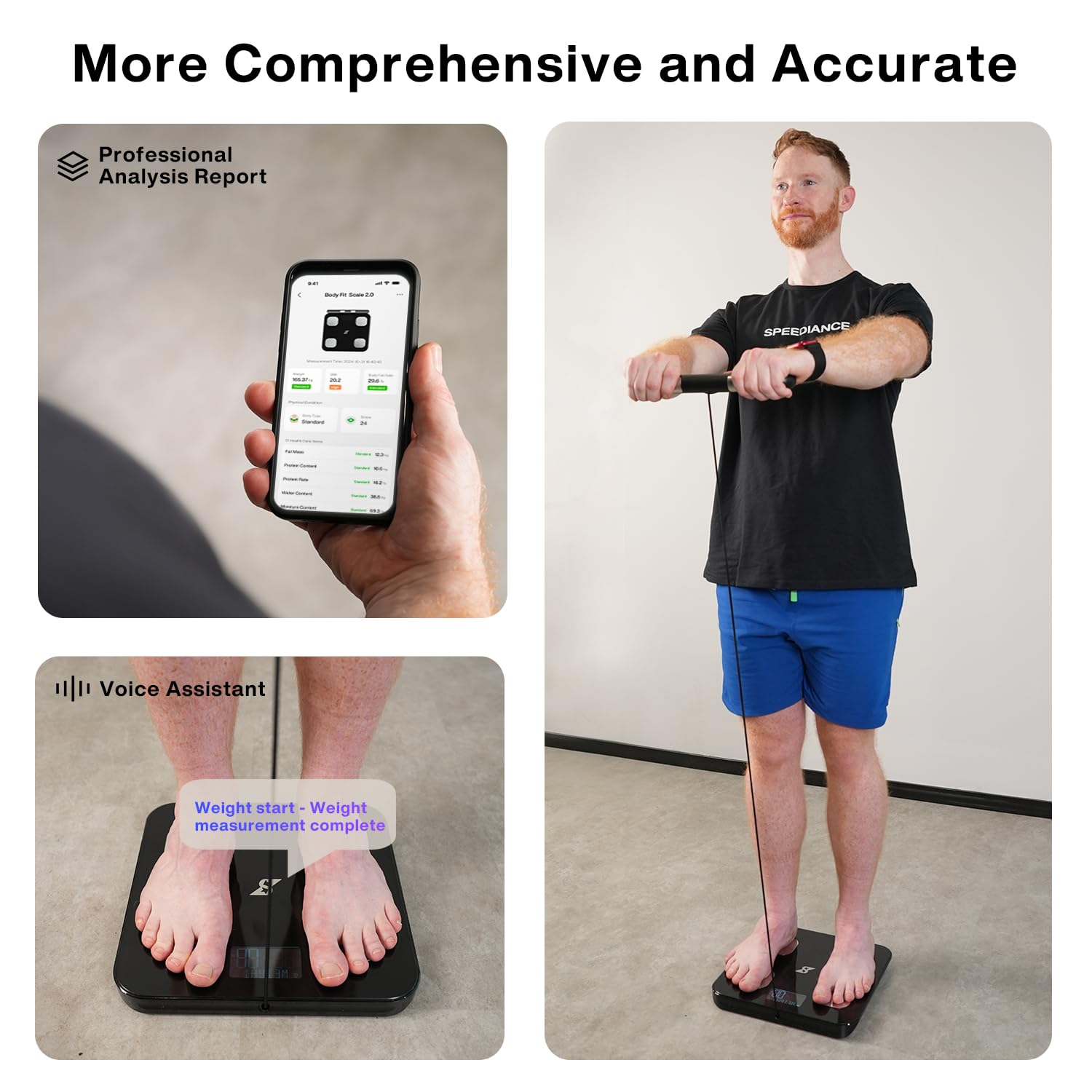
Figure 3: Detailed body analysis report in the Speediance app and voice assistant feedback during measurement.
7. പരിപാലനം
7.1 വൃത്തിയാക്കൽ
മൃദുവായ, d തുണി ഉപയോഗിച്ച് സ്കെയിൽ പ്രതലം തുടയ്ക്കുക.amp തുണിയിൽ വൃത്തിയാക്കുക. അബ്രാസീവ് ക്ലീനറുകൾ ഉപയോഗിക്കരുത് അല്ലെങ്കിൽ സ്കെയിൽ വെള്ളത്തിൽ മുക്കിവയ്ക്കരുത്. സംഭരണത്തിനോ അടുത്ത ഉപയോഗത്തിനോ മുമ്പ് സ്കെയിൽ പൂർണ്ണമായും ഉണങ്ങിയെന്ന് ഉറപ്പാക്കുക.
7.2 സംഭരണം
നേരിട്ടുള്ള സൂര്യപ്രകാശത്തിൽ നിന്നും കടുത്ത താപനിലയിൽ നിന്നും അകന്ന് തണുത്തതും വരണ്ടതുമായ സ്ഥലത്ത് സ്കെയിൽ സൂക്ഷിക്കുക.
7.3 ബാറ്ററി മാറ്റിസ്ഥാപിക്കൽ
If the display becomes dim or the scale does not turn on, replace the batteries. Refer to section 5.1 for battery installation instructions.
8. പ്രശ്നപരിഹാരം
- കൃത്യമല്ലാത്ത വായനകൾ: Ensure the scale is on a hard, flat surface. Avoid placing it on carpet. Ensure your feet are clean, dry, and making full contact with the electrode pads. Recalibrate the scale by stepping on it briefly, stepping off, and waiting for it to display '0.0' before taking a measurement.
- സ്കെയിൽ ഓണാക്കുന്നില്ല: Check if the batteries are installed correctly and are not depleted. Replace batteries if necessary.
- ആപ്പ് കണക്ഷൻ പ്രശ്നങ്ങൾ: Ensure Bluetooth is enabled on your smartphone and the scale is within range. Restart the app and try pairing again. If issues persist, try restarting your phone.
- Data Not Syncing: Ensure the app is open and the scale is connected via Bluetooth. If using offline mode, open the app after your measurement to allow data synchronization.
- Voice Assistant Not Working: Check the app settings to ensure the voice assistant feature is enabled and the volume on your phone is audible.
9 സ്പെസിഫിക്കേഷനുകൾ
| സ്പെസിഫിക്കേഷൻ | വിശദാംശങ്ങൾ |
|---|---|
| ബ്രാൻഡ് | Speediance |
| മോഡൽ നമ്പർ | FG2211LB |
| നിറം | കറുപ്പ് |
| ഡിസ്പ്ലേ തരം | LED (86x36mm) |
| ഭാര പരിധി | 180 കിലോഗ്രാം (396 പൗണ്ട്) |
| വായനാ കൃത്യത | ±0.5 kg (1.1 pounds) |
| അളക്കൽ തരം | Kilograms and Pounds |
| കണക്റ്റിവിറ്റി | ബ്ലൂടൂത്ത് |
| ഉൾപ്പെടുത്തിയ ഘടകങ്ങൾ | Smart Body Fit Scale |
10. വാറൻ്റി വിവരങ്ങൾ
The Speediance Smart Body Fat Scale FG2211LB comes with a 2 വർഷത്തെ വാറൻ്റി from the date of purchase. This warranty covers manufacturing defects and malfunctions under normal use. Please retain your proof of purchase for warranty claims. For detailed terms and conditions, please contact customer support.

Figure 4: Speediance 2-Year Warranty information.
11. ഉപഭോക്തൃ പിന്തുണ
If you have any questions, concerns, or require assistance with your Speediance Smart Body Fat Scale, please contact our customer support team:
- ഫോൺ: 855-200-2702
- പ്രവർത്തന സമയം: Monday - Sunday, 11:00 AM – 7:00 PM (EDT)
- ഇമെയിൽ: after-sales@speediance.com

Figure 5: Speediance Customer Support contact details.