
ആമുഖം
The Kaschun K1-N is a professional-grade 4-channel audio mixer designed for a variety of audio applications, including stage performances, live gigs, PC recording, and karaoke. It features a durable steel chassis, built-in Bluetooth connectivity, 99 DSP effects, and advanced equalization capabilities. This manual provides detailed instructions for setting up, operating, maintaining, and troubleshooting your K1-N mixer to ensure optimal performance and longevity.

Image: The Kaschun K1-N 4-Channel Professional Audio Mixer, showcasing അതിന്റെ ഒതുക്കമുള്ള രൂപകൽപ്പനയും നിയന്ത്രണ ലേഔട്ടും.
സജ്ജമാക്കുക
1. അൺപാക്ക് ചെയ്യലും പരിശോധനയും
Carefully remove the mixer from its packaging. Inspect all components for any signs of damage. Ensure all listed accessories are present.
2. പവർ കണക്ഷൻ
Connect the provided 100V-240V (+/-15V DC) power adapter to the mixer's power input. Plug the adapter into a suitable electrical outlet. The mixer is designed for global use with its multi-voltagഇ വൈദ്യുതി വിതരണം.
3 ഓഡിയോ ഇൻപുട്ട് കണക്ഷനുകൾ
The K1-N mixer supports various input types:
- XLR/1/4" Combo Inputs: Use these for microphones (dynamic or condenser with 48V phantom power enabled) and line-level sources.
- 48V ഫാന്റം പവർ: Activate the dedicated 48V phantom power switch for condenser microphones. Ensure phantom power is off before connecting or disconnecting condenser microphones to prevent damage.
- സ്റ്റീരിയോ RCA ഇൻപുട്ട്: Connect external audio devices such as CD players or media players to the stereo RCA input.
- USB/PC കണക്ഷൻ: Connect the mixer to a computer via USB for direct audio playback and recording.
- ബ്ലൂടൂത്ത്: Pair your smartphone or other Bluetooth-enabled device for wireless audio streaming. The effective range is approximately 3 feet.
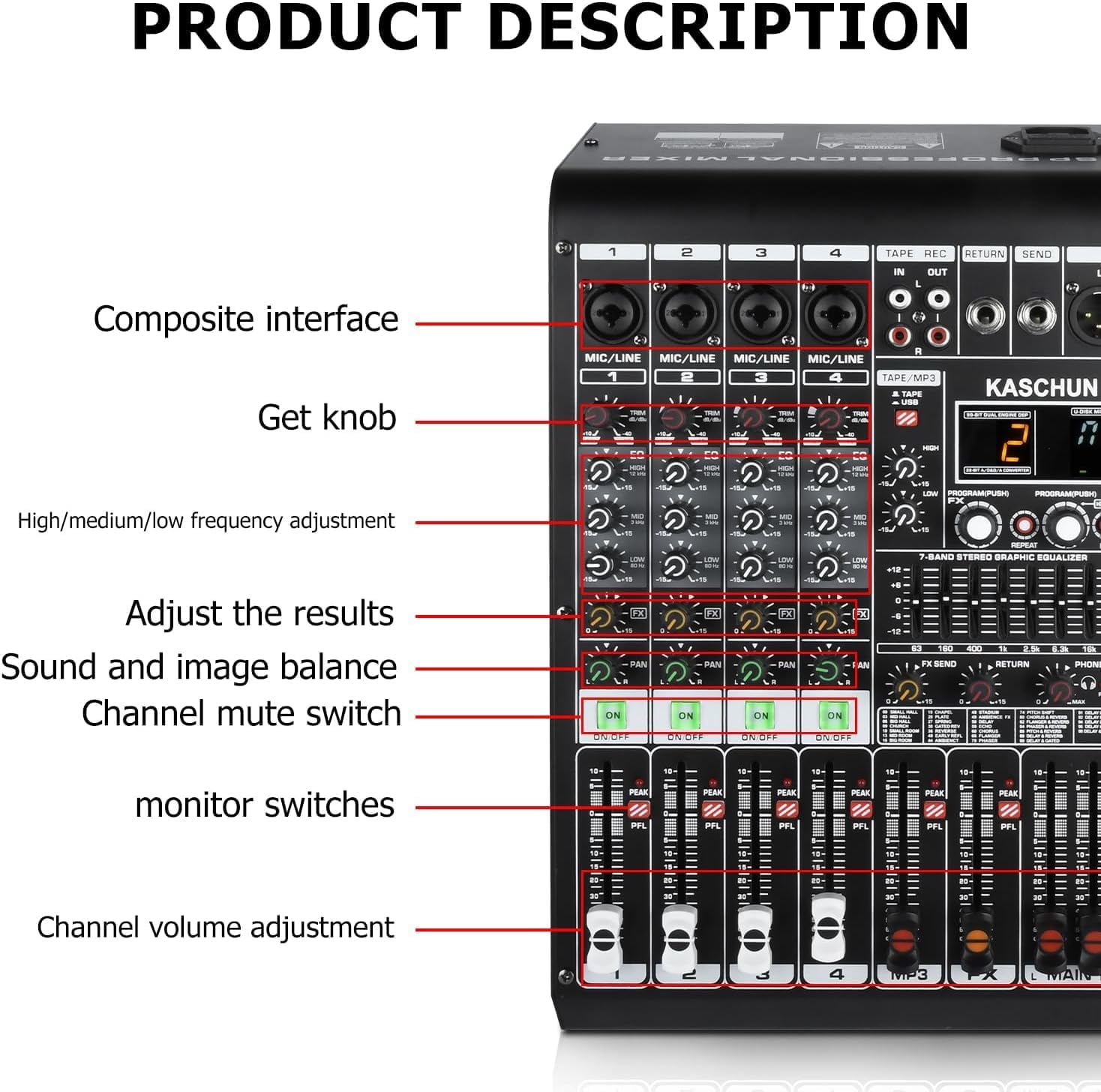
ചിത്രം: വിശദമായത് view of the K1-N mixer's left side, showing composite interfaces, gain knobs, EQ controls, channel mute switches, and channel volume faders.
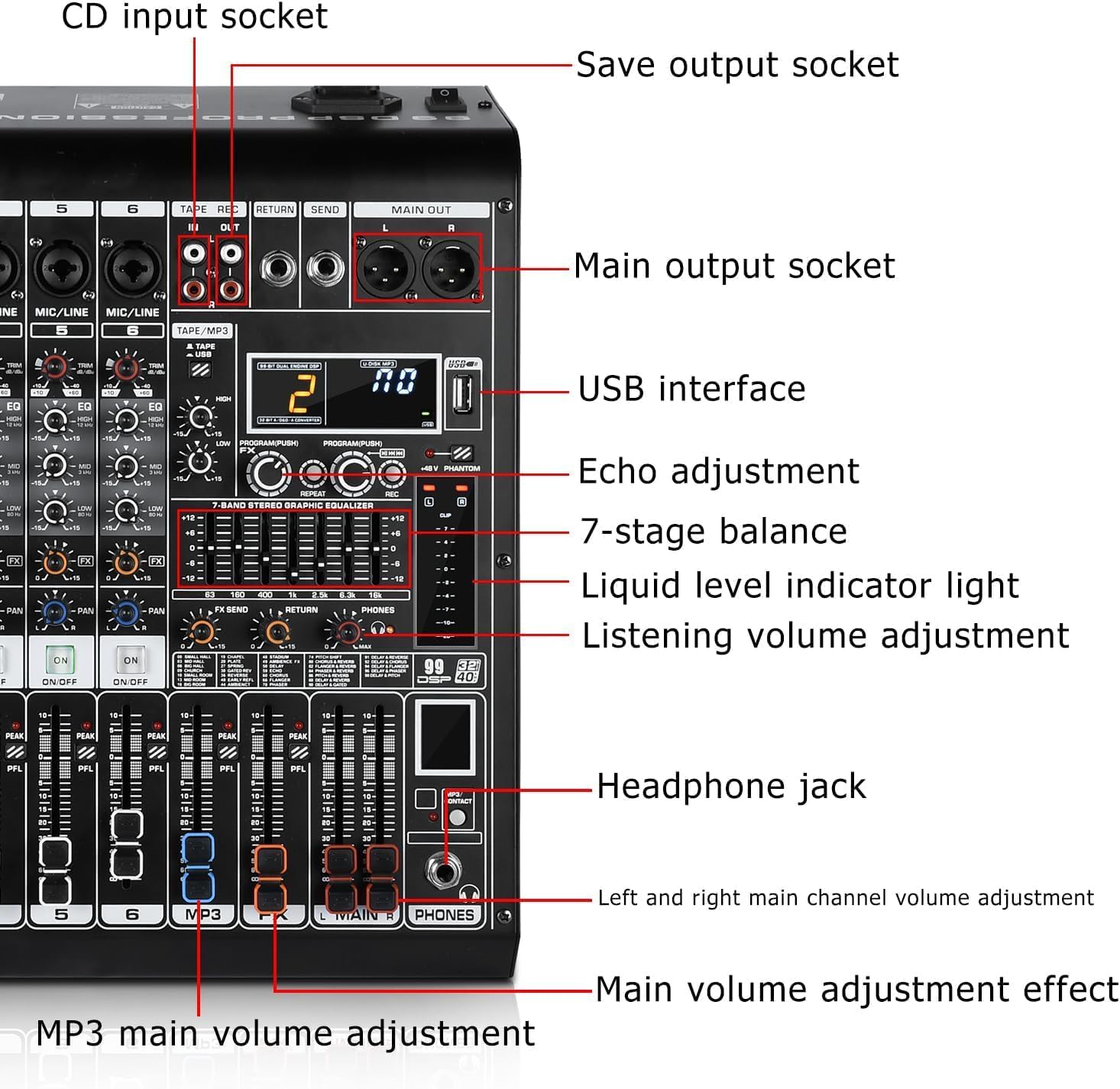
ചിത്രം: വിശദമായത് view of the K1-N mixer's right side, highlighting the USB interface, main output sockets, echo adjustment, 7-band graphic equalizer, liquid level indicator, headphone jack, and main volume controls.
4 ഓഡിയോ ഔട്ട്പുട്ട് കണക്ഷനുകൾ
- പ്രധാന p ട്ട്പുട്ടുകൾ: Connect the main outputs (XLR or 1/4" TRS) to your powered speakers, power amplifier, or recording interface.
- ഹെഡ്ഫോൺ ജാക്ക്: Plug in headphones for monitoring your mix.
- Tape/REC Out: Use the RCA outputs for recording your mix to an external device.
പ്രവർത്തന നിർദ്ദേശങ്ങൾ
1. ചാനൽ നിയന്ത്രണങ്ങൾ
Each input channel (1-4) features dedicated controls:
- നോബ് നേടുക: Adjusts the input sensitivity for the connected microphone or line source. Set this to achieve a strong signal without clipping (indicated by the PEAK LED).
- 3-ബാൻഡ് EQ: Controls the High, Mid, and Low frequencies for each channel, allowing you to shape the tone of individual inputs.
- FX അയയ്ക്കുക: Adjusts the amount of signal sent from the channel to the internal DSP effects processor.
- പാൻ: Positions the channel's sound within the stereo field (left to right).
- Channel Mute Switch: വ്യക്തിഗത ചാനൽ മ്യൂട്ട് ചെയ്യുകയോ അൺമ്യൂട്ട് ചെയ്യുകയോ ചെയ്യുന്നു.
- PFL (Pre-Fader Listen) / Solo: Allows you to monitor the channel's signal independently through headphones, before the fader affects the main mix.
- ചാനൽ വോളിയം ഫേഡർ: വ്യക്തിഗത ചാനലിന്റെ ഔട്ട്പുട്ട് ലെവൽ പ്രധാന മിശ്രിതത്തിലേക്ക് ക്രമീകരിക്കുന്നു.
2. ഡിഎസ്പി ഇഫക്റ്റുകൾ
The K1-N features 99 built-in Digital Signal Processing (DSP) effects to enhance your audio. Use the PROGRAM/PUSH knob to select an effect and adjust its parameters. The digital display shows the selected effect number.

Image: A list of the 99 available DSP effects, including various hall, room, church, plate, spring, delay, chorus, flanger, phaser, and reverb effects.
3. മാസ്റ്റർ നിയന്ത്രണങ്ങൾ
- 7-ബാൻഡ് സ്റ്റീരിയോ ഗ്രാഫിക് ഇക്വലൈസർ: Provides precise control over the overall frequency response of your main mix. Adjust the sliders to boost or cut specific frequency bands.
- Echo Adjustment: Controls the overall level of the selected DSP effect applied to the main mix.
- Main Volume Faders (L/R): സ്റ്റീരിയോ മെയിൻ മിക്സിന്റെ മൊത്തത്തിലുള്ള ഔട്ട്പുട്ട് ലെവൽ നിയന്ത്രിക്കുന്നു.
- ഫോണുകളുടെ വോളിയം: ഹെഡ്ഫോൺ ഔട്ട്പുട്ടിനായി വോളിയം ലെവൽ ക്രമീകരിക്കുന്നു.

ചിത്രം: ഒരു ഓവർഹെഡ് view of the K1-N 4-channel mixing console, highlighting the layout of controls and the 7-band stereo graphic equalizer.
4. USB/Bluetooth Operation
The K1-N allows for flexible audio playback:
- യുഎസ്ബി പ്ലേബാക്ക്: ഓഡിയോ ഉള്ള ഒരു USB ഫ്ലാഷ് ഡ്രൈവ് ചേർക്കുക files into the USB port. Use the built-in controls (play/pause/skip) to navigate your tracks.
- ബ്ലൂടൂത്ത് സ്ട്രീമിംഗ്: Enable Bluetooth on your device and select the K1-N mixer from the list of available devices. Once paired, you can stream audio wirelessly.
- പിസി കണക്ഷൻ: Connect the mixer to your PC via USB to use it as an audio interface for recording or playback.

Image: The K1-N mixer demonstrating its professional audio console capabilities, supporting multiple device connections including USB and Bluetooth for wireless streaming from a smartphone.
മെയിൻ്റനൻസ്
Proper maintenance ensures the longevity and optimal performance of your K1-N mixer:
- വൃത്തിയാക്കൽ: Regularly wipe down the mixer with a soft, dry cloth to remove dust and grime. Avoid using liquid cleaners or abrasive materials. The sealed rotary controls are designed to resist dust.
- സംഭരണം: ഉപയോഗത്തിലില്ലാത്തപ്പോൾ, നേരിട്ട് സൂര്യപ്രകാശം ഏൽക്കാത്തതും കടുത്ത താപനില ഏൽക്കാത്തതുമായ ഒരു തണുത്ത വരണ്ട സ്ഥലത്ത് മിക്സർ സൂക്ഷിക്കുക.
- കേബിൾ മാനേജുമെന്റ്: കണക്ടറുകൾക്കും പോർട്ടുകൾക്കും കേടുപാടുകൾ സംഭവിക്കുന്നത് തടയാൻ കേബിളുകൾ വൃത്തിയായി ക്രമീകരിച്ചിട്ടുണ്ടെന്നും സമ്മർദ്ദത്തിലല്ലെന്നും ഉറപ്പാക്കുക.
ട്രബിൾഷൂട്ടിംഗ്
If you encounter issues with your K1-N mixer, refer to the following common problems and solutions:
| പ്രശ്നം | സാധ്യമായ കാരണം | പരിഹാരം |
|---|---|---|
| ശബ്ദ ഔട്ട്പുട്ട് ഇല്ല | Power off; incorrect connections; volume levels too low; muted channels. | Ensure power is on; check all audio cable connections; increase main and channel volume faders; verify no channels are muted. |
| വികലമായ അല്ലെങ്കിൽ ശബ്ദായമാനമായ ഓഡിയോ | Input gain too high; faulty cables; impedance mismatch; fan noise. | Reduce input gain (ensure PEAK LED does not light consistently); try different cables; ensure correct impedance matching for connected devices. Note: Some users have reported fan noise; ensure the mixer is in a well-ventilated area. |
| മൈക്രോഫോൺ പ്രവർത്തിക്കുന്നില്ല | 48V phantom power off (for condenser mics); incorrect mic type; faulty mic/cable. | Activate 48V phantom power for condenser mics; ensure dynamic mics are connected correctly; test with a different microphone or cable. |
| USB/Bluetooth audio bypasses effects | ഡിസൈൻ സവിശേഷത. | The USB/Bluetooth input signal is routed directly to the main outputs and does not pass through the internal DSP effects. This is normal operation. |
| Sound quality degrades at high fader levels | Overdriving the mixer's internal circuitry. | Ensure input gain levels are set correctly (not too high). Avoid pushing channel or main faders to their maximum limits if distortion occurs. Adjust levels gradually. |
If the problem persists after attempting these solutions, please contact Kaschun customer support for further assistance.
സ്പെസിഫിക്കേഷനുകൾ
| ഫീച്ചർ | വിശദാംശങ്ങൾ |
|---|---|
| മോഡൽ നമ്പർ | കെ1-എൻ |
| ബ്രാൻഡ് | Kaschun |
| ചാനലുകളുടെ എണ്ണം | 4 (input channels) / 8 (total channels including USB/Bluetooth) |
| കണക്റ്റിവിറ്റി ടെക്നോളജി | USB, ബ്ലൂടൂത്ത് |
| ഔട്ട്പുട്ട് കണക്റ്റർ തരം | USB Type B, XLR, 1/4" TRS, RCA |
| പവർ ഉറവിടം | Corded Electric (100V-240V +/-15V DC adapter) |
| ഡിഎസ്പി ഇഫക്റ്റുകൾ | 99 Bit DSP effects |
| തുല്യത | Per-channel 3-band EQ, 7-band master EQ |
| ഫാന്റം പവർ | 48V (switchable) |
| ഇനത്തിൻ്റെ ഭാരം | 8 പൗണ്ട് |
| പാക്കേജ് അളവുകൾ | 18 x 14 x 8 ഇഞ്ച് |
| മാതൃരാജ്യം | ചൈന |

Image: The K1-N mixer with its dimensions labeled: 13.7cm width, 37cm height, and 25.3cm depth.
വാറൻ്റിയും പിന്തുണയും
For warranty information or technical support regarding your Kaschun K1-N mixer, please contact the Kaschun Store directly. Refer to your purchase documentation for specific warranty terms and contact details. Ensure you have your model number (K1-N) and purchase date available when seeking support.