
ആമുഖം
Thank you for choosing the TELE System TS9019HEVC Satellite Decoder. This device is designed to provide stable and seamless reception of Tivùsat digital satellite channels, including over 70 free HD channels. This manual will guide you through the setup, operation, and maintenance of your new decoder to ensure an optimal viewഅനുഭവം.
പാക്കേജ് ഉള്ളടക്കം
താഴെ ലിസ്റ്റ് ചെയ്തിരിക്കുന്ന എല്ലാ ഇനങ്ങളും നിങ്ങളുടെ പാക്കേജിൽ ഉൾപ്പെടുത്തിയിട്ടുണ്ടെന്ന് ദയവായി പരിശോധിക്കുക:
- TELE System TS9019HEVC Satellite Decoder
- Tivùsat HD Smartcard (Merlin)
- ബാഹ്യ വൈദ്യുതി വിതരണം
- റിമോട്ട് കൺട്രോൾ
- 2x AAA ബാറ്ററികൾ
- HDMI കേബിൾ

Image: The TELE System TS9019HEVC decoder, its remote control, and the included Tivùsat Smartcard.
സജ്ജമാക്കുക
1. Connecting the Decoder
- സാറ്റലൈറ്റ് ആന്റിന കണക്ഷൻ: Connect your satellite dish cable to the "RF IN" port on the back of the decoder.
- HDMI കണക്ഷൻ: Connect one end of the supplied HDMI cable to the "HDMI" port on the decoder and the other end to an available HDMI input on your television.
- പവർ കണക്ഷൻ: Connect the external power supply to the "12V DC" port on the decoder, then plug the power adapter into a wall outlet.
- Optional AV Connection: If your TV does not have an HDMI input, you can use an AV cable (not included) to connect to the "AV" port.
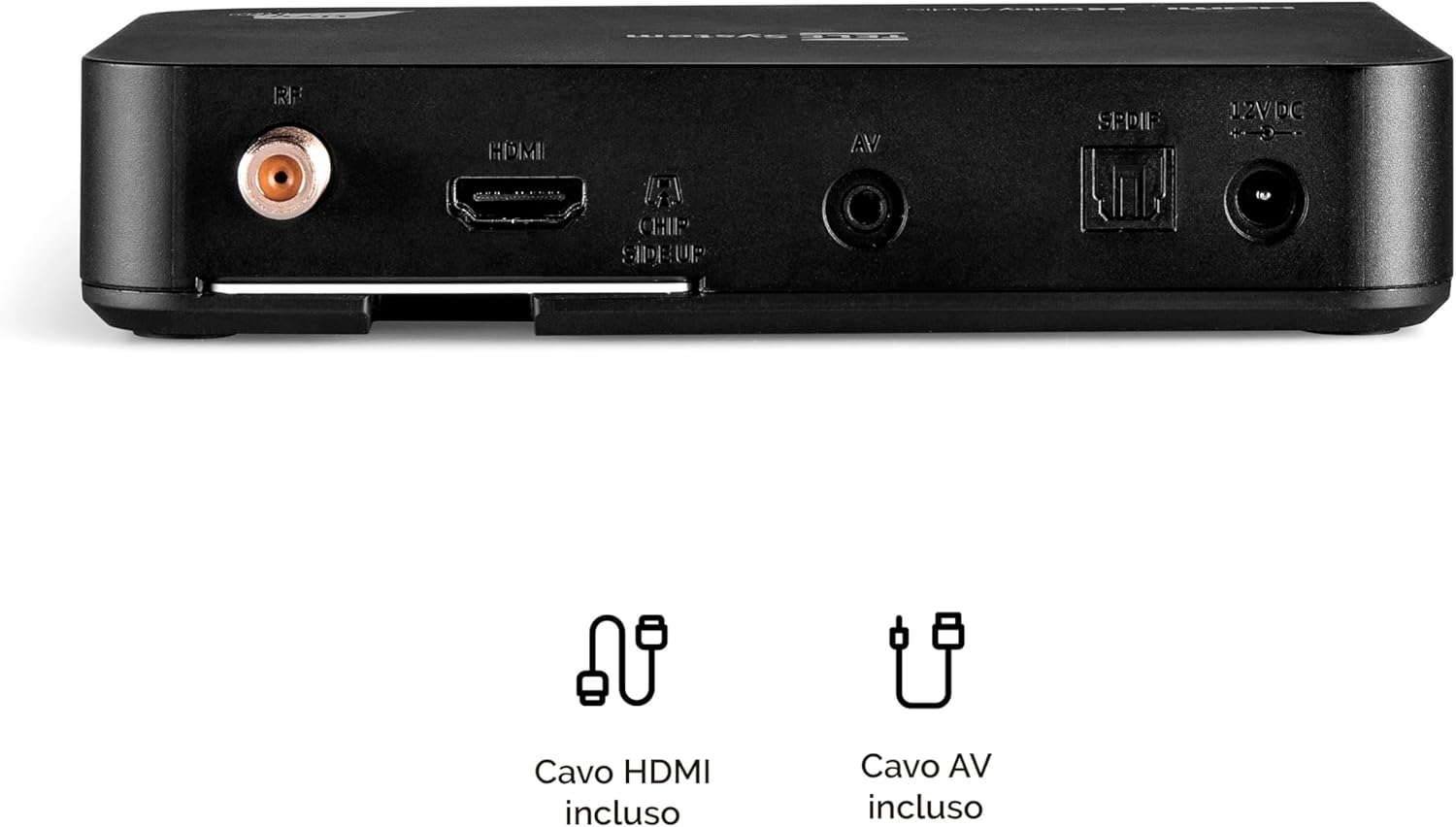
Image: Rear panel connections of the decoder, including RF IN, HDMI, AV, SPDIF, and 12V DC power input.
2. Inserting the Tivùsat Smartcard
The Tivùsat Smartcard is essential for accessing encrypted channels. Ensure it is inserted correctly:
- Locate the smartcard slot on the side of the decoder.
- Insert the Tivùsat Smartcard with the chip facing upwards and the arrow pointing into the slot. Push it gently until it clicks into place.
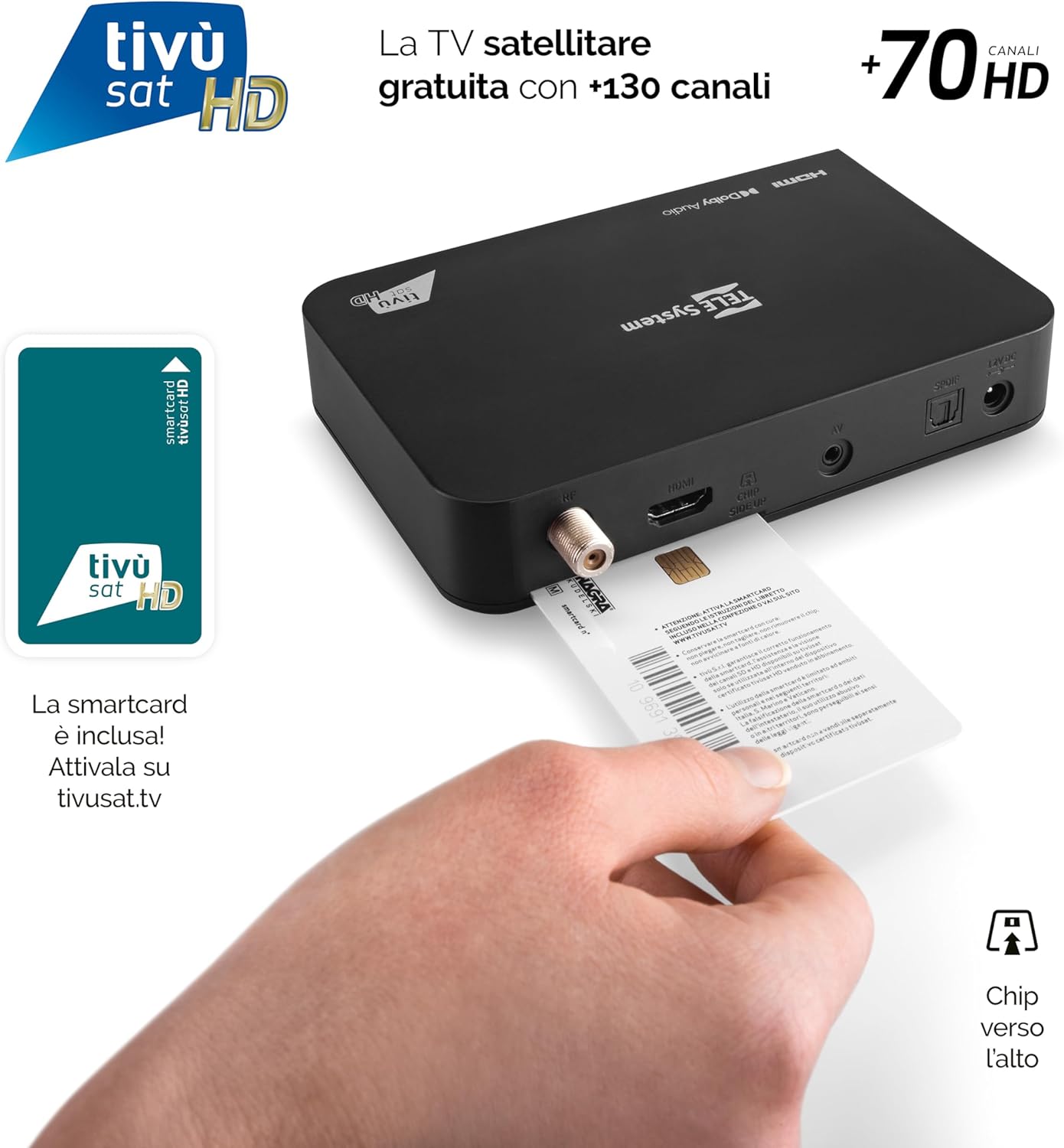
Image: Proper insertion of the Tivùsat Smartcard into the decoder's side slot.
3. പ്രാരംഭ സജ്ജീകരണ വിസാർഡ്
After connecting all cables and inserting the smartcard, turn on your TV and select the correct HDMI input. Power on the decoder. The initial setup wizard will guide you through:
- ഭാഷ തിരഞ്ഞെടുക്കൽ
- Satellite dish configuration
- Automatic channel scan (EASY HD)
4. Activating the Tivùsat Smartcard
To access all Tivùsat channels, your smartcard must be activated. You can activate it easily on the official Tivùsat webസൈറ്റ് (www.tivusat.tv). Follow the instructions provided on the website for activation. Note that older Tivùsat Tiger smartcards may be obsolete and require replacement with a Merlin card.
പ്രവർത്തന നിർദ്ദേശങ്ങൾ
അടിസ്ഥാന പ്രവർത്തനങ്ങൾ
- പവർ ഓൺ/ഓഫ്: ഉപയോഗിക്കുക പവർ button on the remote control or the front panel of the decoder.
- ചാനൽ തിരഞ്ഞെടുക്കൽ: ഉപയോഗിക്കുക P+ / P- ചാനലുകൾ തുടർച്ചയായി മാറ്റുന്നതിനുള്ള ബട്ടണുകൾ, അല്ലെങ്കിൽ സംഖ്യാ കീപാഡ് ഉപയോഗിച്ച് നേരിട്ട് ചാനൽ നമ്പർ നൽകുക.
- വോളിയം നിയന്ത്രണം: ഉപയോഗിക്കുക VOL + / VOL- വോളിയം ക്രമീകരിക്കാനുള്ള ബട്ടണുകൾ.
- മെനു: അമർത്തുക മെനു ക്രമീകരണങ്ങൾക്കും സവിശേഷതകൾക്കുമായി പ്രധാന മെനു ആക്സസ് ചെയ്യുന്നതിനുള്ള ബട്ടൺ.
- ശരി ബട്ടൺ: Confirms selections in menus or displays the channel list during live TV.
- പുറത്തുകടക്കുക/പിന്നോട്ട് പോകുക: മുമ്പത്തെ സ്ക്രീനിലേക്ക് മടങ്ങുന്നു അല്ലെങ്കിൽ മെനുവിൽ നിന്ന് പുറത്തുകടക്കുന്നു.

Image: The remote control for the TELE System TS9019HEVC decoder, highlighting key function buttons.
വിപുലമായ സവിശേഷതകൾ
- ഇലക്ട്രോണിക് പ്രോഗ്രാം ഗൈഡ് (ഇപിജി): അമർത്തുക ഇ.പി.ജി button on the remote to view വരാനിരിക്കുന്ന പ്രക്ഷേപണങ്ങൾക്കായുള്ള പ്രോഗ്രാം ഷെഡ്യൂൾ.
- പ്രിയപ്പെട്ട ലിസ്റ്റുകൾ: Create and manage personalized lists of your preferred channels for quick access. Refer to the on-screen menu for instructions.
- TV Pause (Timeshift): Connect a USB storage device (not included) to the USB port on the decoder. This feature allows you to pause live TV and resume viewപിന്നീട്.
- Automatic Channel Update: The decoder automatically updates Tivùsat channels, ensuring you always have access to the latest channel lineup.
- ടൈമർ പ്രവർത്തനം: Set timers to automatically switch to a specific channel at a scheduled time.

ചിത്രം: ഉദാample of the channel list interface, displaying various Tivùsat channels.
മെയിൻ്റനൻസ്
സോഫ്റ്റ്വെയർ അപ്ഡേറ്റുകൾ
To ensure your decoder always has the latest features, improvements, and security updates, regularly check for software updates. Updates can be performed via:
- Over-The-Air (OTA): The decoder may receive updates automatically via satellite. You will be prompted on-screen if an update is available.
- USB: Download the latest firmware from the TELE System official website to a USB stick and follow the instructions provided with the firmware file for a manual update.
Always ensure the decoder remains powered on during a software update to prevent damage.
ജനറൽ കെയർ
- Keep the decoder in a well-ventilated area to prevent overheating.
- Clean the exterior with a soft, dry cloth. Do not use liquid cleaners or abrasive materials.
- Avoid exposing the decoder to direct sunlight, high temperatures, or humidity.
ട്രബിൾഷൂട്ടിംഗ്
| പ്രശ്നം | സാധ്യമായ കാരണം | പരിഹാരം |
|---|---|---|
| സിഗ്നൽ ഇല്ല / കറുത്ത സ്ക്രീൻ | Incorrect HDMI input selected on TV; Satellite cable disconnected; Dish misalignment. |
|
| "Smartcard Error" Message | Smartcard incorrectly inserted; Smartcard not activated; Obsolete smartcard. |
|
| ശബ്ദമില്ല | TV or decoder volume muted; Incorrect audio settings. |
|
| റിമോട്ട് കൺട്രോൾ പ്രവർത്തിക്കുന്നില്ല | Dead batteries; Obstruction between remote and decoder; Remote not paired (if applicable). |
|
സ്പെസിഫിക്കേഷനുകൾ
| ഫീച്ചർ | വിശദാംശങ്ങൾ |
|---|---|
| ബ്രാൻഡ് | TELE സിസ്റ്റം |
| മോഡൽ നമ്പർ | 58010100 |
| നിറം | കറുപ്പ് |
| കണക്റ്റിവിറ്റി ടെക്നോളജി | USB |
| ഓഡിയോ put ട്ട്പുട്ട് മോഡ് | സ്റ്റീരിയോ |
| ആകെ HDMI പോർട്ടുകൾ | 1 |
| അനുയോജ്യമായ ഉപകരണങ്ങൾ | ടെലിവിഷൻ |
| പിന്തുണയ്ക്കുന്ന ഓഡിയോ ഫോർമാറ്റുകൾ | Dolby Digital, DTS, AAC, MP3, PCM |
| Satellite Service Description | Tivùsat HD Classic and DAZN |
| Total Video Output Ports | 1 |
| വീഡിയോ put ട്ട്പുട്ട് മിഴിവ് | 1080p |
| പിന്തുണയ്ക്കുന്ന മാനദണ്ഡങ്ങൾ | DVB-S, H.264, MP2, MP3, AAC, HD |
| സ്ക്രീൻ ഫോർമാറ്റ് | 16:9 |
| മാതൃരാജ്യം | ചൈന |
വാറൻ്റി വിവരങ്ങൾ
The TELE System TS9019HEVC Satellite Decoder comes with a 2 വർഷത്തെ ഉൽപ്പന്ന വാറൻ്റി from the date of purchase. This warranty covers manufacturing defects and malfunctions under normal use. Please retain your proof of purchase for warranty claims. For detailed terms and conditions, please refer to the warranty card included in your package or visit the official TELE System webസൈറ്റ്.
പിന്തുണ
For further assistance, technical support, or frequently asked questions, please visit:
- TELE System Official Webസൈറ്റ്: www.telesystem.it
- Tivùsat Support: For smartcard activation and Tivùsat specific inquiries, visit www.tivusat.tv
Before contacting support, please ensure you have reviewed the troubleshooting section of this manual.