ആമുഖം
This manual provides detailed instructions for the installation, operation, and maintenance of your BT12 Wireless Helmet Bluetooth Headset. Please read this manual thoroughly before using the product to ensure proper function and safety.
The BT12 headset features super signal transmission, ultra-low power consumption, and is compatible with all Bluetooth devices. It supports automatic answer functionality for calls, high sound fidelity, and simple operation for various functions including volume control, track navigation, and call management.
ഉൽപ്പന്നം കഴിഞ്ഞുview

Image: The BT12 Wireless Helmet Bluetooth Headset shown in use, integrated with a motorcycle helmet, demonstrating its compact design and placement for communication while riding.
The BT12 Wireless Helmet Bluetooth Headset is designed for seamless integration into motorcycle helmets, providing hands-free communication and audio playback. Key features include:
- Strong signal transmission for reliable connectivity.
- Ultra-low power consumption for extended standby time.
- Compatibility with all Bluetooth-enabled smartphones and devices.
- Automatic call answering function for safety and convenience.
- Built-in high-quality anti-interference microphone.
- High sound fidelity for clear audio.
- Intuitive button controls for volume, track navigation, and call management.
ബോക്സിൽ എന്താണുള്ളത്
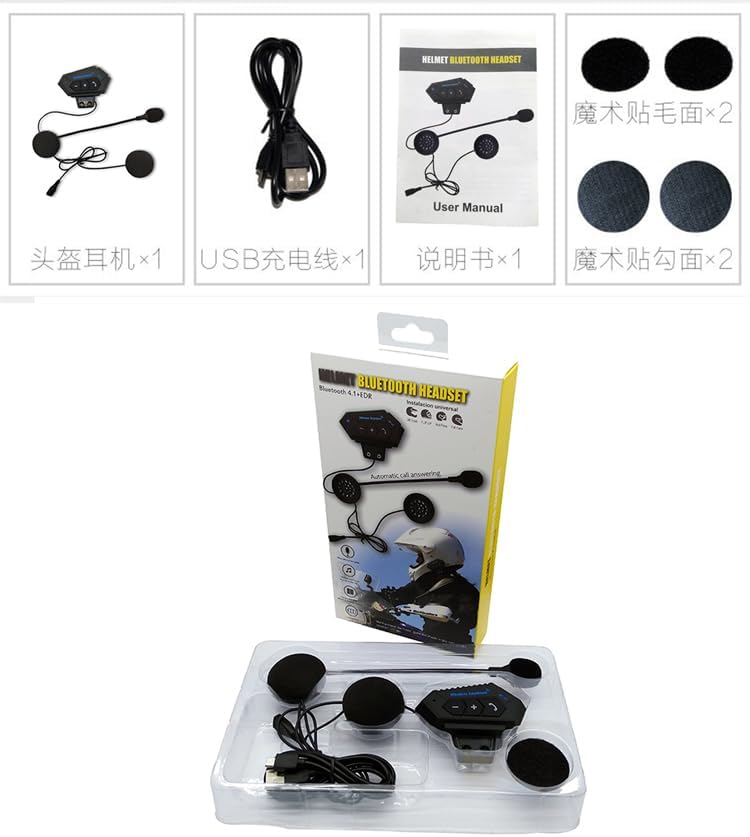
ചിത്രം: ഒരു വ്യക്തമായ view of all items included in the BT12 Helmet Bluetooth Headset package, typically showing the headset unit, charging cable, and user manual.
പാക്കേജ് തുറക്കുമ്പോൾ, ഇനിപ്പറയുന്ന എല്ലാ ഘടകങ്ങളും ഉണ്ടെന്ന് ദയവായി ഉറപ്പാക്കുക:
- BT12 Wireless Helmet Bluetooth Headset Unit
- യുഎസ്ബി ചാർജിംഗ് കേബിൾ
- ഉപയോക്തൃ മാനുവൽ
- Velcro Pads for Speaker Mounting (x2)
- Velcro Pads for Main Unit Mounting (x2)
സജ്ജമാക്കുക
1. ഹെഡ്സെറ്റ് ചാർജ് ചെയ്യുന്നു
Before first use, fully charge the headset. Connect the provided USB charging cable to the charging port on the headset and plug the other end into a USB power source (e.g., computer USB port, USB wall adapter). The indicator light will show charging status and turn off when fully charged.
2. നിങ്ങളുടെ ഹെൽമെറ്റിൽ ഹെഡ്സെറ്റ് ഇൻസ്റ്റാൾ ചെയ്യുന്നു

Image: The rear side of the BT12 headset, highlighting the integrated mounting clip designed for secure attachment to a helmet's edge or interior.
- പ്രധാന യൂണിറ്റ് മൌണ്ട് ചെയ്യുന്നു: Identify a suitable flat surface on the side of your helmet, near the bottom edge, where the main unit can be securely attached. Use the provided Velcro pads to affix the main unit to the helmet. Ensure the buttons are easily accessible.
- സ്പീക്കറുകളുടെ സ്ഥാനം: Carefully place the two speakers inside the helmet's ear pockets. Use the provided Velcro pads to secure them. Ensure the speakers are positioned directly over your ears for optimal sound quality.
- മൈക്രോഫോണിന്റെ സ്ഥാനം: Route the microphone arm towards your mouth. The flexible arm allows for precise positioning to ensure clear voice pickup while minimizing wind noise.
- കേബിൾ മാനേജുമെന്റ്: Tuck all excess cables neatly within the helmet's padding to prevent interference and ensure comfort.

ചിത്രം: ഉദാamples of the BT12 headset successfully installed on various types of motorcycle helmets, demonstrating its adaptability and discreet integration.
3. നിങ്ങളുടെ സ്മാർട്ട്ഫോണുമായി ജോടിയാക്കൽ
- ഹെഡ്സെറ്റ് ഓഫാണെന്ന് ഉറപ്പാക്കുക.
- Press and hold the Power/Multi-function button until the indicator light flashes red and blue alternately, indicating pairing mode.
- നിങ്ങളുടെ സ്മാർട്ട്ഫോണിൽ, ബ്ലൂടൂത്ത് ക്രമീകരണങ്ങളിലേക്ക് പോയി ബ്ലൂടൂത്ത് പ്രവർത്തനക്ഷമമാക്കുക.
- ഇതിനായി തിരയുക available devices. Select "BT12" from the list.
- Once paired, the indicator light on the headset will flash blue slowly, and you will hear a confirmation tone.
പ്രവർത്തന നിർദ്ദേശങ്ങൾ

ചിത്രം: വിശദമായ ഒരു ചിത്രം view of the BT12 headset's main unit, clearly showing the control buttons for volume, track control, and call management, along with the attached microphone.
പവർ ഓൺ/ഓഫ്
- പവർ ഓൺ: Press and hold the Power/Multi-function button for approximately 3 seconds until you hear a power-on tone and the blue indicator light flashes.
- പവർ ഓഫ്: Press and hold the Power/Multi-function button for approximately 3 seconds until you hear a power-off tone and the red indicator light flashes briefly before turning off.
കോൾ മാനേജുമെന്റ്
- മറുപടി കോൾ: When an incoming call rings, the headset will automatically answer after 5 seconds. Alternatively, short press the Phone button to answer immediately.
- കോൾ അവസാനിപ്പിക്കുക: Short press the Phone button during a call.
- കോൾ നിരസിക്കുക: Press and hold the Phone button for 2 seconds when an incoming call rings.
- അവസാന നമ്പർ വീണ്ടും ഡയൽ ചെയ്യുക: Double-press the Phone button when the headset is idle.
സംഗീത പ്ലേബാക്ക്
- പ്ലേ/താൽക്കാലികമായി നിർത്തുക: പവർ/മൾട്ടി-ഫംഗ്ഷൻ ബട്ടൺ ഹ്രസ്വമായി അമർത്തുക.
- അടുത്ത ട്രാക്ക്: "+" ബട്ടൺ ചുരുക്കി അമർത്തുക.
- മുമ്പത്തെ ട്രാക്ക്: "-" ബട്ടൺ ചുരുക്കി അമർത്തുക.
- വോളിയം കൂട്ടുക: "+" ബട്ടൺ അമർത്തിപ്പിടിക്കുക.
- വോളിയം താഴേക്ക്: "-" ബട്ടൺ അമർത്തിപ്പിടിക്കുക.
മെയിൻ്റനൻസ്
- വൃത്തിയാക്കൽ: ഹെഡ്സെറ്റ് വൃത്തിയാക്കാൻ മൃദുവായതും ഉണങ്ങിയതുമായ തുണി ഉപയോഗിക്കുക. അബ്രസീവ് ക്ലീനറുകളോ ലായകങ്ങളോ ഉപയോഗിക്കരുത്.
- സംഭരണം: When not in use for extended periods, store the headset in a cool, dry place away from direct sunlight and extreme temperatures.
- ബാറ്ററി കെയർ: To prolong battery life, avoid fully discharging the battery frequently. Charge the headset regularly, even if not in use.
- ജല പ്രതിരോധം: The headset is designed for outdoor use but is not fully waterproof. Avoid exposing it to heavy rain or submerging it in water.
ട്രബിൾഷൂട്ടിംഗ്
- ഹെഡ്സെറ്റ് പവർ ഓൺ ചെയ്യുന്നില്ല:
- Ensure the battery is charged. Connect the headset to a power source using the USB cable and allow it to charge for at least 30 minutes before attempting to power on again.
- സ്മാർട്ട്ഫോണുമായി ജോടിയാക്കാൻ കഴിയില്ല:
- Ensure the headset is in pairing mode (red and blue indicator lights flashing alternately).
- നിങ്ങളുടെ സ്മാർട്ട്ഫോണിൽ ബ്ലൂടൂത്ത് പ്രവർത്തനക്ഷമമാക്കിയിട്ടുണ്ടെന്ന് ഉറപ്പാക്കുക.
- Move the headset closer to your smartphone.
- Try restarting both the headset and your smartphone.
- Clear previous Bluetooth connections on your phone if you have too many.
- ശബ്ദമില്ല അല്ലെങ്കിൽ കുറഞ്ഞ ശബ്ദം:
- Check the volume level on both the headset and your smartphone.
- ഹെഡ്സെറ്റ് ശരിയായി ജോടിയാക്കിയിട്ടുണ്ടെന്നും ബന്ധിപ്പിച്ചിട്ടുണ്ടെന്നും ഉറപ്പാക്കുക.
- Verify that the speakers are correctly positioned over your ears inside the helmet.
- മൈക്രോഫോൺ പ്രവർത്തിക്കുന്നില്ല:
- Ensure the microphone is properly connected to the main unit.
- Check that the microphone is positioned correctly near your mouth.
- Test the microphone with another application or device if possible.
സ്പെസിഫിക്കേഷനുകൾ
| ഫീച്ചർ | വിശദാംശങ്ങൾ |
|---|---|
| മോഡലിൻ്റെ പേര് | BT-12 വയർലെസ് ഇയർഫോൺ |
| കണക്റ്റിവിറ്റി ടെക്നോളജി | വയർലെസ് (ബ്ലൂടൂത്ത്) |
| ഫ്രീക്വൻസി പ്രതികരണം | 2.4 GHz |
| സംവേദനക്ഷമത | 80 ഡി.ബി |
| പ്രതിരോധം | 32 ഓം |
| നിയന്ത്രണ തരം | ബട്ടൺ നിയന്ത്രണം |
| മെറ്റീരിയൽ | പ്ലാസ്റ്റിക് |
| ശുപാർശ ചെയ്യുന്ന ഉപയോഗം | മോട്ടോർസൈക്ലിംഗ് |
| സ്റ്റാൻഡ്ബൈ സമയം | Up to 240 hours (as per product description) |
വാറൻ്റിയും പിന്തുണയും
വാറന്റി വിവരങ്ങൾക്കും സാങ്കേതിക പിന്തുണയ്ക്കും, നിങ്ങളുടെ റീട്ടെയിലർ അല്ലെങ്കിൽ നിർമ്മാതാവിന്റെ ഉദ്യോഗസ്ഥൻ നൽകിയ കോൺടാക്റ്റ് വിശദാംശങ്ങൾ പരിശോധിക്കുക. webസൈറ്റ്. ഏതെങ്കിലും വാറന്റി ക്ലെയിമുകൾക്ക് വാങ്ങിയതിന്റെ തെളിവായി നിങ്ങളുടെ വാങ്ങൽ രസീത് സൂക്ഷിക്കുക.
This product is designed for durability and performance. Should you encounter any issues not covered in the troubleshooting section, please contact customer support for assistance.


