
1. ആമുഖം
വാങ്ങിയതിന് നന്ദി.asing the Tornado TCM-9008A-GS Automatic Espresso Machine. This appliance is designed to provide high-quality espresso, cappuccino, and hot water with convenience and ease. Featuring an integrated grinder, it processes fresh coffee beans for optimal flavor. Please read this manual thoroughly before operating the machine to ensure safe and efficient use.
2. സുരക്ഷാ നിർദ്ദേശങ്ങൾ
ഉപകരണത്തിന് പരിക്കേൽക്കുകയോ കേടുപാടുകൾ സംഭവിക്കുകയോ ചെയ്യാതിരിക്കാൻ ഇനിപ്പറയുന്ന സുരക്ഷാ മുൻകരുതലുകൾ പാലിക്കുക:
- ഈ ഉപകരണം ഇൻഡോർ ഗാർഹിക ഉപയോഗത്തിന് മാത്രമുള്ളതാണ്.
- മെഷീൻ, പവർ കോർഡ്, പ്ലഗ് എന്നിവ വെള്ളത്തിലോ മറ്റ് ദ്രാവകങ്ങളിലോ മുക്കരുത്.
- Keep the appliance away from direct heat sources, open flames, and hot surfaces.
- വൈദ്യുതി വിതരണം വോളിയം ഉറപ്പാക്കുകtage matches the rating label on the machine.
- Unplug the machine from the power outlet before cleaning, maintenance, or if it will not be used for an extended period.
- Do not operate the machine with a damaged cord or plug, or if the appliance malfunctions or has been damaged in any way.
- പ്രവർത്തന സമയത്ത് കുട്ടികളെയും അനധികൃത വ്യക്തികളെയും ഉപകരണത്തിൽ നിന്ന് അകറ്റി നിർത്തുക.
- യഥാർത്ഥ ആക്സസറികളും സ്പെയർ പാർട്സും മാത്രം ഉപയോഗിക്കുക.
3. ഉൽപ്പന്ന ഘടകങ്ങൾ
നിങ്ങളുടെ എസ്പ്രസ്സോ മെഷീനിന്റെ പ്രധാന ഭാഗങ്ങളുമായി പരിചയപ്പെടുക.
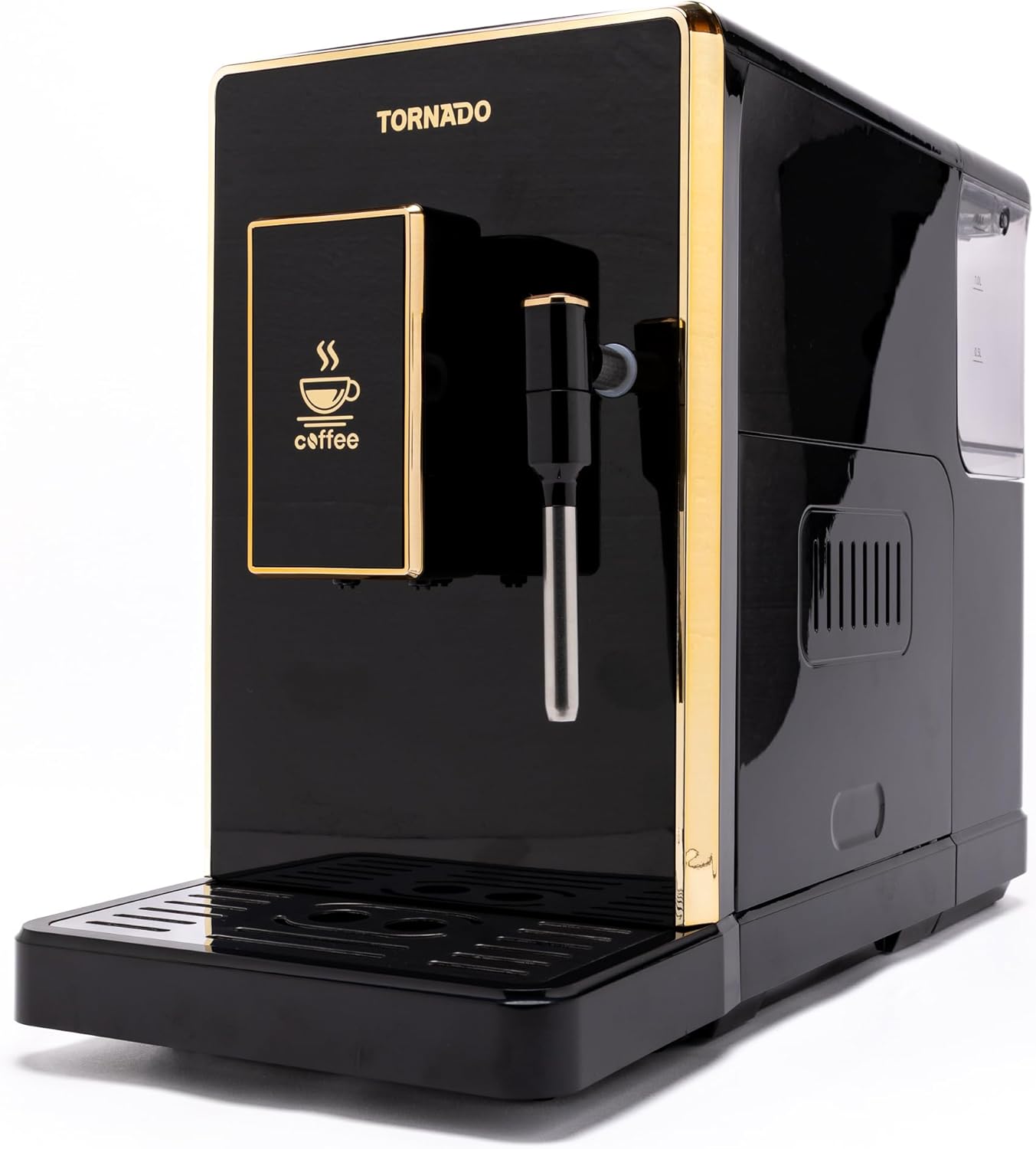
ചിത്രം 3.1: ഫ്രണ്ട് view of the Tornado TCM-9008A-GS Automatic Espresso Machine, showcasing its sleek black design with gold accents, control panel, and coffee dispenser.

ചിത്രം 3.2: വശം view of the espresso machine, highlighting the removable water tank on the right and an access panel for internal components.

ചിത്രം 3.3: മുകളിൽ view of the machine, displaying the coffee bean hopper with its lid and the integrated grinder adjustment dial.

ചിത്രം 3.4: പിൻഭാഗം view of the espresso machine, showing the main power switch (on/off) and the power cord inlet.

ചിത്രം 3.5: Included accessories: the detachable power cord and a cleaning brush for maintenance.
4. സജ്ജീകരണം
- അൺപാക്ക് ചെയ്യുന്നു: പാക്കേജിംഗിൽ നിന്ന് മെഷീനും എല്ലാ അനുബന്ധ ഉപകരണങ്ങളും ശ്രദ്ധാപൂർവ്വം നീക്കം ചെയ്യുക. ഭാവിയിലെ ഗതാഗതത്തിനോ സംഭരണത്തിനോ വേണ്ടി പാക്കേജിംഗ് സൂക്ഷിക്കുക.
- പ്ലേസ്മെൻ്റ്: Place the machine on a stable, level, and heat-resistant surface, away from water sources and direct sunlight. Ensure adequate ventilation around the appliance.
- വാട്ടർ ടാങ്ക്: Remove the water tank (refer to Figure 3.2), rinse it with fresh water, and fill it with clean, cold drinking water up to the MAX level. Reinsert the tank securely.
- ബീൻ ഹോപ്പർ: Open the lid of the coffee bean hopper (refer to Figure 3.3) and fill it with fresh, whole coffee beans. Do not overfill.
- പവർ കണക്ഷൻ: Connect the power cord to the machine's inlet (refer to Figure 3.4) and then plug it into a grounded electrical outlet.
- പ്രാരംഭ കഴുകൽ ചക്രം: Before first use, perform an initial rinse cycle as described in the 'Operating Instructions' section to clean internal components.
5. പ്രവർത്തന നിർദ്ദേശങ്ങൾ
5.1 പവർ ഓൺ ചെയ്യുകയും ഇനീഷ്യലൈസ് ചെയ്യുകയും ചെയ്യുന്നു
- Press the main power switch on the back of the machine (Figure 3.4) to the 'ON' position.
- The machine will perform a self-test and heating cycle. The integrated display will show progress.
- Once ready, the display will indicate that the machine is prepared for use.
5.2 Adjusting Grinder Settings
The integrated grinder allows you to adjust the fineness of the coffee grounds. Turn the adjustment dial inside the bean hopper (Figure 3.3) to your desired setting. Finer settings are suitable for espresso, while coarser settings are better for larger coffee volumes. Adjust only when the grinder is operating or empty.
5.3 എസ്പ്രെസോ ഉണ്ടാക്കുന്നു
- കോഫി ഡിസ്പെൻസറിന് കീഴിൽ ഒരു കപ്പ് വയ്ക്കുക.
- Select your desired espresso strength and volume using the controls on the integrated display.
- Press the 'Espresso' button. The machine will grind the beans, brew, and dispense the coffee.
5.4 Preparing Cappuccino (Milk Frothing)
- ഒരു പാൽ പാത്രത്തിൽ തണുത്ത പാൽ നിറയ്ക്കുക.
- സ്റ്റീം വാൻഡ് പാലിൽ വയ്ക്കുക.
- Select the 'Cappuccino' or 'Steam' function on the display. The machine will heat up to steam temperature.
- Once ready, activate the steam function to froth the milk.
- നുര വന്നതിനുശേഷം, സ്റ്റീം വാൻഡ് ഉടൻ വൃത്തിയാക്കുക.
5.5 ചൂടുവെള്ളം വിതരണം
- Place a cup under the hot water dispenser.
- Select the 'Hot Water' function on the display.
- ചൂടുവെള്ളം വിതരണം ചെയ്യാൻ ബട്ടൺ അമർത്തുക.
6. പരിപാലനവും ശുചീകരണവും
പതിവായി വൃത്തിയാക്കലും അറ്റകുറ്റപ്പണിയും നിങ്ങളുടെ എസ്പ്രസ്സോ മെഷീനിന്റെ മികച്ച പ്രകടനവും ദീർഘായുസ്സും ഉറപ്പാക്കുന്നു.
6.1 പ്രതിദിന ശുചീകരണം
- ഡ്രിപ്പ് ട്രേ: ദിവസവും ഡ്രിപ്പ് ട്രേ കാലിയാക്കി കഴുകുക.
- കോഫി ഗ്രൗണ്ട് കണ്ടെയ്നർ: Empty the coffee grounds container when prompted by the machine or daily. Rinse and dry.
- വാട്ടർ ടാങ്ക്: ദിവസവും ശുദ്ധജലം ഉപയോഗിച്ച് വാട്ടർ ടാങ്ക് കഴുകുക.
- ആവി വടി: ഓരോ ഉപയോഗത്തിനു ശേഷവും, സ്റ്റീം വാൻഡ് പരസ്യം ഉപയോഗിച്ച് തുടയ്ക്കുക.amp പാൽ അവശിഷ്ടങ്ങൾ നീക്കം ചെയ്യാൻ തുണി ഉപയോഗിക്കുക. ആന്തരിക തടസ്സങ്ങൾ നീക്കം ചെയ്യാൻ ഒരു ചെറിയ നീരാവി പൊട്ടിത്തെറിക്കുക.
- പുറം: ഒരു സോഫ്റ്റ്, ഡി ഉപയോഗിച്ച് മെഷീൻ്റെ പുറംഭാഗം തുടയ്ക്കുകamp തുണി. ഉരച്ചിലുകൾ ഉള്ള ക്ലീനറുകൾ ഉപയോഗിക്കരുത്.
6.2 Weekly Cleaning (Brew Unit)
The brew unit should be removed and rinsed weekly:
- മെഷീൻ ഓഫാക്കി അൺപ്ലഗ് ചെയ്യുക.
- Open the side access panel (Figure 3.2).
- Follow the instructions in the machine to remove the brew unit.
- Rinse the brew unit thoroughly under lukewarm running water until all coffee residue is removed. Do not use detergents.
- വീണ്ടും ചേർക്കുന്നതിന് മുമ്പ് ബ്രൂ യൂണിറ്റ് പൂർണ്ണമായും വായുവിൽ ഉണങ്ങാൻ അനുവദിക്കുക.
6.3 ഡെസ്കലിംഗ്
The machine will prompt you when descaling is required. Use a suitable descaling solution specifically designed for espresso machines and follow the instructions provided with the descaler and on the machine's display.
7. പ്രശ്നപരിഹാരം
നിങ്ങളുടെ മെഷീനിൽ പ്രശ്നങ്ങൾ നേരിടുകയാണെങ്കിൽ, പൊതുവായ പ്രശ്നങ്ങളും പരിഹാരങ്ങളും അറിയാൻ താഴെയുള്ള പട്ടിക പരിശോധിക്കുക.
| പ്രശ്നം | സാധ്യമായ കാരണം | പരിഹാരം |
|---|---|---|
| മെഷീൻ ഓണാക്കുന്നില്ല | No power supply; Main switch off | Check power cord connection; Ensure main switch (Figure 3.4) is ON. |
| കോഫി ഡിസ്പെൻസുകളില്ല | Water tank empty; Brew unit clogged; No coffee beans | Fill water tank; Clean brew unit; Fill bean hopper. |
| കാപ്പി വളരെ ദുർബലമാണ്/ശക്തമാണ് | Grinder setting incorrect; Coffee strength setting incorrect | Adjust grinder fineness (Figure 3.3); Adjust coffee strength on display. |
| പാൽ ശരിയായി നുരയുന്നില്ല | Steam wand clogged; Insufficient steam pressure; Milk type/temperature | Clean steam wand thoroughly; Ensure machine is at steam temperature; Use cold, fresh milk. |
| മെഷീൻ പിശക് സന്ദേശം പ്രദർശിപ്പിക്കുന്നു | പ്രത്യേക ആന്തരിക പ്രശ്നം | Refer to the machine's display for specific error codes and consult the full manual or contact customer support. |
ഈ പരിഹാരങ്ങൾ പരീക്ഷിച്ചതിനു ശേഷവും പ്രശ്നം നിലനിൽക്കുകയാണെങ്കിൽ, ദയവായി Tornado ഉപഭോക്തൃ പിന്തുണയുമായി ബന്ധപ്പെടുക.
8 സ്പെസിഫിക്കേഷനുകൾ
| മോഡൽ നമ്പർ | TCM-9008A-GS |
| അളവുകൾ (L x W x H) | 46 x 19 x 31 സെ.മീ |
| ഭാരം | 7.74 കി.ഗ്രാം |
| മെറ്റീരിയൽ | അക്രിലിക് |
| കോഫി ബീൻ ശേഷി | 200 ഗ്രാം |
| പ്രത്യേക പ്രവർത്തനങ്ങൾ | Integrated coffee grinder, Integrated display, Cappuccino preparation, Hot water system, Fully automatic operation |
| കാപ്പി തരം അനുയോജ്യത | Coffee beans, Espresso coffee, Cappuccino |
| നിറം | കറുപ്പ് |
9. ഉൽപ്പന്ന വീഡിയോകൾ
The following videos provide additional visual guidance on using and maintaining your Tornado TCM-9008A-GS espresso machine.
വീഡിയോ 9.1: ഉൽപ്പന്നം കഴിഞ്ഞുview or demonstration (Duration: 0:23).
വീഡിയോ 9.2: Detailed feature explanation or usage guide (Duration: 1:51).
വീഡിയോ 9.3: Operational steps or maintenance tips (Duration: 1:17).
വീഡിയോ 9.4: Quick guide or specific function demonstration (Duration: 0:45).
വീഡിയോ 9.5: Usage scenario or advanced tips (Duration: 1:25).
വീഡിയോ 9.6: Feature highlight or troubleshooting demonstration (Duration: 0:59).
വീഡിയോ 9.7: In-depth guide or comparison (Duration: 1:31).
വീഡിയോ 9.8: User experience or tips and tricks (Duration: 1:05).
വീഡിയോ 9.9: Comprehensive product demonstration (Duration: 2:01).
വീഡിയോ 9.10: Short instructional clip (Duration: 0:36).
10. വാറൻ്റിയും പിന്തുണയും
For warranty information and customer support, please refer to the documentation included with your purchase or visit the official Tornado webസൈറ്റ്. വാറന്റി ക്ലെയിമുകൾക്കായി നിങ്ങളുടെ വാങ്ങലിന്റെ തെളിവ് സൂക്ഷിക്കുക.