
1. ആമുഖം
Welcome to the user manual for your new DOOGEE Tab G6 Android 15 Tablet. This guide provides comprehensive instructions on setting up, operating, maintaining, and troubleshooting your device. Please read this manual carefully to ensure optimal performance and longevity of your tablet.
2. ബോക്സിൽ എന്താണുള്ളത്?
Your DOOGEE Tab G6 Android 15 Tablet comes with a complete accessory kit to enhance your experience and protect your device. Please verify all items are present upon unboxing.
- 1 x DOOGEE TAB G6 VIP Tablet
- 1 x യുഎസ്ബി ടൈപ്പ്-സി കേബിൾ
- 1 x ചാർജർ
- 1 x Stylus (VIP Edition)
- 1 x Pre-applied Protective Film
- 1 x Bluetooth Mouse (VIP Edition)
- 1 x Leather Protective Case (VIP Edition)
- 1 x Bluetooth Keyboard (VIP Edition)
- 1 x SIM Card Tool
- 1 x പാക്കേജിംഗ് ബോക്സ്
- 1 x ഉപയോക്തൃ മാനുവൽ
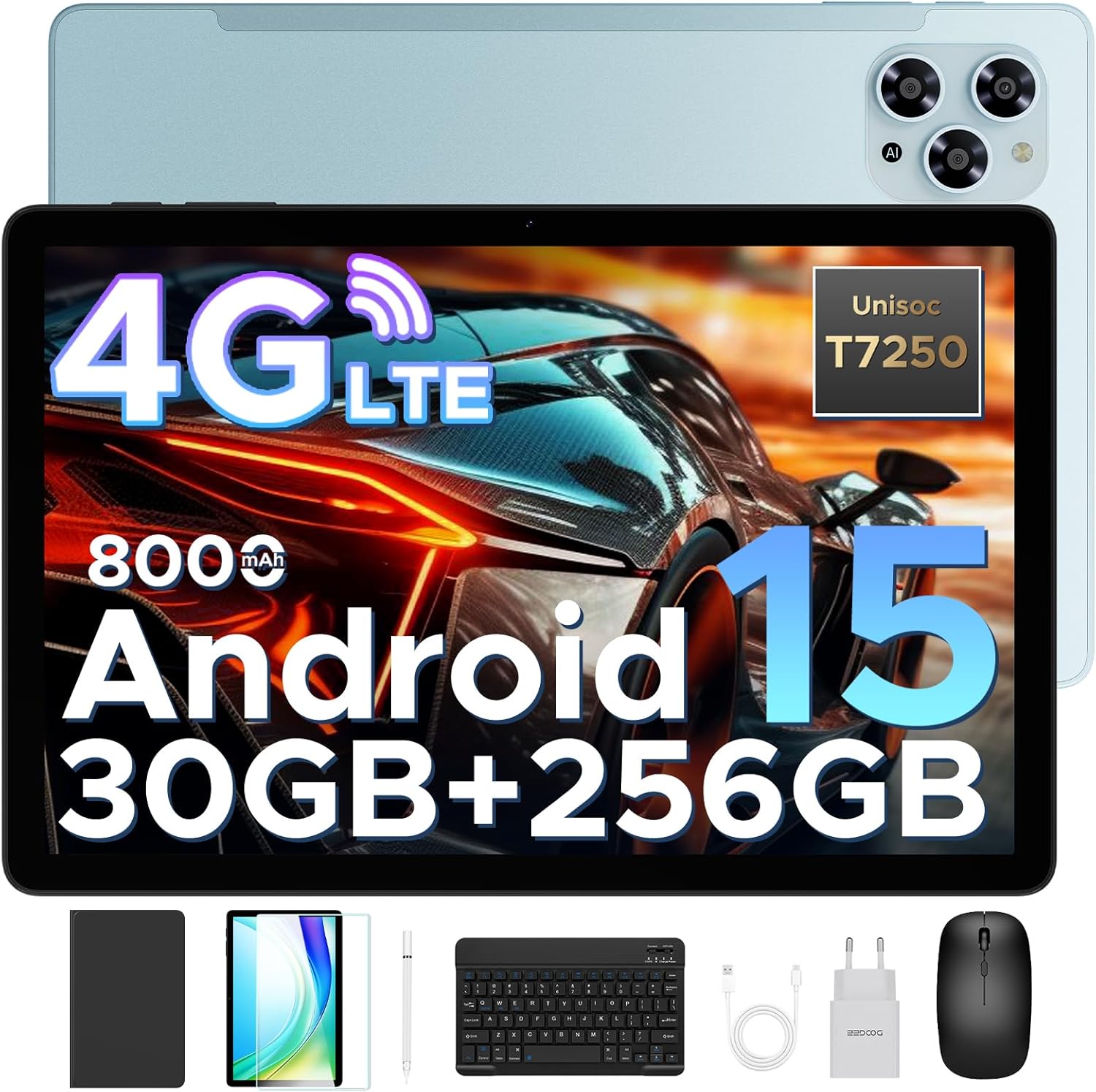
Image: The DOOGEE Tab G6 tablet displayed with all its included accessories, such as the keyboard, mouse, stylus, charger, cables, and protective case.
3. സജ്ജീകരണം
3.1 പ്രാരംഭ ചാർജിംഗ്
Before first use, fully charge your DOOGEE Tab G6 tablet using the provided USB Type-C cable and charger. Connect the cable to the tablet's charging port and the charger to a power outlet. The battery indicator on the screen will show charging progress.
3.2 സിം, ടിഎഫ് കാർഡുകൾ ചേർക്കൽ
The DOOGEE Tab G6 supports dual SIM cards and a TF (microSD) card for expandable storage. Use the provided SIM card tool to open the SIM tray.
- ടാബ്ലെറ്റിന്റെ വശത്ത് സിം ട്രേ കണ്ടെത്തുക.
- Insert the SIM card tool into the small hole next to the tray and gently push until the tray ejects.
- നിങ്ങളുടെ നാനോ-സിം കാർഡുകൾ അല്ലെങ്കിൽ TF കാർഡ് ട്രേയിലെ നിയുക്ത സ്ലോട്ടുകളിൽ വയ്ക്കുക, ശരിയായ ഓറിയന്റേഷൻ ഉറപ്പാക്കുക.
- ട്രേ അതിന്റെ സ്ഥാനത്ത് ക്ലിക്കായി വരുന്നത് വരെ ശ്രദ്ധാപൂർവ്വം ടാബ്ലെറ്റിലേക്ക് തിരികെ തള്ളുക.

Image: A visual representation of the tablet's dual SIM and TF card slots, illustrating how to insert the cards for 4G LTE connectivity.
3.3 പവർ ഓൺ/ഓഫ്
- പവർ ഓണാക്കാൻ: Press and hold the Power button until the DOOGEE logo appears on the screen.
- പവർ ഓഫ് ചെയ്യാൻ: പവർ ഓപ്ഷൻ മെനു ദൃശ്യമാകുന്നതുവരെ പവർ ബട്ടൺ അമർത്തിപ്പിടിക്കുക, തുടർന്ന് "പവർ ഓഫ്" തിരഞ്ഞെടുക്കുക.
- പുനരാരംഭിക്കാൻ: പവർ ഓപ്ഷൻ മെനു ദൃശ്യമാകുന്നതുവരെ പവർ ബട്ടൺ അമർത്തിപ്പിടിക്കുക, തുടർന്ന് "പുനരാരംഭിക്കുക" തിരഞ്ഞെടുക്കുക.
3.4 പ്രാരംഭ സജ്ജീകരണ വിസാർഡ്
Upon first power-on, the tablet will guide you through an initial setup process. Follow the on-screen prompts to select your language, connect to Wi-Fi, set up your Google account, and configure basic settings.
4. പ്രവർത്തന നിർദ്ദേശങ്ങൾ
4.1 അടിസ്ഥാന നാവിഗേഷൻ
The DOOGEE Tab G6 features an intuitive touchscreen interface. Use the following gestures for navigation:
- ടാപ്പ് ചെയ്യുക: ഒരു ഇനം തിരഞ്ഞെടുക്കാനോ ഒരു ആപ്പ് തുറക്കാനോ.
- സ്വൈപ്പ്: പേജുകളിലൂടെയോ മെനുകളിലൂടെയോ സ്ക്രോൾ ചെയ്യാൻ.
- പിഞ്ച്-ടു-സൂം: ചിത്രങ്ങൾ സൂം ഇൻ ചെയ്യാനോ ഔട്ട് ചെയ്യാനോ അല്ലെങ്കിൽ web പേജുകൾ.
- ദീർഘനേരം അമർത്തുക: സന്ദർഭോചിത മെനുകൾ ആക്സസ് ചെയ്യുന്നതിനോ ഐക്കണുകൾ നീക്കുന്നതിനോ.
4.2 കണക്റ്റിംഗ് ആക്സസറികൾ
Your tablet comes with a Bluetooth keyboard, mouse, and a stylus for enhanced productivity.
- ബ്ലൂടൂത്ത് കീബോർഡ്/മൗസ്: Turn on the keyboard/mouse and put it into pairing mode (refer to their respective manuals). On your tablet, go to ക്രമീകരണങ്ങൾ > കണക്റ്റുചെയ്ത ഉപകരണങ്ങൾ > ബ്ലൂടൂത്ത്, turn on Bluetooth, and select the device from the list to pair.
- സ്റ്റൈലസ്: The stylus is pressure-sensitive and does not require Bluetooth pairing. Simply use it directly on the screen for writing or drawing.
4.3 Android 15 System Features
The DOOGEE Tab G6 runs on the latest Android 15 operating system, offering improved security, smoother performance, and smart multitasking capabilities.
- Multi-User System: Create separate user profiles for different family members, each with their own apps, settings, and data. Access this feature in ക്രമീകരണങ്ങൾ > സിസ്റ്റം > ഒന്നിലധികം ഉപയോക്താക്കൾ.
- രക്ഷാകർതൃ നിയന്ത്രണം: Manage app usage, screen time, and content access for children through Google Family Link, integrated with Android 15.
- ബെഡ്ടൈം മോഡ്: Schedule a time for your screen to turn grayscale and silence notifications for a better night's sleep. Configure this in ഡിജിറ്റൽ ക്ഷേമവും രക്ഷാകർതൃ നിയന്ത്രണങ്ങളും.
- മുഖം തിരിച്ചറിയൽ: Unlock your tablet quickly and securely using facial recognition. Set up Face ID in Settings > Security & privacy > Face unlock.
- WPS Office: The tablet comes with built-in WPS Office, allowing you to view and edit documents, spreadsheets, and presentations.

Image: An illustration highlighting the key features of the Android 15 system, including Bedtime Mode, Multi-User System, and Parental Control.
5. കണക്റ്റിവിറ്റി
5.1 Dual SIM 4G LTE
With dual SIM card slots, the DOOGEE Tab G6 supports common 4G LTE networks, allowing you to make calls and access high-speed internet even without Wi-Fi. This ensures network freedom and faster data transfer.
5.2 വൈഫൈ
Connect to available Wi-Fi networks for internet access. Go to ക്രമീകരണങ്ങൾ > നെറ്റ്വർക്കും ഇന്റർനെറ്റും > വൈ-ഫൈ, turn on Wi-Fi, and select your desired network. Enter the password if prompted.
5.3 ബ്ലൂടൂത്ത്
Enable Bluetooth to connect to wireless headphones, speakers, or other Bluetooth-enabled devices. Go to ക്രമീകരണങ്ങൾ > കണക്റ്റുചെയ്ത ഉപകരണങ്ങൾ > ബ്ലൂടൂത്ത്.
5.4 ജിപിഎസ് നാവിഗേഷൻ
The tablet supports GPS, Glonass, Galileo, and Beidou navigation systems, ensuring accurate positioning for maps and location-based services.

Image: A tablet screen showing a navigation map, with icons representing GPS, Glonass, Galileo, and Beidou navigation systems, indicating precise location tracking.
6. ഡിസ്പ്ലേ സവിശേഷതകൾ
The DOOGEE Tab G6 features an 11-inch HD IPS display with a 90Hz refresh rate, providing vibrant colors and smooth visuals for all your content.
- 11-inch HD IPS Display: Enjoy clear and vivid images with a resolution of 1280 x 800 pixels and a 16:10 aspect ratio.
- 90Hz പുതുക്കൽ നിരക്ക്: Experience fluid scrolling and responsive touch control, ideal for gaming and video playback.
- വൈഡ്വൈൻ എൽ1 പിന്തുണ: Stream 1080p HD content from popular platforms like Netflix, Hulu, and Amazon Prime Video.
- Eye-Caring Mode: Reduces blue light emission to protect your eyes during prolonged use.
- ഡാർക്ക് മോഡ്: Provides a darker color scheme for the user interface, reducing eye strain in low-light conditions.
- സ്പ്ലിറ്റ് സ്ക്രീൻ: Multitask efficiently by running two applications side-by-side on the screen.

Image: The tablet's 11-inch HD IPS display with a 90Hz refresh rate, showcasing its visual clarity and smooth performance.
7. പ്രകടനം
7.1 പ്രോസസർ
The DOOGEE Tab G6 is powered by the Unisoc T7250 Octa-Core processor, ensuring smooth and efficient performance for various tasks, from browsing to gaming.

Image: A detailed diagram of the Unisoc T7250 Octa-Core processor, highlighting its 1.8GHz clock speed and 12nm manufacturing process for enhanced speed and efficiency.
7.2 മെമ്മറിയും സംഭരണവും
ടാബ്ലെറ്റ് വാഗ്ദാനം ചെയ്യുന്നത് ample memory and storage for all your applications, media, and documents.
- 30 ജിബി റാം: Comprising 6GB base RAM and 24GB extended RAM, providing smooth multitasking.
- 256 ജിബി റോം: Generous internal storage for your files.
- 2TB TF Card Expansion: Expand storage further with a TF (microSD) card (sold separately) up to 2TB.
- LPDDR4X: Utilizes advanced LPDDR4X memory technology for efficient performance.

Image: The tablet screen displaying numerous app icons, emphasizing the massive storage capacity with 30GB RAM, 256GB ROM, and 2TB expandable storage for videos and music.
8. ബാറ്ററി മാനേജ്മെന്റ്
The DOOGEE Tab G6 is equipped with a large 8000mAh battery for extended usage throughout the day.
- 8000mAh ബാറ്ററി: Provides long-lasting power for work, entertainment, and study.
- 10W ഫാസ്റ്റ് ചാർജിംഗ്: Quickly recharge your tablet to minimize downtime.
- 5W റിവേഴ്സ് ചാർജിംഗ് (OTG): Use your tablet as a power bank to charge other devices in emergencies via an OTG cable (not included).

ചിത്രം: ഒരു ആന്തരികം view of the tablet highlighting the 8000mAh battery, with icons indicating 10W fast charging and 5W reverse charging capabilities.
9. ക്യാമറ സവിശേഷതകൾ
Capture clear photos and videos with the tablet's dual cameras.
- 13MP പ്രധാന ക്യാമറ: For capturing high-resolution images.
- 5MP മുൻ ക്യാമറ: Ideal for video calls and selfies.

ചിത്രം: ഒരു ക്ലോസ്-അപ്പ് view of the tablet's rear and front cameras, indicating the 13MP main camera and 5MP front camera for capturing vivid moments.
10. ഓഡിയോ സവിശേഷതകൾ
- ഇരട്ട സ്പീക്കറുകൾ: Enjoy immersive audio with high-quality dual speakers.
- എഫ്എം റേഡിയോ: Connect wired headphones to use the built-in FM radio feature.
11. പരിപാലനം
To ensure the longevity and optimal performance of your DOOGEE Tab G6, follow these maintenance guidelines:
- വൃത്തിയാക്കൽ: ടാബ്ലെറ്റിന്റെ സ്ക്രീനും ബോഡിയും വൃത്തിയാക്കാൻ മൃദുവായ, ലിന്റ് രഹിത തുണി ഉപയോഗിക്കുക. കഠിനമായ രാസവസ്തുക്കളോ ഉരച്ചിലുകളോ ഉള്ള വസ്തുക്കൾ ഉപയോഗിക്കുന്നത് ഒഴിവാക്കുക.
- സംരക്ഷണം: Always use the provided protective case and screen protector to guard against scratches and minor impacts.
- താപനില: Avoid exposing the tablet to extreme temperatures (hot or cold) or direct sunlight for extended periods.
- വാട്ടർ എക്സ്പോഷർ: The tablet is not waterproof. Keep it away from water and high humidity.
- സോഫ്റ്റ്വെയർ അപ്ഡേറ്റുകൾ: നിങ്ങളുടെ ടാബ്ലെറ്റിൽ ഏറ്റവും പുതിയ സവിശേഷതകളും സുരക്ഷാ പാച്ചുകളും ഉണ്ടെന്ന് ഉറപ്പാക്കാൻ സിസ്റ്റം അപ്ഡേറ്റുകൾ പതിവായി പരിശോധിച്ച് ഇൻസ്റ്റാൾ ചെയ്യുക. പോകുക ക്രമീകരണങ്ങൾ > സിസ്റ്റം > സിസ്റ്റം അപ്ഡേറ്റ്.
12. പ്രശ്നപരിഹാരം
If you encounter any issues with your DOOGEE Tab G6, refer to the following common troubleshooting steps:
12.1 ടാബ്ലെറ്റ് ഓണാക്കുന്നില്ല
- ബാറ്ററി ചാർജ്ജ് ചെയ്തിട്ടുണ്ടെന്ന് ഉറപ്പാക്കുക. ചാർജർ കണക്റ്റ് ചെയ്ത് പവർ ഓൺ ചെയ്യാൻ ശ്രമിക്കുന്നതിന് മുമ്പ് കുറച്ച് മിനിറ്റ് കാത്തിരിക്കുക.
- പുനരാരംഭിക്കാൻ നിർബന്ധിക്കുന്നതിന് പവർ ബട്ടൺ കുറഞ്ഞത് 10-15 സെക്കൻഡ് അമർത്തിപ്പിടിക്കുക.
12.2 സ്ക്രീൻ പ്രതികരണമില്ലായ്മ
- ടാബ്ലെറ്റ് പുനരാരംഭിക്കുക.
- നിങ്ങളുടെ കൈകൾ വൃത്തിയുള്ളതും വരണ്ടതുമാണെന്ന് ഉറപ്പാക്കുക.
- If a screen protector is installed, ensure it is properly applied and not interfering with touch sensitivity.
12.3 Wi-Fi/4G Connectivity Issues
- Toggle Wi-Fi/Mobile Data off and on in Quick Settings or ക്രമീകരണങ്ങൾ > നെറ്റ്വർക്കും ഇന്റർനെറ്റും.
- Restart your Wi-Fi router (for Wi-Fi issues).
- Ensure your SIM card is correctly inserted and activated (for 4G issues).
- Check your data plan with your mobile carrier.
12.4 ആപ്പുകൾ ക്രാഷാകുകയോ മരവിപ്പിക്കുകയോ ചെയ്യുന്നു
- ആപ്പ് അടച്ച് വീണ്ടും തുറക്കുക.
- ആപ്പിന്റെ കാഷെയും ഡാറ്റയും മായ്ക്കുക ക്രമീകരണങ്ങൾ > ആപ്പുകൾ > [ആപ്പ് നാമം] > സംഭരണവും കാഷെയും.
- ഗൂഗിൾ പ്ലേ സ്റ്റോറിൽ നിന്ന് ആപ്പ് അതിന്റെ ഏറ്റവും പുതിയ പതിപ്പിലേക്ക് അപ്ഡേറ്റ് ചെയ്തിട്ടുണ്ടെന്ന് ഉറപ്പാക്കുക.
- Free up storage space if your tablet is running low on memory.
12.5 മന്ദഗതിയിലുള്ള പ്രകടനം
- ആവശ്യമില്ലാത്ത പശ്ചാത്തല ആപ്ലിക്കേഷനുകൾ അടയ്ക്കുക.
- കാഷെ ചെയ്ത ഡാറ്റ പതിവായി മായ്ക്കുക.
- ടാബ്ലെറ്റ് ഇടയ്ക്കിടെ പുനരാരംഭിക്കുക.
- മതിയായ സൗജന്യ സംഭരണ സ്ഥലം ഉറപ്പാക്കുക.
If problems persist, consider performing a factory reset (back up your data first) or contact customer support.
13 സ്പെസിഫിക്കേഷനുകൾ
Detailed technical specifications for your DOOGEE Tab G6 Android 15 Tablet:
| ഫീച്ചർ | സ്പെസിഫിക്കേഷൻ |
|---|---|
| ബ്രാൻഡ് | ഡോഗി |
| മോഡലിൻ്റെ പേര് | TABG6 VIP |
| മോഡൽ നമ്പർ | DOOGEE TABG6-V |
| ഓപ്പറേറ്റിംഗ് സിസ്റ്റം | ആൻഡ്രോയിഡ് 15 |
| പ്രോസസ്സർ | യൂണിസോക്ക് T7250 ഒക്ടാ-കോർ (1.8 GHz) |
| ഗ്രാഫിക്സ് കോപ്രൊസസർ | മാലി-G57 MC2 |
| റാം | 30 GB (6GB + 24GB extended) |
| ആന്തരിക സംഭരണം (ROM) | 256 ജിബി |
| വികസിപ്പിക്കാവുന്ന സംഭരണം | Up to 2 TB (TF Card) |
| ഡിസ്പ്ലേ വലിപ്പം | 11 ഇഞ്ച് |
| ഡിസ്പ്ലേ റെസല്യൂഷൻ | 1280 x 800 പിക്സലുകൾ |
| പുതുക്കിയ നിരക്ക് | 90 Hz |
| ബാറ്ററി ശേഷി | 8000 mAh |
| ചാർജിംഗ് | 10W Fast Charging, 5W Reverse Charging (OTG) |
| പിൻഭാഗം Webക്യാം റെസല്യൂഷൻ | 13 എം.പി |
| ഫ്രണ്ട് Webക്യാം റെസല്യൂഷൻ | 5 എം.പി |
| കണക്റ്റിവിറ്റി | 4G LTE, Wi-Fi (Dual Band 2.4G/5G), Bluetooth |
| നാവിഗേഷൻ | ജിപിഎസ്, ഗ്ലോനാസ്, ഗലീലിയോ, ബീഡോ |
| ഓഡിയോ | Dual Speakers, FM Radio |
| അളവുകൾ | 28.16 x 17.22 x 0.79 സെ.മീ |
| ഇനത്തിൻ്റെ ഭാരം | 500 ഗ്രാം |
| നിറം | TABG6-V(Blue) |
14. വാറൻ്റിയും പിന്തുണയും
DOOGEE is committed to providing excellent customer service and product quality.
- 30-ദിവസത്തെ പണം-ബാക്ക് ഗ്യാരണ്ടി: Enjoy a 30-day money-back guarantee and free returns.
- 2-വർഷ പരിമിത വാറൻ്റി: Your DOOGEE Tab G6 is covered by a 2-year limited warranty from the date of purchase. This warranty covers manufacturing defects and workmanship. Please retain your proof of purchase for warranty claims.
- 24/7 ഓൺലൈൻ പിന്തുണ: For any technical assistance or inquiries, please contact our customer support team available 24/7. Refer to the contact information provided in the packaging or on the official DOOGEE webസൈറ്റ്.