
ആമുഖം
വാങ്ങിയതിന് നന്ദി.asing the Generic Portable Tower Fan. This user manual provides important information regarding the safe operation, installation, maintenance, and troubleshooting of your new fan. Please read this manual thoroughly before using the product and retain it for future reference.
This 32-inch oscillating bladeless tower fan is designed to provide efficient and quiet cooling for your home, office, or bedroom, featuring remote control and a built-in timer for convenience.
സുരക്ഷാ നിർദ്ദേശങ്ങൾ
തീപിടുത്തം, വൈദ്യുതാഘാതം അല്ലെങ്കിൽ പരിക്കുകൾ എന്നിവ കുറയ്ക്കുന്നതിന്, ദയവായി ഇനിപ്പറയുന്ന സുരക്ഷാ മുൻകരുതലുകൾ പാലിക്കുക:
- വൃത്തിയാക്കുന്നതിനോ, അറ്റകുറ്റപ്പണികൾ നടത്തുന്നതിനോ, അല്ലെങ്കിൽ ഉപയോഗത്തിലില്ലാത്തപ്പോഴോ എല്ലായ്പ്പോഴും പവർ ഔട്ട്ലെറ്റിൽ നിന്ന് ഫാൻ അഴിക്കുക.
- കേടായ കോഡോ പ്ലഗോ ഉപയോഗിച്ച് ഫാൻ പ്രവർത്തിപ്പിക്കരുത്. കോഡോ പ്ലഗോ കേടായെങ്കിൽ, സഹായത്തിനായി ഉപഭോക്തൃ പിന്തുണയുമായി ബന്ധപ്പെടുക.
- ചൂടായ പ്രതലങ്ങളിൽ നിന്ന് പവർ കോർഡ് സൂക്ഷിക്കുക.
- കാർപെറ്റിങ്ങിന് കീഴിൽ പവർ കോർഡ് പ്രവർത്തിപ്പിക്കരുത് അല്ലെങ്കിൽ ത്രോ റഗ്ഗുകൾ, റണ്ണറുകൾ അല്ലെങ്കിൽ സമാനമായ കവറുകൾ കൊണ്ട് മൂടരുത്. ചരട് ഗതാഗതം തടസ്സപ്പെടാത്ത സ്ഥലങ്ങളിൽ നിന്ന് അകറ്റി ക്രമീകരിക്കുക.
- ശാരീരികമോ ഇന്ദ്രിയപരമോ മാനസികമോ ആയ കഴിവുകൾ കുറവുള്ള വ്യക്തികൾ (കുട്ടികൾ ഉൾപ്പെടെ) അല്ലെങ്കിൽ അവരുടെ സുരക്ഷയ്ക്ക് ഉത്തരവാദിയായ ഒരു വ്യക്തി ഉപകരണത്തിൻ്റെ ഉപയോഗത്തെ സംബന്ധിച്ച മേൽനോട്ടമോ നിർദ്ദേശമോ നൽകിയിട്ടില്ലെങ്കിൽ, ഈ ഉപകരണം ഉപയോഗിക്കാൻ ഉദ്ദേശിച്ചുള്ളതല്ല. .
- കുട്ടികൾ ഉപകരണം ഉപയോഗിച്ച് കളിക്കുന്നില്ലെന്ന് ഉറപ്പാക്കാൻ മേൽനോട്ടം വഹിക്കണം.
- Do not insert fingers or foreign objects into any openings on the fan.
- വെറ്റ് അല്ലെങ്കിൽ ഡിയിൽ ഫാൻ ഉപയോഗിക്കരുത്amp കുളിമുറികൾ അല്ലെങ്കിൽ അലക്കു സ്ഥലങ്ങൾ പോലുള്ള സ്ഥലങ്ങൾ.
- ഫാൻ മറിഞ്ഞു വീഴുന്നത് തടയാൻ സ്ഥിരതയുള്ളതും നിരപ്പായതുമായ ഒരു പ്രതലത്തിൽ വയ്ക്കുക.
- The bladeless design prevents accidental contact with moving parts, making it safer for households with children and pets. However, always ensure the fan is placed in a secure location.
ഉൽപ്പന്നം കഴിഞ്ഞുview
The Portable Tower Fan is designed for optimal air circulation and user convenience. Key features include:
- 180° Wide-Range Oscillation: മുറിയിലുടനീളം തുല്യമായ വായു വിതരണം ഉറപ്പാക്കുന്നു.
- Lower Noise Operation: Unique air-duct design minimizes noise for a quiet environment.
- അന്തർനിർമ്മിത ടൈമർ: Convenient timer function for automated operation.
- ഒതുക്കമുള്ളതും കൊണ്ടുപോകാവുന്നതും: Space-saving design with a convenient carry handle.
- സുരക്ഷാ ഡിസൈൻ: Bladeless fan prevents accidental contact, ideal for homes with children and pets.
- റിമോട്ട് കൺട്രോൾ: Allows for convenient operation from a distance.
- Infinitely Variable Speed: Precise control over airflow intensity.
- All Copper High-Speed Motor: Provides powerful and efficient airflow.
- Convenient Filter Screen Replacement: Easy access for cleaning and maintenance.
ഘടകങ്ങളും രൂപകൽപ്പനയും
The fan unit consists of the main tower, a stable base, and a remote control for convenient operation. Its bladeless design is a key safety feature.

Figure 1: The Portable Tower Fan with its remote control, illustrating its cooling capability.
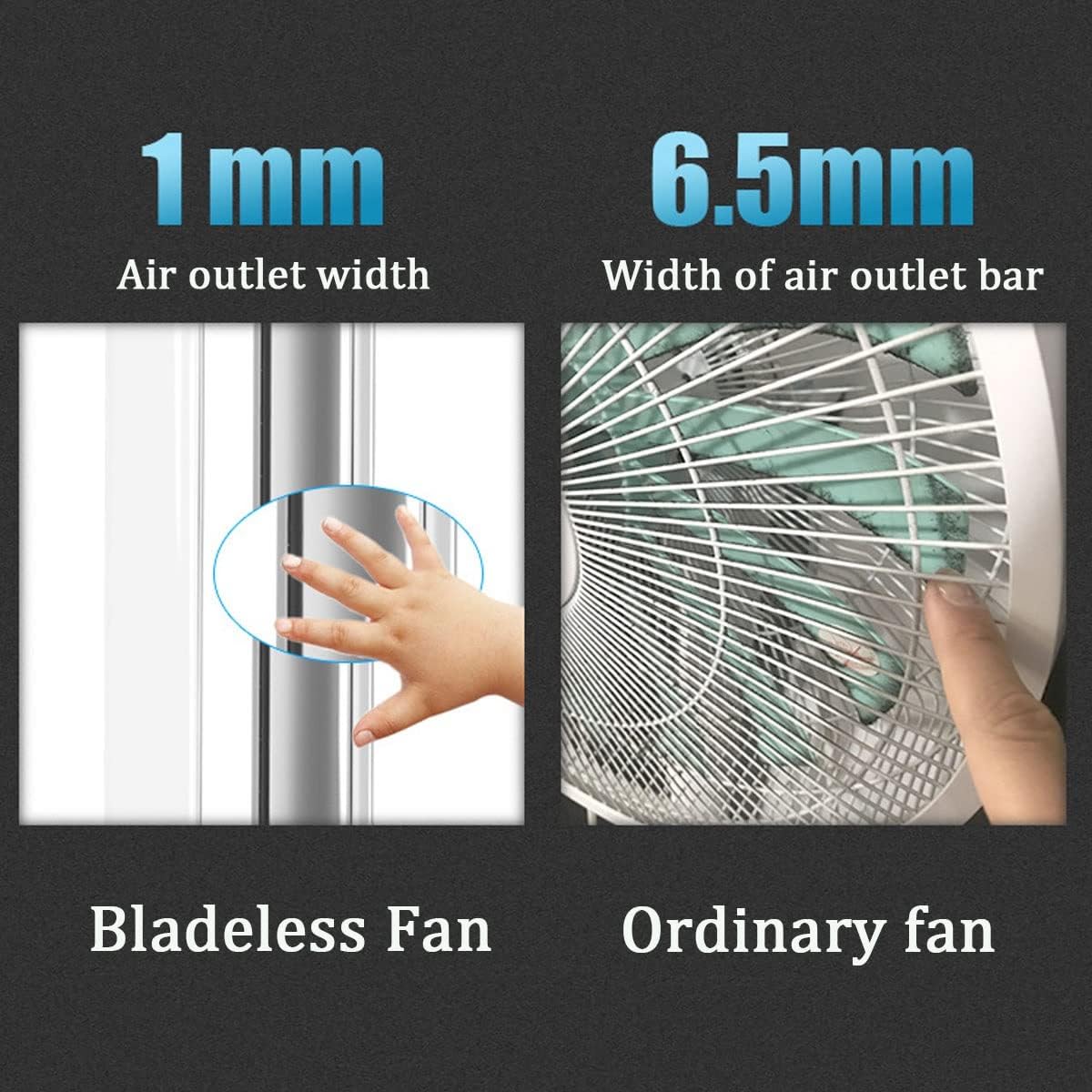
Figure 2: Comparison illustrating the narrow air outlet of the bladeless fan (1mm) compared to an ordinary fan (6.5mm), enhancing safety by preventing accidental contact.

Figure 3: The remote control for the tower fan, capable of operating the unit from up to 5 meters away.

Figure 4: Product dimensions, showing the fan's height of 73.5cm, width of 23.5cm, and depth of 9cm.
സജ്ജമാക്കുക
- അൺപാക്ക് ചെയ്യുന്നു: പാക്കേജിംഗിൽ നിന്ന് ഫാനും എല്ലാ അനുബന്ധ ഉപകരണങ്ങളും ശ്രദ്ധാപൂർവ്വം നീക്കം ചെയ്യുക. ഭാവിയിലെ സംഭരണത്തിനോ ഗതാഗതത്തിനോ വേണ്ടി പാക്കേജിംഗ് സൂക്ഷിക്കുക.
- പ്ലേസ്മെൻ്റ്: Place the fan on a firm, level surface. Ensure there is adequate space around the fan for proper airflow and oscillation. Avoid placing it near curtains or other objects that could obstruct the air intake or outlet.
- പവർ കണക്ഷൻ: Insert the power plug into a standard electrical outlet. Ensure the voltage matches the requirements specified on the product label. The power cord length is 1.5 meters.
പ്രവർത്തന നിർദ്ദേശങ്ങൾ
Your Portable Tower Fan can be operated using the touch controls on the unit or the included remote control.
പവർ ഓൺ/ഓഫ്
- അമർത്തുക ശക്തി button on the fan's control panel or the remote control to turn the fan on or off.
ഫാൻ സ്പീഡ് ക്രമീകരിക്കുന്നു
- The fan features an infinitely variable speed control. Use the "+" ഒപ്പം "-" buttons on the remote control or the corresponding touch controls on the unit to increase or decrease the airflow intensity.
ആന്ദോളന പ്രവർത്തനം
- അമർത്തുക Oscillation (SWAY) button on the remote control or the unit to activate the 180° wide-range oscillation. Press it again to stop oscillation.

Figure 5: The fan's oscillation function helps circulate air efficiently throughout a room.
ടൈമർ പ്രവർത്തനം
- അമർത്തുക ടൈമർ button on the remote control to set the desired operating time. Each press cycles through available timer settings (e.g., 1 hour, 2 hours, etc., up to 8 hours). The fan will automatically turn off once the set time has elapsed.
റിമോട്ട് കൺട്രോൾ ഉപയോഗം
- റിമോട്ട് കൺട്രോളിൽ പ്രവർത്തിക്കുന്ന ബാറ്ററികളുണ്ടെന്ന് ഉറപ്പാക്കുക.
- Point the remote control directly at the fan's receiver for optimal response.
- റിമോട്ട് കൺട്രോളിന് 5 മീറ്റർ വരെ പരിധിയുണ്ട്.
മെയിൻ്റനൻസ്
പതിവ് അറ്റകുറ്റപ്പണികൾ നിങ്ങളുടെ ഫാനിന്റെ ദീർഘായുസ്സും മികച്ച പ്രകടനവും ഉറപ്പാക്കാൻ സഹായിക്കുന്നു.
വൃത്തിയാക്കൽ
- വൃത്തിയാക്കുന്നതിന് മുമ്പ് എല്ലായ്പ്പോഴും ഫാൻ അൺപ്ലഗ് ചെയ്യുക.
- ഒരു സോഫ്റ്റ് ഉപയോഗിക്കുക, ഡിamp ഫാനിന്റെ പുറംഭാഗങ്ങൾ തുടയ്ക്കാൻ തുണി ഉപയോഗിക്കുക. അബ്രാസീവ് ക്ലീനറുകളോ ലായകങ്ങളോ ഉപയോഗിക്കരുത്.
- For the air intake and outlet areas, use a soft brush or vacuum cleaner with a brush attachment to remove dust and debris.
- ഫാൻ വെള്ളത്തിൽ മുക്കുകയോ മോട്ടോർ ഭവനത്തിലേക്ക് വെള്ളം ഒഴുകാൻ അനുവദിക്കുകയോ ചെയ്യരുത്.
Filter Screen Replacement
The fan features a convenient filter screen that can be replaced to effectively filter fine dust and particles from the air. Refer to the product diagram for the exact location of the filter screen. To replace:
- പവർ ഔട്ട്ലെറ്റിൽ നിന്ന് ഫാൻ അൺപ്ലഗ് ചെയ്യുക.
- Locate the filter screen access point (usually on the rear or side of the lower unit).
- Open the access cover and carefully remove the old filter screen.
- Insert a new, clean filter screen, ensuring it is properly seated.
- ആക്സസ് കവർ സുരക്ഷിതമായി അടയ്ക്കുക.
സംഭരണം
- ഫാൻ കൂടുതൽ നേരം സൂക്ഷിക്കുകയാണെങ്കിൽ, അത് നന്നായി വൃത്തിയാക്കുക.
- Store the fan in its original packaging in a cool, dry place, away from direct sunlight and extreme temperatures.
ട്രബിൾഷൂട്ടിംഗ്
ഉപഭോക്തൃ പിന്തുണയുമായി ബന്ധപ്പെടുന്നതിന് മുമ്പ്, പൊതുവായ പ്രശ്നങ്ങൾക്ക് ഇനിപ്പറയുന്ന ട്രബിൾഷൂട്ടിംഗ് ഗൈഡ് പരിശോധിക്കുക:
| പ്രശ്നം | സാധ്യമായ കാരണം | പരിഹാരം |
|---|---|---|
| ഫാൻ ഓണാകുന്നില്ല. | വൈദ്യുതി വിതരണം ഇല്ല. പവർ ബട്ടൺ അമർത്തിയിട്ടില്ല. | വർക്കിംഗ് ഔട്ട്ലെറ്റിലേക്ക് പവർ കോർഡ് സുരക്ഷിതമായി പ്ലഗ് ചെയ്തിട്ടുണ്ടെന്ന് ഉറപ്പാക്കുക. Press the Power button on the unit or remote control. |
| ദുർബലമായ വായുസഞ്ചാരം. | ഫാൻ വേഗത വളരെ കുറവായി സജ്ജീകരിച്ചിരിക്കുന്നു. എയർ ഇൻടേക്ക്/ഔട്ട്ലെറ്റ് അടഞ്ഞുപോയി. Dirty filter screen. | Increase the fan speed using the controls. Ensure nothing is obstructing the fan's air intake or outlet. ഫിൽട്ടർ സ്ക്രീൻ വൃത്തിയാക്കുക അല്ലെങ്കിൽ മാറ്റിസ്ഥാപിക്കുക. |
| റിമോട്ട് കൺട്രോൾ പ്രവർത്തിക്കുന്നില്ല. | ഡെഡ് ബാറ്ററികൾ. റിമോട്ടിനും ഫാനും ഇടയിലുള്ള തടസ്സം. | റിമോട്ട് കൺട്രോളിൽ ബാറ്ററികൾ മാറ്റിസ്ഥാപിക്കുക. റിമോട്ടിനും ഫാനിന്റെ റിസീവറിനും ഇടയിൽ വ്യക്തമായ ഒരു കാഴ്ച രേഖ ഉണ്ടെന്ന് ഉറപ്പാക്കുക. |
| ഫാൻ അസാധാരണമായ ശബ്ദമുണ്ടാക്കുന്നു. | ഫാൻ നിരപ്പായ പ്രതലത്തിലല്ല. ആന്തരിക തടസ്സം. | സ്ഥിരതയുള്ള, നിരപ്പായ പ്രതലത്തിൽ ഫാൻ സ്ഥാപിക്കുക. Unplug the fan and check for any foreign objects inside the air pathways. If the noise persists, contact support. |
സ്പെസിഫിക്കേഷനുകൾ
| ആട്രിബ്യൂട്ട് | വിശദാംശങ്ങൾ |
|---|---|
| ഉൽപ്പന്നത്തിൻ്റെ പേര് | Vaneless Tower Fan |
| മോഡൽ | 32-Inch Oscillating Bladeless Tower Fan |
| ബ്രാൻഡ് | ജനറിക് |
| ഉൽപ്പന്ന നിറം | വെള്ളി |
| ഉൽപ്പന്ന വലുപ്പം (H x W x D) | 73.5 സെ.മീ x 23.5 സെ.മീ x 9 സെ.മീ |
| പവർ കോർഡ് നീളം | 1.5 മീറ്റർ |
| വേഗത നിയന്ത്രണ രീതി | Infinitely Variable Speed |
| മെറ്റീരിയൽ | എബിഎസ് |
| മൗണ്ടിംഗ് തരം | ഫ്ലോർ മൗണ്ട് |
| ASIN | B0DYDPZ5NJ |
| മാതൃരാജ്യം | ചൈന |
പിന്തുണ
If you have any questions or require further assistance with your Portable Tower Fan, please feel free to contact our customer support. We are committed to providing excellent service.
Please note: Specific warranty details may vary. Refer to your purchase documentation for warranty information.