
1. ആമുഖം
The BIGTREETECH Panda Branch is a power expansion board designed to enhance the capabilities of Bambu-Lab P1P, P1S, X1C, X1E, A1, and A1 Mini 3D printers. It provides additional power output ports for various accessories, including the Panda Touch, Panda Knomi, USB fans, USB light strips, and AMS/AMS Lite systems. This manual provides essential information for the safe and effective use of your Panda Branch.
2 സുരക്ഷാ വിവരങ്ങൾ
The Panda Branch is equipped with safety features to protect your connected devices and the board itself. Please observe the following:
- വിപരീത ധ്രുവീകരണ സംരക്ഷണം: All output ports include reverse polarity protection.
- Overcurrent Fuses: Each output port is protected by overcurrent fuses.
- തെറ്റ് സൂചകം: A red fault indicator light will illuminate if overcurrent protection is triggered, indicating a potential issue. Address the cause of the overcurrent before continuing operation.

Figure 2.1: Panda Branch safety features including fault indicator and protection mechanisms.
3. പാക്കേജ് ഉള്ളടക്കം
നിങ്ങളുടെ പാക്കേജിൽ എല്ലാ ഇനങ്ങളും ഉണ്ടെന്ന് ഉറപ്പാക്കുക:
- Panda Branch x1
- പാക്കേജ് ബോക്സ് x1
- പവർ കേബിൾ x1
- M3 x 10 Self-tapping Screws x4
- M3 x 35 Socket Head Cap Screws x2
- BTT Duck x1 (Note: The BTT Duck is an accessory and not essential for the board's function.)

Figure 3.1: Included components in the Panda Branch package.
4. സജ്ജീകരണം
4.1 ഫിസിക്കൽ ഇൻസ്റ്റലേഷൻ
The Panda Branch features a slim 20mm profile for efficient cable management. Custom 3D printable housing cases are available for various Bambu-Lab printer series to ensure a perfect fit. These cases need to be printed separately by the user.

ചിത്രം 4.1: ഉദാample installation of the Panda Branch on different Bambu-Lab printer models.
The Panda Branch connects to your Bambu-Lab printer to provide expanded power options. For specific installation steps, refer to the detailed guides provided by BIGTREETECH, often available on their official wiki or support pages.
Video 4.1: Installation of an LED strip, demonstrating a common accessory powered by the Panda Branch.
4.2 ഇലക്ട്രിക്കൽ കണക്ഷനുകൾ
The Panda Branch offers multiple output options:
- USB-A 5V Output Ports: Four USB-A ports provide 5V power for devices like the Panda Touch, Panda Knomi, USB fans, and USB light strips.
- 24V Power Ports: Four MX3.0 2x2-Pin connectors are fully compatible with the Bambu-Lab AMS system. These are designed for AMS/AMS Lite connection and should not be used to power other devices. Additional 24V power supply interfaces are available for DIY projects.

ചിത്രം 4.2: ഓവർview of Panda Branch connectivity with Bambu-Lab printers and various accessories.
4.3 Adjustable Current Settings
Utilize the onboard DIP switch to select the appropriate current output for your 5V USB-A ports. This ensures precision protection for your connected devices.
- Available settings: 1A, 2A, and 2.7A.
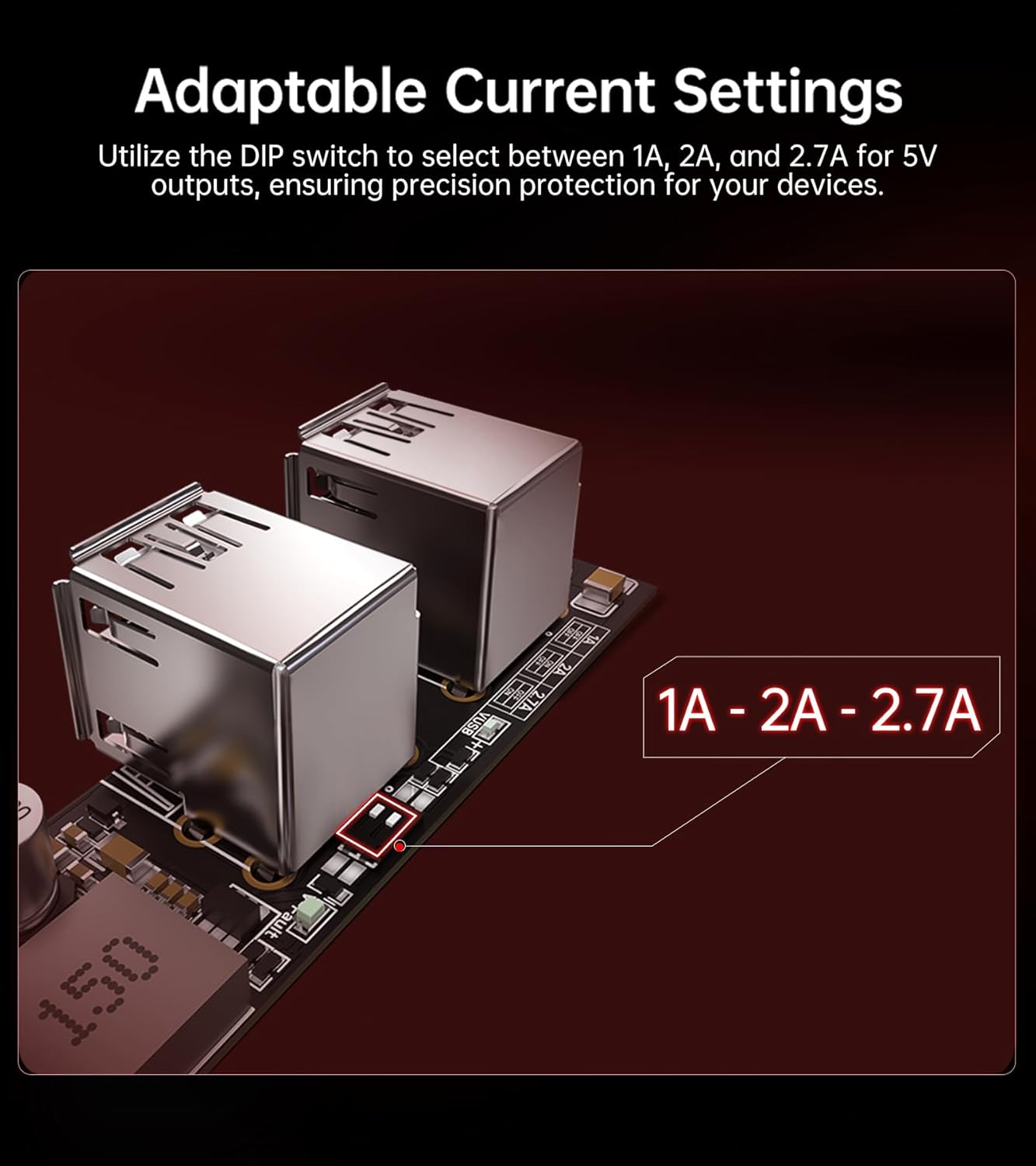
Figure 4.3: Location of the DIP switch for adjusting 5V output current.
5. പ്രവർത്തിക്കുന്നു
Once installed and connected, the Panda Branch operates by providing power to your connected devices. Ensure that the current settings for USB-A ports are correctly configured using the DIP switch (refer to Section 4.3).
The 24V ports are specifically for AMS/AMS Lite systems and should be connected through an AMS Hub if required by your printer model. Do not use these ports to power other devices.
Video 5.1: Demonstration of the Panda Status LED strip, an accessory that can be powered by the Panda Branch, showing various light effects and print status indications.
6. പരിപാലനം
The Panda Branch is designed for reliable operation with minimal maintenance. To ensure longevity and proper function:
- Keep the board clean and free from dust and debris.
- Avoid exposing the board to excessive moisture or extreme temperatures.
- എല്ലാ കണക്ഷനുകളും സുരക്ഷിതമാണെന്ന് ഉറപ്പാക്കാൻ പതിവായി പരിശോധിക്കുക.
7. പ്രശ്നപരിഹാരം
If you encounter issues with your Panda Branch, consider the following:
- Red Fault Indicator: If the red fault indicator light is on, it signifies an overcurrent condition on one of the output ports. Disconnect devices one by one to identify the faulty device or connection. Ensure the DIP switch current setting is appropriate for the connected devices.
- പവർ ഔട്ട്പുട്ട് ഇല്ല: Verify that the Panda Branch is correctly connected to your 3D printer's power source. Check all cables for secure connections.
- Device Not Recognized/Working: Ensure the connected device is compatible with the Panda Branch's 5V USB-A or 24V AMS ports. For USB devices, confirm the current setting is sufficient.
8 സ്പെസിഫിക്കേഷനുകൾ
Detailed specifications for the BIGTREETECH Panda Branch:

Figure 8.1: Interface diagram and specifications table.
| ഫീച്ചർ | വിശദാംശങ്ങൾ |
|---|---|
| ഉൽപ്പന്നത്തിൻ്റെ പേര് | Panda Branch |
| ഇൻപുട്ട് വോളിയംtage | DC 24V |
| Putട്ട്പുട്ട് വോളിയംtagഇയും കറൻ്റും | 5V 2.7A (Peak) |
| 5V Output Interface | 4x Type-A Female |
| MX3.0 2x2Pin Interface | One for connecting to AMS/AMS Lite, while the other three are redundant designs, designed only for AMS/AMS Lite connection. Do not use them to power other devices. |
| അനുയോജ്യത | For Bambu-Lab P1/X1/A1 Series Printers |
| പാക്കേജ് അളവുകൾ | 6.65 x 2.13 x 1.85 ഇഞ്ച് |
| ഇനത്തിൻ്റെ ഭാരം | 3.52 ഔൺസ് |
| മെറ്റീരിയൽ | പി.സി.ബി |
8.1 ഉൽപ്പന്ന അളവുകൾ

Figure 8.2: Product dimensions of the Panda Branch and its compatible printed mounting case.
9. വാറൻ്റിയും പിന്തുണയും
For warranty information, please refer to the terms and conditions provided at the point of purchase or visit the official BIGTREETECH website. For technical support or further assistance, please contact BIGTREETECH customer service through their official channels.