
RORRY D2
RORRY 5000mAh Portable Charger Instruction Manual
Model: D2 | Brand: RORRY
1. ആമുഖം
Thank you for choosing the RORRY 5000mAh Portable Charger. This compact and versatile power bank is designed to provide convenient charging for your Apple Watch, iPhone, and other USB-C compatible devices on the go. Its built-in cables and keychain design make it an ideal travel companion.
പ്രധാന സവിശേഷതകൾ:
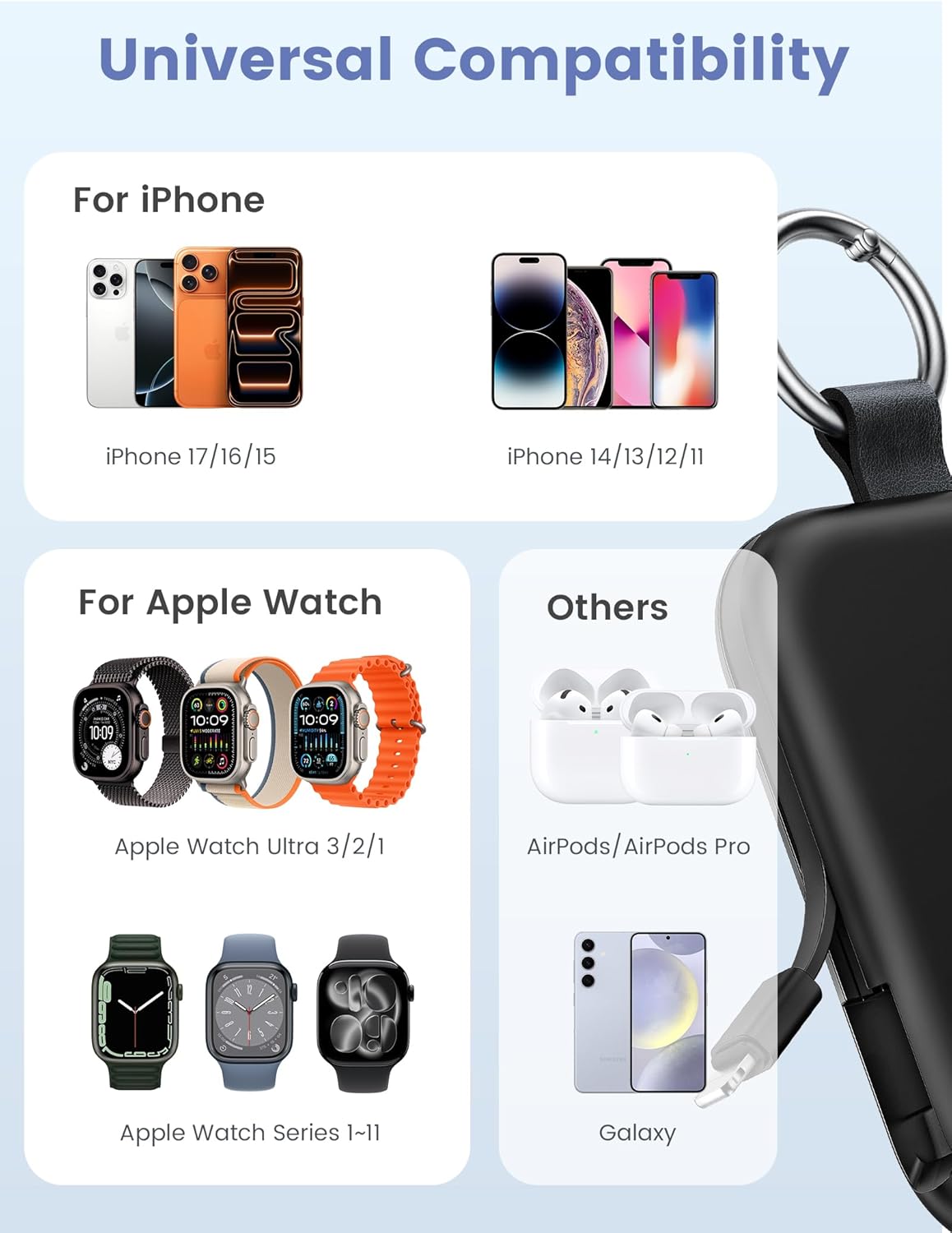
- സാർവത്രിക അനുയോജ്യത: Designed for Apple Watch Ultra/11/10/9/8/7/6/SE, iPhone 17/16/15/14/13/12/11/Pro/Pro Max, AirPods, and Android devices.
- 5000mAh ശേഷി: Provides approximately 7-10 charges for an Apple Watch, 1 full charge for an iPhone 15, or 6-8 charges for AirPods.
- ഒരേസമയം ചാർജിംഗ്: Capable of charging multiple devices concurrently.
- പോർട്ടബിൾ ഡിസൈൻ: Compact, lightweight, and features a keychain for easy transport.
- സംയോജിത കേബിളുകൾ: Includes built-in USB-C and Lightning cables for convenience.
- സുരക്ഷാ സവിശേഷതകൾ: Equipped with over-temperature, over-current, over-voltagഇ, ഷോർട്ട് സർക്യൂട്ട് സംരക്ഷണം.
2. ബോക്സിൽ എന്താണുള്ളത്?
- RORRY Portable Charger x 1
- 1M USB-C മുതൽ USB-C വരെ ചാർജിംഗ് കേബിൾ x 1
- ഉപയോക്തൃ മാനുവൽ x 1
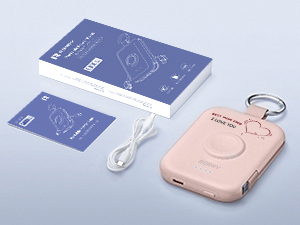
Image: RORRY Portable Charger, USB-C cable, and user manual.
3. ഉൽപ്പന്നം കഴിഞ്ഞുview
Familiarize yourself with the components of your RORRY Portable Charger.
ചിത്രം: മുൻഭാഗം view of the RORRY Portable Charger, highlighting the integrated Apple Watch charging pad and LED indicators.

ചിത്രം: വശം view of the RORRY Portable Charger, showing the retractable built-in USB-C and Lightning cables.
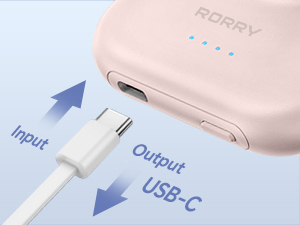
Image: Close-up of the USB-C port on the side of the charger, used for both input (recharging the power bank) and output (charging other devices).
4. സജ്ജീകരണം
പ്രാരംഭ ചാർജ്:
- ആദ്യ ഉപയോഗത്തിന് മുമ്പ്, നിങ്ങളുടെ RORRY പോർട്ടബിൾ ചാർജർ പൂർണ്ണമായും ചാർജ് ചെയ്യുക.
- നൽകിയിരിക്കുന്ന USB-C മുതൽ USB-C വരെ കേബിൾ പവർ ബാങ്കിന്റെ USB-C പോർട്ടിലേക്ക് ബന്ധിപ്പിക്കുക.
- കേബിളിന്റെ മറ്റേ അറ്റം അനുയോജ്യമായ ഒരു USB പവർ അഡാപ്റ്ററുമായി ബന്ധിപ്പിക്കുക (ഉൾപ്പെടുത്തിയിട്ടില്ല).
- പവർ ബാങ്കിലെ എൽഇഡി ഇൻഡിക്കേറ്റർ ലൈറ്റുകൾ ചാർജിംഗ് പുരോഗതി കാണിക്കുന്നതിനായി പ്രകാശിക്കും. പൂർണ്ണമായി ചാർജ് ചെയ്യുമ്പോൾ നാല് ലൈറ്റുകളും ഉറച്ചതായിരിക്കും.
- A full charge typically takes approximately 2.5 to 2.8 hours.
5. പ്രവർത്തന നിർദ്ദേശങ്ങൾ
നിങ്ങളുടെ ഉപകരണങ്ങൾ ചാർജ് ചെയ്യുന്നു:
Press the power button on the side of the power bank to activate it before connecting devices. The LED indicators will show the remaining battery level.
5.1. Charging an Apple Watch:
- Place your Apple Watch onto the magnetic charging pad on the front of the power bank.
- Ensure the watch is properly aligned for optimal charging.
- The watch display will indicate that it is charging.

Image: An Apple Watch placed on the magnetic charging pad of the RORRY Portable Charger.
5.2. Charging an iPhone (Lightning Devices):
- Gently pull out the built-in Lightning cable from the side of the power bank.
- Connect the Lightning connector to your iPhone or other compatible Apple device.
- ഉപകരണം യാന്ത്രികമായി ചാർജ് ചെയ്യാൻ തുടങ്ങും.
5.3. Charging USB-C Devices (e.g., iPhone 15, Android, AirPods):
- Gently pull out the built-in USB-C cable from the side of the power bank.
- Connect the USB-C connector to your compatible device.
- Alternatively, use the USB-C port on the side of the power bank with your own USB-C to USB-C cable for charging.
- ഉപകരണം യാന്ത്രികമായി ചാർജ് ചെയ്യാൻ തുടങ്ങും.

Image: The RORRY Portable Charger charging an Apple Watch, iPhone, and AirPods simultaneously using its built-in cables and wireless pad.
5.4. Simultaneous Charging:
The RORRY Portable Charger supports charging multiple devices at once, such as an Apple Watch, an iPhone via Lightning cable, and another device via the USB-C port or built-in USB-C cable.
Video: Demonstrates the RORRY Portable Charger's ability to charge an Apple Watch and other devices. This video is provided by the seller, RORRY DIRECT.
6. പവർ ബാങ്ക് റീചാർജ് ചെയ്യുന്നു
To recharge the RORRY Portable Charger:
- നൽകിയിരിക്കുന്ന USB-C മുതൽ USB-C വരെ കേബിൾ പവർ ബാങ്കിന്റെ USB-C പോർട്ടിലേക്ക് ബന്ധിപ്പിക്കുക.
- Plug the other end into a USB power adapter (e.g., wall charger, computer USB port).
- The LED indicators will flash to show the charging status and become solid when fully charged.

Image: The RORRY Portable Charger connected to a wall adapter for recharging, while simultaneously charging an Apple Watch and two iPhones.
7. പരിപാലനം
- പവർ ബാങ്ക് ഉയർന്ന താപനിലയിൽ നിന്നും, നേരിട്ടുള്ള സൂര്യപ്രകാശത്തിൽ നിന്നും, ദ്രാവകങ്ങളിൽ നിന്നും അകറ്റി നിർത്തുക.
- മൃദുവായതും ഉണങ്ങിയതുമായ തുണി ഉപയോഗിച്ച് ഉപകരണം വൃത്തിയാക്കുക. കഠിനമായ രാസവസ്തുക്കളോ ഉരച്ചിലുകളോ ഉള്ള വസ്തുക്കൾ ഉപയോഗിക്കരുത്.
- ഉപയോഗത്തിലില്ലാത്തപ്പോൾ തണുത്തതും ഉണങ്ങിയതുമായ സ്ഥലത്ത് സൂക്ഷിക്കുക.
- ശക്തമായ ആഘാതങ്ങൾക്ക് ഉപകരണം ഇടുകയോ ഇടുകയോ ചെയ്യുന്നത് ഒഴിവാക്കുക.
8. പ്രശ്നപരിഹാരം
| പ്രശ്നം | സാധ്യമായ കാരണം | പരിഹാരം |
|---|---|---|
| ഉപകരണം ചാർജ് ചെയ്യുന്നില്ല | Power bank is off or depleted. | Press the power button to turn on. Recharge the power bank if necessary. |
| സ്ലോ ചാർജിംഗ് | Using a low-power adapter or cable. | Ensure you are using a compatible power adapter and the provided USB-C cable for optimal charging speed. |
| ആപ്പിൾ വാച്ച് ചാർജ് ചെയ്യുന്നില്ല | Improper alignment on charging pad. | Adjust the Apple Watch position on the magnetic pad until charging begins. |
| Built-in cables not working | കേബിൾ പൂർണ്ണമായി നീട്ടിയിട്ടില്ല അല്ലെങ്കിൽ ബന്ധിപ്പിച്ചിട്ടില്ല. | Ensure cables are fully extended and securely connected to your device. |
9 സ്പെസിഫിക്കേഷനുകൾ
| മോഡൽ നമ്പർ | D2 |
| ബാറ്ററി ശേഷി | 5000 മില്ലിamp മണിക്കൂറുകൾ |
| ഉൽപ്പന്ന അളവുകൾ | 3.86 x 0.65 x 2.82 ഇഞ്ച് |
| ഇനത്തിൻ്റെ ഭാരം | 4.4 ഔൺസ് |
| കണക്റ്റർ തരം | Built-in Cable L+C, USB-C Port |
| പ്രത്യേക സവിശേഷതകൾ | Compact, Built-In Cables, All-in-one, Keychain design |
| നിർമ്മാതാവ് | ShenZhen XingYuanSheng Electronic Technology Co,Ltd |
| ആദ്യ തീയതി ലഭ്യമാണ് | 3 മാർച്ച് 2025 |
10 സുരക്ഷാ വിവരങ്ങൾ
- ബാറ്ററി പായ്ക്ക് വേർപെടുത്തുകയോ തുറക്കുകയോ കീറുകയോ ചെയ്യരുത്.
- പവർ ബാങ്ക് ചൂടിലോ തീയിലോ ഏൽക്കരുത്. നേരിട്ട് സൂര്യപ്രകാശം ഏൽക്കുന്നിടത്ത് സൂക്ഷിക്കുന്നത് ഒഴിവാക്കുക.
- ബാറ്ററി പായ്ക്ക് ഷോർട്ട് സർക്യൂട്ട് ചെയ്യരുത്. പരസ്പരം ഷോർട്ട് സർക്യൂട്ട് ചെയ്യാനോ ചാലക വസ്തുക്കൾ ഉപയോഗിച്ച് ഷോർട്ട് സർക്യൂട്ട് ചെയ്യാനോ സാധ്യതയുള്ള ഒരു ബോക്സിലോ ഡ്രോയറിലോ ബാറ്ററി പായ്ക്കുകൾ ക്രമരഹിതമായി സൂക്ഷിക്കരുത്.
- പവർ ബാങ്കിനെ മെക്കാനിക്കൽ ഷോക്കിന് വിധേയമാക്കരുത്.
- In the event of a battery leak, do not allow the liquid to come into contact with the skin or eyes. If contact has been made, wash the affected area with copious amounts of water and seek medical advice.
- പവർ ബാങ്ക് കുട്ടികൾക്ക് ലഭ്യമാകാതെ സൂക്ഷിക്കുക.
- ഉപകരണങ്ങളുടെ ഉപയോഗത്തിനായി പ്രത്യേകം നൽകിയിട്ടുള്ള ചാർജർ അല്ലാതെ മറ്റൊന്നും ഉപയോഗിക്കരുത്.
- പ്രാദേശിക നിയന്ത്രണങ്ങൾ അനുസരിച്ച് പവർ ബാങ്ക് ശരിയായി സംസ്കരിക്കുക.
11. വാറൻ്റിയും പിന്തുണയും
For warranty information or customer support, please refer to the contact details provided with your purchase or visit the official RORRY webസൈറ്റ്. വാങ്ങിയതിന്റെ തെളിവായി നിങ്ങളുടെ വാങ്ങൽ രസീത് സൂക്ഷിക്കുക.
നിർമ്മാതാവ്: ShenZhen XingYuanSheng Electronic Technology Co,Ltd
ബ്രാൻഡ് സ്റ്റോർ: Visit the RORRY Store on Amazon
Ask a question about this manual
Ask about setup, troubleshooting, compatibility, parts, safety, or missing instructions. Manuals+ will review the question and use this page’s manual context to help answer it.