
MRSCOZ TCR
MRSCOZ Toddlers Sleep Training Clock
Model: TCR
ഉപയോക്തൃ നിർദ്ദേശ മാനുവൽ
1. ആമുഖം
The MRSCOZ Toddlers Sleep Training Clock is a multifunctional device designed to assist children with sleep training, provide alarm clock functionality, act as a Bluetooth music player, and offer various night light and sound machine features. Its intuitive design and multiple settings aim to create a comfortable and consistent sleep environment for toddlers and kids.

Image: The MRSCOZ Sleep Training Clock displaying different light colors, highlighting its versatile illumination options.
2 സുരക്ഷാ വിവരങ്ങൾ
- ഈ ഉൽപ്പന്നം ഒരു കളിപ്പാട്ടമല്ല. ചെറിയ കുട്ടികൾക്ക് മുതിർന്നവരുടെ മേൽനോട്ടം ശുപാർശ ചെയ്യുന്നു.
- Keep the device away from water and excessive moisture to prevent electrical hazards.
- Use only the provided USB-C cable for charging. Do not use damaged cables or chargers.
- ഉപകരണം സ്വയം ഡിസ്അസംബ്ലിംഗ് ചെയ്യാനോ നന്നാക്കാനോ ശ്രമിക്കരുത്. സഹായത്തിന് ഉപഭോക്തൃ പിന്തുണയുമായി ബന്ധപ്പെടുക.
- Ensure the clock is placed on a stable, flat surface to prevent it from falling.
3. പാക്കേജ് ഉള്ളടക്കം
തുറക്കുമ്പോൾ പാക്കേജ് ഉള്ളടക്കങ്ങൾ പരിശോധിക്കുക:
- MRSCOZ Toddlers Sleep Training Clock (White)
- USB-C ചാർജിംഗ് കേബിൾ
- ഉപയോക്തൃ മാനുവൽ (ഈ പ്രമാണം)
4. ഉൽപ്പന്നം കഴിഞ്ഞുview
Familiarize yourself with the clock's components and controls.

Image: The multifunctional MRSCOZ Sleep Training Clock highlighting its use as an alarm clock, night light, Bluetooth music player, and sound machine.
നിയന്ത്രണങ്ങളും സൂചകങ്ങളും:
| ബട്ടൺ/ഇൻഡിക്കേറ്റർ | ഫംഗ്ഷൻ |
|---|---|
| Time Setting Button (Clock icon) | Press to enter time setting mode. |
| Alarm Setting Button (Bell icon) | Press to set or adjust alarms. |
| Night Light Button (Sun icon) | Short press to change light color. Long press to adjust brightness. |
| Music/Sound Button (Music note icon) | Press to cycle through sleep sounds. |
| Bluetooth Button (M icon) | ബ്ലൂടൂത്ത് ജോടിയാക്കൽ മോഡിൽ പ്രവേശിക്കാൻ ദീർഘനേരം അമർത്തുക. |
| Volume Up/Down Buttons (+/-) | Adjust volume for sounds and music. |
| ഡിസ്പ്ലേ സ്ക്രീൻ | Shows time, AM/PM, sleep/wake icons, and other indicators. |
| USB-C Port (Rear) | ഉപകരണം ചാർജ് ചെയ്യുന്നതിനായി. |
5. സജ്ജീകരണം
5.1 ഉപകരണം ചാർജ് ചെയ്യുന്നു
Before first use, fully charge the sleep training clock. Connect the provided USB-C cable to the charging port on the back of the clock and plug the other end into a compatible USB power adapter (not included).

Image: The sleep training clock connected to a USB-C charging cable, indicating its portable night light feature.
5.2 പ്രാരംഭ പവർ ഓൺ
The clock will automatically power on when connected to power or if it has sufficient battery charge. The display will light up.
5.3 Time Synchronization via Bluetooth
When connected to a smartphone via Bluetooth, the clock will automatically synchronize with your phone's time, simplifying initial setup.
6. പ്രവർത്തന നിർദ്ദേശങ്ങൾ
6.1 സമയം ക്രമീകരിക്കുന്നു
സമയം സ്വമേധയാ സജ്ജീകരിക്കാൻ:
- അമർത്തുക സമയം ക്രമീകരണ ബട്ടൺ (Clock icon) to enter time setting mode.
- ഉപയോഗിക്കുക +/- ബട്ടണുകൾ മണിക്കൂർ ക്രമീകരിക്കാൻ.
- അമർത്തുക സമയം ക്രമീകരണ ബട്ടൺ വീണ്ടും മിനിറ്റ് ക്രമീകരണത്തിലേക്ക് നീങ്ങാൻ.
- ഉപയോഗിക്കുക +/- ബട്ടണുകൾ മിനിറ്റ് ക്രമീകരിക്കാൻ.
- അമർത്തുക സമയം ക്രമീകരണ ബട്ടൺ one more time to confirm and exit setting mode.
For a visual guide on setting up the time, please refer to the video below:
Video: A short demonstration on how to set up the time on the MRSCOZ Sleep Training Clock.
6.2 Sleep Training Function
The clock uses visual cues to help children understand when it's time to sleep and wake up:
- Time to Sleep: The clock displays a closed-eye icon and emits a blue light, indicating it's bedtime.
- Time to Wake Up: The clock displays an open-eye icon and emits a yellow light, signaling it's okay to wake up.
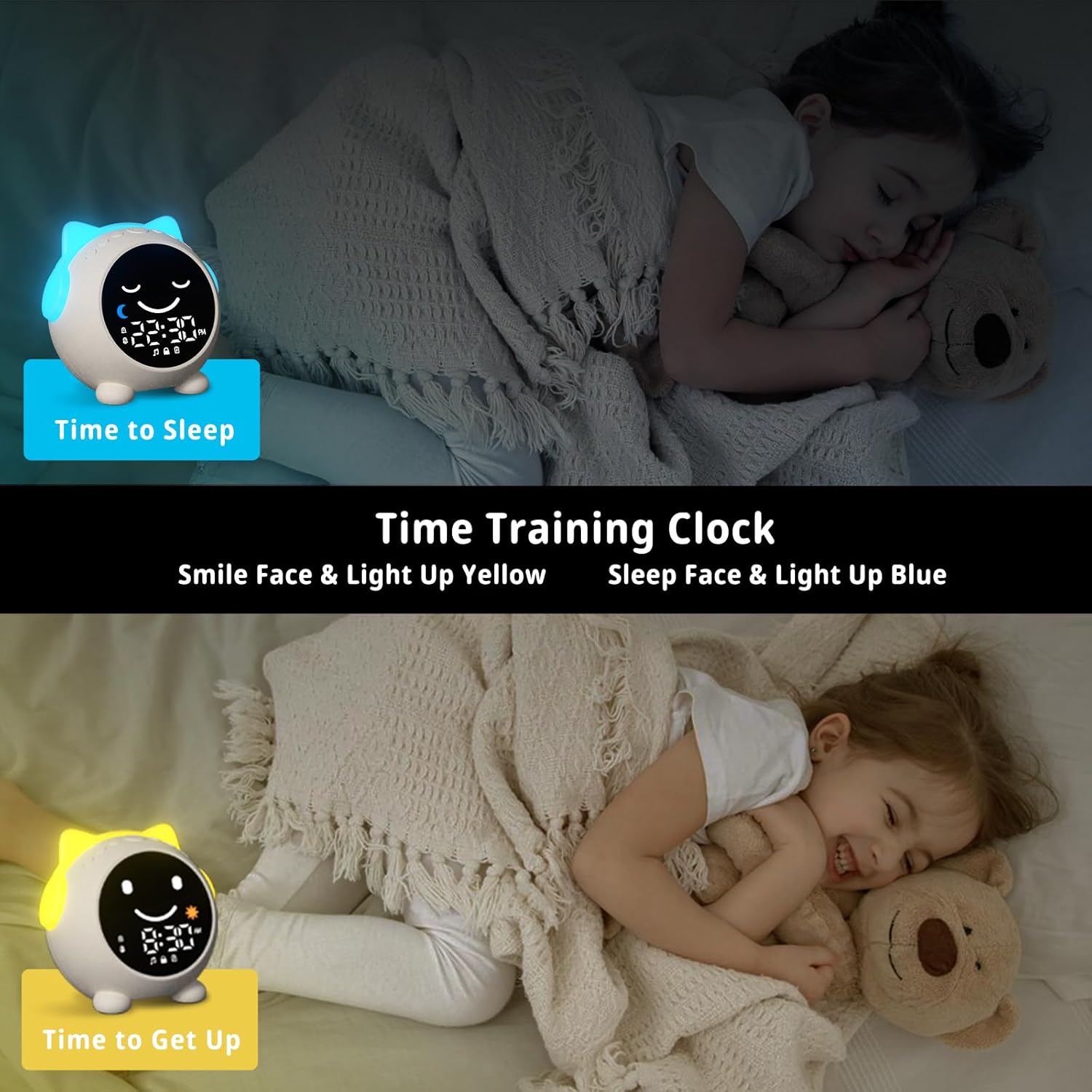
Image: The sleep training clock illustrating the "Time to Sleep" (blue light, closed eyes) and "Time to Get Up" (yellow light, open eyes) features.
6.3 അലാറം ക്ലോക്ക് ക്രമീകരണങ്ങൾ
The clock features dual alarms and a snooze function:
- അമർത്തുക അലാറം ക്രമീകരിക്കുന്ന ബട്ടൺ (Bell icon) to select Alarm 1 or Alarm 2.
- ഉപയോഗിക്കുക +/- ബട്ടണുകൾ ആവശ്യമുള്ള അലാറം സമയം സജ്ജമാക്കാൻ.
- അമർത്തുക അലാറം ക്രമീകരിക്കുന്ന ബട്ടൺ സ്ഥിരീകരിക്കാൻ വീണ്ടും.
- To activate the snooze function, simply touch the clock when the alarm sounds. It will ring again after 10 minutes, up to 3 times.
- To stop the alarm, press any button on the clock.
വീഡിയോ: ഒരു ഓവർview of the Toddlers Sleep Training Clock and its alarm features, including snooze functionality.
6.4 രാത്രി വെളിച്ച പ്രവർത്തനം
The clock offers 9 light colors and 2 brightness levels:
- മാറുന്ന നിറങ്ങൾ: ഷോർട്ട് അമർത്തുക രാത്രി ലൈറ്റ് ബട്ടൺ (Sun icon) to cycle through the 9 available colors.
- തെളിച്ചം ക്രമീകരിക്കൽ: ദീർഘനേരം അമർത്തുക രാത്രി ലൈറ്റ് ബട്ടൺ to switch between the 2 brightness levels.

Image: The sleep training clock demonstrating its 9 distinct night light colors and two brightness settings.
6.5 Sleep Sound Machine
Choose from 7 soothing sleep sounds to help your child relax:
- അമർത്തുക Music/Sound Button (Music note icon) to cycle through the available sounds: Ocean Wave, Rain, Campfire, Summer Night, Bird Songs, Wind Bell, and Fan.
- ഉപയോഗിക്കുക +/- ബട്ടണുകൾ to adjust the volume of the selected sound.

Image: The sleep training clock illustrating its 7 white noise options, including natural sounds like ocean waves and rain.
6.6 Bluetooth Music Player
Connect your smartphone or other Bluetooth-enabled device to play music through the clock's speaker:
- ദീർഘനേരം അമർത്തുക ബ്ലൂടൂത്ത് ബട്ടൺ (M icon) to enter Bluetooth pairing mode. The display will show a Bluetooth icon.
- On your device, enable Bluetooth and search for "C1" (or similar device name).
- Select "C1" to pair. Once connected, the clock will synchronize its time with your phone.
- You can now play music from your device through the clock. Use the +/- ബട്ടണുകൾ വോളിയം ക്രമീകരിക്കുന്നതിന്.
7. പരിപാലനം
- മൃദുവായതും ഉണങ്ങിയതുമായ തുണി ഉപയോഗിച്ച് ക്ലോക്ക് വൃത്തിയാക്കുക. അബ്രസീവ് ക്ലീനറുകളോ ലായകങ്ങളോ ഉപയോഗിക്കരുത്.
- ഉപകരണത്തെ തീവ്രമായ താപനിലയിലോ നേരിട്ടുള്ള സൂര്യപ്രകാശത്തിലോ ദീർഘനേരം തുറന്നുകാട്ടുന്നത് ഒഴിവാക്കുക.
- ദീർഘനേരം ഉപയോഗിക്കാത്തപ്പോൾ, തണുത്തതും വരണ്ടതുമായ സ്ഥലത്ത് ക്ലോക്ക് സൂക്ഷിക്കുക.
8. പ്രശ്നപരിഹാരം
| പ്രശ്നം | സാധ്യമായ പരിഹാരം |
|---|---|
| Clock display is blank or unresponsive. | Ensure the clock is charged. Connect it to a power source using the USB-C cable. If the issue persists, try resetting the device (if a reset button is available, otherwise let it fully discharge and recharge). |
| അലാറം മുഴങ്ങുന്നില്ല. | Check if the alarm is enabled and the volume is not set to zero. Verify the alarm time is correctly set. |
| ബ്ലൂടൂത്ത് വഴി ബന്ധിപ്പിക്കാൻ കഴിയില്ല. | Ensure the clock is in Bluetooth pairing mode (long press M button). Make sure Bluetooth is enabled on your device and it's within range. Try forgetting the device on your phone and re-pairing. |
| Time format stuck in 24-hour mode. | Refer to the time setting instructions. Some models may automatically switch based on phone sync, or require specific button combinations (e.g., long press time button) not explicitly detailed in general instructions. |
| Night light not changing colors/brightness. | Ensure you are using short presses for color change and long presses for brightness adjustment on the Night Light button. |
9 സ്പെസിഫിക്കേഷനുകൾ
| ഫീച്ചർ | വിശദാംശങ്ങൾ |
|---|---|
| ബ്രാൻഡ് | MRSCOZ |
| മോഡൽ നമ്പർ | ടിസിആർ |
| നിറം | വെള്ള |
| ഡിസ്പ്ലേ തരം | ഡിജിറ്റൽ |
| ഉൽപ്പന്ന അളവുകൾ | 3.8"ആംശം x 3.9"ആംശം |
| പവർ ഉറവിടം | Corded Electric (Rechargeable Battery) |
| മെറ്റീരിയൽ | അക്രിലോണിട്രൈൽ ബ്യൂട്ടാഡീൻ സ്റ്റൈറൈൻ (എബിഎസ്) |
| പ്രത്യേക സവിശേഷതകൾ | Bluetooth, Timer, Adjustable Brightness, LED Display, Adjustable Volume, Sleep Training, Night Light, Sound Machine |
| ബാറ്ററികളുടെ എണ്ണം | 1 12V battery required (internal) |
| ഇനത്തിൻ്റെ ഭാരം | 9.6 ഔൺസ് |
10. വാറൻ്റിയും പിന്തുണയും
This MRSCOZ product comes with a limited warranty. For detailed warranty information, product support, or to report any issues, please contact MRSCOZ customer service through the retailer's platform or the official brand webസൈറ്റ്. വാറന്റി ക്ലെയിമുകൾക്കായി നിങ്ങളുടെ വാങ്ങലിന്റെ തെളിവ് സൂക്ഷിക്കുക.
Ask a question about this manual
Ask about setup, troubleshooting, compatibility, parts, safety, or missing instructions. Manuals+ will review the question and use this page’s manual context to help answer it.