
DOOGEE Tab G6+
DOOGEE Tab G6+ Android 15 Tablet User Manual
Model: Tab G6+
1. ആമുഖം
The DOOGEE Tab G6+ is an advanced 11-inch Android 15 tablet designed for versatile use, from entertainment to productivity. Featuring a vibrant FHD+ 90Hz display, powerful Unisoc T7280 octa-core processor, and integrated Gemini AI, it offers a smooth and intelligent user experience. With a massive 32GB of RAM and 256GB of internal storage, expandable up to 2TB, you have ample space for all your applications, media, and documents. The tablet also boasts an 8000mAh battery for extended use, 4G LTE connectivity, and comes with a suite of accessories including a keyboard, stylus, and mouse to enhance your productivity.
2. സജ്ജീകരണം
2.1. ബോക്സിൽ എന്താണുള്ളത്?
Carefully unbox your DOOGEE Tab G6+ tablet and ensure all components are present:
- DOOGEE Tab G6+ Tablet PC
- ചാർജർ
- യുഎസ്ബി ടൈപ്പ്-സി കേബിൾ
- കീബോർഡ്
- സ്റ്റൈലസ്
- SIM Card Slot Pin
- മൗസ്
- സംരക്ഷണ കേസ്
- ഉപയോക്തൃ മാനുവൽ
- വാറൻ്റി കാർഡ്
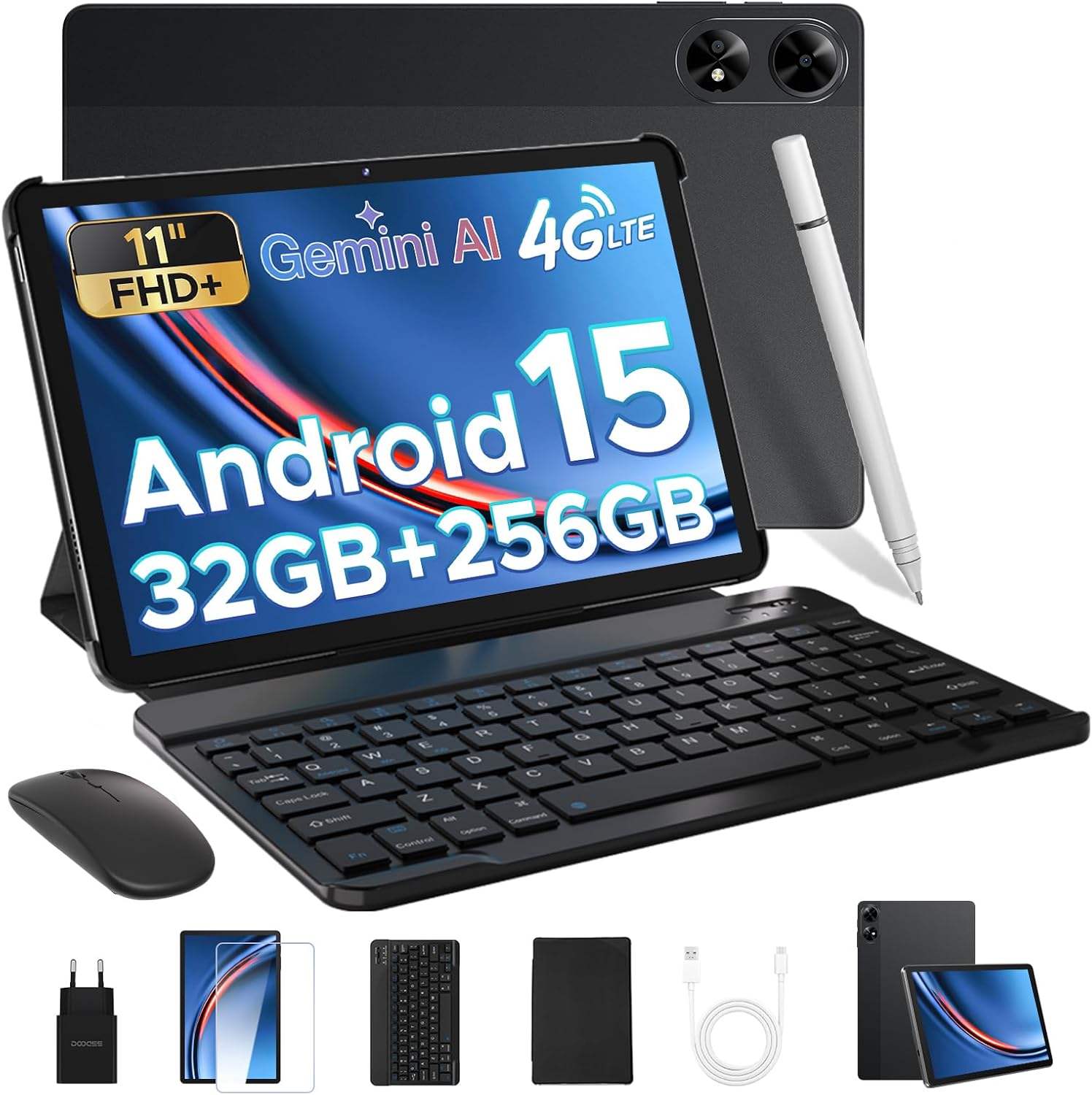
Figure 2.1: DOOGEE Tab G6+ and included accessories.

ചിത്രം 2.2: വിശദമായി view പാക്കേജ് ഉള്ളടക്കങ്ങളുടെ.
2.2. പ്രാരംഭ പവർ ഓൺ
To power on your tablet, press and hold the power button located on the side of the device until the DOOGEE logo appears on the screen. Follow the on-screen prompts to complete the initial setup, including selecting your language, connecting to a Wi-Fi network, and setting up your Google account.
2.3. സിം കാർഡും മൈക്രോ എസ്ഡി കാർഡും ഇൻസ്റ്റാൾ ചെയ്യൽ
The DOOGEE Tab G6+ supports dual SIM cards and a microSD card for expandable storage. Locate the SIM card tray on the side of the tablet. Use the provided SIM ejector tool to open the tray. Insert your Nano-SIM cards and/or microSD card into the designated slots, ensuring correct orientation. Gently push the tray back into the tablet until it clicks into place.

Figure 2.3: Inserting SIM and microSD cards.
2.4. ആക്സസറികൾ ബന്ധിപ്പിക്കുന്നു
The tablet comes with a magnetic keyboard, stylus, and mouse for enhanced productivity. These accessories connect via Bluetooth 5.0 for a lag-free experience.
- കീബോർഡ്: Align the magnetic connectors on the keyboard with those on the tablet. The keyboard will snap into place and automatically connect.
- Stylus & Mouse: Turn on the stylus and mouse. Go to ക്രമീകരണങ്ങൾ > ബന്ധിപ്പിച്ച ഉപകരണങ്ങൾ > ബ്ലൂടൂത്ത് on your tablet. Enable Bluetooth and select the stylus or mouse from the list of available devices to pair.
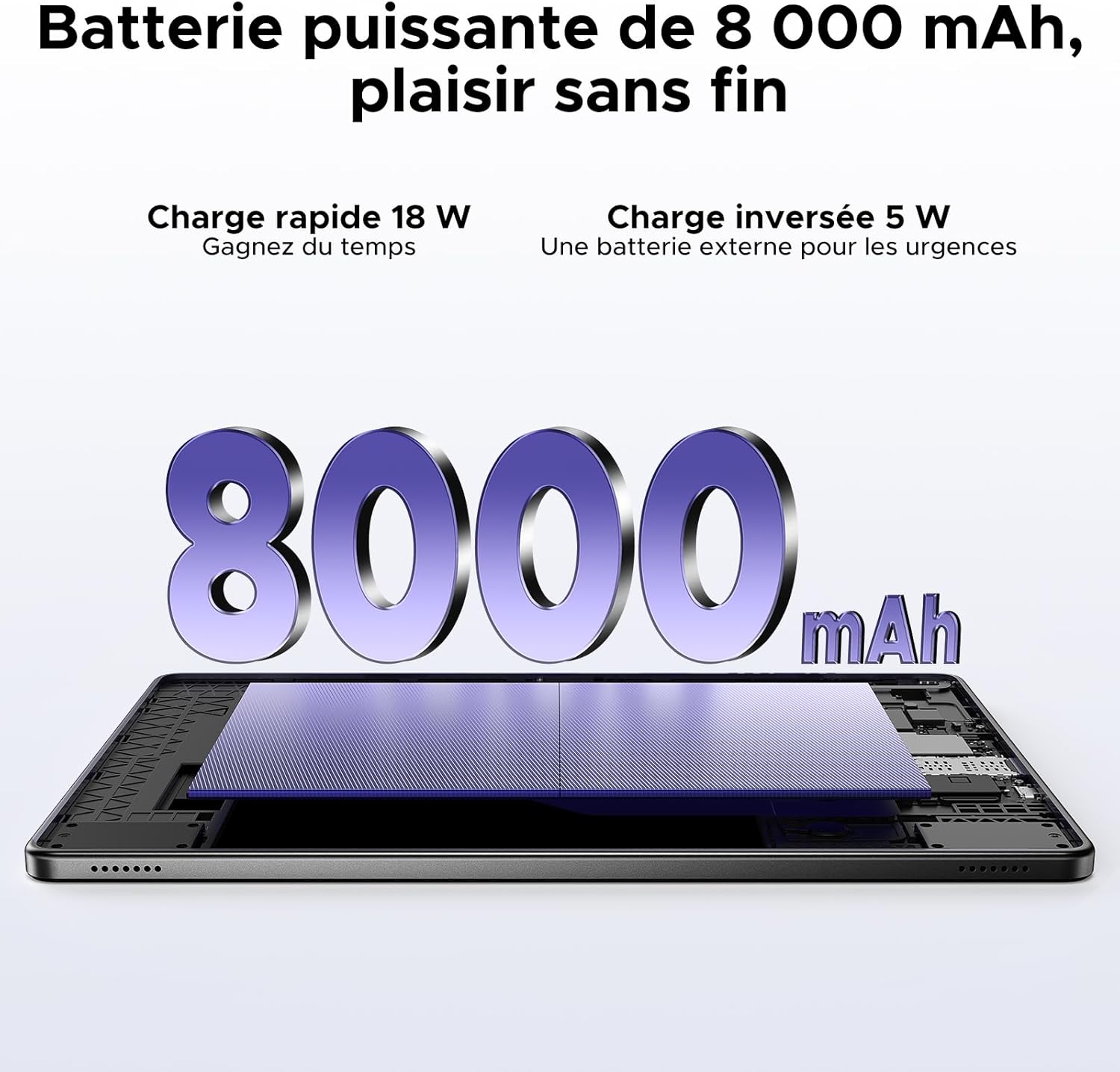
Figure 2.4: Tablet with keyboard, stylus, and mouse.
3. ടാബ്ലെറ്റ് പ്രവർത്തിപ്പിക്കൽ
3.1. ഡിസ്പ്ലേ സവിശേഷതകൾ
The DOOGEE Tab G6+ features an 11-inch FHD+ display with a 90Hz refresh rate, providing smooth visuals and an immersive viewing experience. It supports a resolution of 1920 x 1200 pixels and is Widevine L1 certified, allowing you to stream high-definition content from platforms like Netflix and Prime Video.

Figure 3.1: 11-inch FHD+ 90Hz Display.

Figure 3.2: Widevine L1 Support for HD Streaming.
3.2. Android 15 and Gemini AI
The tablet runs on the latest Android 15 operating system, enhanced with Google's Gemini AI. This integration provides features such as real-time translation, intelligent content synthesis, and creative assistance, making daily tasks more efficient and intuitive.

Figure 3.3: Android 15 Operating System.

Figure 3.4: Integrated Gemini AI.
3.3. പ്രകടനവും സംഭരണവും
Powered by an Unisoc T7280 octa-core processor clocked at 2.2 GHz, the tablet ensures smooth multitasking and gaming. It comes with 32GB of RAM (8GB base + 24GB extended) and 256GB of UFS internal storage, which can be expanded up to 2TB using a microSD card (sold separately).

Figure 3.5: Unisoc T7280 Octa-Core Processor.

Figure 3.6: Massive Storage and RAM.
3.4. ക്യാമറ ഉപയോഗം
The tablet is equipped with a 13MP main camera for clear photos and document scanning, and a 5MP front camera for video calls and selfies. The front camera supports AI Beauty mode and facial recognition for quick unlocking.

Figure 3.7: Main and Front Cameras.
3.5. ഓഡിയോ സിസ്റ്റം
Experience rich audio with the tablet's dual speakers, providing 360° stereo sound. A 3.5mm audio jack is also available for connecting wired headphones, ideal for private listening.

Figure 3.8: Dual Speaker System.
3.6. കണക്റ്റിവിറ്റി
The tablet supports dual-band Wi-Fi (2.4GHz/5GHz) for stable and fast internet connections, reducing buffering time. Bluetooth 5.0 ensures seamless connection with wireless peripherals. With 4G LTE support, you can stay connected on the go by inserting a SIM card.

Figure 3.9: High-Speed Wi-Fi 5.
3.7. നാവിഗേഷൻ
The DOOGEE Tab G6+ integrates multiple navigation systems including GPS, Beidou, Glonass, and Galileo, providing accurate positioning for all your travel and outdoor activities.

Figure 3.10: Precise Navigation System.
3.8. Productivity Tools
With pre-installed WPS Office, the tablet transforms into a portable workstation, supporting Word, Excel, and PowerPoint operations. The detachable magnetic keyboard and stylus provide a comfortable and efficient input experience for both work and creative tasks.

Figure 3.11: WPS Office Integration.
3.9. ബാറ്ററി മാനേജ്മെന്റ്
The 8000mAh large-capacity battery provides up to 14 hours of continuous video playback. It supports 18W fast charging, allowing you to recharge 50% of the battery in approximately 85 minutes. The tablet also features 5W OTG reverse charging, enabling you to use it as a power bank for other devices in emergencies.

Figure 3.12: 8000mAh Battery with Fast and Reverse Charging.
3.10. സുരക്ഷാ സവിശേഷതകൾ
Unlock your tablet quickly and securely using facial recognition. This feature provides convenient access while keeping your data protected.

Figure 3.13: Facial Recognition Unlock.
3.11. അധിക സവിശേഷതകൾ
- എഫ്എം റേഡിയോ: Enjoy free FM radio without data consumption, ideal for outdoor activities or commutes.
- Multi-user System: Create separate user profiles for different family members, ensuring privacy and personalized experiences.
- രക്ഷാകർതൃ നിയന്ത്രണം: Manage and restrict content access for children, promoting a safe digital environment.
- രാത്രി മോഡ്: Reduce eye strain during low-light conditions by activating Night Mode, which adjusts screen colors.

Figure 3.14: FM Radio Functionality.

Figure 3.15: Android 15 Enhanced Features.
4. പരിപാലനം
4.1. ടാബ്ലെറ്റ് വൃത്തിയാക്കൽ
To maintain the tablet's appearance and functionality, regularly clean its surfaces. Use a soft, lint-free cloth, slightly dampened with water or a screen cleaner, to wipe the screen and body. Avoid using harsh chemicals or abrasive materials that could damage the finish.
4.2. ബാറ്ററി പരിചരണം
To prolong battery life, avoid exposing the tablet to extreme temperatures. Do not let the battery completely drain frequently. For long-term storage, charge the battery to about 50% and store the device in a cool, dry place.
4.3. സോഫ്റ്റ്വെയർ അപ്ഡേറ്റുകൾ
Regularly check for and install software updates to ensure your tablet has the latest features, security patches, and performance improvements. You can usually find this option in ക്രമീകരണങ്ങൾ > സിസ്റ്റം > സിസ്റ്റം അപ്ഡേറ്റ്.
5. പ്രശ്നപരിഹാരം
This section addresses common issues you might encounter with your DOOGEE Tab G6+ tablet.
- Tablet does not turn on: Ensure the battery is charged. Connect the tablet to the charger and wait a few minutes before attempting to power it on again. If it still doesn't turn on, try holding the power button for 10-15 seconds for a forced restart.
- വൈഫൈ കണക്റ്റിവിറ്റി പ്രശ്നങ്ങൾ: Check if Wi-Fi is enabled in settings. Restart your Wi-Fi router. Forget the network on your tablet and reconnect. If the issue persists, try restarting the tablet.
- ആപ്പുകൾ ക്രാഷാകുകയോ മരവിക്കുകയോ ചെയ്യുന്നു: Close the problematic app and reopen it. Clear the app's cache and data in ക്രമീകരണങ്ങൾ > ആപ്പുകൾ. Ensure the app is updated to its latest version. If the problem continues, consider uninstalling and reinstalling the app.
- മന്ദഗതിയിലുള്ള പ്രകടനം: Close unnecessary background apps. Clear cached data regularly. Ensure you have sufficient free storage space. A factory reset can resolve persistent performance issues, but remember to back up your data first.
- Accessories not connecting: Ensure Bluetooth is enabled on the tablet and the accessory is in pairing mode. Check the accessory's battery level. Try unpairing and re-pairing the accessory.
6 സ്പെസിഫിക്കേഷനുകൾ
| ഫീച്ചർ | സ്പെസിഫിക്കേഷൻ |
|---|---|
| ബ്രാൻഡ് | ഡോഗി |
| മോഡലിൻ്റെ പേര് | Tab G6+ V |
| ഓപ്പറേറ്റിംഗ് സിസ്റ്റം | ആൻഡ്രോയിഡ് 15 |
| പ്രോസസ്സർ | യൂണിസോക്ക് T7280 ഒക്ടാ-കോർ, 2.2 GHz |
| സ്ക്രീൻ വലിപ്പം | 11 ഇഞ്ച് |
| സ്ക്രീൻ റെസല്യൂഷൻ | 1920 x 1200 Pixels (FHD+) |
| പുതുക്കിയ നിരക്ക് | 90Hz |
| റാം | 32 GB (8GB base + 24GB extended) |
| ആന്തരിക സംഭരണം | 256 GB UFS |
| വികസിപ്പിക്കാവുന്ന സംഭരണം | 2 TB വരെ (മൈക്രോഎസ്ഡി) |
| ബാറ്ററി ശേഷി | 8000 mAh |
| ചാർജിംഗ് | 18W ഫാസ്റ്റ് ചാർജിംഗ്, 5W OTG റിവേഴ്സ് ചാർജിംഗ് |
| പ്രധാന ക്യാമറ | 13 എം.പി |
| മുൻ ക്യാമറ | 5 എം.പി |
| കണക്റ്റിവിറ്റി | 4G LTE, Dual-band Wi-Fi (802.11a/b/g/n/ac), Bluetooth 5.0 |
| നാവിഗേഷൻ | GPS, Beidou, Glonass, ഗലീലിയോ |
| അളവുകൾ (L x W x H) | 24.5 x 16.3 x 1 സെ.മീ |
| ഉൽപ്പന്ന ഭാരം | 528 ഗ്രാം |
| പ്രത്യേക സവിശേഷതകൾ | Fast Charging, Detachable Keyboard, Expandable Storage, Stylus Support, Facial Recognition, FM Radio |
7. വാറൻ്റിയും പിന്തുണയും
DOOGEE is committed to providing excellent customer service for your Tab G6+ tablet.
- 30 ദിവസത്തെ ഗ്യാരണ്ടി: Enjoy a 30-day refund and free return policy from the date of purchase.
- 2-വർഷ പരിമിത വാറൻ്റി: Your tablet is covered by a 2-year limited warranty against manufacturing defects.
- 24/7 Online Assistance: For any inquiries or technical support, please utilize the 24/7 online assistance available through DOOGEE's official support channels.

Figure 7.1: DOOGEE Customer Service Information.
For further assistance, please visit the official DOOGEE webസൈറ്റിൽ ബന്ധപ്പെടുകയോ അവരുടെ ഉപഭോക്തൃ പിന്തുണാ ടീമിനെ നേരിട്ട് ബന്ധപ്പെടുകയോ ചെയ്യുക.
Ask a question about this manual
Ask about setup, troubleshooting, compatibility, parts, safety, or missing instructions. Manuals+ will review the question and use this page’s manual context to help answer it.