
മോൺസ്റ്റർ AC390
മോൺസ്റ്റർ ഓപ്പൺ ഇയർ AC390 ഹെഡ്ഫോണുകൾ ഉപയോക്തൃ മാനുവൽ
മോഡൽ: AC390 | ബ്രാൻഡ്: മോൺസ്റ്റർ
1. ആമുഖം
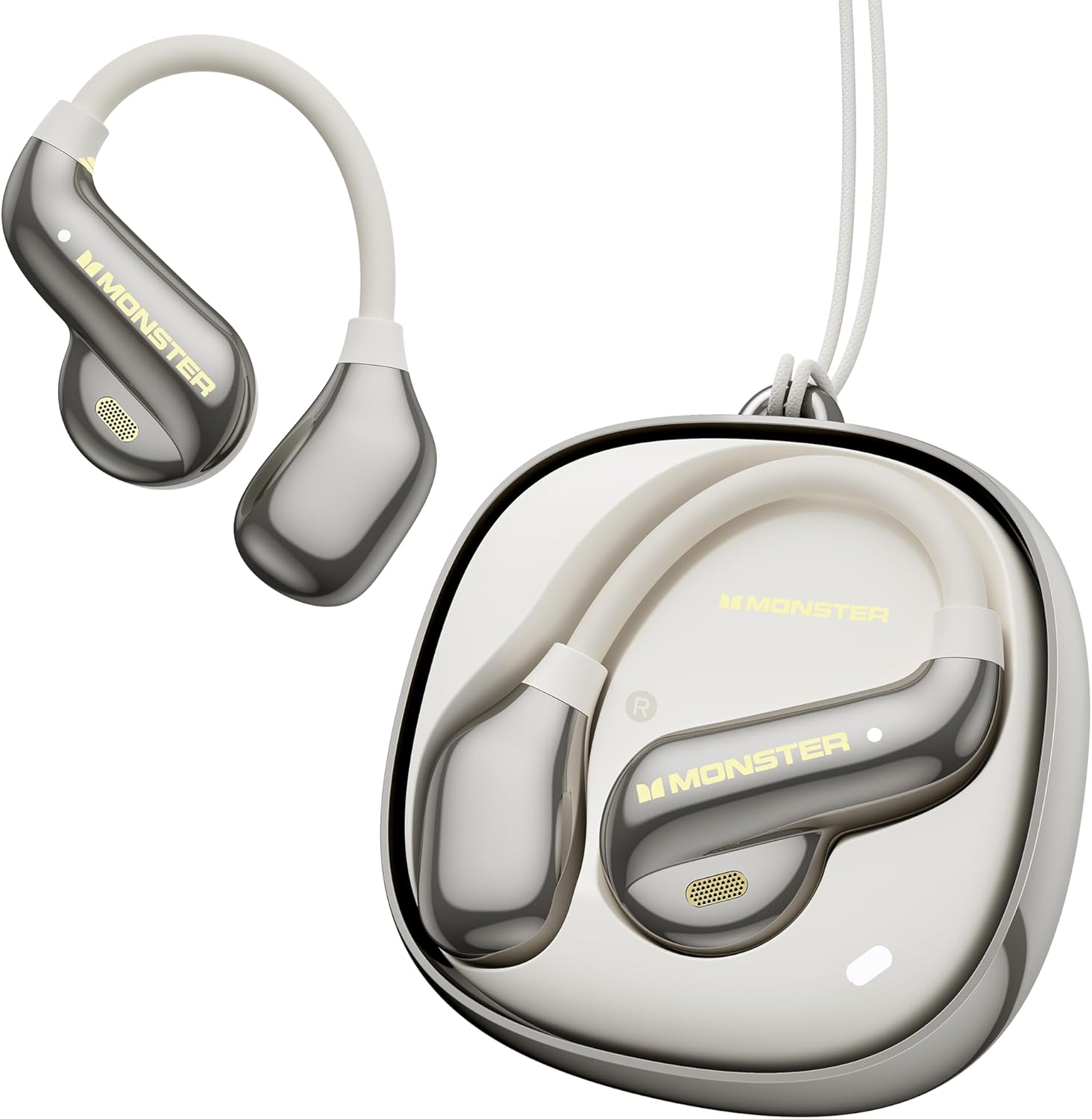
Image: The Monster Open Ear AC390 headphones and their charging case.
This manual provides comprehensive instructions for the safe and efficient use of your Monster Open Ear AC390 Headphones. Please read this manual thoroughly before using the product and retain it for future reference.
1.1 What's in the Box?
- Monster Open Ear AC390 Wireless Earbuds (x2)
- Wireless Charging Case (x1)
- USB-C ചാർജിംഗ് കേബിൾ (x1)
- ഉപയോക്തൃ നിർദ്ദേശങ്ങൾ (x1)
- Detachable Hanging Rope (x1)

Image: All components included in the Monster Open Ear AC390 package.
2. സജ്ജീകരണവും പ്രാരംഭ ഉപയോഗവും
2.1 ഉപകരണം ചാർജ് ചെയ്യുന്നു
Before first use, fully charge the earbuds and the charging case. Connect the provided USB-C charging cable to the charging port on the case and the other end to a USB power source (e.g., computer, wall adapter). The charging indicator lights on the case will show the charging status. A full charge takes approximately 2 hours.

Image: Illustration of the charging process and battery life.
2.2 ഒരു ബ്ലൂടൂത്ത് ഉപകരണവുമായി ജോടിയാക്കൽ
- ഇയർബഡുകൾ ചാർജിംഗ് കെയ്സിലാണെന്നും കെയ്സിന് ആവശ്യത്തിന് പവർ ഉണ്ടെന്നും ഉറപ്പാക്കുക.
- ചാർജിംഗ് കേസ് തുറക്കുക. ഇയർബഡുകൾ സ്വയമേവ ജോടിയാക്കൽ മോഡിലേക്ക് പ്രവേശിക്കും, ഇയർബഡുകളിൽ മിന്നുന്ന LED ലൈറ്റ് ഇത് സൂചിപ്പിക്കും.
- നിങ്ങളുടെ ഉപകരണത്തിൽ (സ്മാർട്ട്ഫോൺ, ടാബ്ലെറ്റ്, ലാപ്ടോപ്പ്), ബ്ലൂടൂത്ത് പ്രവർത്തനക്ഷമമാക്കി ലഭ്യമായ ഉപകരണങ്ങൾക്കായി തിരയുക.
- കണ്ടെത്തിയ ഉപകരണങ്ങളുടെ പട്ടികയിൽ നിന്ന് "മോൺസ്റ്റർ AC390" തിരഞ്ഞെടുക്കുക.
- Once connected, the LED indicator on the earbuds will stop flashing, and you will hear an audible confirmation.
The AC390 utilizes Bluetooth 6.0 technology for faster pairing and stable connections.

Image: Representation of the Bluetooth 6.0 technology within the earbuds.
3. ഹെഡ്ഫോണുകൾ പ്രവർത്തിപ്പിക്കൽ
3.1 ഇയർബഡുകൾ ധരിക്കൽ
The Monster Open Ear AC390 headphones feature an ultra-lightweight, open-ear design with soft silicone ear-hooks for a secure and comfortable fit. Gently place the earbud over your ear, ensuring the speaker portion is positioned near your ear canal without entering it, allowing for situational awareness.

Image: A user wearing the Open Ear AC390 headphones, highlighting the design.
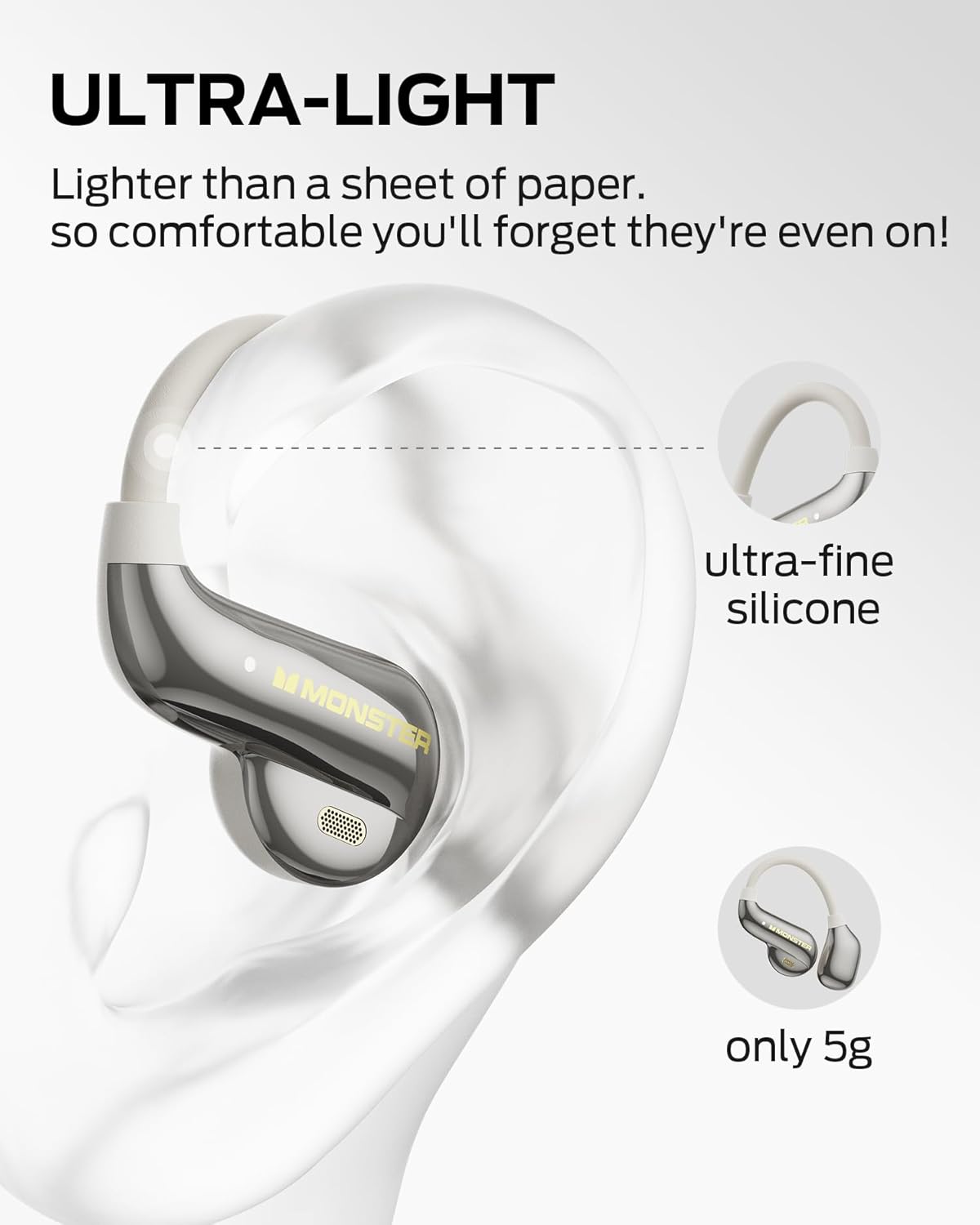
Image: Close-up of an earbud on an ear, illustrating its lightweight design and silicone material.
3.2 ടച്ച് നിയന്ത്രണങ്ങൾ
The AC390 headphones are equipped with touch-sensitive controls on each earbud. Refer to the following table for common functions:
| ആക്ഷൻ | ഫംഗ്ഷൻ |
|---|---|
| Single Click (Right Earbud) | വോളിയം കൂട്ടുക |
| Single Click (Left Earbud) | വോളിയം ഡൗൺ |
| Double Click (Either Earbud) | കോൾ സ്വീകരിക്കുക/അവസാനിപ്പിക്കുക, സംഗീതം പ്ലേ ചെയ്യുക/താൽക്കാലികമായി നിർത്തുക |
| Triple Click (Either Earbud) | മുമ്പത്തെ/അടുത്ത ട്രാക്ക് |
| അമർത്തിപ്പിടിക്കുക (2 സെക്കൻഡ്) | കോൾ നിരസിക്കുക |

Image: Visual guide to earbud touch controls.
4 പ്രധാന സവിശേഷതകൾ
4.1 Pure Monster Sound
Equipped with a 13mm PU titanium diaphragm driver, the AC390 headphones deliver a balanced audio profile with crisp highs, full mids, and deep bass, providing a rich listening experience.
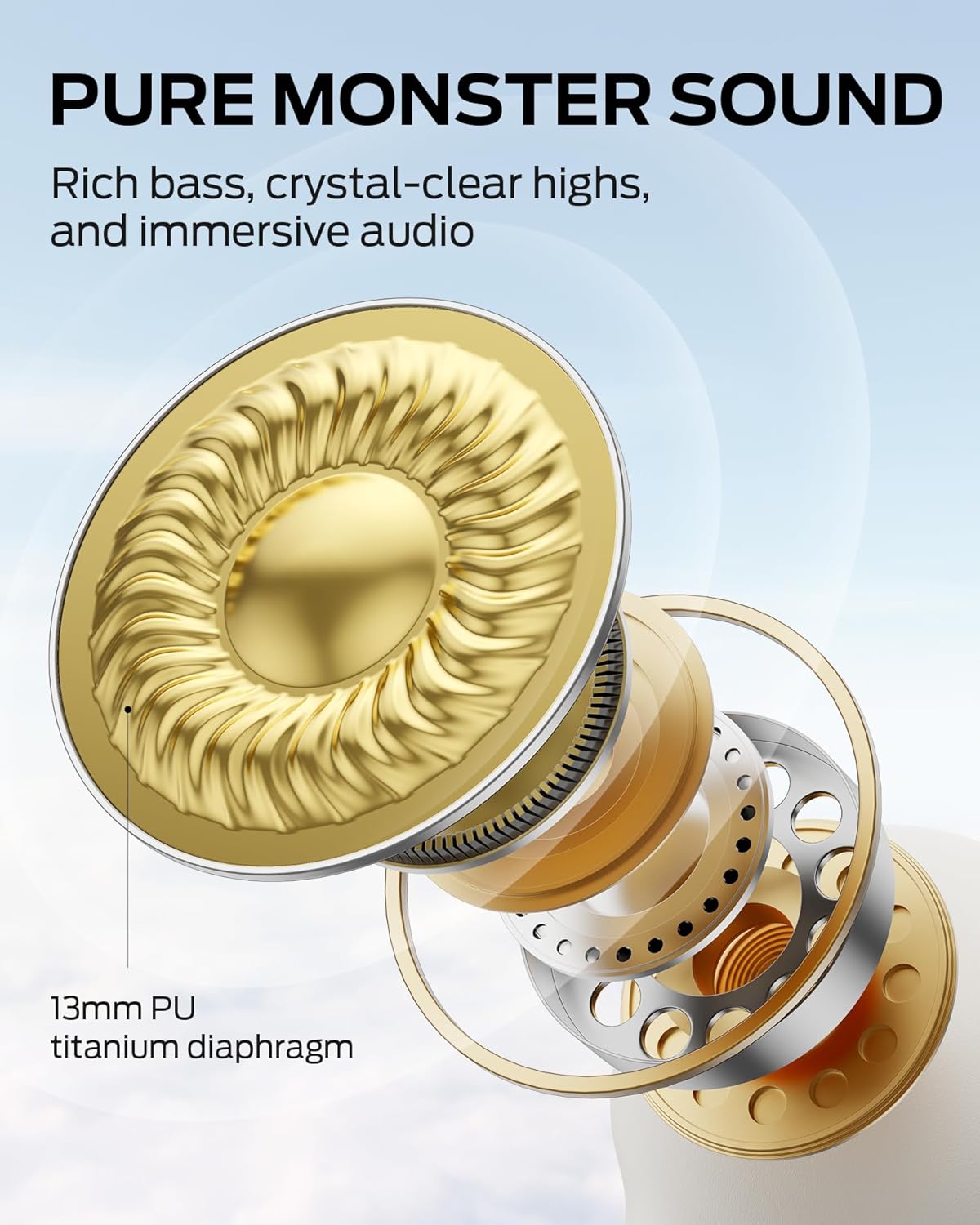
ചിത്രം: ആന്തരികം view of the 13mm PU titanium diaphragm driver.
4.2 Dynamic Noise Cancellation (DNC) for Calls
The advanced DNC technology effectively reduces environmental noise during calls, ensuring clear and uninterrupted voice transmission for both the user and the listener.
4.3 Rotating Charging Case
The innovative charging case features a rotating design for easy access to the earbuds. It provides an additional 16 hours of playtime, extending the total battery life to 24 hours.

Image: The rotating mechanism of the charging case.
4.4 IPX5 ജല പ്രതിരോധം
With an IPX5 rating, these headphones are resistant to sweat and light rain, making them suitable for workouts and outdoor activities. They are not designed for submersion in water.

Image: Earbud demonstrating water resistance.
5. പരിപാലനവും പരിചരണവും
- വൃത്തിയാക്കൽ: ഇയർബഡുകളും ചാർജിംഗ് കെയ്സും വൃത്തിയാക്കാൻ മൃദുവായതും ഉണങ്ങിയതും ലിന്റ് രഹിതവുമായ തുണി ഉപയോഗിക്കുക. അബ്രാസീവ് ക്ലീനറുകൾ, ആൽക്കഹോൾ, കെമിക്കൽ ലായകങ്ങൾ എന്നിവ ഉപയോഗിക്കരുത്.
- സംഭരണം: ഉപയോഗത്തിലില്ലാത്തപ്പോൾ, പൊടിയിൽ നിന്നും കേടുപാടുകളിൽ നിന്നും സംരക്ഷിക്കാൻ ഇയർബഡുകൾ അവയുടെ ചാർജിംഗ് കേസിൽ സൂക്ഷിക്കുക. കടുത്ത താപനിലയിൽ നിന്ന് മാറി തണുത്തതും വരണ്ടതുമായ സ്ഥലത്ത് സൂക്ഷിക്കുക.
- ബാറ്ററി കെയർ: ബാറ്ററി ലൈഫ് വർദ്ധിപ്പിക്കാൻ, ബാറ്ററി ഇടയ്ക്കിടെ പൂർണ്ണമായും ഡിസ്ചാർജ് ചെയ്യുന്നത് ഒഴിവാക്കുക. സജീവ ഉപയോഗത്തിലല്ലെങ്കിൽ പോലും ഉപകരണം പതിവായി ചാർജ് ചെയ്യുക.
- വാട്ടർ എക്സ്പോഷർ: While IPX5 rated, avoid direct exposure to strong jets of water or submersion. Dry thoroughly if exposed to moisture before placing back in the charging case.
6. പ്രശ്നപരിഹാരം
| പ്രശ്നം | സാധ്യമായ കാരണം | പരിഹാരം |
|---|---|---|
| ഇയർബഡുകൾ ജോടിയാക്കുന്നില്ല | Low battery; not in pairing mode; device Bluetooth off. | Charge earbuds and case. Ensure earbuds are in case and lid is opened to initiate pairing. Turn on Bluetooth on your device. Forget "Monster AC390" from your device's Bluetooth list and re-pair. |
| ഇയർബഡുകളിൽ നിന്ന് ശബ്ദമില്ല | ശബ്ദം വളരെ കുറവാണ്; കണക്റ്റുചെയ്തിട്ടില്ല; മീഡിയ താൽക്കാലികമായി നിർത്തി. | Increase volume on both earbuds and connected device. Ensure earbuds are connected. Check if media is playing. |
| ഇടവിട്ടുള്ള കണക്ഷൻ | ഉപകരണത്തിൽ നിന്ന് വളരെ അകലെയാണ്; തടസ്സം; കുറഞ്ഞ ബാറ്ററി. | Move closer to the connected device (within 10 meters). Avoid strong electromagnetic interference. Charge earbuds and case. |
| ചാർജിംഗ് കേസ് ചാർജുചെയ്യുന്നില്ല | കേബിൾ പ്രശ്നം; വൈദ്യുതി സ്രോതസ്സിലെ പ്രശ്നം. | Ensure USB-C cable is securely connected. Try a different USB port or power adapter. |
7. ഉൽപ്പന്ന സവിശേഷതകൾ
| ഫീച്ചർ | വിശദാംശങ്ങൾ |
|---|---|
| മോഡലിൻ്റെ പേര് | മോൺസ്റ്റർ ഓപ്പൺ ഇയർ AC390 ഹെഡ്ഫോണുകൾ |
| കണക്റ്റിവിറ്റി ടെക്നോളജി | വയർലെസ്സ് (ബ്ലൂടൂത്ത് 6.0) |
| ചെവി പ്ലേസ്മെൻ്റ് | തുറന്ന ചെവി |
| ഡ്രൈവർ വലിപ്പം | 13mm PU Titanium Diaphragm |
| ശബ്ദ നിയന്ത്രണം | Dynamic Noise Cancellation (DNC) for calls |
| ജല പ്രതിരോധ നില | IPX5 |
| ബാറ്ററി ലൈഫ് (ഇയർബഡുകൾ) | 8 മണിക്കൂർ വരെ (ഒറ്റ ചാർജ്) |
| ആകെ പ്ലേടൈം (കേസിനൊപ്പം) | 24 മണിക്കൂർ വരെ |
| ചാർജിംഗ് സമയം | ഏകദേശം 2 മണിക്കൂർ |
| നിയന്ത്രണ തരം | ടച്ച് നിയന്ത്രണം |
| ഫ്രീക്വൻസി റേഞ്ച് | 20 ഹെർട്സ് - 20,000 ഹെർട്സ് |
| ഇയർബഡ് ഭാരം | ഒരു ഇയർബഡിന് ഏകദേശം 5 ഗ്രാം |
| ബാറ്ററി സെൽ കോമ്പോസിഷൻ | ലിഥിയം അയോൺ |
8. വാറൻ്റിയും പിന്തുണയും
മോൺസ്റ്റർ ഉൽപ്പന്നങ്ങൾ ഉയർന്ന നിലവാരമുള്ള മാനദണ്ഡങ്ങൾക്കനുസൃതമായി രൂപകൽപ്പന ചെയ്ത് നിർമ്മിക്കുന്നു. വാറന്റി കവറേജ്, സാങ്കേതിക പിന്തുണ അല്ലെങ്കിൽ സേവന അന്വേഷണങ്ങൾ എന്നിവയെക്കുറിച്ചുള്ള വിവരങ്ങൾക്ക്, ദയവായി നിങ്ങളുടെ ഉൽപ്പന്നത്തിനൊപ്പം ഉൾപ്പെടുത്തിയിരിക്കുന്ന വാറന്റി കാർഡ് പരിശോധിക്കുക അല്ലെങ്കിൽ ഔദ്യോഗിക മോൺസ്റ്റർ സന്ദർശിക്കുക. webസൈറ്റ്.
വാറൻ്റി ക്ലെയിമുകൾക്കായി നിങ്ങളുടെ വാങ്ങിയതിൻ്റെ തെളിവ് സൂക്ഷിക്കുക.
Ask a question about this manual
Ask about setup, troubleshooting, compatibility, parts, safety, or missing instructions. Manuals+ will review the question and use this page’s manual context to help answer it.