
1. ആമുഖം
Welcome to the realme 14 Pro 5G Smartphone user manual. This guide provides essential information to help you get started with your new device, understand its features, and ensure optimal performance. The realme 14 Pro 5G combines advanced technology with a unique design, offering a powerful and reliable mobile experience.
Key features of your realme 14 Pro 5G include:
- Sony IMX882 OIS Camera: 50MP Ultra-Clear OIS camera with AI Clarity for stunning photos and a triple MagicGlow flash.
- ഡൈമെൻസിറ്റി 7300 എനർജി 5G ചിപ്സെറ്റ്: An ultra-fast and energy-efficient 4nm processor for smooth daily use.
- AI അൾട്രാ ക്ലാരിറ്റി 2.0: Enhances every shot with advanced AI for natural lighting, improved night noise reduction, and ultra-clear zoom.
- Maximum Water Resistance: IP69, IP68, and IP66 ratings ensure durability against water and dust.
- തനതായ ഡിസൈൻ: A pearl-inspired design with cold-sensitive fusion fibers that allow for a color-changing effect.
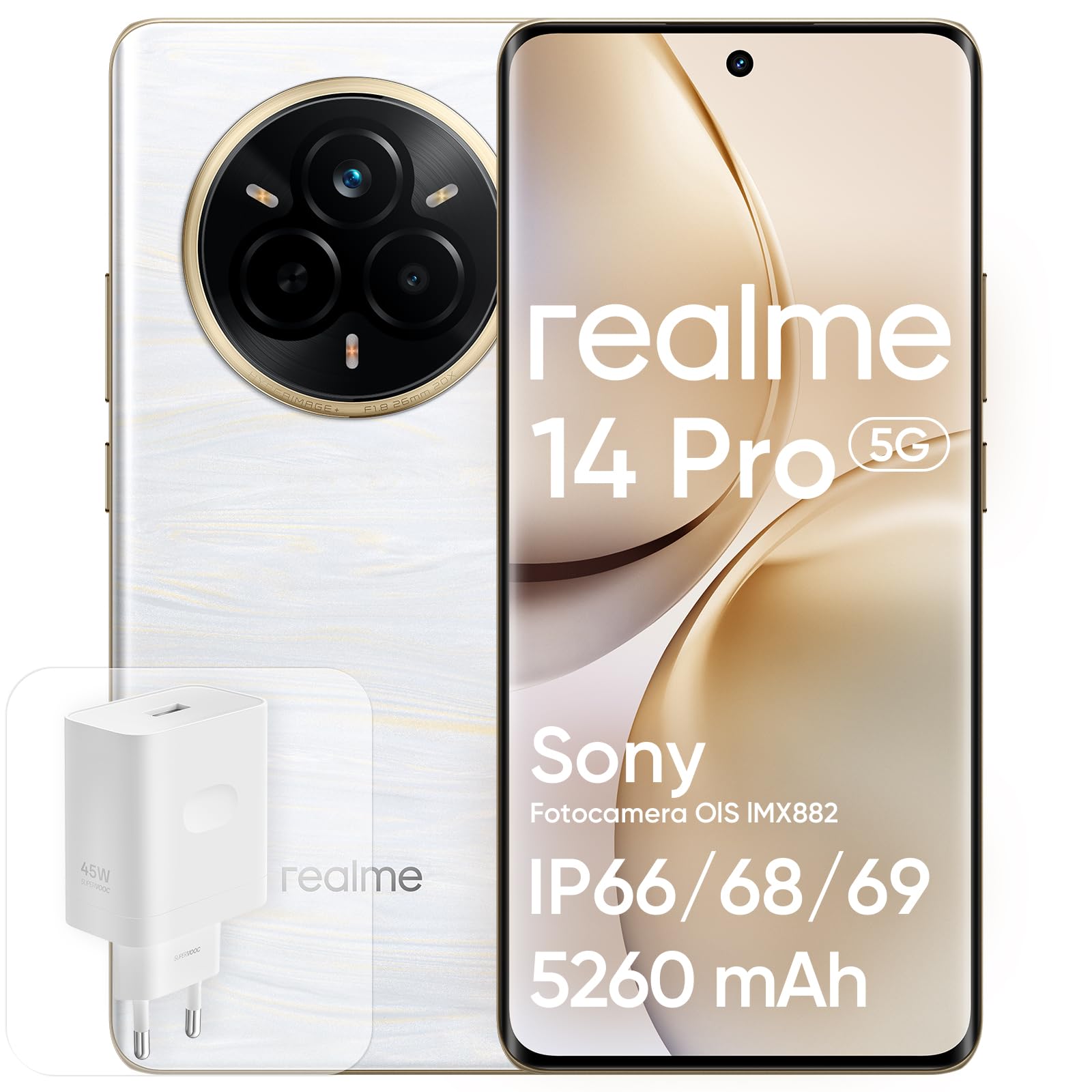
Figure 1: realme 14 Pro 5G Smartphone. This image shows the elegant design of the device, highlighting its display and camera module.
2. സജ്ജീകരണം
2.1 അൺബോക്സിംഗും പ്രാരംഭ പരിശോധനയും
Upon opening the package, ensure all components are present and undamaged. The box should contain:
- റിയൽമി 14 പ്രോ 5G സ്മാർട്ട്ഫോൺ
- USB കേബിൾ
- ഫോൺ കേസ്
- സംരക്ഷണ ഫിലിം (മുൻപ് പ്രയോഗിച്ചതോ പ്രത്യേകം നിർമ്മിച്ചതോ)
- Charging Head (Adapter)

ചിത്രം 2: പിൻഭാഗം view of the realme 14 Pro 5G, showcasing its camera array and unique back panel design.
2.2 സിം കാർഡ് ചേർക്കൽ
- നിങ്ങളുടെ ഉപകരണത്തിന്റെ വശത്ത് സിം കാർഡ് ട്രേ കണ്ടെത്തുക.
- ട്രേ തുറക്കാൻ നൽകിയിരിക്കുന്ന സിം എജക്റ്റർ ഉപകരണം ഉപയോഗിക്കുക.
- Place your Nano SIM card into the tray, ensuring the gold contacts face downwards and the card is correctly oriented.
- ഫോണിന്റെ ബോഡിയുമായി ഫ്ലഷ് ആകുന്നതുവരെ ട്രേ സ്ലോട്ടിലേക്ക് പതുക്കെ തള്ളുക.
2.3 പ്രാരംഭ പവർ-ഓണും അടിസ്ഥാന സജ്ജീകരണവും
- Press and hold the Power button until the realme logo appears.
- നിങ്ങളുടെ ഭാഷ, പ്രദേശം എന്നിവ തിരഞ്ഞെടുത്ത് ഒരു വൈഫൈ നെറ്റ്വർക്കിലേക്ക് കണക്റ്റുചെയ്യുന്നതിന് ഓൺ-സ്ക്രീൻ നിർദ്ദേശങ്ങൾ പാലിക്കുക.
- Sign in with your Google account or create a new one to access Android services and the Google Play Store.
- Set up your screen lock method, such as PIN, pattern, or password.
2.4 Fingerprint Recognition Setup
Your realme 14 Pro 5G features an in-display fingerprint sensor for secure and quick unlocking.
- നാവിഗേറ്റ് ചെയ്യുക Settings > Security & privacy > Fingerprint.
- Follow the on-screen instructions to register your fingerprint. Ensure your finger covers the sensor completely during the process.
- സൗകര്യാർത്ഥം നിങ്ങൾക്ക് ഒന്നിലധികം വിരലടയാളങ്ങൾ രജിസ്റ്റർ ചെയ്യാം.
2.5 ഉപകരണം ചാർജ് ചെയ്യുന്നു
Before first use, it is recommended to fully charge your device. Use the provided 45W SUPERVOOC charging head and USB cable for optimal charging speed.
- Connect the USB cable to the charging head and then to a power outlet.
- Plug the other end of the USB cable into the USB-C port at the bottom of your phone.
- ചാർജിംഗ് ഇൻഡിക്കേറ്റർ സ്ക്രീനിൽ ദൃശ്യമാകും.

Figure 3: Visual representation of the 5260mAh battery and 45W SUPERVOOC charging technology.
വീഡിയോ 1: ഒരു ഓവർview of the realme 14 Pro 5G Smartphone, demonstrating its design and user interface. This video provides a visual guide to the phone's features and initial interaction.
3. Operating Your realme 14 Pro 5G
3.1 ഡിസ്പ്ലേ സവിശേഷതകൾ
The realme 14 Pro 5G features a 6.77-inch 120Hz 3D Curved Vision OLED Display with a resolution of 2392x1080 pixels. This display offers vibrant colors, deep blacks, and smooth scrolling for an immersive visual experience.
- 120Hz പുതുക്കൽ നിരക്ക്: Provides fluid animations and a responsive touch experience.
- 3D Curved Vision: Enhances immersion and provides a comfortable grip.
- OLED സാങ്കേതികവിദ്യ: Delivers excellent contrast and color accuracy.

Figure 4: The 6.77-inch 120Hz 3D Curved Vision Display in action, showcasing its vibrant colors and immersive viewഅനുഭവം.
3.2 ക്യാമറ ഉപയോഗം
Your device is equipped with a powerful Sony IMX882 OIS 50MP Ultra-Clear camera system, designed to capture stunning photos and videos in various conditions.
- 50MP പ്രധാന ക്യാമറ: Captures high-resolution images with optical image stabilization (OIS).
- AI അൾട്രാ ക്ലാരിറ്റി 2.0: Automatically enhances photo quality, especially in low light, by reducing noise and improving detail.
- MagicGlow Triple Flash: Provides enhanced illumination for portraits and close-up shots.
- 50MP മുൻ ക്യാമറ: ഉയർന്ന നിലവാരമുള്ള സെൽഫികൾക്കും വീഡിയോ കോളുകൾക്കും.
To open the camera, tap the camera icon on your home screen or swipe left from the lock screen. Explore various modes like Photo, Portrait, Night, and Video.

Figure 5: Demonstrates the 50MP+16MP camera capabilities, including night portraits, underwater mode, and Livephoto features.
3.3 പ്രകടനവും കണക്റ്റിവിറ്റിയും
Powered by the Dimensity 7300 Energy 5G chipset, your realme 14 Pro 5G delivers robust performance for multitasking, gaming, and demanding applications. With 12GB of RAM and 512GB of internal storage, you have ample space and speed for all your needs.
- 5G കണക്റ്റിവിറ്റി: Enjoy ultra-fast download and upload speeds, and low latency for streaming and online gaming.
- വൈഫൈയും ബ്ലൂടൂത്തും: Standard wireless connectivity for internet access and connecting accessories.

Figure 6: The realme 14 Pro Series, highlighting its powerful performance and AI capabilities.
4. പരിപാലനം
4.1 വെള്ളത്തിനും പൊടിക്കും പ്രതിരോധം
The realme 14 Pro 5G boasts IP69, IP68, and IP66 ratings, providing excellent resistance against dust and water. This means your phone can withstand high-pressure, high-temperature water jets (IP69), continuous immersion in water (IP68), and powerful water jets (IP66).
- While highly resistant, avoid intentional submersion in harsh conditions or prolonged exposure to water.
- Ensure all ports are dry before charging to prevent damage.

Figure 7: The realme 14 Pro 5G submerged in water, illustrating its robust IP69, IP68, and IP66 water resistance ratings.
4.2 നിങ്ങളുടെ ഉപകരണം വൃത്തിയാക്കൽ
To keep your phone clean and extend its lifespan:
- സ്ക്രീനും ബോഡിയും തുടയ്ക്കാൻ മൃദുവായ, ലിന്റ് രഹിത തുണി ഉപയോഗിക്കുക.
- കഠിനമായ രാസവസ്തുക്കൾ, ഉരച്ചിലുകൾ ഉള്ള വസ്തുക്കൾ, എയറോസോൾ സ്പ്രേകൾ എന്നിവ ഉപയോഗിക്കുന്നത് ഒഴിവാക്കുക.
- കഠിനമായ പാടുകൾക്ക്, ചെറുതായി dampഇലക്ട്രോണിക് ഉപകരണങ്ങൾക്കായി രൂപകൽപ്പന ചെയ്ത വെള്ളമുള്ള തുണി അല്ലെങ്കിൽ സ്ക്രീൻ ക്ലീനർ.
4.3 ബാറ്ററി കെയർ
The 5260mAh battery provides extended usage. To maintain battery health:
- കടുത്ത താപനില, ചൂടും തണുപ്പും, ഒഴിവാക്കുക.
- നിങ്ങളുടെ ഉപകരണത്തിനൊപ്പം നൽകിയിരിക്കുന്ന യഥാർത്ഥ ചാർജറും കേബിളും മാത്രം ഉപയോഗിക്കുക.
- ദീർഘകാല സംഭരണത്തിനായി, ബാറ്ററി ഏകദേശം 50% വരെ ചാർജ് ചെയ്യുക, തുടർന്ന് ഉപകരണം ഓഫ് ചെയ്യുക.
5. പ്രശ്നപരിഹാരം
This section addresses common issues you might encounter with your realme 14 Pro 5G.
5.1 ഉപകരണം ഓണാക്കുന്നില്ല
- ബാറ്ററി പരിശോധിക്കുക: Ensure the device has sufficient charge. Connect it to the charger for at least 15-30 minutes.
- നിർബന്ധിത പുനരാരംഭിക്കുക: Press and hold the Power button and Volume Down button simultaneously for about 10-15 seconds until the realme logo appears.
5.2 Screen Freezing or Unresponsive
- നിർബന്ധിത പുനരാരംഭിക്കുക: Perform a force restart as described above.
- Close Apps: If the screen is partially responsive, try closing recent applications.
- സോഫ്റ്റ്വെയർ അപ്ഡേറ്റ്: Ensure your device's software is up to date via Settings > About device > realme UI version.
5.3 Camera Not Opening or Functioning
- ഉപകരണം പുനരാരംഭിക്കുക: A simple restart can often resolve temporary software glitches.
- Clear Camera App Cache: പോകുക Settings > Apps > Camera > Storage usage > Clear cache and Clear data. Note: This will reset camera settings.
- Check Permissions: Ensure the camera app has necessary permissions via Settings > Apps > Camera > Permissions.
5.4 Connectivity Issues (Wi-Fi, Bluetooth, 5G)
- ഓൺ/ഓഫ് ടോഗിൾ ചെയ്യുക: Turn Wi-Fi, Bluetooth, or Mobile Data off and then back on.
- റൂട്ടർ/മോഡം പുനരാരംഭിക്കുക: For Wi-Fi issues, restart your router.
- Network Settings Reset: പോകുക Settings > System settings > Back up and reset > Reset phone > Reset network settings. This will reset Wi-Fi, Bluetooth, and mobile network settings.
6 സ്പെസിഫിക്കേഷനുകൾ
Here are the detailed technical specifications for the realme 14 Pro 5G Smartphone:
| ഫീച്ചർ | സ്പെസിഫിക്കേഷൻ |
|---|---|
| ബ്രാൻഡ് | റിയൽമി |
| മോഡൽ | 14 പ്രോ 5 ജി |
| സിപിയു വേഗത | 2.5 GHz |
| മെമ്മറി ശേഷി (റാം) | 12 GB (as per product title, though not explicitly in specs list) |
| Storage Capacity (ROM) | 512 ജിബി |
| സ്ക്രീൻ വലിപ്പം | 6.77 ഇഞ്ച് |
| റെസലൂഷൻ | 2392x1080 |
| പുതുക്കിയ നിരക്ക് | 120 Hz |
| സെല്ലുലാർ ടെക്നോളജി | 5G |
| കണക്റ്റിവിറ്റി ടെക്നോളജി | 5G |
| നിറം | വെള്ള (ബിയാൻകോ) |
| സിം കാർഡ് സ്ലോട്ടുകൾ | Single SIM (Nano SIM) |
| ബയോമെട്രിക് ഐഡന്റിഫിക്കേഷൻ | വിരലടയാള തിരിച്ചറിയൽ |
| ജല പ്രതിരോധ നില | Waterproof (IP69, IP68, IP66) |
| ഹെഡ്ഫോൺ ജാക്ക് | ഹാജരാകുന്നില്ല |
| ഫ്രണ്ട് ക്യാമറ റെസല്യൂഷൻ | 50 എം.പി |
| പിൻ ക്യാമറ റെസല്യൂഷൻ | 50 MP (Dual Rear Cameras) |
| ബാറ്ററി ശേഷി | 5260 മില്ലിamper-മണിക്കൂർ (mAh) |
| ഇനത്തിൻ്റെ അളവുകൾ | 16.3 x 7.5 x 0.8 സെ.മീ |
| സംസാര സമയം | 20 മണിക്കൂർ |
| ജിപിഎസ് പ്രവർത്തനം | സത്യം |
| ഡിസ്പ്ലേ തരം | OLED |
| Display Pixel Density | 386 Pixels per inch (PPI) |
| വീഡിയോ ക്യാപ്ചർ റെസല്യൂഷൻ | 1080 fps-ൽ 120p |
| വീഡിയോ ഫ്രെയിം റേറ്റ് | 60 fps |
7. വാറൻ്റിയും പിന്തുണയും
7.1 ഉൽപ്പന്ന വാറന്റി
realme products come with a ഒരു വർഷത്തെ വാറൻ്റി. We adhere to strict standards in every phase, from design to production, to ensure that every product meets our commitment to quality. This warranty covers manufacturing defects and ensures that your product performs as expected under normal use.

Figure 8: Details regarding realme's one-year warranty and commitment to quality.
7.2 ഉപഭോക്തൃ പിന്തുണ
We are committed to providing high-quality goods and services to ensure a worry-free shopping experience. If you have any questions or require assistance, please do not hesitate to contact us. We will respond within 24 hours.
- ദ്രുത പ്രതികരണം: Support available with a response within 24 hours.
- Free Returns & Exchanges: വാങ്ങിയതിന് 30 ദിവസത്തിനുള്ളിൽ.
- വിൽപ്പനാനന്തര പിന്തുണ: One year of dedicated after-sales support.
For further assistance, please visit the official realme support webസൈറ്റ് അല്ലെങ്കിൽ നിങ്ങളുടെ റീട്ടെയിലറെ ബന്ധപ്പെടുക.

Figure 9: realme's promise of service, including 24-hour response, 30-day returns, and 1-year after-sales support.