1. ആമുഖം
This manual provides detailed instructions for the installation, operation, and maintenance of your Generic Android 12 Car Stereo, model M600S. This unit is specifically designed for Suzuki Celerio vehicles manufactured between 2015 and 2018. Please read this manual thoroughly before installation and use to ensure proper function and safety.
1.1 ബാധകമായ മോഡൽ
- വാഹനം: Suzuki Celerio
- മോഡൽ വർഷങ്ങൾ: 2015, 2016, 2017, 2018
- Stereo Model: M600S (8-core, 6GB RAM + 128GB ROM)
1.2 പ്രധാന സവിശേഷതകൾ
- ആൻഡ്രോയിഡ് 12 ഓപ്പറേറ്റിംഗ് സിസ്റ്റം
- 9-inch HD Touchscreen (1280x720 IPS)
- Built-in Wireless CarPlay and Android Auto
- ഹാൻഡ്സ്-ഫ്രീ കോളിംഗിനും ഓഡിയോ സ്ട്രീമിംഗിനും ബ്ലൂടൂത്ത് 5.0
- Integrated GPS Navigation with support for various map applications
- Digital Sound Processor (DSP) for enhanced audio quality
- FM/AM RDS Radio
- Support for Steering Wheel Controls
- സ്പ്ലിറ്റ് സ്ക്രീൻ പ്രവർത്തനം
- OBD II Support for vehicle diagnostics
- Built-in 4G LTE and Wi-Fi connectivity
- Cooling Fan for optimal performance
1.3 പാക്കേജ് ഉള്ളടക്കം
ഇൻസ്റ്റാളേഷനുമായി മുന്നോട്ടുപോകുന്നതിനുമുമ്പ് എല്ലാ ഇനങ്ങളും പാക്കേജിൽ ഉണ്ടെന്ന് ഉറപ്പാക്കുക:
- 1x Car Frame (specific to Suzuki Celerio)
- 1x Head-up Display (Screen Unit)
- 1x Power Cable (Plug and Play)
- RCA കേബിളുകൾ
- റിവേഴ്സിംഗ് ക്യാമറ
- യുഎസ്ബി കേബിളുകൾ
- മൈക്രോഫോൺ
- ജിപിഎസ് ആൻ്റിന
- 4 ജി ആന്റിന

This image displays the various components included with the car stereo system, such as the main unit, power cable, RCA cables, reversing camera, USB cables, microphone, and GPS antenna. It also shows a side-by-side comparison of a Suzuki Celerio dashboard before and after the 9-inch Android 12 car stereo is installed, highlighting the integrated appearance.
2 സുരക്ഷാ വിവരങ്ങൾ
ഉപകരണത്തിന് പരിക്കേൽക്കുകയോ കേടുപാടുകൾ സംഭവിക്കുകയോ ചെയ്യാതിരിക്കാൻ ഇനിപ്പറയുന്ന സുരക്ഷാ മുൻകരുതലുകൾ പാലിക്കുക:
- പ്രൊഫഷണൽ ഇൻസ്റ്റാളേഷൻ ശുപാർശ ചെയ്യുന്നു: The installation of this device requires technical knowledge and experience. It is strongly recommended to seek assistance from qualified professional installation engineers to avoid damage to the vehicle's electrical system or the stereo unit.
- വൈദ്യുതി വിതരണം: Ensure the device is connected to a 12V DC power supply. Incorrect voltage കേടുപാടുകൾ വരുത്തിവയ്ക്കാം.
- വയറിംഗ്: Double-check all wiring connections before powering on the unit. Incorrect wiring can lead to short circuits or malfunction.
- ഡ്രൈവിംഗ് സുരക്ഷ: Do not operate complex functions or watch videos that may distract you while driving. Always prioritize road safety.
- താപനില: യൂണിറ്റ് ദീർഘനേരം തീവ്രമായ താപനിലയിലോ നേരിട്ടുള്ള സൂര്യപ്രകാശത്തിലോ ആയിരിക്കുന്നത് ഒഴിവാക്കുക.
- ഈർപ്പം: യൂണിറ്റ് വെള്ളത്തിൽ നിന്നും അമിതമായ ഈർപ്പത്തിൽ നിന്നും അകറ്റി നിർത്തുക.
3. സജ്ജീകരണവും ഇൻസ്റ്റാളേഷനും
3.1 പ്രീ-ഇൻസ്റ്റലേഷൻ പരിശോധന
Before beginning installation, confirm the following:
- Your vehicle is a Suzuki Celerio (2015-2018). If unsure, send a photo of your car's center console to the supplier for verification.
- All components listed in Section 1.3 are present.
- ഇൻസ്റ്റാളേഷൻ സമയത്ത് വൈദ്യുത ഷോർട്ട്സ് ഒഴിവാക്കാൻ വാഹനത്തിന്റെ ബാറ്ററി വിച്ഛേദിക്കുക.
3.2 വയറിംഗ് ഡയഗ്രം
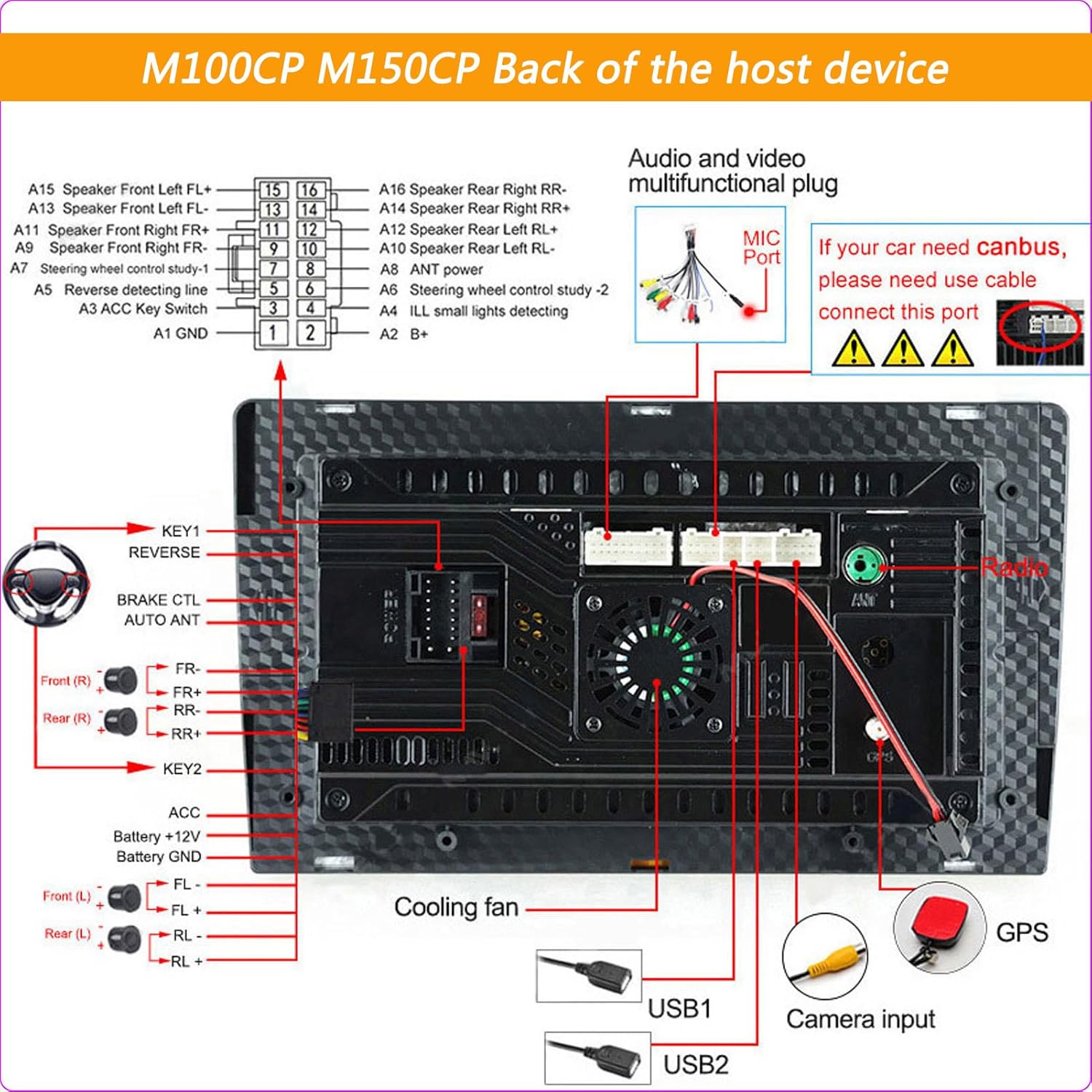
Refer to the following diagrams for proper connection of the main unit and accessories. Note that specific wiring may vary slightly between models, but the general principles apply.

This diagram details the rear connections for M100CP and M150CP models, including the audio and video multi-functional plug, MIC port, power cable, steering wheel control inputs, brake control, auto antenna, amplifier control, USB ports, camera input, and GPS antenna connection. It also notes the requirement for a CANBUS cable if the car has CANBUS.

This image displays the accessories included with M200S through M800S models, such as RCA cables, reversing camera, microphone, GPS antenna, and 4G antenna. It also provides a detailed wiring diagram for the back of these host devices, showing connections for GPS, radio antenna, 4G antenna, USB ports, camera input, cooling fan, and the main power harness. Specific notes are included for CANBUS connection and coaxial fiber optic for M500S/M600S models.
3.3 ഇൻസ്റ്റലേഷൻ ഘട്ടങ്ങൾ (പൊതുവായത്)
- Carefully remove the original car stereo and trim panels from your Suzuki Celerio dashboard.
- Connect the provided power cable harness to the vehicle's wiring and the new stereo unit. Ensure all connections are secure.
- Connect the GPS antenna, 4G antenna (if applicable), USB cables, microphone, and reversing camera cable to their respective ports on the stereo unit.
- If your vehicle has steering wheel controls, connect the appropriate wires as per the wiring diagram.
- Carefully slide the new stereo unit into the dashboard opening.
- Secure the unit with screws or clips as required by the car frame.
- നീക്കം ചെയ്ത ഏതെങ്കിലും ട്രിം പാനലുകൾ വീണ്ടും ഇൻസ്റ്റാൾ ചെയ്യുക.
- പ്രവർത്തനക്ഷമത പരിശോധിക്കുന്നതിനായി വാഹനത്തിന്റെ ബാറ്ററിയും യൂണിറ്റിലെ പവറും വീണ്ടും ബന്ധിപ്പിക്കുക.
4. പ്രവർത്തന നിർദ്ദേശങ്ങൾ
4.1 പവർ ഓൺ/ഓഫ്
- The unit typically powers on automatically when the vehicle's ignition is turned on.
- To manually power off or restart, press and hold the power button on the unit or use the software option in the settings menu.
4.2 ടച്ച്സ്ക്രീൻ പ്രവർത്തനം
The 9-inch HD touchscreen supports multi-touch gestures. Navigate through menus, select applications, and control functions by tapping, swiping, and pinching.
4.3 വയർലെസ് കാർപ്ലേ / ആൻഡ്രോയിഡ് ഓട്ടോ
This unit supports wireless CarPlay and Android Auto for seamless smartphone integration.
- നിങ്ങളുടെ സ്മാർട്ട്ഫോണിൽ ബ്ലൂടൂത്തും വൈഫൈയും പ്രവർത്തനക്ഷമമാക്കിയിട്ടുണ്ടെന്ന് ഉറപ്പാക്കുക.
- On the car stereo, open the CarPlay or Android Auto application.
- Follow the on-screen prompts to pair your phone via Bluetooth.
- Once paired, the system will automatically connect for wireless CarPlay or Android Auto functionality.
4.4 ജിപിഎസ് നാവിഗേഷൻ
The built-in GPS module provides accurate positioning and navigation. The unit comes with pre-installed navigation applications and supports others from the Google Play Store.
- Open the desired navigation app from the main menu.
- Enter your destination and follow the voice and visual prompts.
- The system supports real-time traffic condition display (requires internet connection).

This image illustrates key functionalities of the car stereo. It shows the Digital Sound Processor (DSP) interface for audio customization, the Bluetooth function for hands-free calls and music streaming with contact synchronization, the GPS navigation system supporting various map applications like Navitel, iGO, Yandex, and Google, and the FM/AM RDS radio interface for station tuning and display.
4.5 ബ്ലൂടൂത്ത് കണക്റ്റിവിറ്റി
Connect your smartphone or other Bluetooth devices for hands-free calling and audio streaming.
- കാർ സ്റ്റീരിയോയിലെ ബ്ലൂടൂത്ത് ക്രമീകരണങ്ങളിലേക്ക് പോകുക.
- നിങ്ങളുടെ ഫോണിൽ ബ്ലൂടൂത്ത് പ്രവർത്തനക്ഷമമാക്കി ലഭ്യമായ ഉപകരണങ്ങൾക്കായി തിരയുക.
- Select the car stereo's Bluetooth name (e.g., "CarBT") from your phone's list and pair.
- കണക്റ്റ് ചെയ്തുകഴിഞ്ഞാൽ, കാർ സ്പീക്കറുകൾ വഴി നിങ്ങൾക്ക് കോളുകൾ വിളിക്കാനും സ്വീകരിക്കാനും സംഗീതം പ്ലേ ചെയ്യാനും കഴിയും.
4.6 FM/AM RDS Radio
Access local radio stations with clear reception and RDS (Radio Data System) information.
- റേഡിയോ ആപ്ലിക്കേഷൻ തുറക്കുക.
- ലഭ്യമായ സ്റ്റേഷനുകൾ സ്വയമേവ കണ്ടെത്തി സംരക്ഷിക്കാൻ സ്കാൻ ഫംഗ്ഷൻ ഉപയോഗിക്കുക.
- Manually tune to frequencies or select from saved presets.
- RDS provides station information, song titles, and traffic announcements where available.
4.7 ഡിഎസ്പി പ്രോസസർ
The Digital Sound Processor allows for fine-tuning of audio output to match your preferences and vehicle acoustics.
- പ്രധാന മെനുവിൽ നിന്നോ ഓഡിയോ ക്രമീകരണങ്ങളിൽ നിന്നോ DSP ക്രമീകരണങ്ങൾ ആക്സസ് ചെയ്യുക.
- Adjust equalizer settings, balance, fader, and other audio parameters.
4.8 സ്പ്ലിറ്റ് സ്ക്രീൻ ഫംഗ്ഷൻ
Run two applications simultaneously on the screen, such as navigation and music playback.
- ആദ്യത്തെ ആപ്ലിക്കേഷൻ തുറക്കുക.
- Press and hold the recent apps button or swipe from the bottom (depending on Android version) to activate split-screen mode.
- Select the second application to run alongside the first.
4.9 സ്റ്റിയറിംഗ് വീൽ നിയന്ത്രണങ്ങൾ
If properly wired, the unit supports your vehicle's existing steering wheel controls for safe and convenient operation.
- സിസ്റ്റം മെനുവിലെ 'സ്റ്റിയറിങ് വീൽ കൺട്രോൾ' ക്രമീകരണങ്ങളിലേക്ക് പോകുക.
- നിങ്ങളുടെ സ്റ്റിയറിംഗ് വീൽ ബട്ടണുകൾ നിർദ്ദിഷ്ട ഫംഗ്ഷനുകളിലേക്ക് (ഉദാ: വോളിയം കൂട്ടുക/താഴ്ത്തുക, ട്രാക്ക് ഒഴിവാക്കുക, മോഡ്) മാപ്പ് ചെയ്യുന്നതിന് ഓൺ-സ്ക്രീൻ നിർദ്ദേശങ്ങൾ പാലിക്കുക.
4.10 OBD II Diagnostics
Connect an optional OBD II adapter (sold separately) to monitor your vehicle's performance and diagnostic information.
- Pair the OBD II adapter via Bluetooth.
- Open a compatible OBD II application (e.g., Torque) on the stereo.
- View real-time engine data, fault codes, and other vehicle parameters.
This image highlights advanced features: ADAS (Advanced Driver-Assistance Systems) DVR for anti-collision and lane departure warnings, a demonstration of the cooling fan's effectiveness in managing device temperature (contrasting high temperature without a fan versus normal temperature with a fan), and the OBD II (On-Board Diagnostics) interface for real-time vehicle status monitoring.
4.11 പിൻഭാഗം View ക്യാമറ
യൂണിറ്റ് ഒരു പിൻഭാഗത്തെ പിന്തുണയ്ക്കുന്നു view camera for safer parking and reversing.
- When the vehicle is shifted into reverse gear, the display will automatically switch to the rear view ക്യാമറ ഫീഡ്.
- Ensure the camera is properly installed and connected to the 'Camera Input' port.
4.12 4G LTE & Wi-Fi
Stay connected with built-in 4G LTE (requires SIM card) and Wi-Fi capabilities.
- 4G LTE: Insert a compatible 4G SIM card into the designated slot (if available on your model) to access mobile data.
- വൈഫൈ: Connect to available Wi-Fi networks (e.g., mobile hotspot) through the system settings to access online features and download apps.
5. പരിപാലനം
5.1 സ്ക്രീൻ വൃത്തിയാക്കൽ
- സ്ക്രീൻ മൃദുവായി തുടയ്ക്കാൻ മൃദുവായ, ലിന്റ് രഹിത തുണി ഉപയോഗിക്കുക.
- കഠിനമായ പാടുകൾക്ക്, ചെറുതായി dampതുണിയിൽ വെള്ളം അല്ലെങ്കിൽ സ്ക്രീൻ ക്ലീനിംഗ് ലായനി ഉപയോഗിക്കുക. കഠിനമായ രാസവസ്തുക്കൾ ഒഴിവാക്കുക.
5.2 സോഫ്റ്റ്വെയർ അപ്ഡേറ്റുകൾ
- Periodically check for system software updates in the 'Settings' menu.
- Updates can improve performance, add new features, and fix bugs. Ensure a stable internet connection during updates.
5.3 കൂളിംഗ് ഫാൻ
The M600S model includes a cooling fan to maintain optimal operating temperature. Ensure the fan vents are not obstructed to allow for proper airflow.
6. പ്രശ്നപരിഹാരം
നിങ്ങളുടെ കാർ സ്റ്റീരിയോയിൽ പ്രശ്നങ്ങൾ നേരിടുകയാണെങ്കിൽ, ഇനിപ്പറയുന്ന പൊതുവായ പ്രശ്നങ്ങളും പരിഹാരങ്ങളും പരിശോധിക്കുക:
| പ്രശ്നം | സാധ്യമായ കാരണം | പരിഹാരം |
|---|---|---|
| വൈദ്യുതി ഇല്ല / യൂണിറ്റ് ഓണാകുന്നില്ല | Incorrect wiring; Blown fuse; Loose power connection | Check power cable connections; Inspect vehicle's fuse box; Ensure battery is connected. |
| ശബ്ദമില്ല | Volume too low; Mute activated; Speaker wires disconnected; Incorrect audio settings | Increase volume; Check mute status; Verify speaker wiring; Adjust audio output settings (e.g., balance/fader). |
| GPS സിഗ്നൽ നഷ്ടപ്പെട്ടു അല്ലെങ്കിൽ കൃത്യമല്ല. | GPS antenna obstructed or disconnected; Poor satellite reception | ജിപിഎസ് ആന്റിന ശരിയായി ഇൻസ്റ്റാൾ ചെയ്തിട്ടുണ്ടെന്നും വ്യക്തമായ ഒരു കണക്ഷൻ ഉണ്ടെന്നും ഉറപ്പാക്കുക. view of the sky; Check antenna connection. |
| ബ്ലൂടൂത്ത് ജോടിയാക്കൽ പ്രശ്നങ്ങൾ | Bluetooth not enabled; Device not discoverable; Interference | Ensure Bluetooth is on for both devices; Make sure the stereo is in pairing mode; Restart both devices. |
| ടച്ച്സ്ക്രീൻ പ്രതികരിക്കുന്നില്ല | System freeze; Software glitch | Restart the unit (press and hold power button); If persistent, perform a factory reset (data will be lost). |
| CarPlay/Android Auto കണക്റ്റ് ചെയ്യുന്നില്ല | Phone settings; App issues; USB cable (for wired connection) | Ensure phone's Bluetooth/Wi-Fi is on; Check phone's CarPlay/Android Auto settings; Try restarting phone and stereo. |
ഈ പരിഹാരങ്ങൾ പരീക്ഷിച്ചതിനുശേഷവും പ്രശ്നം നിലനിൽക്കുകയാണെങ്കിൽ, കൂടുതൽ സഹായത്തിനായി ഉപഭോക്തൃ പിന്തുണയുമായി ബന്ധപ്പെടുക.
7 സ്പെസിഫിക്കേഷനുകൾ
Detailed technical specifications for the M600S model:
| ഫീച്ചർ | Specification (M600S) |
|---|---|
| ഓപ്പറേറ്റിംഗ് സിസ്റ്റം | ആൻഡ്രോയിഡ് 12 |
| പ്രോസസ്സർ | 8-കോർ |
| റാം / റോം | 6 ജിബി റാം / 128 ജിബി റോം |
| സ്ക്രീൻ വലിപ്പം | 9 ഇഞ്ച് |
| സ്ക്രീൻ റെസല്യൂഷൻ | 1280x720 |
| സ്ക്രീൻ തരം | ഐ.പി.എസ് |
| CarPlay / Android Auto | വയർലെസ് പിന്തുണ |
| ബ്ലൂടൂത്ത് മൊഡ്യൂൾ | 5.0 |
| 4G LTE & Wi-Fi | അന്തർനിർമ്മിത പിന്തുണ |
| കൂളിംഗ് ഫാൻ | പിന്തുണച്ചു |
| DSP പ്രോസസർ | പിന്തുണച്ചു |
| റിവേഴ്സിംഗ് ക്യാമറ | പിന്തുണച്ചു |
| RDS Radio | പിന്തുണച്ചു |
| വൈദ്യുതി വിതരണം | 12V DC |
| ഇനം മോഡൽ നമ്പർ | HL723783-Black-M600S8-core6+128G |
| ASIN | B0DZP16XXM |

This table provides a detailed comparison of various car stereo models, outlining their internet connectivity (4G/Wi-Fi), operating system (Android 12), core processor type, RAM/ROM configurations, CarPlay/Android Auto support, Bluetooth module version, screen resolution, screen type (IPS), cooling fan presence, full AV output, DSP processor, and RDS radio capabilities. The M600S model features an 8-core processor, 6GB RAM + 128GB ROM, wireless CarPlay/Android Auto, Bluetooth 5.0, 1280x720 IPS screen, cooling fan, DSP, and RDS.
8. വാറൻ്റിയും പിന്തുണയും
വാറന്റി വിവരങ്ങൾക്കും സാങ്കേതിക പിന്തുണയ്ക്കും, നിങ്ങളുടെ വാങ്ങലിനൊപ്പം നൽകിയിരിക്കുന്ന ഡോക്യുമെന്റേഷൻ പരിശോധിക്കുകയോ വിൽപ്പനക്കാരനെ നേരിട്ട് ബന്ധപ്പെടുകയോ ചെയ്യുക. വാറന്റി ക്ലെയിമുകൾക്കായി നിങ്ങളുടെ വാങ്ങിയതിന്റെ തെളിവ് സൂക്ഷിക്കുക.


