
1. ആമുഖം
The AirheadStorm FS899C is a versatile digital multimeter designed for accurate electrical measurements. This device can measure AC/DC current and voltage, capacitance, continuity, resistance, frequency, non-contact voltage (NCV), and ambient temperature. Featuring a large backlit display and a rechargeable battery, it is suitable for both home and industrial electrical tasks.
This manual provides essential information for the safe and effective use of your FS899C Digital Multimeter. Please read it thoroughly before operation and retain it for future reference.
2. പാക്കേജ് ഉള്ളടക്കം
പാക്കേജ് തുറക്കുമ്പോൾ താഴെ പട്ടികപ്പെടുത്തിയിരിക്കുന്ന എല്ലാ ഇനങ്ങളും നിലവിലുണ്ടെന്നും നല്ല നിലയിലാണെന്നും ഉറപ്പാക്കുക:
- 1 x AirheadStorm FS899C Digital Multimeter
- 2 x ടെസ്റ്റ് ലീഡുകൾ (ചുവപ്പും കറുപ്പും)
- 1 x യുഎസ്ബി-സി ചാർജിംഗ് കേബിൾ
- 1 x ഇൻസ്ട്രക്ഷൻ മാനുവൽ (ഈ ഡോക്യുമെന്റ്)
- 1 x പാക്കേജിംഗ് ബോക്സ്

Figure 2.1: Contents of the FS899C package, including the multimeter, test leads, and charging cable.
3 സുരക്ഷാ വിവരങ്ങൾ
Always adhere to basic safety precautions when using electrical testing equipment to reduce the risk of fire, electric shock, or personal injury. Improper use can result in electric shock or damage to the meter.
- Inspect the Meter: Before each use, check the meter and test leads for any damage. Do not use the meter if it appears damaged or if the insulation on the test leads is compromised.
- വാല്യംtagഇ പരിധികൾ: റേറ്റുചെയ്ത വോള്യത്തേക്കാൾ കൂടുതൽ പ്രയോഗിക്കരുത്tage, മീറ്ററിൽ അടയാളപ്പെടുത്തിയിരിക്കുന്നതുപോലെ, ടെർമിനലുകൾക്കിടയിൽ അല്ലെങ്കിൽ ഏതെങ്കിലും ടെർമിനലിനും ഭൂമിക്കും ഇടയിൽ.
- Proper Terminal Use: Ensure the test leads are connected to the correct input terminals for the measurement function selected.
- Avoid Live Circuits: Do not measure current on a circuit with voltage exceeding the meter's specified limits.
- പ്രവർത്തന അന്തരീക്ഷം: Use the meter in a dry environment. Avoid using it in wet or damp വ്യവസ്ഥകൾ.
- വ്യക്തിഗത സംരക്ഷണ ഉപകരണങ്ങൾ: Always wear appropriate personal protective equipment, such as safety glasses, when working with electrical circuits.
- ആഘാത സംരക്ഷണം: The meter features an impact-resistant plastic housing designed to protect against damage from drops. However, avoid unnecessary drops and handle the device with care.
- സേവനം: Refer all servicing to qualified service personnel. Do not attempt to repair the meter yourself.
4. ഉൽപ്പന്ന സവിശേഷതകൾ
The AirheadStorm FS899C Digital Multimeter offers a range of features for efficient and accurate electrical testing:
- വൈവിധ്യമാർന്ന അളവെടുപ്പ് കഴിവുകൾ: Accurately measures AC/DC current and voltage, capacitance, continuity, resistance, frequency, non-contact voltage (NCV), and ambient temperature.
- റീചാർജ് ചെയ്യാവുന്ന ബാറ്ററി: Equipped with a USB-C rechargeable battery, providing up to 8 hours of operation after approximately 2 hours of charging.
- വലിയ ബാക്ക്ലിറ്റ് ഡിസ്പ്ലേ: Features a 4.8-inch display with backlight for clear visibility in various lighting conditions.
- ഇന്റഗ്രേറ്റഡ് ടോർച്ച്: A practical torch function assists in illuminating dark work areas.
- ഡാറ്റ ഹോൾഡ് പ്രവർത്തനം: Allows users to freeze the current reading on the display for convenient recording.
- നീണ്ടുനിൽക്കുന്ന നിർമ്മാണം: Impact-resistant plastic housing provides protection against accidental drops.
- High Accuracy with True RMS: Offers precise measurements with a count capacity of up to 6000.
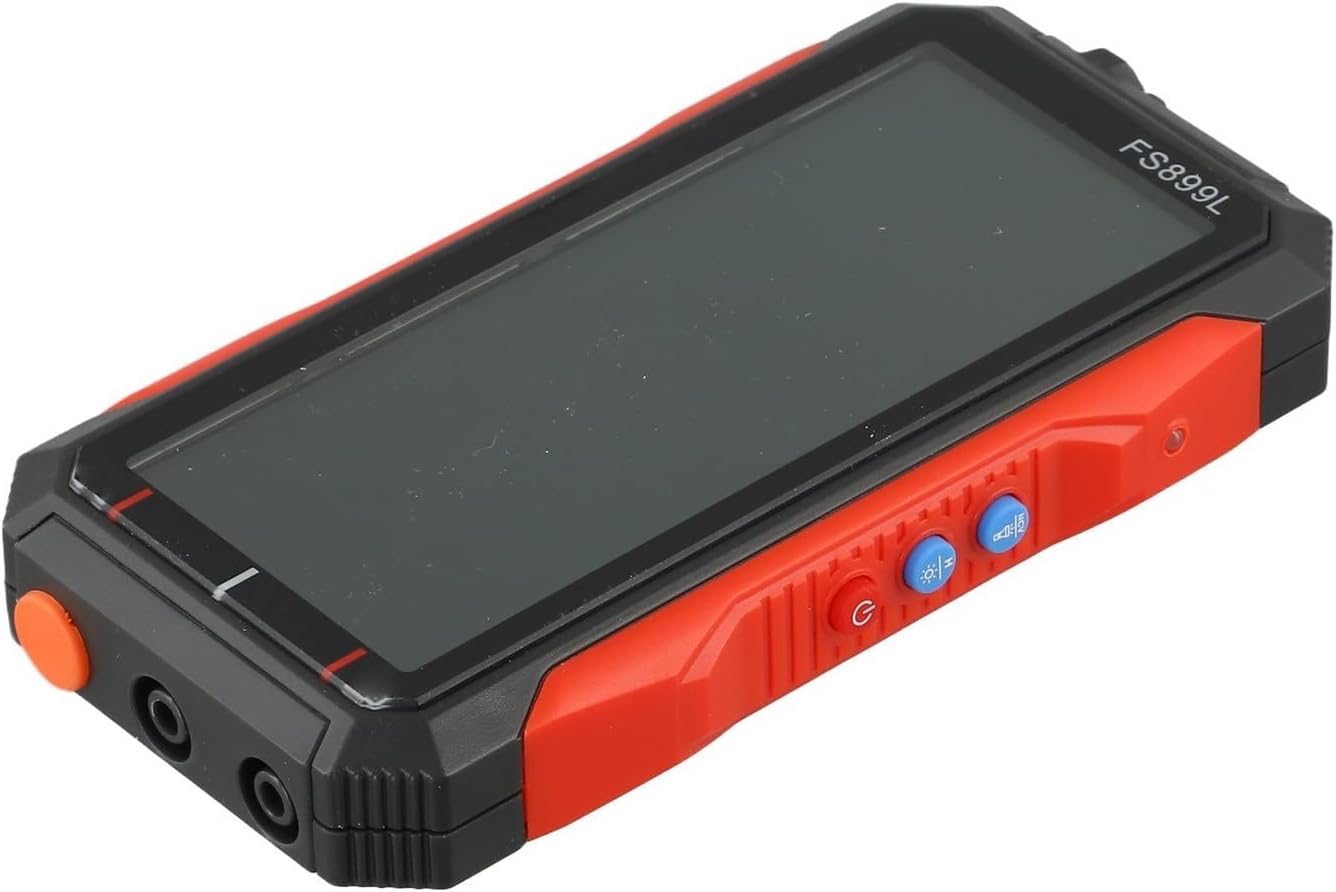
ചിത്രം 4.1: വശം view of the FS899C multimeter, highlighting its robust casing and control interface.
5. സജ്ജീകരണം
5.1 Charging the Multimeter
- Locate the USB-C charging port on the side of the multimeter.
- Connect the provided USB-C charging cable to the multimeter and to a standard USB power adapter (not included).
- The charging indicator on the display will show the charging status. A full charge typically takes approximately 2 hours and provides up to 8 hours of operation.
5.2 ടെസ്റ്റ് ലീഡുകൾ ബന്ധിപ്പിക്കുന്നു
Always ensure the multimeter is powered off before connecting or disconnecting test leads.
- തിരുകുക ചുവപ്പ് ടെസ്റ്റ് ലീഡ് VΩmA വോളിയത്തിനായുള്ള ഇൻപുട്ട് ജാക്ക്tage, resistance, capacitance, frequency, and low current measurements.
- തിരുകുക കറുപ്പ് ടെസ്റ്റ് ലീഡ് COM (സാധാരണ) ഇൻപുട്ട് ജാക്ക്.
- For high current measurements (up to 10A), insert the ചുവപ്പ് ടെസ്റ്റ് ലീഡ് 10എ ഇൻപുട്ട് ജാക്ക്.
6. പ്രവർത്തന നിർദ്ദേശങ്ങൾ
6.1 പവർ ഓൺ/ഓഫ്
അമർത്തിപ്പിടിക്കുക ശക്തി button to turn the multimeter on or off.
6.2 ഫംഗ്ഷൻ തിരഞ്ഞെടുക്കൽ
The FS899C typically features an auto-ranging function, simplifying operation. For specific modes, use the function buttons on the device.

Figure 6.1: The FS899C display showing active measurements for voltage, resistance, and temperature, along with mode indicators.
6.3 Common Measurements
- വാല്യംtagഇ മെഷർമെന്റ് (എസി/ഡിസി):
- Connect the red lead to VΩmA and the black lead to COM.
- ഉചിതമായ AC അല്ലെങ്കിൽ DC വോളിയം തിരഞ്ഞെടുക്കുക.tagഇ മോഡ്.
- ടെസ്റ്റ് പ്രോബുകൾ പരിശോധനയിലുള്ള സർക്യൂട്ടിനോ ഘടകത്തിനോ സമാന്തരമായി ബന്ധിപ്പിക്കുക.
- കറന്റ് അളവ് (എസി/ഡിസി):
- മുന്നറിയിപ്പ്: Ensure the circuit is de-energized before connecting the meter in series.
- For low current, connect the red lead to VΩmA; for high current (up to 10A), connect the red lead to 10A. Connect the black lead to COM.
- Select the appropriate AC or DC current mode.
- ടെസ്റ്റ് പ്രോബുകളെ സർക്യൂട്ടുമായി ശ്രേണിയിൽ ബന്ധിപ്പിക്കുക.
- പ്രതിരോധം അളക്കൽ:
- Connect the red lead to VΩmA and the black lead to COM.
- പ്രതിരോധ മോഡ് (Ω) തിരഞ്ഞെടുക്കുക.
- Ensure the circuit or component is de-energized before measuring resistance. Connect the probes across the component.
- തുടർച്ച പരിശോധന:
- Connect the red lead to VΩmA and the black lead to COM.
- Select the continuity mode (often indicated by a speaker icon).
- Touch the probes to the ends of the circuit or component. A beep indicates continuity.
- കപ്പാസിറ്റൻസ് അളക്കൽ:
- Connect the red lead to VΩmA and the black lead to COM.
- കപ്പാസിറ്റൻസ് മോഡ് (F) തിരഞ്ഞെടുക്കുക.
- Ensure the capacitor is fully discharged before testing. Connect the probes across the capacitor terminals.
- ആവൃത്തി അളക്കൽ:
- Connect the red lead to VΩmA and the black lead to COM.
- ഫ്രീക്വൻസി മോഡ് (Hz) തിരഞ്ഞെടുക്കുക.
- സിഗ്നൽ ഉറവിടത്തിലേക്ക് പ്രോബുകൾ ബന്ധിപ്പിക്കുക.
- നോൺ-കോൺടാക്റ്റ് വോളിയംtage (NCV) കണ്ടെത്തൽ:
- NCV മോഡ് തിരഞ്ഞെടുക്കുക.
- Hold the top of the multimeter near a live conductor. The meter will indicate the presence of AC voltage through an audible alarm and/or visual indicator.
6.4 ഡാറ്റ ഹോൾഡ് പ്രവർത്തനം
അമർത്തുക പിടിക്കുക button to freeze the current reading on the display. Press it again to release the hold function and resume live readings.
7. പരിപാലനം
7.1 വൃത്തിയാക്കൽ
മീറ്ററിന്റെ സി തുടയ്ക്കുകasinപരസ്യത്തോടുകൂടിയ ജിamp തുണിയും നേരിയ ഡിറ്റർജന്റും ഉപയോഗിക്കുക. അബ്രാസീവ് വസ്തുക്കളോ ലായകങ്ങളോ ഉപയോഗിക്കരുത്. ഉപയോഗിക്കുന്നതിന് മുമ്പ് മീറ്റർ പൂർണ്ണമായും ഉണങ്ങിയെന്ന് ഉറപ്പാക്കുക.
7.2 ബാറ്ററി കെയർ
The FS899C uses a rechargeable battery. To prolong battery life:
- ആദ്യ ഉപയോഗത്തിന് മുമ്പ് ബാറ്ററി പൂർണ്ണമായും ചാർജ് ചെയ്യുക.
- ബാറ്ററി ഇടയ്ക്കിടെ പൂർണ്ണമായും ഡിസ്ചാർജ് ചെയ്യുന്നത് ഒഴിവാക്കുക.
- If storing the meter for an extended period, charge it periodically (e.g., every 3-6 months) to maintain battery health.
7.3 ടെസ്റ്റ് ലീഡ് പരിശോധന
Regularly inspect the test leads for any cuts, cracks, or damage to the insulation. Replace damaged leads immediately to prevent electric shock hazards.
8. പ്രശ്നപരിഹാരം
| പ്രശ്നം | സാധ്യമായ കാരണം | പരിഹാരം |
|---|---|---|
| മീറ്റർ പവർ ഓൺ ആകുന്നില്ല. | Low or discharged battery. | Charge the multimeter using the provided USB-C cable. |
| തെറ്റായ അല്ലെങ്കിൽ അസ്ഥിരമായ വായനകൾ. | Incorrect function selected; poor test lead connection; external interference. | Verify the correct measurement function. Ensure test leads are securely connected. Move away from strong electromagnetic fields. |
| "OL" or "OVERLOAD" displayed. | Measurement exceeds the meter's range. | Select a higher range if available, or ensure the measured value is within the meter's specifications. |
| No continuity beep. | Open circuit; continuity mode not selected. | Check the circuit for breaks. Ensure the meter is in continuity mode. |
9 സ്പെസിഫിക്കേഷനുകൾ
| പരാമീറ്റർ | മൂല്യം |
|---|---|
| മോഡൽ | FS899C |
| പ്രദർശിപ്പിക്കുക | 4.8-inch, Backlit |
| Count Capacity | Up to 6000 counts |
| ഡിസി വോളിയംtagഇ റേഞ്ച് | 60mV to 600V (Accuracy: ±(1.2%+5d)) |
| എസി വോളിയംtagഇ റേഞ്ച് | 60mV to 600V (Accuracy: ±(1.5%+8d)) |
| DC നിലവിലെ ശ്രേണി | 300mA to 10A (Accuracy: ±(2.2%+8d)) |
| എസി കറന്റ് റേഞ്ച് | 300mA to 10A (Accuracy: ±(2.5%+8d)) |
| പ്രതിരോധ ശ്രേണി | 600Ω to 60MΩ (Accuracy: ±(1.5%+10d)) |
| കപ്പാസിറ്റൻസ് റേഞ്ച് | 10nF to 60mF (Accuracy: ±(10%+88d)) |
| ഫ്രീക്വൻസി റേഞ്ച് | (Specific range not provided, but implied by feature) |
| ബാറ്ററി | റീചാർജ് ചെയ്യാവുന്ന (USB-C) |
| പ്രവർത്തന സമയം | 8 മണിക്കൂർ വരെ (2 മണിക്കൂർ ചാർജ് ചെയ്തതിന് ശേഷം) |
| ഉൽപ്പന്ന അളവുകൾ | 6.3 x 4.72 x 1.38 ഇഞ്ച് |
| ഇനത്തിൻ്റെ ഭാരം | 9.4 ഔൺസ് (267 ഗ്രാം) |
| നിർമ്മാതാവ് | AirheadStorm |
10. വാറൻ്റിയും പിന്തുണയും
For warranty information, technical support, or service inquiries regarding your AirheadStorm FS899C Digital Multimeter, please contact the retailer or manufacturer directly. Retain your proof of purchase for warranty claims.