
for Keeson MC120PR (JLDP 15.020.035)
മാറ്റിസ്ഥാപിക്കൽ വിദൂര നിയന്ത്രണ ഉപയോക്തൃ മാനുവൽ
മോഡൽ: for Keeson MC120PR (JLDP 15.020.035)
ബ്രാൻഡ്: ജനറിക്
ആമുഖം
This manual provides essential information for the proper use, setup, and maintenance of your new replacement remote control for adjustable bed bases. This remote is specifically designed for compatibility with the Keeson MC120PR (JLDP 15.020.035) control box. Please read this manual thoroughly before attempting to use the remote control.
പ്രധാന അനുയോജ്യതാ വിവരങ്ങൾ
This remote control is NOT universal.
It is crucial to verify compatibility with your existing adjustable bed base control box. This remote is only compatible with control boxes manufactured by Keeson with the model number MC120PR (JLDP 15.020.035).
Before attempting to use this remote, ensure your control box model number matches exactly. If you are unsure, it is recommended to provide clear photos of your control box and old remote control (front and back), including any product numbers found in the battery compartment, to the supplier for verification.

ചിത്രം 1: ഉദാample of control box label and remote control for compatibility verification.
സജ്ജമാക്കുക
1. ബാറ്ററി ഇൻസ്റ്റാളേഷൻ
റിമോട്ട് കൺട്രോളിന് 2 AAA ബാറ്ററികൾ ആവശ്യമാണ് (ഉൾപ്പെടുത്തിയിട്ടില്ല). ഇൻസ്റ്റാൾ ചെയ്യാൻ:
- റിമോട്ട് കൺട്രോളിൻ്റെ പിൻഭാഗത്ത് ബാറ്ററി കമ്പാർട്ട്മെൻ്റ് കവർ കണ്ടെത്തുക.
- കമ്പാർട്ട്മെന്റ് തുറക്കാൻ കവർ താഴേക്ക് സ്ലൈഡ് ചെയ്യുക.
- കമ്പാർട്ടുമെന്റിനുള്ളിൽ സൂചിപ്പിച്ചിരിക്കുന്നതുപോലെ ശരിയായ പോളാരിറ്റി (+/-) ഉറപ്പാക്കിക്കൊണ്ട് 2 AAA ബാറ്ററികൾ ഇടുക.
- ബാറ്ററി കമ്പാർട്ട്മെന്റ് കവർ സ്ഥാനത്ത് ക്ലിക്ക് ചെയ്യുന്നതുവരെ മുകളിലേക്ക് സ്ലൈഡുചെയ്ത് മാറ്റിസ്ഥാപിക്കുക.
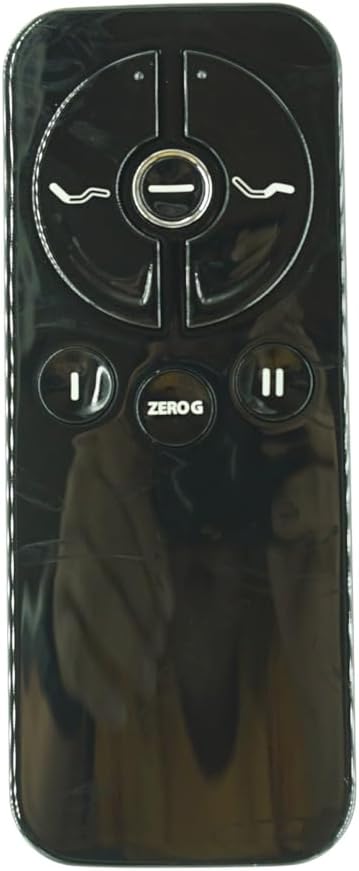
Figure 2: Remote control battery compartment.
2. റിമോട്ട് കൺട്രോൾ ജോടിയാക്കുന്നു
The remote control must be paired with your adjustable bed base's control box before first use. The pairing distance between the remote and control box should be less than 2 meters (approximately 6.5 feet).
- പവർ കോർഡ് അൺപ്ലഗ് ചെയ്യുക മതിൽ ഔട്ട്ലെറ്റിൽ നിന്ന്.
- ഏകദേശം 5 സെക്കൻഡ് കാത്തിരിക്കുക.
- പവർ കോഡ് the ട്ട്ലെറ്റിലേക്ക് തിരികെ പ്ലഗ് ചെയ്യുക.
- Within 10 seconds of plugging in the power cord, locate the PAIR button on the back of the remote control.
- Press and hold the PAIR button on the remote. The PAIR button will illuminate blue and begin flashing.
- Continue holding the PAIR button until the LED light on the control box goes out, indicating successful pairing.
- Release the PAIR button. The remote is now paired with the adjustable base.
- Test all remote functions to confirm successful pairing.

Figure 3: Visual guide for pairing process, showing remote and control box LED.
പ്രവർത്തന നിർദ്ദേശങ്ങൾ
The remote control features intuitive buttons for adjusting your bed base. Familiarize yourself with the button layout:

Figure 4: Remote Control Front View.
- Head Up/Down Buttons: Control the elevation of the head section of the bed.
- Foot Up/Down Buttons: Control the elevation of the foot section of the bed.
- ZERO G Button: "സീറോ ഗ്രാവിറ്റി" പ്രീസെറ്റ് പൊസിഷൻ സജീവമാക്കുന്നു, ഇത് തലയെയും കാലിനെയും പുറകിലെ മർദ്ദം ഒഴിവാക്കാൻ കഴിയുന്ന ഒരു സ്ഥാനത്തേക്ക് ഉയർത്തുന്നു.
- Flat Button (if applicable): Returns the bed to a flat position. (Note: This specific remote image does not clearly show a dedicated flat button, but it's a common feature. Refer to your bed base manual for specific functions.)
Press and hold the desired button to move the bed section. Release the button when the desired position is reached.
മെയിൻ്റനൻസ്
നിങ്ങളുടെ റിമോട്ട് കൺട്രോളിന്റെ ദീർഘായുസ്സും ശരിയായ പ്രവർത്തനവും ഉറപ്പാക്കാൻ:
- Keep the remote clean by wiping it with a soft, dry cloth. Avoid using liquid cleaners or abrasive materials.
- Do not expose the remote to excessive moisture, heat, or direct sunlight.
- റിമോട്ട് ദീർഘനേരം ഉപയോഗിക്കുന്നില്ലെങ്കിൽ, ചോർച്ച തടയാൻ ബാറ്ററികൾ നീക്കം ചെയ്യുക.
- Handle the remote with care to avoid dropping it or subjecting it to strong impacts.
ട്രബിൾഷൂട്ടിംഗ്
റിമോട്ട് പ്രതികരിക്കുന്നില്ല:
- ബാറ്ററികൾ പരിശോധിക്കുക: Ensure batteries are correctly installed and not depleted. Replace with fresh AAA batteries if necessary.
- Re-Pair Remote: Follow the "Pairing the Remote Control" steps in the Setup section to re-establish connection with the control box.
- Power Cycle Bed Base: Unplug the bed base from the power outlet for 30 seconds, then plug it back in. This can reset the control box.
- തടസ്സങ്ങൾ: Ensure there are no objects blocking the signal path between the remote and the control box.
കിടക്കയുടെ അടിഭാഗം നീങ്ങുന്നില്ല:
- പവർ പരിശോധിക്കുക: Verify the bed base is properly plugged into a working electrical outlet.
- Control Box Status: Check the LED indicator on the control box (if present) for any error codes or status lights. Refer to your bed base's original manual for control box specific troubleshooting.
- ഓവർലോഡ് സംരക്ഷണം: Some bed bases have overload protection. If the motor has been running continuously for an extended period, it may temporarily shut off. Allow it to cool down before attempting to operate again.
If problems persist after following these steps, contact the product supplier or a qualified technician for assistance.
സ്പെസിഫിക്കേഷനുകൾ
| ഫീച്ചർ | വിശദാംശങ്ങൾ |
|---|---|
| മോഡൽ നമ്പർ | for Keeson MC120PR (JLDP 15.020.035) |
| ബ്രാൻഡ് | ജനറിക് |
| അനുയോജ്യമായ ഉപകരണങ്ങൾ | Adjustable bed base with Keeson MC120PR (JLDP 15.020.035) control box |
| പവർ ഉറവിടം | 2 x AAA ബാറ്ററികൾ (ഉൾപ്പെടുത്തിയിട്ടില്ല) |
| നിറം | കറുപ്പ് |
| പ്രത്യേക ഫീച്ചർ | Not Universal, specific compatibility required |
വാറൻ്റിയും പിന്തുണയും
For warranty information or technical support, please refer to the documentation provided with your original adjustable bed base or contact the seller directly. It is recommended to have your product model number and purchase details ready when seeking support.
Ask a question about this manual
Ask about setup, troubleshooting, compatibility, parts, safety, or missing instructions. Manuals+ will review the question and use this page’s manual context to help answer it.