
DOOGEE Tab E3-V
DOOGEE Tab E3 Android 15 Tablet User Manual
Model: Tab E3-V | Brand: DOOGEE
1. സജ്ജീകരണം
1.1 പാക്കേജ് ഉള്ളടക്കം
പാക്കേജിൽ എല്ലാ ഇനങ്ങളും ഉണ്ടെന്ന് ഉറപ്പാക്കുക:
- 1 x DOOGEE Tab E3 Android 15 Tablet
- 1 x കീബോർഡ്
- 1 x മൗസ്
- 1 x സ്റ്റൈലസ് പേന
- 1 x ചാർജർ
- 1 x ടൈപ്പ്-സി യുഎസ്ബി കേബിൾ
- 1 x Card Removal Needle
- 1 x ഉപയോക്തൃ മാനുവൽ
- 1 x വാറൻ്റി കാർഡ്

Image: Contents of the DOOGEE Tab E3 retail package, including the tablet, keyboard, mouse, stylus, charger, USB cable, card removal tool, user manual, and warranty card.
1.2 പ്രാരംഭ ചാർജിംഗ്
Before first use, fully charge your DOOGEE Tab E3 tablet. Connect the provided Type-C USB cable to the tablet's charging port and the charger to a power outlet. The tablet supports 18W fast charging, reaching 50% charge in approximately 90 minutes.
1.3 സിം കാർഡും മൈക്രോ എസ്ഡി കാർഡും ഇൻസ്റ്റാൾ ചെയ്യൽ
The DOOGEE Tab E3 supports dual SIM cards and expandable storage via a microSD card (up to 2TB, sold separately). Use the provided card removal needle to open the SIM tray. Insert your SIM cards and/or microSD card into the designated slots, ensuring correct orientation. Close the tray securely.

Image: Diagram illustrating the dual SIM and microSD card slots on the DOOGEE Tab E3, showing how to insert SIM cards and a TF card for expanded storage.
1.4 പെരിഫറലുകൾ ബന്ധിപ്പിക്കുന്നു
The tablet comes with a keyboard, mouse, and stylus for enhanced productivity. These accessories connect via Bluetooth 5.2. To pair:
- Enable Bluetooth on your tablet via Settings > Connected devices > Bluetooth.
- Put the accessory (keyboard, mouse) into pairing mode (refer to the accessory's specific instructions).
- Select the accessory from the list of available devices on your tablet to complete pairing.

Image: The DOOGEE Tab E3 tablet connected to its dedicated keyboard, demonstrating its laptop-like functionality.
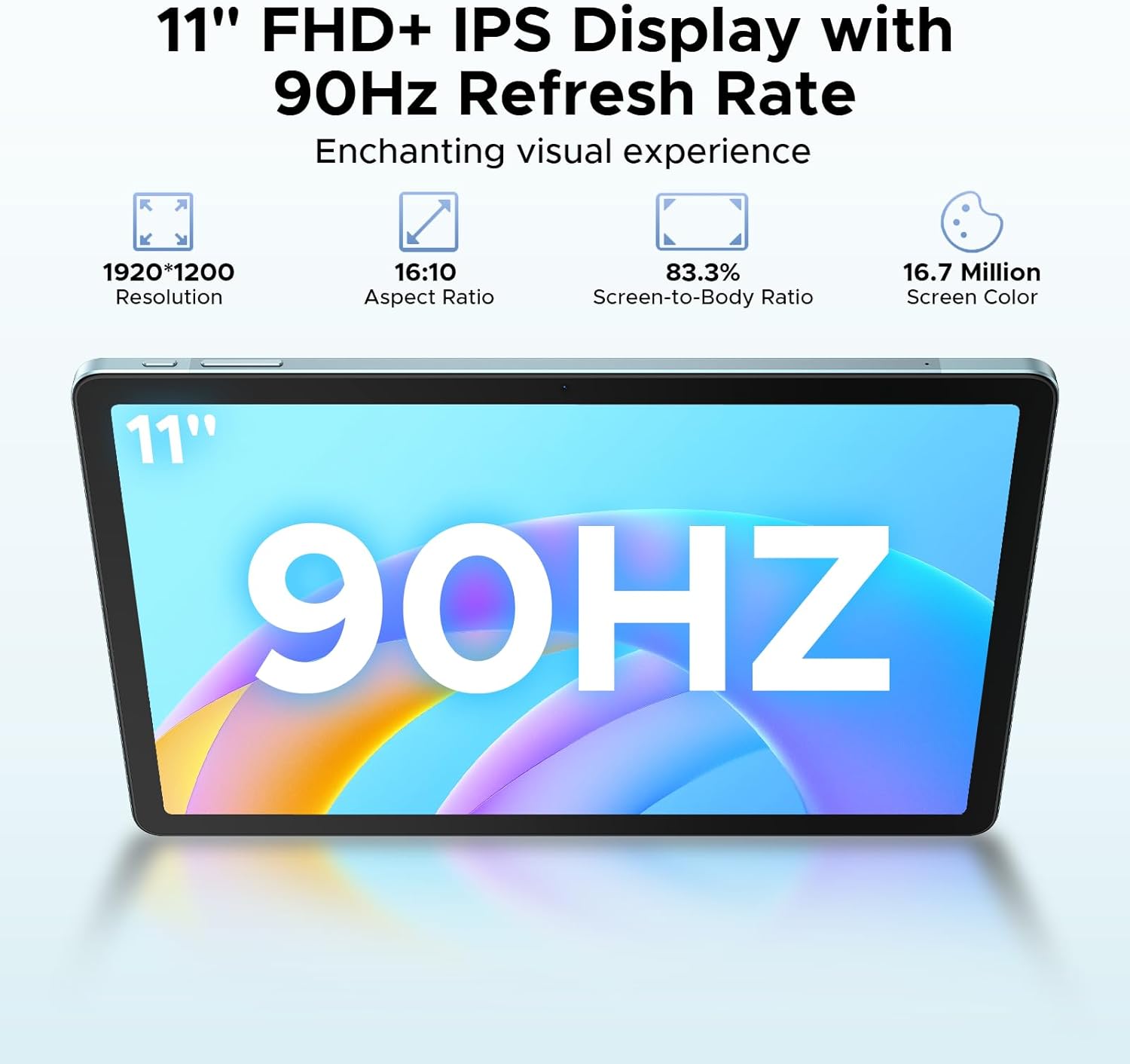
Image: The DOOGEE Tab E3 tablet paired with its wireless mouse, highlighting its versatility for navigation and productivity tasks.
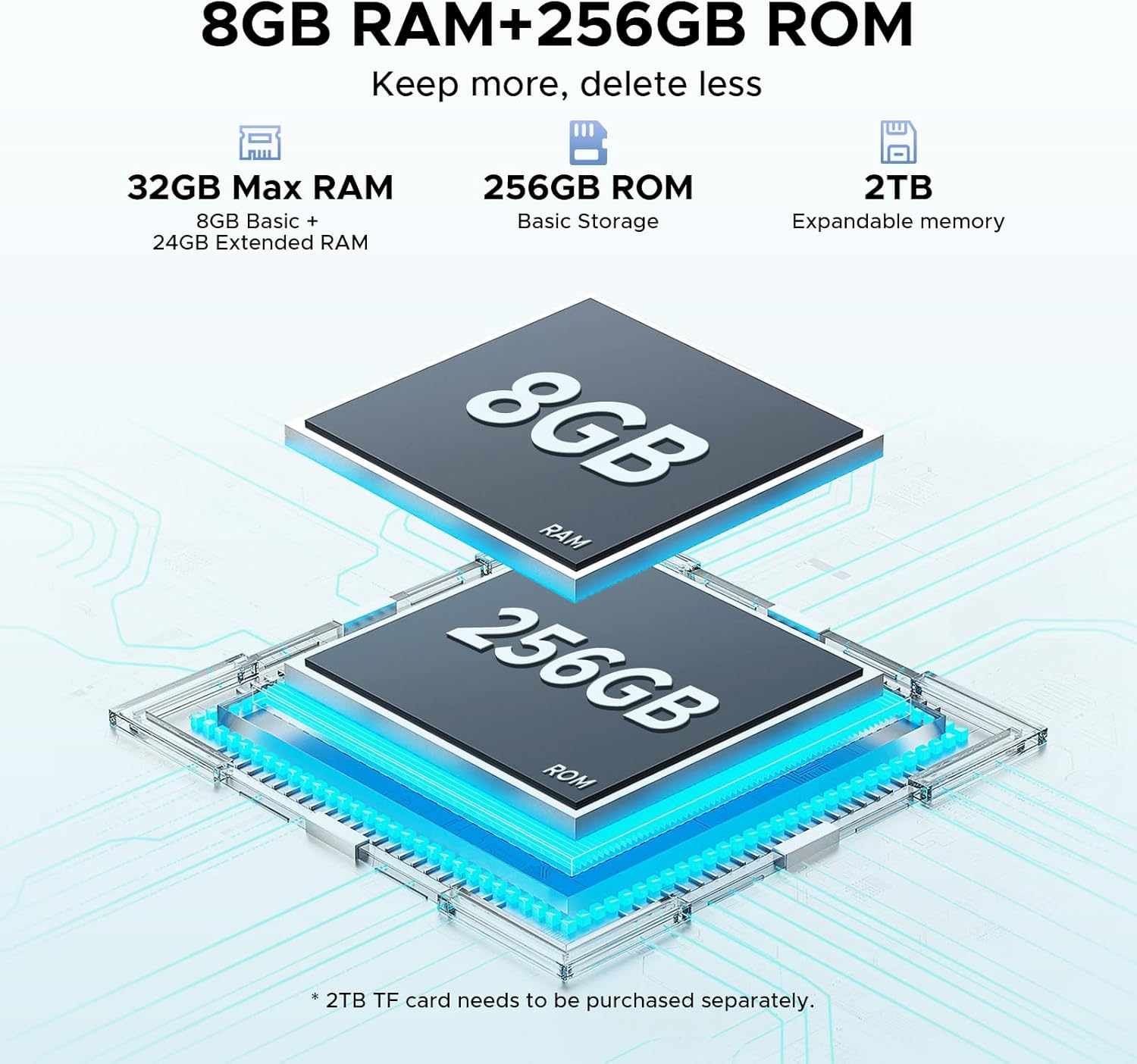
Image: The DOOGEE Tab E3 tablet being used with its stylus pen, ideal for note-taking, drawing, and precise interactions.
2. നിങ്ങളുടെ ടാബ്ലെറ്റ് പ്രവർത്തിപ്പിക്കൽ
2.1 പവർ ഓൺ/ഓഫ്, അടിസ്ഥാന നാവിഗേഷൻ
To power on, press and hold the power button until the DOOGEE logo appears. To power off, press and hold the power button, then select 'Power off' from the options. The tablet runs on Android 15, offering an intuitive interface. Navigate using touch gestures: swipe, tap, pinch-to-zoom.

Image: Visual representation of the Android 15 operating system interface on the DOOGEE Tab E3, highlighting its intelligent, seamless, and secure features.
2.2 ഡിസ്പ്ലേ സെറ്റിംഗുകളും നേത്ര പരിചരണവും
The 11-inch FHD+ IPS display features a 90Hz refresh rate for smooth visuals. Adjust brightness, text size, and display mode (e.g., Dark Mode, Eye-Caring Mode) in Settings > Display. Eye-Caring Mode reduces blue light to minimize eye fatigue during prolonged use, while Dark Mode softens light for night use.

Image: The 11-inch FHD+ IPS display of the DOOGEE Tab E3, showcasing its 1920x1200 resolution, 16:10 aspect ratio, 83.3% screen-to-body ratio, and 16.7 million screen colors for an enchanting visual experience.

Image: A visual representation of the 90Hz screen refresh rate on the DOOGEE Tab E3, emphasizing its upgraded smooth experience across all usage scenarios.

Image: The tablet displaying content in Eye-Caring Mode and Dark Mode, illustrating how these features gently protect eyesight and soften light for comfortable night use.
2.3 Android 15 Features and Gemini AI
The DOOGEE Tab E3 leverages Android 15 with integrated Gemini AI for enhanced intelligence. Key features include:
- ജെമിനി AI: Provides real-time translation, smart text suggestions, AI-enhanced multitasking, content creation, information retrieval, image analysis, code development, language learning, and smart assistance.
- Multi-user System: Allows multiple users to have personalized profiles on the tablet.
- രക്ഷാകർതൃ നിയന്ത്രണം: Manage and restrict content access for children.
- സ്വകാര്യതാ ഷീൽഡ്: Enhanced security features including precision permission control, robust data encryption, timely security patches, and proactive app screening.
- Facial Recognition Unlock: Effortlessly unlock your tablet using facial recognition.

Image: Screenshots demonstrating various Android 15 features on the DOOGEE Tab E3, including Bedtime Mode, Auto Brightness Adjustment, Multi-user System, and Parental Control.

ചിത്രം: ഒരു ഓവർview of the built-in Gemini AI capabilities on the DOOGEE Tab E3, listing features such as Content Creation, Information Retrieval & Summarization, Image Analysis, Code Development, Language Learning, and Smart Assistant.

Image: A visual representation of the Facial Recognition Unlock feature on the DOOGEE Tab E3, showing a user effortlessly accessing the tablet.
2.4 കണക്റ്റിവിറ്റി
The tablet offers comprehensive connectivity options:
- വൈഫൈ: Supports dual-band Wi-Fi (2.4G/5G) for stable and fast internet access.
- ബ്ലൂടൂത്ത് 5.2: For connecting wireless peripherals like headphones, keyboards, and mice.
- 4G LTE: Stay connected on the go with cellular data support via dual SIM slots.

Image: A graphic illustrating the Dual-Band WiFi 2.4G/5G capabilities of the DOOGEE Tab E3, emphasizing low latency, anti-congestion, wide coverage, low power consumption, and high speed.
2.5 ക്യാമറ പ്രവർത്തനങ്ങൾ
The DOOGEE Tab E3 is equipped with a 13MP main camera and a 5MP front camera. Use the camera application to capture photos and record videos. The tablet supports 2K video recording.

ചിത്രം: പിൻഭാഗം view of the DOOGEE Tab E3, highlighting its 13MP main camera designed for capturing sharp photos and clear details.

Image: A group video call displayed on the DOOGEE Tab E3, showcasing its Ultra-Clear 5MP Front Camera, perfect for selfies and video calls.

Image: A dynamic scene of a car driving through a tunnel, illustrating the DOOGEE Tab E3's capability for 2K video recording to capture memorable moments.
2.6 ഓഡിയോ ക്രമീകരണങ്ങൾ
The tablet features dual HD speakers for clear sound. Adjust volume using the physical buttons or through Settings > Sound & vibration. A 3.5mm headphone jack is available for private listening.

Image: A visual representation of the DOOGEE Tab E3's dual speakers, indicating premium 1217 BOX technology for cinema-quality sound in a tablet size.
2.7 Split-Screen Multitasking
Utilize the split-screen feature to run two applications simultaneously, enhancing productivity. To activate, open a recent apps view and drag one app to the top or side of the screen, then select another app for the remaining space.

Image: The DOOGEE Tab E3 displaying two applications side-by-side in split-screen mode, demonstrating efficient multitasking capabilities.
2.8 നാവിഗേഷൻ സിസ്റ്റം
The tablet includes a precise navigation system with support for GPS, Glonass, Galileo, and Beidou, ensuring accurate location tracking and navigation.

Image: A person using the DOOGEE Tab E3 for navigation in a car, highlighting its precise navigation system with GPS, Glonass, Galileo, and Beidou support.
3. പരിപാലനവും പരിചരണവും
3.1 ബാറ്ററി മാനേജ്മെൻ്റ്
The 8800mAh high-capacity battery provides extended usage. To maximize battery life:
- തീവ്രമായ താപനില ഒഴിവാക്കുക.
- പതിവായി റീചാർജ് ചെയ്യുന്നതിനുമുമ്പ് ബാറ്ററി പൂർണ്ണമായും തീർന്നുപോകാൻ അനുവദിക്കരുത്.
- ഒപ്റ്റിമൽ ചാർജിംഗിനായി നൽകിയിരിക്കുന്ന ചാർജർ ഉപയോഗിക്കുക.
- പശ്ചാത്തലത്തിൽ പ്രവർത്തിക്കുന്ന ഉപയോഗിക്കാത്ത ആപ്പുകൾ അടയ്ക്കുക.
The tablet also supports OTG reverse charging, allowing it to act as a power bank for other devices.

Image: A comparison showing the DOOGEE Tab E3's 8800mAh battery capacity versus ordinary tablets, detailing estimated standby, music playing, video watching, and web browsing hours.
3.2 നിങ്ങളുടെ ഉപകരണം വൃത്തിയാക്കൽ
ടാബ്ലെറ്റിന്റെ സ്ക്രീനും ബോഡിയും വൃത്തിയാക്കാൻ മൃദുവായ, ലിന്റ് രഹിത തുണി ഉപയോഗിക്കുക. ഉപരിതലത്തിന് കേടുവരുത്തുന്ന കഠിനമായ രാസവസ്തുക്കളോ ഉരച്ചിലുകളുള്ള വസ്തുക്കളോ ഉപയോഗിക്കുന്നത് ഒഴിവാക്കുക.
3.3 സോഫ്റ്റ്വെയർ അപ്ഡേറ്റുകൾ
നിങ്ങളുടെ ടാബ്ലെറ്റിൽ ഏറ്റവും പുതിയ ഫീച്ചറുകൾ, സുരക്ഷാ പാച്ചുകൾ, പ്രകടന മെച്ചപ്പെടുത്തലുകൾ എന്നിവ ഉറപ്പാക്കാൻ പതിവായി സോഫ്റ്റ്വെയർ അപ്ഡേറ്റുകൾ പരിശോധിച്ച് ഇൻസ്റ്റാൾ ചെയ്യുക. ക്രമീകരണങ്ങൾ > സിസ്റ്റം > സിസ്റ്റം അപ്ഡേറ്റ് എന്നതിലേക്ക് പോകുക.
3.4 സ്റ്റോറേജ് മാനേജ്മെൻ്റ്
The tablet comes with 256GB of internal storage and supports up to 2TB expandable memory. Regularly manage your storage by deleting unnecessary files, uninstalling unused apps, and moving large media fileആവശ്യമെങ്കിൽ ബാഹ്യ സംഭരണത്തിലേക്ക് എസ്.
4. പ്രശ്നപരിഹാരം
4.1 പൊതുവായ പ്രശ്നങ്ങളും പരിഹാരങ്ങളും
| ഇഷ്യൂ | സാധ്യമായ പരിഹാരം |
|---|---|
| ടാബ്ലെറ്റ് ഓണാക്കുന്നില്ല | ബാറ്ററി ചാർജ്ജ് ചെയ്തിട്ടുണ്ടെന്ന് ഉറപ്പാക്കുക. റീസ്റ്റാർട്ട് ചെയ്യാൻ പവർ ബട്ടൺ കുറഞ്ഞത് 10-15 സെക്കൻഡ് അമർത്തിപ്പിടിക്കുക. |
| ആപ്പുകൾ ക്രാഷാകുന്നു അല്ലെങ്കിൽ മരവിക്കുന്നു | ആപ്പിന്റെ കാഷെ മായ്ക്കുക (ക്രമീകരണങ്ങൾ > ആപ്പുകൾ > [ആപ്പ് നാമം] > സംഭരണം > കാഷെ മായ്ക്കുക). ടാബ്ലെറ്റ് പുനരാരംഭിക്കുക. ആപ്പുകൾ അപ്ഡേറ്റ് ചെയ്തിട്ടുണ്ടെന്ന് ഉറപ്പാക്കുക. |
| Wi-Fi/Bluetooth connectivity issues | Toggle Wi-Fi/Bluetooth off and on. Restart your router/device. Forget the network/device and reconnect. |
| മന്ദഗതിയിലുള്ള പ്രകടനം | Close background apps. Clear cache. Free up storage space. Restart the tablet. |
| സ്ക്രീൻ പ്രതികരിക്കുന്നില്ല | Restart the tablet. If the issue persists, consider a factory reset (backup data first). |
4.2 ഫാക്ടറി റീസെറ്റ്
If you encounter persistent issues, a factory reset can resolve them by restoring the tablet to its original state. മുന്നറിയിപ്പ്: ഇത് നിങ്ങളുടെ ടാബ്ലെറ്റിലെ എല്ലാ ഡാറ്റയും മായ്ക്കും. തുടരുന്നതിന് മുമ്പ് പ്രധാനപ്പെട്ട ഡാറ്റയുടെ ബാക്കപ്പ് എടുക്കുക.
ഒരു ഫാക്ടറി റീസെറ്റ് നടത്താൻ:
- ക്രമീകരണങ്ങൾ > സിസ്റ്റം > റീസെറ്റ് ഓപ്ഷനുകൾ എന്നതിലേക്ക് പോകുക.
- 'എല്ലാ ഡാറ്റയും മായ്ക്കുക (ഫാക്ടറി റീസെറ്റ്)' തിരഞ്ഞെടുക്കുക.
- നിങ്ങളുടെ തീരുമാനം സ്ഥിരീകരിച്ച് സ്ക്രീനിലെ നിർദ്ദേശങ്ങൾ പാലിക്കുക.
5 സ്പെസിഫിക്കേഷനുകൾ
| ഫീച്ചർ | വിശദാംശങ്ങൾ |
|---|---|
| ബ്രാൻഡ് | ഡോഗി |
| മോഡലിൻ്റെ പേര് | Tab E3-V |
| ഓപ്പറേറ്റിംഗ് സിസ്റ്റം | ആൻഡ്രോയിഡ് 15 |
| പ്രോസസ്സർ | Helio G100 Octa-Core (6nm) |
| റാം | 32GB (8GB physical + 24GB expansion) |
| ആന്തരിക സംഭരണം | 256 ജിബി |
| വികസിപ്പിക്കാവുന്ന സംഭരണം | Up to 2TB (via microSD card) |
| സ്ക്രീൻ വലിപ്പം | 11 ഇഞ്ച് |
| ഡിസ്പ്ലേ റെസല്യൂഷൻ | 1920x1200 Pixels (FHD+) |
| പുതുക്കിയ നിരക്ക് | 90Hz |
| ബാറ്ററി ശേഷി | 8800mAh |
| ചാർജിംഗ് | 18W ഫാസ്റ്റ് ചാർജിംഗ് |
| പ്രധാന ക്യാമറ | 13എംപി |
| മുൻ ക്യാമറ | 5എംപി |
| കണക്റ്റിവിറ്റി | Wi-Fi 2.4G/5G, Bluetooth 5.2, 4G LTE (Dual SIM) |
| ഓഡിയോ | Dual HD Speakers, 3.5mm Headphone Jack |
| അളവുകൾ (LxWxH) | 0.29 x 6.64 x 10.11 ഇഞ്ച് |
| ഇനത്തിൻ്റെ ഭാരം | 3.15 പൗണ്ട് |
| നിറം | നീല |
6. വാറൻ്റിയും പിന്തുണയും
6.1 വാറൻ്റി വിവരങ്ങൾ
Your DOOGEE Tab E3 tablet is covered by a manufacturer's warranty. Please refer to the included Warranty Card in your package for specific terms, conditions, and duration of the warranty.
6.2 ഉപഭോക്തൃ പിന്തുണ
For technical assistance, troubleshooting beyond this manual, or warranty claims, please contact DOOGEE customer support. You can find contact information on the official DOOGEE webസൈറ്റ് അല്ലെങ്കിൽ നിങ്ങൾ ഉൽപ്പന്നം വാങ്ങിയ റീട്ടെയിലർ വഴി.
Visit the official DOOGEE Store for more information and support: DOOGEE Store on Amazon
Ask a question about this manual
Ask about setup, troubleshooting, compatibility, parts, safety, or missing instructions. Manuals+ will review the question and use this page’s manual context to help answer it.