
Amicura F1 PRO-US
Amicura F1 PRO Automatic Pet Feeder User Manual
Model: F1 PRO-US
1. ആമുഖം
Thank you for choosing the Amicura F1 PRO Automatic Pet Feeder. This smart feeder is designed to provide convenient and reliable feeding for your cats and dogs, featuring a 2K AI camera, dual-band WiFi connectivity, and smart app control. It ensures your pet is fed on schedule and allows you to monitor and interact with them remotely.
2 സുരക്ഷാ വിവരങ്ങൾ
- ഉപയോഗിക്കുന്നതിന് മുമ്പ് എല്ലാ നിർദ്ദേശങ്ങളും ശ്രദ്ധാപൂർവ്വം വായിക്കുക.
- Keep the feeder on a stable, level surface to prevent tipping.
- പ്രധാന യൂണിറ്റ് വെള്ളത്തിലോ മറ്റേതെങ്കിലും ദ്രാവകത്തിലോ മുക്കരുത്.
- നൽകിയിരിക്കുന്ന പവർ അഡാപ്റ്റർ മാത്രം ഉപയോഗിക്കുക.
- Ensure the power cable is not chewed by pets. Use the chew-proof cable provided.
- കുട്ടികൾക്ക് ലഭ്യമാകാതെ സൂക്ഷിക്കുക.
- ഈ ഉപകരണം ഇൻഡോർ ഉപയോഗത്തിന് മാത്രമുള്ളതാണ്.
- Only use dry pet food with a diameter of 5-15mm.
- Do not place foreign objects into the food storage or dispensing mechanism.
3. പാക്കേജ് ഉള്ളടക്കം
എല്ലാ ഇനങ്ങളും നിലവിലുണ്ടോ എന്നും നല്ല നിലയിലാണെന്നും ദയവായി പരിശോധിക്കുക:
- Amicura F1 PRO Automatic Cat Feeder x1
- പവർ അഡാപ്റ്റർ x1
- ഡെസിക്കന്റ് ബാഗ് x1
- ഉപയോക്തൃ മാനുവൽ x1

Image: The Amicura F1 PRO feeder shown alongside its included accessories: the power adapter, a desiccant bag, and the user manual.
4. ഉൽപ്പന്നം കഴിഞ്ഞുview
The Amicura F1 PRO features a sleek design with key components for smart feeding and monitoring.

ചിത്രം: ഒരു സമഗ്രമായ view of the Amicura F1 PRO Automatic Cat Feeder, highlighting its main unit, food bowl, and integrated camera features, with various pet images demonstrating its use.
പ്രധാന സവിശേഷതകൾ:
- 2K Ultra HD AI Camera: 160 ° വൈഡ് ആംഗിൾ view with night vision, intelligent overhead shooting, and AI motion capture.
- Dual-Band WiFi (5G/2.4G): Compatible with iOS and Android for smart APP control.
- Real-Time Video Chat & Personalized Meal Call: Two-way audio and 10-second voice message recording.
- Worry-Free Feeding: Infrared sensor for low food/card food/power outage alerts, APP push notifications.
- 4.5 ലിറ്റർ ശേഷി: Suitable for 15-30 days of feeding for adult cats.
- Removable Food Spout & 304 Stainless Steel Bowl: Easy to clean and maintain hygiene.
- Advanced Anti-Clog System: Silicone auger prevents jams for 5-15mm food.
- Freshness Tech: Hidden dispensing port, airtight lid, silicone desiccant.
- ഇരട്ട പവർ സപ്ലൈ: Plug-in operation with chew-proof cable and 3x D-cell battery backup (sold separately).
5. സജ്ജീകരണ ഗൈഡ്
5.1 അൺപാക്കിംഗും അസംബ്ലിയും
- പാക്കേജിംഗിൽ നിന്ന് എല്ലാ ഘടകങ്ങളും നീക്കം ചെയ്യുക.
- ഫീഡർ ഒരു പരന്നതും സ്ഥിരതയുള്ളതുമായ പ്രതലത്തിൽ വയ്ക്കുക.
- Ensure the stainless steel food bowl is properly seated in the base.
5.2 ഫീഡറിന് പവർ നൽകുന്നു
The feeder supports dual power options:
- പ്രാഥമിക ശക്തി: Connect the provided power adapter to the feeder and a wall outlet.
- ബാറ്ററി ബാക്കപ്പ്: വൈദ്യുതി സമയത്ത് തടസ്സമില്ലാത്ത ഫീഡിംഗിനായി outages, insert three (3) D-cell alkaline batteries (not included) into the battery compartment at the bottom of the unit. This provides up to 180 days of operation without external power, though WiFi and camera functions are disabled in battery-only mode.

Image: The feeder demonstrating its dual power capabilities, showing both plug-in operation for full features and battery power for essential feeding during outages.
5.3 ആപ്പ് ഇൻസ്റ്റാളേഷനും വൈഫൈ കണക്ഷനും
- Download the "Amicura" app from the App Store (iOS) or Google Play Store (Android).
- ഒരു അക്കൗണ്ടിനായി രജിസ്റ്റർ ചെയ്ത് ലോഗിൻ ചെയ്യുക.
- Follow the in-app instructions to add your Amicura F1 PRO feeder. The feeder supports dual-band WiFi (2.4GHz and 5GHz) for stable and fast connection.

Image: A user interacting with the Amicura app on a smartphone, demonstrating real-time video and voice communication features with their pet.
5.4 ഭക്ഷണ പാത്രം നിറയ്ക്കൽ
- Open the lid of the food storage container.
- Pour dry pet food (5-15mm diameter) into the container. The 4.5L capacity can hold a significant amount of food.
- Place the desiccant bag into its designated slot under the lid to maintain food freshness.
- Close the lid securely to ensure an airtight seal.
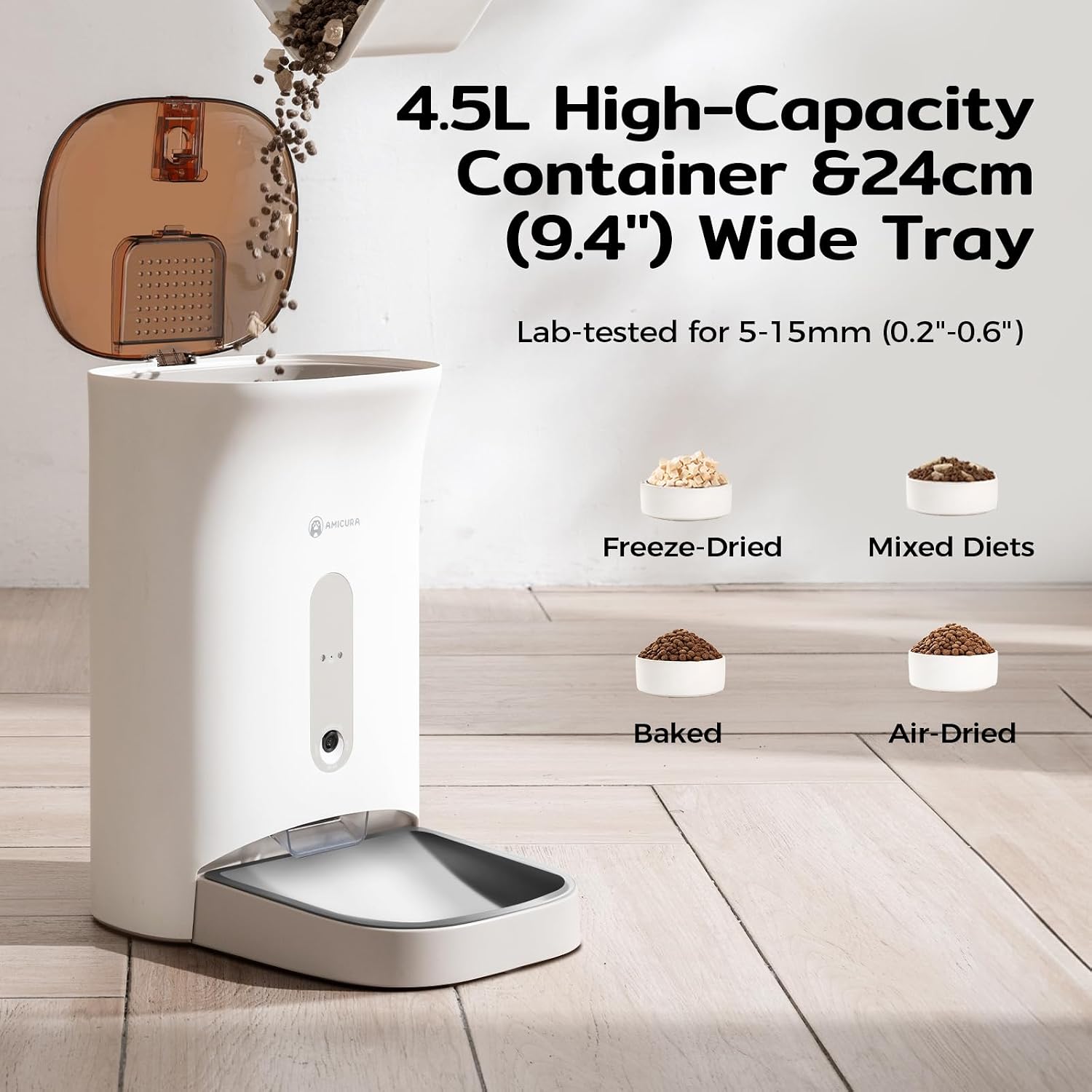
Image: The feeder with its lid open, illustrating the 4.5L food capacity and compatibility with various dry food types like freeze-dried, mixed diets, baked, and air-dried kibble.
5.5 Camera and Privacy Settings
The integrated 2K AI camera provides clear monitoring. For privacy, the camera is downward-focused to monitor food levels without invading your living space. You can also use the APP to close the lens at any time to protect family privacy.

Image: The feeder and a smartphone screen showing the camera's view of a cat eating, emphasizing the privacy protection system with a toggle to shut off monitoring.
6. പ്രവർത്തന നിർദ്ദേശങ്ങൾ
6.1 Scheduling Meals via App
Use the Amicura app to set up customized feeding schedules for your pet. You can define meal times and portion sizes according to your pet's needs.
- Open the Amicura app and select your feeder.
- Navigate to the "Feeding Plan" or "Schedule" section.
- Add new feeding times and adjust the number of portions for each meal.
- നിങ്ങളുടെ ഷെഡ്യൂൾ സംരക്ഷിക്കുക. പ്രോഗ്രാം ചെയ്ത സമയങ്ങളിൽ ഫീഡർ യാന്ത്രികമായി ഭക്ഷണം വിതരണം ചെയ്യും.
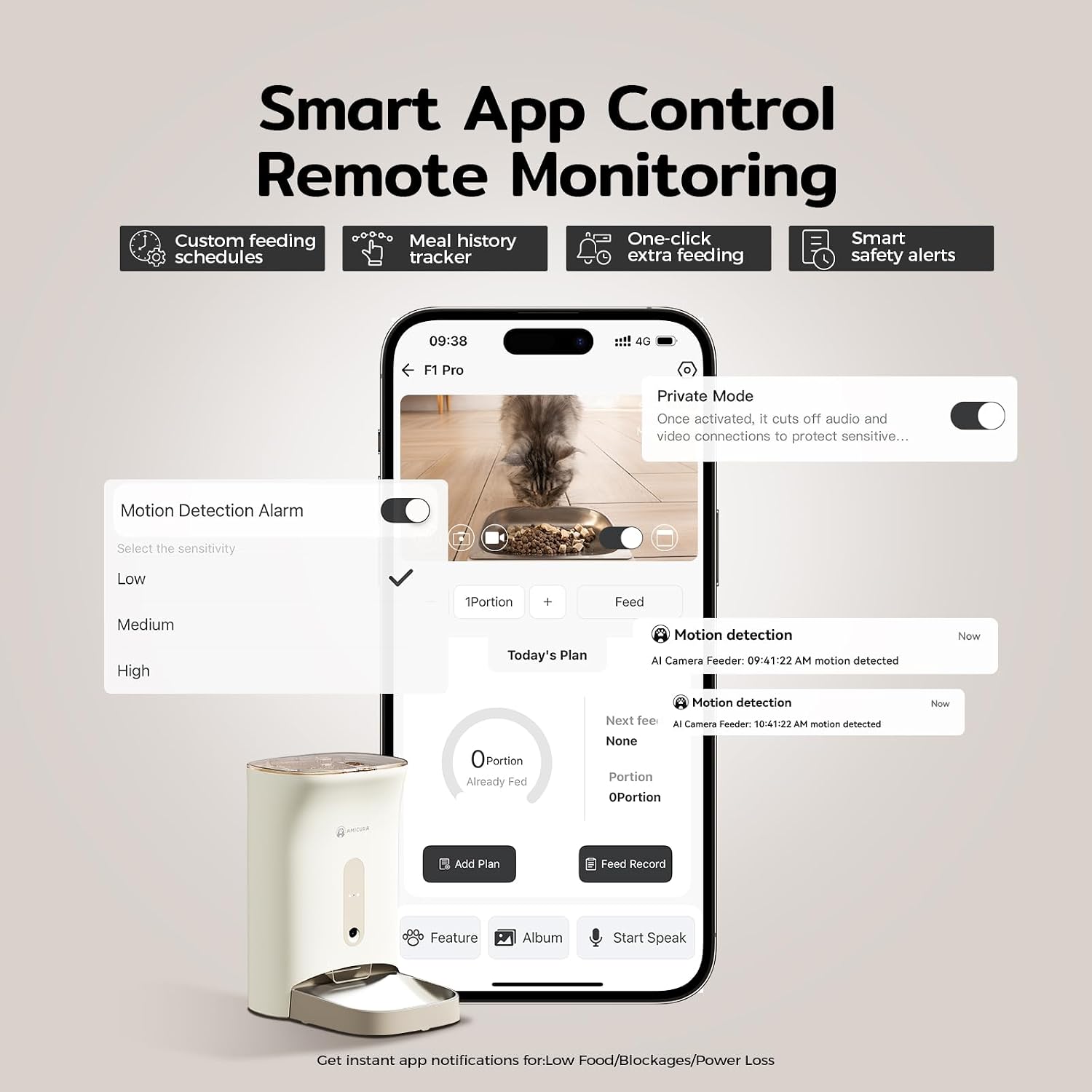
Image: The Amicura app interface on a smartphone, illustrating features like custom feeding schedules, meal history tracking, one-click feeding, and smart safety alerts.
6.2 മാനുവൽ ഫീഡിംഗ്
You can dispense food manually at any time:
- ആപ്പ് വഴി: In the Amicura app, tap the "Feed" button to dispense one portion immediately.
- ഉപകരണത്തിൽ: Press the manual feed button on the feeder itself to dispense a single portion.
6.3 Real-Time Video Chat and Voice Call
Engage with your pet remotely using the two-way audio and video features:
- Open the app and access the live camera view.
- Use the microphone icon to speak to your pet.
- Use the speaker icon to hear your pet.
- Record a 10-second personalized voice message that plays at mealtimes to comfort your pet.
6.4 നിരീക്ഷണവും അലേർട്ടുകളും
The feeder provides intelligent monitoring and alerts:
- 2K HD ക്യാമറ: Monitor your pet with clear 2K video, even in low light with night vision.
- AI Motion Capture: The camera automatically captures lovely moments when your pet passes by.
- ഇൻഫ്രാറെഡ് സെൻസർ: Detects low food levels, food card blockages, or power outages, triggering sound and light alarms, plus APP push notifications.
- Live Photo Push: The AI camera intelligently pushes live photos of your pet during meal times to your phone.

Image: The feeder in use, with a smartphone showing the 160° wide-angle night vision AI camera's 2K HD view, emphasizing 24/7 monitoring and smart motion detection.
7. പരിപാലനം
7.1 ഫീഡർ വൃത്തിയാക്കൽ
Regular cleaning ensures hygiene and proper operation:
- നീക്കം ചെയ്യാവുന്ന ഘടകങ്ങൾ: The food bucket, food bowl (304 stainless steel), and food spout are detachable for easy cleaning. Lift the food bucket straight up to remove it.
- Wash these components with mild soap and water. Rinse thoroughly and dry completely before reassembling.
- പ്രധാന യൂണിറ്റ്: പ്രധാന യൂണിറ്റിന്റെ പുറംഭാഗം പരസ്യം ഉപയോഗിച്ച് തുടയ്ക്കുക.amp തുണി. അബ്രാസീവ് ക്ലീനറുകൾ ഉപയോഗിക്കരുത് അല്ലെങ്കിൽ യൂണിറ്റ് വെള്ളത്തിൽ മുക്കരുത്.

Image: The feeder demonstrating its "Hassle-Free Removable Bucket, Lift & Clean Design," highlighting the easy removal of the food bucket and the 304 stainless steel bowl for quick cleaning.
7.2 ഡെസിക്കന്റ് മാറ്റിസ്ഥാപിക്കൽ
The desiccant bag helps keep food fresh and dry. Replace it periodically (e.g., every 1-2 months) to maintain effectiveness.
7.3 Anti-Clog System
The feeder features a silicone auger and a hidden dispensing port that auto-closes to prevent jams and maintain freshness. If a jam occurs, the infrared sensor will trigger an alert. Clear any obstructions manually if necessary.

ചിത്രം: പൊട്ടിത്തെറിച്ച ഒരു view of the feeder's internal components, detailing the removable desiccant box, airtight lid, and auto-sealing port, which together form the Triple-Lock Freshness Preservation System.
8. പ്രശ്നപരിഹാരം
| പ്രശ്നം | സാധ്യമായ കാരണം | പരിഹാരം |
|---|---|---|
| ഫീഡർ ഭക്ഷണം വിതരണം ചെയ്യുന്നില്ല. | Food jam; low food level; power issue. | Check for obstructions in the dispensing port. Refill food container. Ensure power adapter is connected or batteries are installed. |
| ആപ്പിന് ഫീഡറിലേക്ക് കണക്റ്റ് ചെയ്യാൻ കഴിയില്ല. | Incorrect WiFi password; feeder too far from router; 5G/2.4G conflict. | Verify WiFi password. Move feeder closer to router. Ensure your router supports dual-band and try connecting to both 2.4GHz and 5GHz networks. Restart feeder and router. |
| Camera not working or poor quality. | Poor WiFi signal; privacy mode enabled; lens obstructed. | Check WiFi signal strength in the app. Disable privacy mode in the app. Clean the camera lens. |
| Voice messages not playing. | Message not recorded; volume too low. | Record a new voice message in the app. Check feeder volume settings. |
| Feeder alerts (low food, blockage) not received. | App notifications disabled; poor internet connection. | Enable notifications for the Amicura app in your phone settings. Ensure stable internet connection for both phone and feeder. |
9 സ്പെസിഫിക്കേഷനുകൾ
- മോഡൽ: F1 PRO-US
- ശേഷി: 4.5 ലിറ്റർ
- ക്യാമറ: 2K Ultra HD AI Camera, 160° Wide Angle, Night Vision
- കണക്റ്റിവിറ്റി: Dual-Band WiFi (2.4GHz & 5GHz)
- Food Size Compatibility: 5-15mm dry pet food
- വൈദ്യുതി വിതരണം: DC 5V/1A adapter (included), 3x D-cell batteries (not included)
- അളവുകൾ: 12.48 x 9.45 x 14.57 ഇഞ്ച് (L x W x H)
- ഭാരം: 5.72 പൗണ്ട് (2.6 കിലോഗ്രാം)
- മെറ്റീരിയൽ: Food-grade ABS, 304 Stainless Steel bowl
10. വാറൻ്റിയും പിന്തുണയും
Amicura provides a 2 വർഷത്തെ വാറൻ്റി for the F1 PRO Automatic Pet Feeder, covering manufacturing defects and malfunctions under normal use. For any questions, technical assistance, or warranty claims, please contact our customer support team.
- ഉപഭോക്തൃ പിന്തുണ: Available 24/7. Please refer to the contact information provided on the Amicura webസൈറ്റ് അല്ലെങ്കിൽ നിങ്ങളുടെ വാങ്ങൽ ഡോക്യുമെന്റേഷൻ.

Image: A graphic representing Amicura's customer satisfaction guarantee, featuring a cat wearing a headset, indicating 24/7 customer support and a 2-year warranty.
Ask a question about this manual
Ask about setup, troubleshooting, compatibility, parts, safety, or missing instructions. Manuals+ will review the question and use this page’s manual context to help answer it.