1. ആമുഖം
The Unitek 2 Bay USB-C RAID External Hard Drive Enclosure (Model S1308C) provides a reliable and stable storage solution for your data. This enclosure supports up to 40TB of total capacity and offers various RAID modes to suit your specific data management needs, including performance enhancement and data redundancy. It is compatible with both 2.5" and 3.5" SATA HDDs and features efficient heat dissipation for stable operation. This manual provides instructions for proper installation, configuration, and use of your Unitek enclosure.

Image 1.1: The Unitek 2 Bay USB-C RAID External Hard Drive Enclosure shown in its retail packaging.

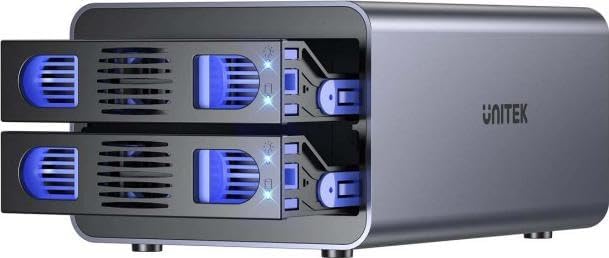
ചിത്രം 1.2: മുൻഭാഗം view of the Unitek 2 Bay USB-C RAID External Hard Drive Enclosure, displaying the two drive bays with blue LED indicators.
2. സവിശേഷതകൾ
The Unitek 2 Bay USB-C RAID External Hard Drive Enclosure is equipped with several features designed for optimal performance and data protection:
- റെയ്ഡ് മോഡുകൾ: Supports RAID 0 (for speed), RAID 1 (for data safety), JBOD (for combined use), and PM (for normal operation).
- HDD Compatibility: Accommodates both 2.5" and 3.5" SATA HDDs.
- ഡാറ്റ കൈമാറ്റം: Up to 10Gbps for model S1308C.
- തണുപ്പിക്കൽ സംവിധാനം: Features an efficient cooling fan and aluminum alloy housing for effective heat dissipation.
- പവർ സുരക്ഷ: Includes triple protection features against overcurrent, short-circuit, and overvoltage.
- ഉപയോഗം എളുപ്പം: Tool-free installation for 3.5" HDDs; no additional drivers required for operation.
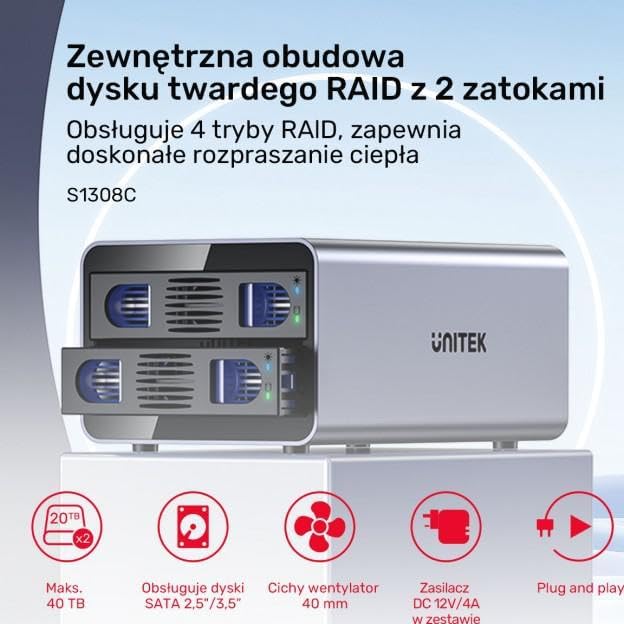
ചിത്രം 2.1: കഴിഞ്ഞുview of key features, including maximum capacity, drive compatibility, cooling, power, and ease of use.
4. Operating Modes (RAID Configuration)
The Unitek 2 Bay enclosure supports four operating modes: RAID 0, RAID 1, JBOD, and PM. Important: Changing RAID modes will erase all data on the installed hard drives. Back up your data before making any changes.
4.1. മോഡ് തിരഞ്ഞെടുക്കൽ
The RAID mode is typically selected using DIP switches or a physical button on the back of the enclosure. Refer to the diagram on the back of your enclosure for specific switch positions for each mode. After setting the desired mode, you must press and hold the "RESET" button for approximately 5 seconds until the indicator lights confirm the change.

Image 4.1: Rear panel of the enclosure, showing the cooling fan, power input, USB-C port, and control buttons including the RESET button and mode selection switches (if present).
4.2. RAID Mode Descriptions
- റെയ്ഡ് 0 (സ്ട്രൈപ്പിംഗ്): Combines two drives into a single large volume, distributing data across both drives. This mode offers the highest performance and capacity but provides no data redundancy. If one drive fails, all data is lost.
- റെയ്ഡ് 1 (മിററിംഗ്): Creates an exact copy of data on both drives. This provides data redundancy; if one drive fails, your data is still accessible on the other drive. The total usable capacity is equal to the size of the smaller drive.
- JBOD (ഒരു കൂട്ടം ഡിസ്കുകൾ): Presents the drives as a single, concatenated volume. Data is written sequentially to the first drive, then to the second. This increases total capacity but offers no performance or redundancy benefits.
- PM (Port Multiplier / Individual Disks): Each drive is recognized as a separate, independent volume by the operating system. This is the default mode if no RAID configuration is desired.
5. പരിപാലനം
Proper maintenance ensures the longevity and optimal performance of your Unitek enclosure:
- വൃത്തിയാക്കൽ: Use a soft, dry cloth to clean the exterior of the enclosure. Avoid liquid cleaners. Ensure the cooling fan vents are free from dust and obstructions to maintain proper airflow.
- വെൻ്റിലേഷൻ: Place the enclosure in a well-ventilated area. Do not block the air vents.
- താപനില: Operate the enclosure within recommended environmental temperatures to prevent overheating.
- സുരക്ഷിതമായ നീക്കം: Always safely eject or unmount the drives from your operating system before disconnecting the enclosure or powering it off to prevent data corruption.
8. വാറൻ്റിയും പിന്തുണയും
Unitek products are designed for reliability and performance. For specific warranty details, please refer to the warranty card included with your product or visit the official Unitek website. If you encounter any issues or require technical assistance, please contact Unitek customer support through their official webസൈറ്റ് അല്ലെങ്കിൽ നിങ്ങളുടെ ഉൽപ്പന്ന പാക്കേജിംഗിൽ നൽകിയിരിക്കുന്ന ബന്ധപ്പെടാനുള്ള വിവരങ്ങൾ.
Unitek Official Webസൈറ്റ്: www.unitek-products.com (കുറിപ്പ്: ഇതൊരു പ്ലെയ്സ്ഹോൾഡറാണ് URL, please refer to your product documentation for the correct support webസൈറ്റ്.)