ആമുഖം
This manual provides essential information for the proper use, setup, and maintenance of your new remote control for adjustable bed bases. Please read this manual thoroughly before operation to ensure correct functionality and to prevent any issues.
- ബ്രാൻഡ്: ജനറിക്
- മോഡൽ: for Richmat BT2000LP C144980C180175
- അനുയോജ്യമായ ഉപകരണങ്ങൾ: Adjustable bed base
Important Compatibility Information
This remote control is specifically designed for certain adjustable bed base control boxes and is not universal. To ensure compatibility, it is crucial that your existing control box and old remote match the specifications for this model.
This remote only fits for Richmat NL200ULB 12778C0180410 and NL300B-L1 12778C0180412 Control boxes. If your model number is not included, this remote will not be compatible.

Figure 1: Important compatibility tips. This image displays a label from a control box (model JLDP.10.030.000, NPIE2W) and views of an old remote control, including its front and the battery compartment with AAA batteries inserted. This visual aid helps users verify their existing equipment against the required specifications for compatibility.

Figure 2: Diagram illustrating the components of an adjustable bed base system, including the control box (JLDP.15.013.001) and connections to various motors (Head Motor, Foot Motor). This diagram helps in identifying the control box location and its connections.

ചിത്രം 3: ക്ലോസപ്പ് view of a control box, highlighting its label with model information (JLDP.15.013.001). This image assists users in verifying the model number of their control box for compatibility.
Setup: Pairing Instructions
Follow these steps carefully to pair your new remote control with your adjustable bed base control box. Ensure you have 2 AAA batteries ready for the remote (not included).
- Prepare the Bed Base: Unplug the adjustable bed base from the power outlet. Wait for 5 seconds, then plug it back in.
- Locate Control Box Reset Button: Locate the battery backup box or power down box under the bed. Double-click the "reset" button on the control box twice. This button is usually labeled "Learn" or "Reset Coding". Do not press and hold; simply press and release.
- Initiate Remote Pairing: On the remote control, press and hold the "head up" button and the "foot up" button together for 10 seconds.
- ജോടിയാക്കൽ പൂർത്തിയാക്കുക: Pairings must be completed within 15 seconds of pressing the reset button on the control box. If 15 seconds pass, you must unplug the power again and restart from Step 1. Ensure to pair when the light on the control box is on, as it will go out if not paired within 15 seconds.
- സ്ഥിരീകരണം: Once you hear beeps, this indicates that the remote is successfully synced with the control box.
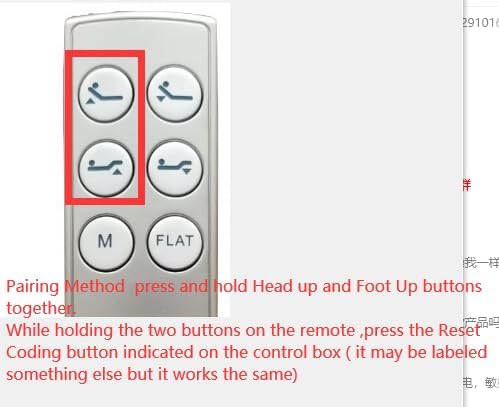
Figure 4: The remote control with the "head up" and "foot up" buttons highlighted, indicating the buttons to press simultaneously for pairing. This image visually guides users during the pairing process.
പ്രവർത്തന നിർദ്ദേശങ്ങൾ
Once paired, your remote control allows you to adjust your bed base. The remote features six primary buttons:
- തല മുകളിലേക്കും താഴേക്കും: Adjusts the head section of the bed.
- കാൽ മുകളിലേക്കും താഴേക്കും: Adjusts the foot section of the bed.
- M (Memory): Typically used to set or recall a favorite position. Refer to your bed base manual for specific memory function details.
- ഫ്ലാറ്റ്: കിടക്ക പൂർണ്ണമായും പരന്ന സ്ഥാനത്തേക്ക് തിരികെ കൊണ്ടുവരുന്നു.

ചിത്രം 5: മുൻഭാഗം view of the remote control, displaying all six control buttons: Head Up, Head Down, Foot Up, Foot Down, Memory (M), and Flat. This image provides a clear visual reference for the remote's layout.

ചിത്രം 6: പിന്നിലേക്ക് view of the remote control with the battery cover removed, revealing the compartment for two AAA batteries. This image assists users in correctly installing or replacing batteries.
മെയിൻ്റനൻസ്
നിങ്ങളുടെ റിമോട്ട് കൺട്രോളിന്റെ ദീർഘായുസ്സും ശരിയായ പ്രവർത്തനവും ഉറപ്പാക്കാൻ, ഈ അറ്റകുറ്റപ്പണി മാർഗ്ഗനിർദ്ദേശങ്ങൾ പാലിക്കുക:
- ബാറ്ററി മാറ്റിസ്ഥാപിക്കൽ: The remote requires 2 AAA batteries. Replace batteries when the remote's response becomes sluggish or stops working. Ensure correct polarity when inserting new batteries.
- വൃത്തിയാക്കൽ: Wipe the remote with a soft, dry cloth. Do not use liquid cleaners or abrasive materials, as they may damage the remote's surface or internal components.
- സംഭരണം: നേരിട്ടുള്ള സൂര്യപ്രകാശത്തിൽ നിന്നും കടുത്ത താപനിലയിൽ നിന്നും മാറി, വരണ്ട സ്ഥലത്ത് റിമോട്ട് സൂക്ഷിക്കുക.
- കൈകാര്യം ചെയ്യൽ: Avoid dropping the remote or exposing it to excessive force, which can cause internal damage.
ട്രബിൾഷൂട്ടിംഗ്
If you encounter issues with your remote control, try the following troubleshooting steps:
- റിമോട്ട് പ്രതികരിക്കുന്നില്ല:
- ബാറ്ററികൾ ശരിയായി ചേർത്തിട്ടുണ്ടോ എന്നും ആവശ്യത്തിന് ചാർജ് ഉണ്ടോ എന്നും പരിശോധിക്കുക. ആവശ്യമെങ്കിൽ അവ മാറ്റിസ്ഥാപിക്കുക.
- റിമോട്ടിനും ബെഡ് ബേസിന്റെ റിസീവറിനും ഇടയിൽ തടസ്സങ്ങളൊന്നുമില്ലെന്ന് ഉറപ്പാക്കുക.
- Re-attempt the pairing process as described in the "Setup: Pairing Instructions" section.
- Bed Base Not Moving:
- Verify that the bed base is properly plugged into a working power outlet.
- എന്തെങ്കിലും കേടുപാടുകൾ ഉണ്ടോയെന്ന് പവർ കോർഡ് പരിശോധിക്കുക.
- Ensure the control box is receiving power.
- ഇടയ്ക്കിടെയുള്ള പ്രവർത്തനം:
- This could indicate low batteries in the remote. Replace them.
- Ensure the remote is within effective range of the bed base.
If problems persist after attempting these steps, please refer to the support section or contact the manufacturer.
സ്പെസിഫിക്കേഷനുകൾ
| മോഡൽ നമ്പർ | for Richmat BT2000LP C144980C180175 |
| ബ്രാൻഡ് | ജനറിക് |
| അനുയോജ്യമായ ഉപകരണങ്ങൾ | Adjustable bed base |
| പവർ ഉറവിടം | 2 x AAA ബാറ്ററികൾ (ഉൾപ്പെടുത്തിയിട്ടില്ല) |
| നിറം | കറുപ്പ് |
| പിന്തുണയ്ക്കുന്ന ഉപകരണങ്ങളുടെ പരമാവധി എണ്ണം | 1 |
| നിർമ്മാതാവ് | ഈസിട്രി |
| മാതൃരാജ്യം | ചൈന |
വാറൻ്റിയും പിന്തുണയും
This product is a replacement remote control. For specific warranty information regarding your adjustable bed base or the remote control, please refer to the documentation provided with your original bed base or contact the manufacturer of the bed base directly.
For further assistance or technical support related to this remote control, please contact the seller or manufacturer, Easytry, through the platform where the purchase was made.


