
CORBOBO 60 HE
AULA WIN60 HE MAX Mechanical Gaming Keyboard Instruction Manual
Brand: CORBOBO | Model: 60 HE
1. ആമുഖം
The AULA WIN60 HE MAX is a high-performance 60% mechanical gaming keyboard designed for competitive gaming and efficient typing. It features advanced Hall Effect magnetic switches, adjustable actuation, rapid trigger mode, and an 8000Hz polling rate for ultra-fast response times. Its compact design saves desk space, while dynamic RGB lighting and a web-based driver offer extensive customization.
This manual provides detailed instructions for setting up, operating, maintaining, and troubleshooting your AULA WIN60 HE MAX keyboard to ensure optimal performance and longevity.
2. ബോക്സിൽ എന്താണുള്ളത്?
Upon opening your AULA WIN60 HE MAX package, please verify that all the following items are included:
- കീബോർഡ് x 1
- USB-C കേബിൾ x 1
- കീക്യാപ്പ് പുള്ളർ x 1

Image: The AULA WIN60 HE MAX keyboard with its USB-C cable and keycap puller, as typically found in the box.
Video: An unboxing demonstration of the AULA WIN60 HE MAX keyboard, showing the contents of the package.
3. സജ്ജീകരണം
3.1 പ്രാരംഭ കണക്ഷൻ
- Unpack the keyboard and the USB-C cable from the box.
- Connect the USB-C end of the cable to the port on the AULA WIN60 HE MAX keyboard.
- Connect the other end of the USB-C cable to an available USB port on your computer (Laptop, PC Windows).
- The keyboard will automatically be recognized by your operating system. The RGB lighting will illuminate, indicating it is powered on.
Note: This keyboard is not compatible with PlayStation 5/4 (PS5/PS4) and OBOX.
3.2 Web-Based Driver Setup
The AULA WIN60 HE MAX features a powerful web-based driver for customization, eliminating the need for software downloads. To access the driver:
- Ensure your keyboard is connected to your computer and your computer has an active internet connection.
- നിങ്ങൾക്ക് ഇഷ്ടമുള്ളത് തുറക്കുക web ബ്രൗസർ.
- Navigate to the official AULA driver website (refer to the product packaging or manufacturer's webകൃത്യമായ വിവരങ്ങൾക്ക് സൈറ്റ് URL).
- ദി web interface will detect your keyboard, allowing you to customize settings such as key remapping, macros, and RGB lighting effects in real-time.
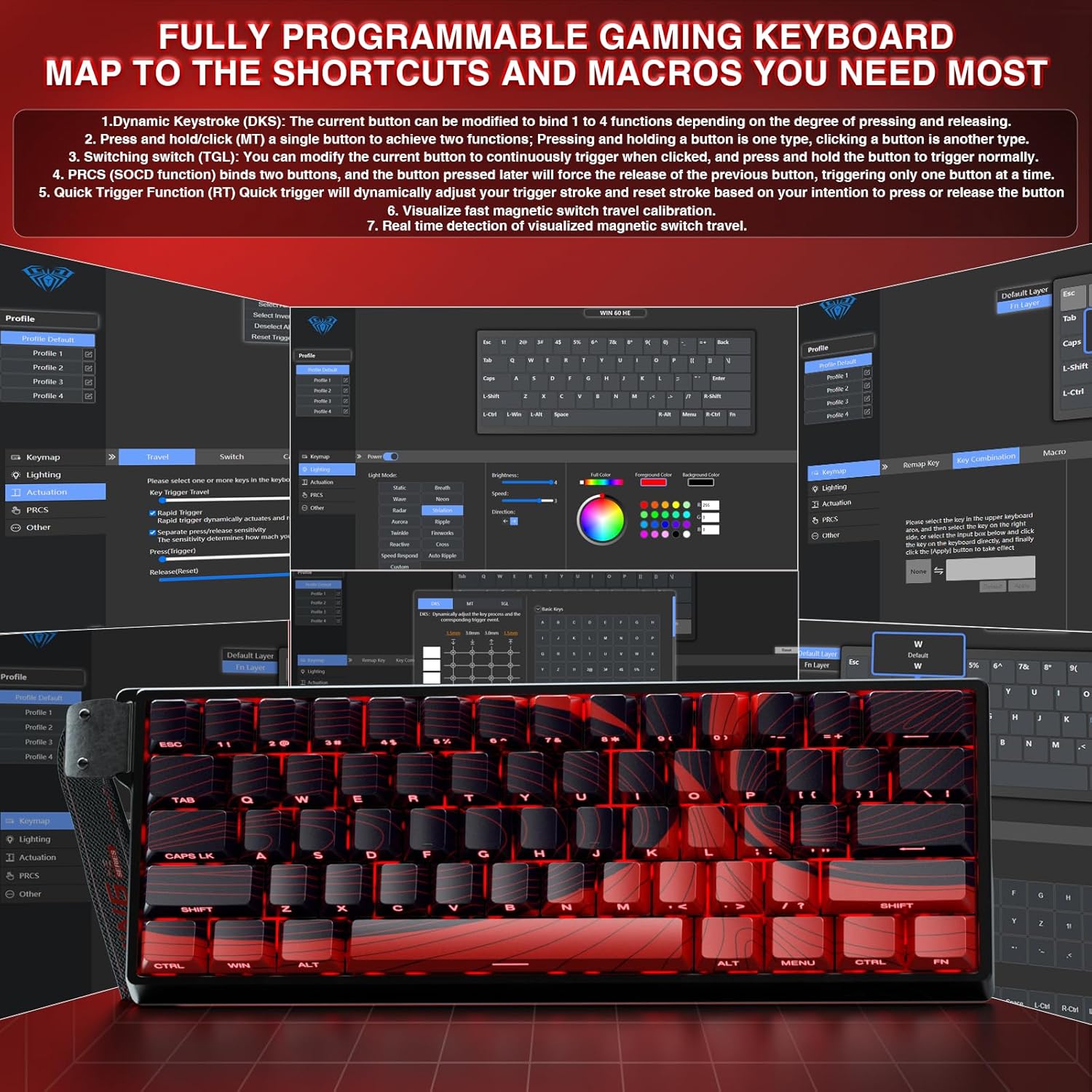
ചിത്രം: ദി web-based driver interface for the AULA WIN60 HE MAX, showing options for key remapping, lighting, and other settings.
4. നിങ്ങളുടെ കീബോർഡ് പ്രവർത്തിപ്പിക്കൽ
4.1 ഹാൾ ഇഫക്റ്റ് മാഗ്നറ്റിക് സ്വിച്ചുകളും റാപ്പിഡ് ട്രിഗറും
The AULA WIN60 HE MAX is equipped with advanced Hall Effect magnetic switches, offering precise and customizable actuation. The Rapid Trigger mode allows for ultra-fast response times, ideal for competitive gaming.
- ക്രമീകരിക്കാവുന്ന പ്രവർത്തനം: The magnetic switches allow you to set the actuation point (the distance a key needs to travel to register a press) from 0.02mm to 3.44mm. This can be adjusted via the web-based driver to suit your preference for typing or gaming.
- Rapid Trigger Mode: With an ultra-low RT step distance of just 0.01mm, keys can be released and re-pressed at an incredibly fast rate, providing a significant advantage in games requiring quick, repeated inputs.

Image: A close-up diagram showing the adjustable actuation range (0.02mm to 3.44mm) and the rapid trigger functionality of the magnetic switches.

Image: An illustration demonstrating the innovative magnetic switch technology for smooth feel and precise trigger response.
4.2 Hot-Swappable PBT Double Shot Keycaps
The keyboard features full-key hot-swappable PBT double shot keycaps, allowing for easy customization and maintenance of switches and keycaps.
- സ്വിച്ച് അനുയോജ്യത: Compatible with most magnetic switches on the market.
- ഈട്: PBT keycaps offer high wear resistance and a frosted hand feeling, providing superior durability compared to regular keycaps.

Image: The AULA WIN60 HE MAX keyboard demonstrating its full-key hot-swappable PBT double shot keycaps, with individual switches visible.
4.3 ഡൈനാമിക് RGB ലൈറ്റിംഗ്
Customize your keyboard's aesthetics with 16.8 million customizable RGB colors and 14 backlight effects. The lower light position design illuminates side-printed PBT keycaps for enhanced visual appeal.
- ഇഷ്ടാനുസൃതമാക്കൽ: ഉപയോഗിക്കുക web-based driver to select from a wide spectrum of colors and lighting effects.
- On-the-Fly Controls: Utilize FN key combinations for quick adjustments:
- FN + Backspace: Turn off keyboard lighting effect
- FN + Tab: Switch light effect mode
- FN + \: Switch light effect color
- FN + F: Light brightness increases
- FN + J: Light brightness decreases
- FN + Alt: Left Alt light speed increase
- FN + Ctrl: Right Alt light speed decrease
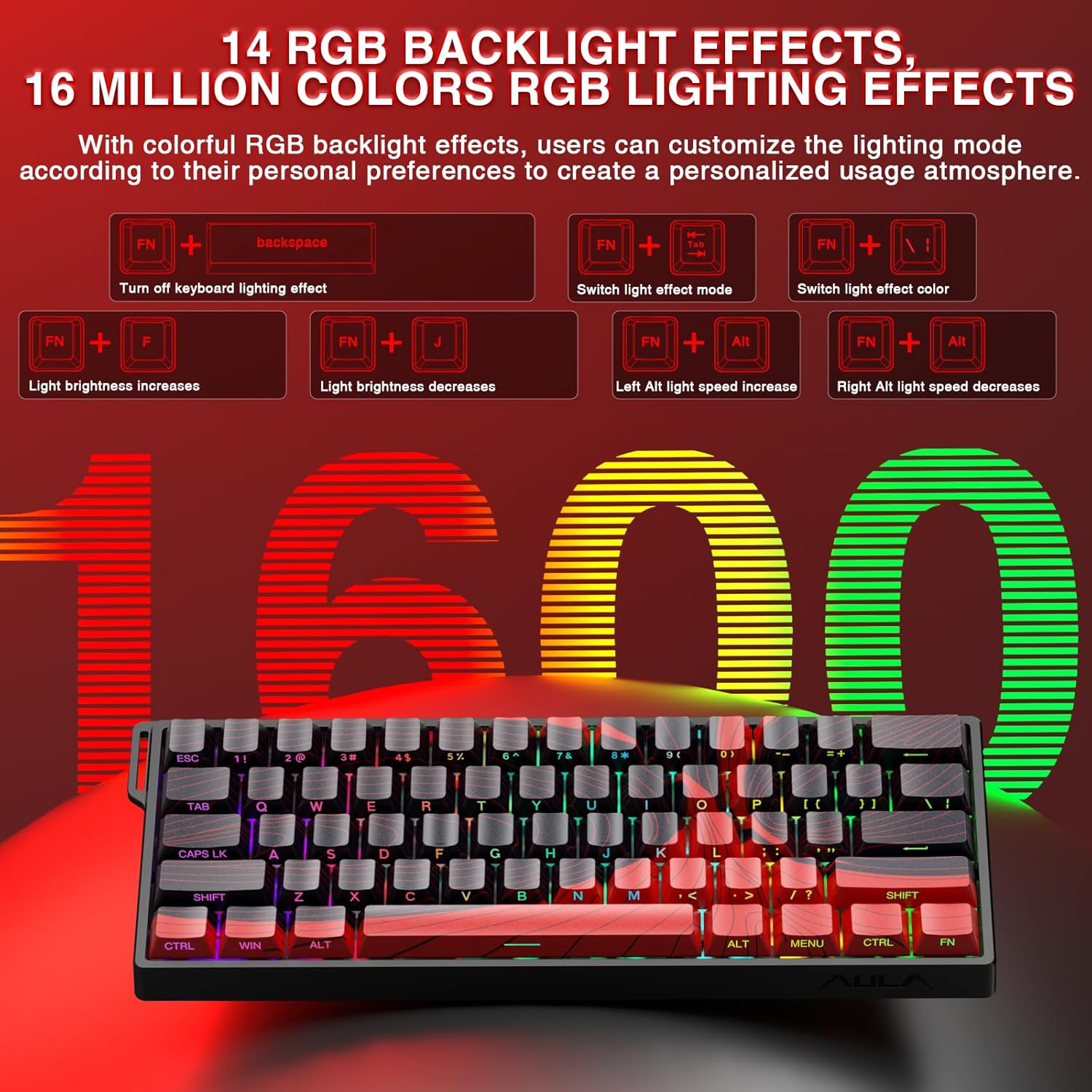
Image: The AULA WIN60 HE MAX keyboard showcasing its 14 RGB backlight effects and 16 million color options, along with key combinations for control.
4.4 Compact 60% Design
The space-saving 60% layout of the AULA WIN60 HE MAX makes it ideal for gaming, work, or travel. Its compact size optimizes desk space without compromising functionality.

Image: The AULA WIN60 HE MAX keyboard positioned on a desk, demonstrating its compact 60% design for space-saving and portability.
4.5 High Polling Rate
Experience ultra-fast response times with an 8000Hz polling rate, ensuring every keystroke is registered almost instantaneously for a competitive edge in fast-paced games.

Image: Visual comparison highlighting the benefits of rapid trigger technology for FPS and MOBA games, showing faster reset and active states.
5. പരിപാലനം
Proper maintenance ensures the longevity and optimal performance of your AULA WIN60 HE MAX keyboard.
5.1 വൃത്തിയാക്കൽ
- പൊതുവായ ശുചീകരണം: മൃദുവായ, ലിൻ്റ് രഹിത തുണി ഉപയോഗിക്കുകampകീക്യാപ്പുകളും കീബോർഡ് പ്രതലവും തുടയ്ക്കാൻ വെള്ളമോ നേരിയ ക്ലീനിംഗ് ലായനിയോ ഉപയോഗിച്ച് തുടയ്ക്കുക. അമിതമായ ഈർപ്പം ഒഴിവാക്കുക.
- പൊടി നീക്കം: കീക്യാപ്പുകൾക്കും സ്വിച്ചുകൾക്കുമിടയിലുള്ള പൊടിയും അവശിഷ്ടങ്ങളും നീക്കം ചെയ്യാൻ കംപ്രസ് ചെയ്ത വായു ഉപയോഗിക്കുക.
- ഡീപ് ക്ലീനിംഗ് (കീക്യാപ്പുകൾ): For a more thorough clean, use the provided keycap puller to carefully remove keycaps. Wash them with mild soap and water, rinse thoroughly, and ensure they are completely dry before reattaching.
5.2 സ്വിച്ച് ആൻഡ് കീക്യാപ്പ് കെയർ
- When removing or installing keycaps, apply gentle, even pressure to avoid damaging the switch stems.
- If replacing switches, ensure they are properly aligned with the hot-swap sockets before pressing them into place. Do not force switches.
6. പ്രശ്നപരിഹാരം
If you encounter issues with your AULA WIN60 HE MAX keyboard, refer to the following common solutions:
- കീബോർഡ് പ്രതികരിക്കുന്നില്ല:
- USB-C കേബിൾ കീബോർഡിലേക്കും കമ്പ്യൂട്ടറിലേക്കും സുരക്ഷിതമായി ബന്ധിപ്പിച്ചിട്ടുണ്ടെന്ന് ഉറപ്പാക്കുക.
- നിങ്ങളുടെ കമ്പ്യൂട്ടറിലെ മറ്റൊരു USB പോർട്ടിലേക്ക് കീബോർഡ് ബന്ധിപ്പിക്കാൻ ശ്രമിക്കുക.
- ഒരു കമ്പ്യൂട്ടർ-നിർദ്ദിഷ്ട പ്രശ്നം ഒഴിവാക്കാൻ മറ്റൊരു കമ്പ്യൂട്ടറിൽ കീബോർഡ് പരിശോധിക്കുക.
- നിങ്ങളുടെ കമ്പ്യൂട്ടർ പുനരാരംഭിക്കുക.
- RGB ലൈറ്റിംഗ് പ്രവർത്തിക്കുന്നില്ല/തെറ്റാണ്:
- Check the FN key combinations (e.g., FN + Backspace) to ensure lighting hasn't been turned off.
- ആക്സസ് ചെയ്യുക web-based driver to verify lighting settings and apply changes.
- കീബോർഡ് ഫേംവെയർ ഇതിലൂടെ കാലികമാണെന്ന് ഉറപ്പാക്കുക web ഡ്രൈവർ.
- കീകൾ രജിസ്റ്റർ ചെയ്യുന്നില്ല അല്ലെങ്കിൽ ഇരട്ട-ടൈപ്പിംഗ് ഇല്ല:
- Carefully remove the keycap and inspect the switch for any visible debris. Use compressed air to clean around the switch.
- ഒരു പ്രത്യേക സ്വിച്ച് തകരാറിലാണെങ്കിൽ, ഹോട്ട്-സ്വാപ്പ് ചെയ്യാവുന്ന ഡിസൈൻ ഉപയോഗിച്ച് അത് മാറ്റിസ്ഥാപിക്കാവുന്നതാണ്.
- Check the actuation settings in the web-based driver; a very low actuation point might cause unintended presses.
- Web-Based Driver Not Detecting Keyboard:
- നിങ്ങളുടെ കമ്പ്യൂട്ടറിന് സ്ഥിരമായ ഒരു ഇന്റർനെറ്റ് കണക്ഷൻ ഉണ്ടെന്ന് ഉറപ്പാക്കുക.
- മറ്റൊന്ന് പരീക്ഷിക്കുക web ബ്രൗസർ.
- നിങ്ങളുടെ ബ്രൗസറിന്റെ കാഷെയും കുക്കികളും മായ്ക്കുക.
- Temporarily disable any VPN or firewall that might be blocking the connection to the driver webസൈറ്റ്.
7 സ്പെസിഫിക്കേഷനുകൾ
| ഫീച്ചർ | വിശദാംശങ്ങൾ |
|---|---|
| ഉൽപ്പന്ന അളവുകൾ | 11 x 5 x 1.1 ഇഞ്ച് |
| ഇനത്തിൻ്റെ ഭാരം | 2.23 പൗണ്ട് |
| നിർമ്മാതാവ് | ഔല |
| ASIN | B0F195TK4B |
| ഇനം മോഡൽ നമ്പർ | 60 HE |
| ബ്രാൻഡ് | കോർബോബോ |
| അനുയോജ്യമായ ഉപകരണങ്ങൾ | Laptop, PC Windows (Not compatible with PlayStation 5/4 (PS5/PS4) and OBOX) |
| കണക്റ്റിവിറ്റി ടെക്നോളജി | USB-C, Wired Keyboard |
| കീബോർഡ് വിവരണം | Hall Effect Magnetic Switches Rapid Trigger Mechanical Gaming Keyboard |
| ശുപാർശ ചെയ്യുന്ന ഉപയോഗങ്ങൾ | Everyday Use, Gaming, Programming |
| പ്രത്യേക സവിശേഷതകൾ | Backlit, Hot-Swappable, Hotkeys and Media Keys, Portable, Programmable Keys |
| നിറം | Red (for this variant) |
| കീകളുടെ എണ്ണം | 61 |
| കീബോർഡ് ബാക്ക്ലൈറ്റിംഗ് | ആർജിബി (16.8 ദശലക്ഷം നിറങ്ങൾ) |
| ശൈലി | സമകാലികം |
8. വാറൻ്റിയും പിന്തുണയും
For warranty information, technical support, or further inquiries regarding your AULA WIN60 HE MAX keyboard, please contact CORBOBO customer service or visit the official CORBOBO website. Details can typically be found on the product packaging or the manufacturer's official online presence.
ഏതെങ്കിലും വാറന്റി ക്ലെയിമുകൾക്കായി നിങ്ങളുടെ വാങ്ങിയതിന്റെ തെളിവ് സൂക്ഷിക്കുക.
Ask a question about this manual
Ask about setup, troubleshooting, compatibility, parts, safety, or missing instructions. Manuals+ will review the question and use this page’s manual context to help answer it.