
ആമുഖം
വാങ്ങിയതിന് നന്ദി.asing the Sigma 50mm F2 DG Contemporary lens. This manual provides essential information for the safe and effective use of your new lens. Please read it thoroughly before using the product and keep it for future reference.
സുരക്ഷാ മുൻകരുതലുകൾ
- Do not look at the sun or other strong light sources through the lens, as this can cause permanent vision damage.
- Keep the lens away from direct sunlight when not in use to prevent fire hazards.
- Avoid exposing the lens to extreme temperatures, humidity, or dust.
- Do not attempt to disassemble or modify the lens. Repairs should only be performed by authorized service personnel.
- കുട്ടികൾക്ക് ലഭ്യമാകാതെ സൂക്ഷിക്കുക.
പാക്കേജ് ഉള്ളടക്കം
നിങ്ങളുടെ പാക്കേജിൽ എല്ലാ ഇനങ്ങളും ഉണ്ടെന്ന് ഉറപ്പാക്കുക:
- Sigma 50mm F2 DG Contemporary Lens
- Lens Hood (LH633-02S)
- ഫ്രണ്ട് ലെൻസ് ക്യാപ്
- പിൻ ലെൻസ് തൊപ്പി
- നിർദ്ദേശ മാനുവൽ (ഈ പ്രമാണം)
ലെൻസിൻ്റെ ഭാഗങ്ങൾ
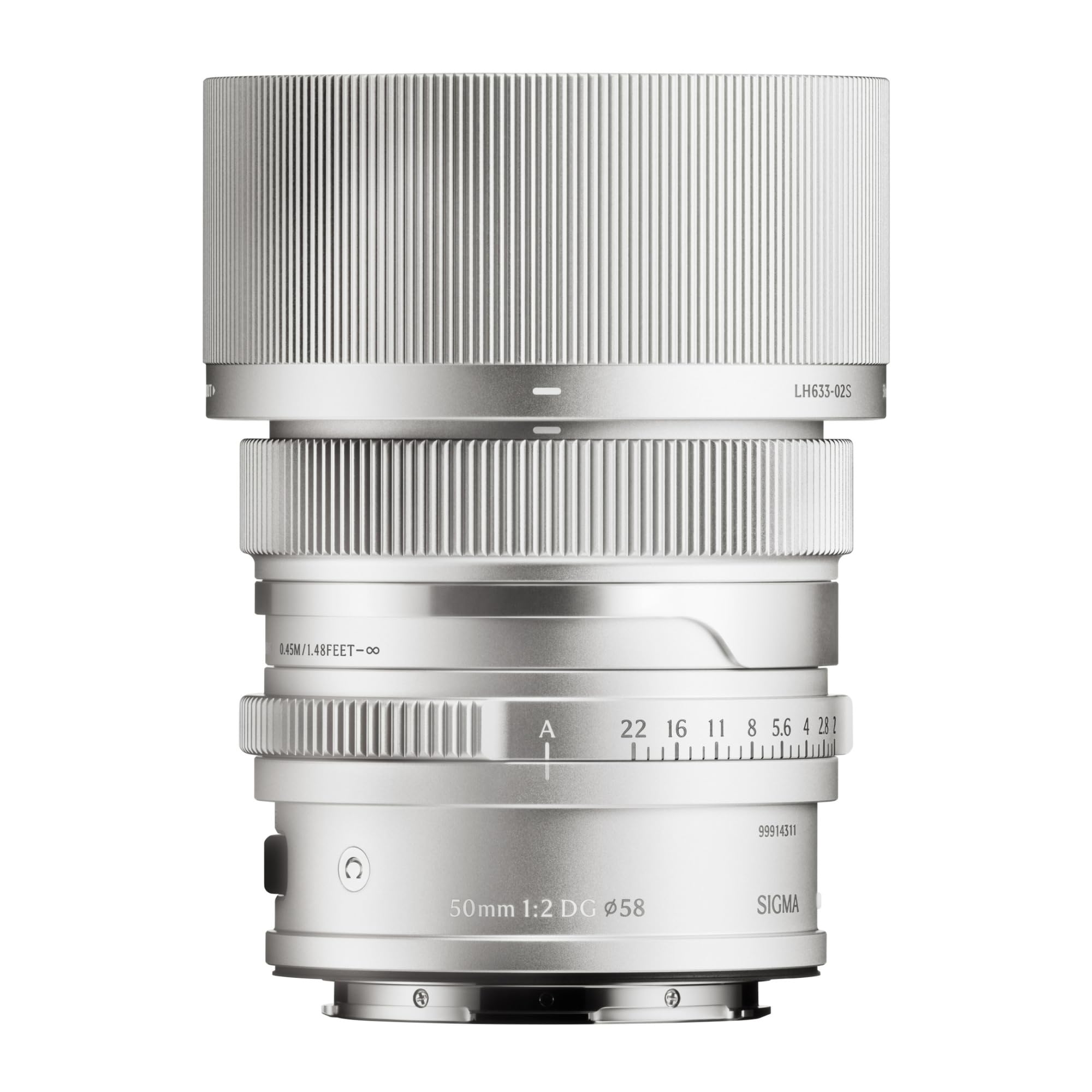
This image displays the Sigma 50mm F2 DG Contemporary lens, a prime lens designed for L-mount cameras. It features a sleek silver finish and a compact design, suitable for various photographic applications.
The Sigma 50mm F2 DG Contemporary lens features several key components:
- ഫോക്കസ് റിംഗ്: മാനുവൽ ഫോക്കസിംഗിനായി ഉപയോഗിക്കുന്നു.
- അപ്പേർച്ചർ റിംഗ്: Allows direct control over the lens aperture.
- ലെൻസ് മൗണ്ട്: Connects the lens to the camera body (L-Mount).
- Lens Hood Attachment Point: Where the dedicated lens hood is secured.

The image shows the LH633-02S lens hood, a cylindrical accessory with a ribbed exterior, designed to attach to the Sigma 50mm F2 DG Contemporary lens. It helps to prevent stray light from entering the lens, reducing flare and ghosting, and offers protection to the front element.
സജ്ജമാക്കുക
ലെൻസ് ഘടിപ്പിക്കുന്നു
- ക്യാമറയും ലെൻസും ഓഫ് ചെയ്തിട്ടുണ്ടെന്ന് ഉറപ്പാക്കുക.
- ലെൻസിൽ നിന്ന് പിൻ ലെൻസ് കാപ്പും ക്യാമറയിൽ നിന്ന് ബോഡി കാപ്പും നീക്കം ചെയ്യുക.
- Align the mounting index on the lens with the mounting index on the camera body.
- ക്യാമറ മൗണ്ടിലേക്ക് ലെൻസ് തിരുകുക, അത് സ്ഥലത്ത് ക്ലിക്ക് ചെയ്യുന്നത് വരെ ഘടികാരദിശയിൽ തിരിക്കുക. ലെൻസിനെ ബലമായി അമർത്തരുത്.
Attaching the Lens Hood (LH633-02S)
- ലെൻസ് ഹുഡിലെ ചുവന്ന ഡോട്ടും ലെൻസിന്റെ മുൻവശത്തുള്ള ചുവന്ന ഡോട്ടും വിന്യസിക്കുക.
- Rotate the lens hood clockwise until it locks securely into position.
- To remove, press the release button on the lens hood and rotate counter-clockwise.
പ്രവർത്തിക്കുന്നു
ഫോക്കസിംഗ്
This lens supports both autofocus (AF) and manual focus (MF).
- ഓട്ടോഫോക്കസ്: Set your camera's focus mode to AF. The lens will automatically focus when the shutter button is half-pressed.
- മാനുവൽ ഫോക്കസ്: Set your camera's focus mode to MF. Rotate the focus ring on the lens to adjust focus manually. Use your camera's focus peaking or magnification features for precise focusing.
അപ്പർച്ചർ നിയന്ത്രണം
The lens features an aperture ring for direct control over the aperture setting. You can also control the aperture through your camera body, depending on your camera's settings and mode.
അനുയോജ്യമായ ക്യാമറകൾ
This lens is designed for L-Mount cameras, including models such as Leica SL, Leica TL2, and Leica CL.
മെയിൻ്റനൻസ്
ലെൻസ് വൃത്തിയാക്കൽ
- Use a blower brush to remove dust from the lens surface.
- വിരലടയാളങ്ങൾക്കോ പാടുകൾക്കോ, ഒപ്റ്റിക്കൽ ലെൻസുകൾക്കായി പ്രത്യേകം രൂപകൽപ്പന ചെയ്ത വൃത്തിയുള്ളതും മൃദുവായതുമായ മൈക്രോഫൈബർ തുണി ഉപയോഗിക്കുക. ലെൻസിൽ നേരിട്ട് പുരട്ടാതെ, തുണിയിൽ ചെറിയ അളവിൽ ലെൻസ് ക്ലീനിംഗ് ലായനി പുരട്ടുക.
- Never use abrasive materials, solvents, or harsh chemicals to clean the lens.
സംഭരണം
- ഉപയോഗത്തിലില്ലാത്തപ്പോൾ, മുന്നിലെയും പിന്നിലെയും ലെൻസ് ക്യാപ്പുകൾ ഘടിപ്പിക്കുക.
- Store the lens in a cool, dry place, away from direct sunlight and high humidity.
- If storing for an extended period, consider using a desiccant to prevent mold growth.
ട്രബിൾഷൂട്ടിംഗ്
- ക്യാമറയ്ക്ക് ലെൻസ് തിരിച്ചറിയാൻ കഴിഞ്ഞില്ല: Ensure the lens is securely attached to the camera body. Power off and restart the camera. Check for any firmware updates for both the lens and camera.
- ഓട്ടോഫോക്കസ് പ്രവർത്തിക്കുന്നില്ല: Verify the camera's focus mode is set to AF. Ensure there is sufficient light and contrast in the scene for the autofocus system to operate effectively.
- ചിത്രങ്ങൾ മങ്ങിയതാണ്: Check that the lens is properly focused. Ensure the shutter speed is fast enough to prevent camera shake, especially in low light. Clean the lens elements if smudges are present.
- Lens hood difficult to attach/remove: Ensure proper alignment of the red dots. Do not force the hood; it should click into place smoothly.
സ്പെസിഫിക്കേഷനുകൾ
| മോഡലിൻ്റെ പേര് | 31S969 |
| ഫോക്കൽ ലെങ്ത് | 50 മി.മീ |
| പരമാവധി അപ്പേർച്ചർ | F2 |
| മിനിമം അപ്പർച്ചർ | F2 |
| ലെൻസ് തരം | പ്രൈം ലെൻസ് |
| അനുയോജ്യമായ മൗണ്ടിംഗുകൾ | ലെയ്ക എൽ |
| ഫോക്കസ് തരം | ഓട്ടോ ഫോക്കസ് |
| ഇമേജ് സ്റ്റെബിലൈസേഷൻ | No image stabilization |
| ജല പ്രതിരോധ നില | വാട്ടർ റെസിസ്റ്റൻ്റ് അല്ല |
| ഇനത്തിൻ്റെ ഭാരം | 2 പൗണ്ട് |
വാറൻ്റിയും പിന്തുണയും
വാറൻ്റി വിവരങ്ങൾ
ഈ ഉൽപ്പന്നം എ 9 വർഷത്തെ വാറൻ്റി. Please retain your proof of purchase for warranty claims. The warranty covers manufacturing defects under normal use. It does not cover damage caused by misuse, accidents, unauthorized repairs, or normal wear and tear.
ഉപഭോക്തൃ പിന്തുണ
For technical assistance, service, or warranty inquiries, please contact Sigma customer support through their official website or the retailer where you purchased the product. Have your model number (31S969) and proof of purchase ready when contacting support.