
1. ഉൽപ്പന്നം കഴിഞ്ഞുview
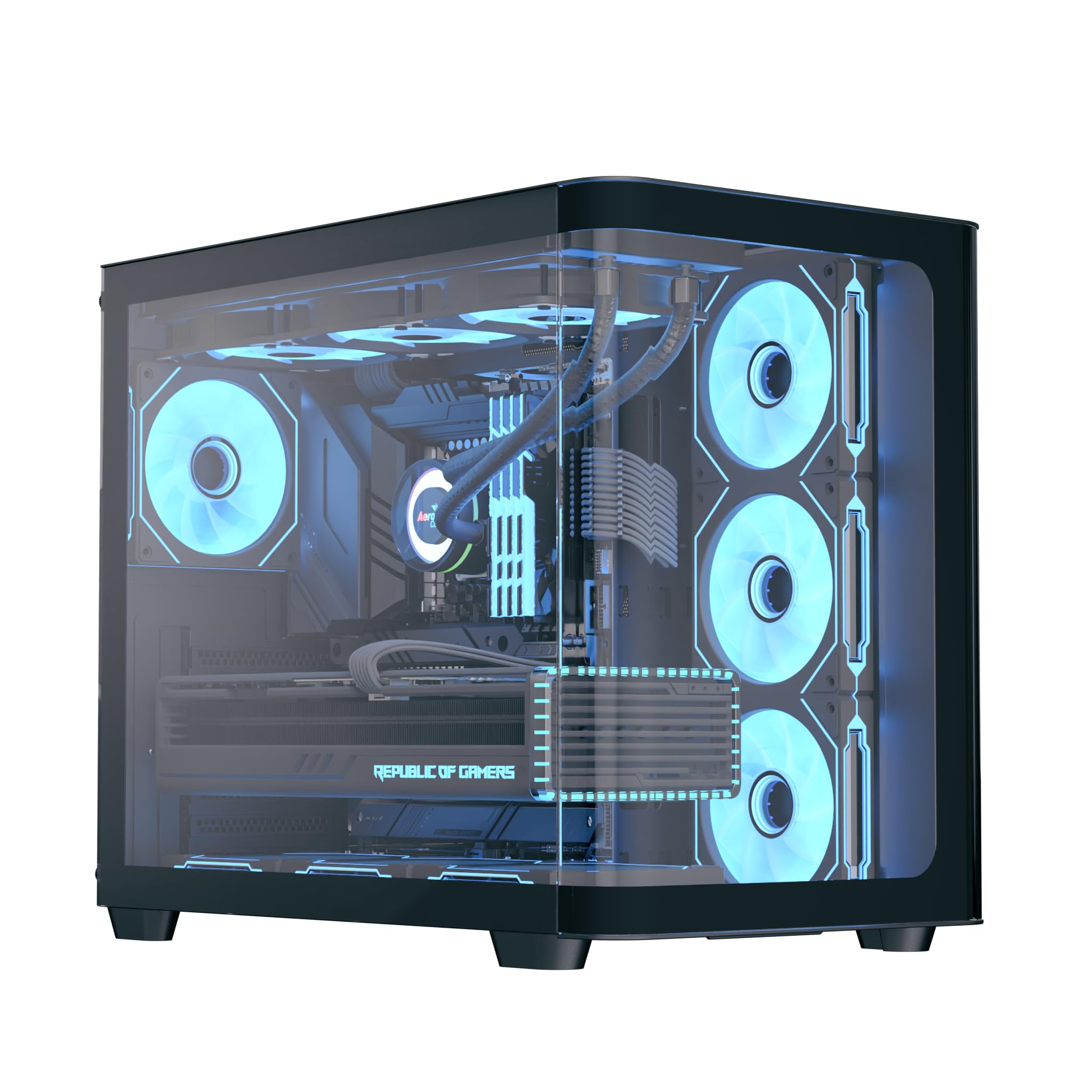
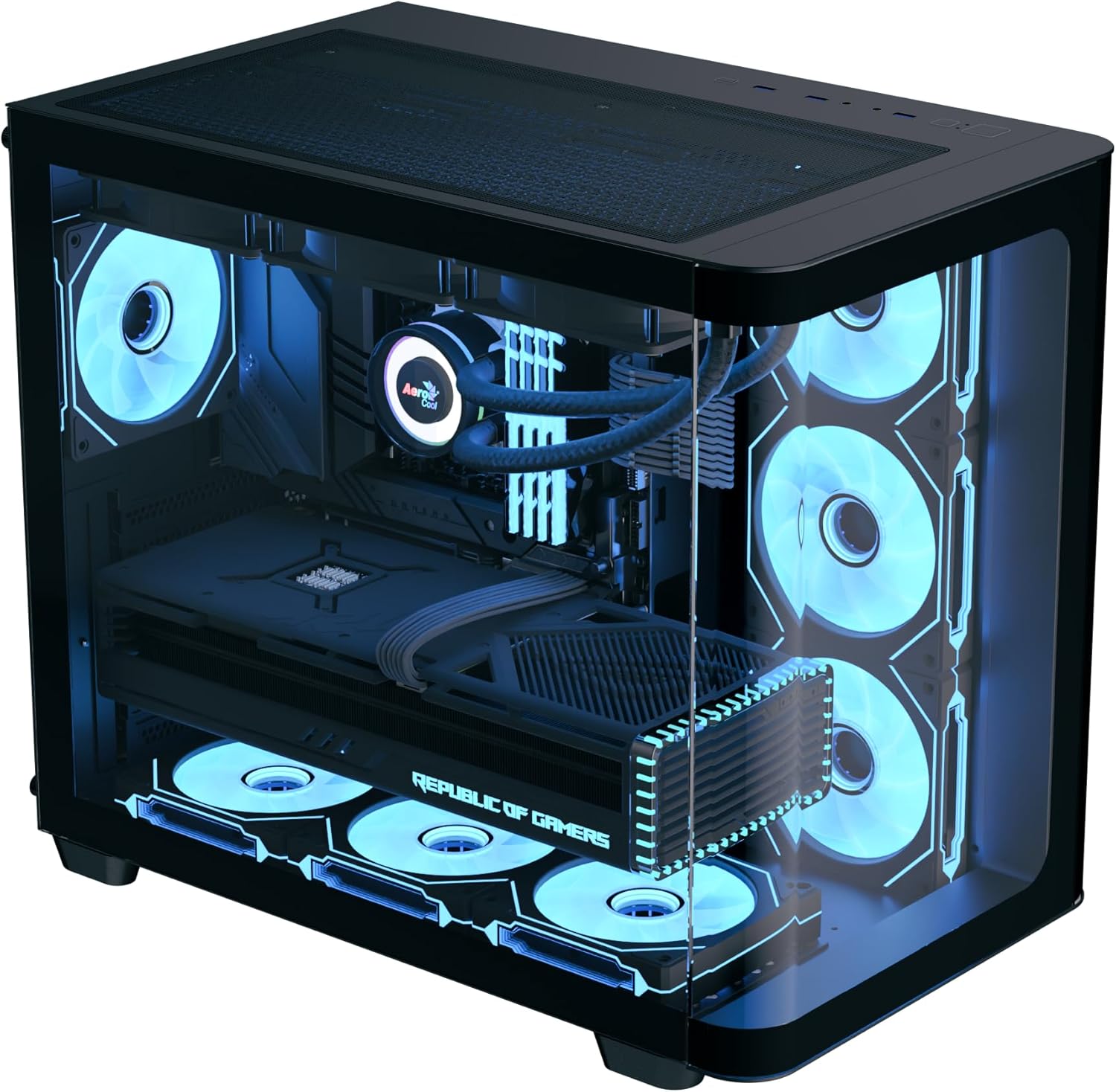
The AeroCool P500C is a mid-tower PC case designed with a dual-chamber layout. It features full tempered glass panels on the front and side, providing a clear view of internal components. The case includes four pre-installed ARGB fans, with three reverse-blade fans on the side and one standard fan at the rear, all featuring a "mirage" infinity mirror lighting effect. This case supports various cooling configurations, including air and liquid cooling systems up to 360mm radiators. It is compatible with ATX, micro-ATX, and mini-ITX motherboards, and accommodates high-end graphics cards up to 450mm in length and CPU coolers up to 162mm in height. Storage options include three SSD slots and two HDD drive bays. For ease of maintenance, the case is equipped with magnetic dust filters on the top and bottom.
2 പ്രധാന സവിശേഷതകൾ
- Mid-tower dual chamber design with full tempered glass front and side panels.
- Four pre-installed ARGB fans: three 12cm reverse-blade fans on the side and one 12cm fan at the rear.
- "Mirage" infinity mirror lighting effect on all included fans.
- Extensive cooling support for radiators up to 360mm (top and bottom) and up to 10 total fan slots.
- Compatibility with high-end graphics cards up to 450mm in length.
- Supports ATX, micro-ATX, and mini-ITX motherboards.
- Includes a 4-port PWM ARGB fan hub for centralized control.
- Equipped with top and bottom magnetic dust filters for easy maintenance.
3. പാക്കേജ് ഉള്ളടക്കം
പാക്കേജിൽ എല്ലാ ഘടകങ്ങളും ഉണ്ടെന്ന് ദയവായി പരിശോധിക്കുക:
- AeroCool P500C Mid-Tower PC Case
- Four pre-installed 12cm ARGB fans (3 reverse-blade, 1 standard)
- 4-port PWM ARGB fan hub
- Accessory box with screws, standoffs, and cable ties
- ഉപയോക്തൃ മാനുവൽ (ഈ പ്രമാണം)
4. സജ്ജീകരണവും ഇൻസ്റ്റാളേഷനും
This section provides general guidelines for installing components into your AeroCool P500C PC case. Always refer to the specific manuals for your motherboard, power supply, and other components for detailed installation instructions.
4.1 കേസ് തയ്യാറാക്കൽ
- സൈഡ് പാനലുകൾ നീക്കം ചെയ്യുക: Carefully remove the tempered glass side panel(s) by unscrewing the thumb screws and gently sliding them off. Place them on a soft, flat surface to prevent scratches.
- ആക്സസറി ബോക്സ്: Locate the accessory box inside the case, which contains all necessary screws and mounting hardware.
4.2 മദർബോർഡ് ഇൻസ്റ്റാളേഷൻ
- സ്റ്റാൻഡ്ഓഫുകൾ ഇൻസ്റ്റാൾ ചെയ്യുക: Ensure the correct standoffs are installed for your motherboard form factor (ATX, micro-ATX, mini-ITX). The P500C typically has pre-installed standoffs for ATX. Adjust as needed.
- I/O ഷീൽഡ് ഇൻസ്റ്റാൾ ചെയ്യുക: If your motherboard requires a separate I/O shield, install it into the rear opening of the case before mounting the motherboard.
- മദർബോർഡ് മൗണ്ട് ചെയ്യുക: Carefully align your motherboard with the standoffs and I/O shield, then gently lower it into place. Secure it with the provided screws.
4.3 സ്റ്റോറേജ് ഡിവൈസ് ഇൻസ്റ്റലേഷൻ
The P500C supports three SSDs and two HDDs.
- 2.5" എസ്എസ്ഡികൾ: Mount 2.5" SSDs onto the dedicated SSD trays, typically located behind the motherboard tray or in the PSU shroud area. Secure with screws.
- 3.5" എച്ച്ഡിഡികൾ: Install 3.5" HDDs into the drive bays, usually found in the lower chamber. Slide the drives into the trays and secure them.
4.4 ഗ്രാഫിക്സ് കാർഡ് (GPU) ഇൻസ്റ്റാളേഷൻ
450mm വരെ നീളമുള്ള ഗ്രാഫിക്സ് കാർഡുകൾ കേസ് പിന്തുണയ്ക്കുന്നു.
- PCIe സ്ലോട്ട് കവറുകൾ നീക്കം ചെയ്യുക: നിങ്ങളുടെ GPU യുടെ വലുപ്പത്തിന് അനുയോജ്യമായ, കേസിന്റെ പിന്നിൽ നിന്ന് ആവശ്യമായ PCIe സ്ലോട്ട് കവറുകൾ നീക്കം ചെയ്യുക.
- GPU ചേർക്കുക: Align your graphics card with the PCIe slot on the motherboard and press firmly until it clicks into place. Secure it with screws.

4.5 കൂളിംഗ് സിസ്റ്റം ഇൻസ്റ്റലേഷൻ
The P500C supports up to 360mm radiators at the top and bottom, and a total of 10 fans.
- റേഡിയറുകൾ: Mount radiators to the designated top or bottom brackets using the appropriate screws.
- അധിക ആരാധകർ: Install any additional fans in available slots (e.g., front, top, bottom, rear) as needed for optimal airflow.
- Fan Hub: Connect the pre-installed fans and any additional ARGB/PWM fans to the included 4-port PWM ARGB fan hub. Connect the hub to your motherboard's ARGB header and a PWM fan header for control.
4.6 കേബിൾ മാനേജ്മെന്റ്
കേബിളുകൾ കൈകാര്യം ചെയ്യുന്നതിന് മദർബോർഡ് ട്രേയ്ക്ക് പിന്നിലുള്ള കേബിൾ റൂട്ടിംഗ് കട്ടൗട്ടുകളും ടൈ-ഡൗൺ പോയിന്റുകളും ഉപയോഗിക്കുക. ഇത് വായുസഞ്ചാരവും സൗന്ദര്യശാസ്ത്രവും മെച്ചപ്പെടുത്തുന്നു.
4.7 ഫ്രണ്ട് I/O പാനൽ കണക്ഷനുകൾ
Connect the front panel cables (USB, audio, power switch, reset switch, LED indicators) to the corresponding headers on your motherboard. Refer to your motherboard manual for header locations.

5. പ്രവർത്തന നിർദ്ദേശങ്ങൾ
- പവർ ഓൺ: After all components are installed and cables connected, close the side panels. Connect your power supply to a wall outlet and flip the PSU switch to the ON position. Press the power button on the front panel of the case to start your system.
- ARGB ലൈറ്റിംഗ് നിയന്ത്രണം: The pre-installed ARGB fans are connected to a 4-port PWM ARGB fan hub. If this hub is connected to your motherboard's ARGB header, you can control the lighting effects using your motherboard's RGB software (e.g., ASUS Aura Sync, MSI Mystic Light Sync, Gigabyte RGB Fusion, ASRock Polychrome Sync).
- ഫാൻ സ്പീഡ് നിയന്ത്രണം: The PWM functionality of the fan hub allows your motherboard to control fan speeds based on system temperatures, optimizing cooling performance and noise levels.
6. പരിപാലനം
നിങ്ങളുടെ പിസി ഘടകങ്ങളുടെ ഒപ്റ്റിമൽ പ്രകടനവും ദീർഘായുസ്സും ഉറപ്പാക്കാൻ പതിവ് അറ്റകുറ്റപ്പണികൾ സഹായിക്കുന്നു.
- പൊടി ഫിൽട്ടറുകൾ: The AeroCool P500C is equipped with magnetic dust filters on the top and bottom. Regularly remove and clean these filters to prevent dust buildup inside the case, which can impede airflow and component cooling.
- ആന്തരിക ശുചീകരണം: Periodically open the case and use compressed air to remove dust from fans, heatsinks, and other components. Ensure the system is powered off and unplugged before cleaning.
- കേബിൾ മാനേജുമെന്റ്: Periodically check cable routing to ensure no cables are obstructing airflow or fan operation.
7. പ്രശ്നപരിഹാരം
പ്രശ്നങ്ങൾ നേരിടുകയാണെങ്കിൽ, ഇനിപ്പറയുന്ന പൊതുവായ ട്രബിൾഷൂട്ടിംഗ് ഘട്ടങ്ങൾ പരിഗണിക്കുക:
- സിസ്റ്റം ഓണാക്കുന്നില്ല:
- Ensure the power supply is properly connected to the wall outlet and the PSU switch is ON.
- എല്ലാ പവർ കേബിളുകളും (24-പിൻ ATX, 8-പിൻ CPU, PCIe പവർ) മദർബോർഡിലേക്കും ഘടകങ്ങളിലേക്കും സുരക്ഷിതമായി ബന്ധിപ്പിച്ചിട്ടുണ്ടെന്ന് ഉറപ്പാക്കുക.
- ഫ്രണ്ട് പാനൽ പവർ സ്വിച്ച് കേബിൾ മദർബോർഡ് ഹെഡറുമായി ശരിയായി ബന്ധിപ്പിച്ചിട്ടുണ്ടോയെന്ന് പരിശോധിക്കുക.
- ഫാനുകൾ കറങ്ങുന്നില്ല/ARGB പ്രകാശിക്കുന്നില്ല:
- Confirm that the fans are properly connected to the fan hub.
- Ensure the fan hub is connected to a power source (e.g., SATA power) and the motherboard's ARGB/PWM headers.
- Check your motherboard's BIOS/UEFI settings or RGB software for fan control and lighting settings.
- അമിത ചൂടാക്കൽ പ്രശ്നങ്ങൾ:
- Verify that all case fans are spinning and oriented correctly for optimal airflow (intake/exhaust).
- Clean dust filters and internal components to ensure unrestricted airflow.
- സിപിയു കൂളറും ജിപിയു ഫാനുകളും ശരിയായി പ്രവർത്തിക്കുന്നുണ്ടെന്ന് ഉറപ്പാക്കുക.
8 സ്പെസിഫിക്കേഷനുകൾ
| ഫീച്ചർ | സ്പെസിഫിക്കേഷൻ |
|---|---|
| ബ്രാൻഡ് | എയറോകൂൾ |
| കേസ് തരം | മിഡ് ടവർ |
| മോഡലിൻ്റെ പേര് | P500C |
| നിറം | കറുപ്പ് |
| മദർബോർഡ് പിന്തുണ | ATX, മൈക്രോ-ATX, മിനി-ITX |
| മുൻകൂട്ടി ഇൻസ്റ്റാൾ ചെയ്ത ഫാനുകൾ | 4 x 12cm ARGB (3 reverse-blade side, 1 rear) |
| റേഡിയേറ്റർ പിന്തുണ | Up to 360mm (Top, Bottom) |
| പരമാവധി GPU ദൈർഘ്യം | 450 മി.മീ |
| പരമാവധി സിപിയു കൂളർ ഉയരം | 162 മി.മീ |
| ഡ്രൈവ് ബേകൾ | 3 x 2.5" SSD, 2 x 3.5" HDD |
| I/O പോർട്ടുകൾ | USB, Audio (specifics not detailed in source) |
| ഇനത്തിൻ്റെ ഭാരം | 9.12 കിലോഗ്രാം |
| യു.പി.സി | 810189570009 |
9. വാറൻ്റിയും പിന്തുണയും
The AeroCool P500C PC Case comes with a പരിമിത വാറൻ്റിവാറന്റി ക്ലെയിമുകൾക്കായി നിങ്ങളുടെ വാങ്ങിയതിന്റെ തെളിവ് സൂക്ഷിക്കുക.
For technical support, warranty inquiries, or further assistance, please visit the official AeroCool website or contact their customer service department. Contact information can typically be found on the AeroCool webസൈറ്റ് അല്ലെങ്കിൽ ഉൽപ്പന്ന പാക്കേജിംഗിൽ.