
1. ആമുഖം
This user manual provides detailed instructions for the installation, operation, and maintenance of your Tuya Wi-Fi BL E27 Smart Light Socket Adapter. Please read this manual thoroughly before using the product to ensure safe and optimal performance. This smart adapter allows you to convert any standard E27 light fixture into a smart light, controllable via Wi-Fi, voice commands, and a mobile application.
2. ഉൽപ്പന്നം കഴിഞ്ഞുview
The Tuya Wi-Fi BL E27 Smart Light Socket Adapter is designed to add smart functionality to your existing E27 light bulbs. It integrates seamlessly with smart home ecosystems like Amazon Alexa and Google Home, enabling convenient voice control and remote management of your lighting. The adapter features a standard E27 screw base for installation into your light fixture and an E27 socket for your light bulb.

ചിത്രം: വശം view of the Tuya Wi-Fi E27 Smart Light Socket Adapter, showing the E27 screw base and the E27 bulb socket.
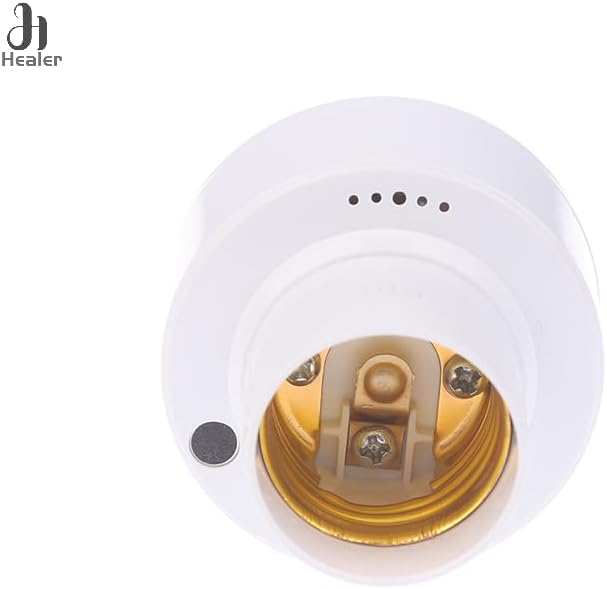
ചിത്രം: താഴെ view of the smart light socket adapter, highlighting the internal E27 bulb connection points.

Image: Diagram showing the dimensions of the smart light socket adapter: 52mm (2.05in) width and 92mm (3.62in) height.
3. സവിശേഷതകൾ
- E27 Compatibility: Designed for standard E27 screw-in light bulbs and fixtures.
- വൈഫൈ കണക്റ്റിവിറ്റി: Connects to your home Wi-Fi network for remote control.
- ശബ്ദ നിയന്ത്രണം: ഹാൻഡ്സ്-ഫ്രീ പ്രവർത്തനത്തിനായി ആമസോൺ അലക്സ, ഗൂഗിൾ ഹോം എന്നിവയുമായി പൊരുത്തപ്പെടുന്നു.
- ആപ്പ് നിയന്ത്രണം: Manage your lights from anywhere using the Tuya Smart or Smart Life mobile application.
- Timer & Schedule Functions: Set schedules for lights to turn on/off automatically.
- കോംപാക്റ്റ് ഡിസൈൻ: Blends seamlessly with most light fixtures.
4. സജ്ജീകരണം
4.1. ഇൻസ്റ്റലേഷൻ
- പവർ ഓഫ്: Ensure the power to the light fixture is turned off at the main circuit breaker before installation.
- Screw In Adapter: Carefully screw the Tuya Wi-Fi BL E27 Smart Light Socket Adapter into your existing E27 light fixture until it is snug. Do not overtighten.
- ബൾബ് ചേർക്കുക: Screw your E27 light bulb into the smart adapter's socket.
- പവർ ഓൺ: Restore power to the light fixture from the main circuit breaker. The light bulb should turn on, indicating the adapter is receiving power.
4.2. App Pairing (Tuya Smart / Smart Life App)
- അപ്ലിക്കേഷൻ ഡൗൺലോഡുചെയ്യുക: Download the "Tuya Smart" or "Smart Life" app from the App Store (iOS) or Google Play Store (Android).
- രജിസ്റ്റർ ചെയ്യുക/ലോഗിൻ ചെയ്യുക: ആപ്പ് തുറന്ന് പുതിയൊരു അക്കൗണ്ടിനായി രജിസ്റ്റർ ചെയ്യുക അല്ലെങ്കിൽ നിലവിലുള്ള ഒരു അക്കൗണ്ടിൽ ലോഗിൻ ചെയ്യുക.
- ഉപകരണം ചേർക്കുക: ഒരു പുതിയ ഉപകരണം ചേർക്കാൻ ആപ്പിന്റെ മുകളിൽ വലത് കോണിലുള്ള "+" ഐക്കണിൽ ടാപ്പ് ചെയ്യുക.
- ഉപകരണ തരം തിരഞ്ഞെടുക്കുക: Select "Lighting" or "Light Source (Wi-Fi)" from the device list.
- Confirm Indicator: Ensure the light bulb connected to the adapter is blinking rapidly. If not, turn the light switch ON-OFF-ON-OFF-ON (or similar sequence, consult app for specific reset instructions) until it blinks rapidly.
- വൈഫൈ വിശദാംശങ്ങൾ നൽകുക: നിങ്ങളുടെ 2.4GHz വൈഫൈ നെറ്റ്വർക്ക് പേരും പാസ്വേഡും നൽകുക. കുറിപ്പ്: 5GHz വൈഫൈ നെറ്റ്വർക്കുകൾ പിന്തുണയ്ക്കുന്നില്ല.
- ബന്ധിപ്പിക്കുക: The app will begin searching for and connecting to the device. Once connected, you can rename the device for easier control.
4.3. വോയ്സ് അസിസ്റ്റന്റ് ഇന്റഗ്രേഷൻ (അലക്സ/ഗൂഗിൾ ഹോം)
- കഴിവ് പ്രവർത്തനക്ഷമമാക്കുക: Open your Amazon Alexa or Google Home app. Go to "Skills & Games" (Alexa) or "Works with Google" (Google Home) and search for "Tuya Smart" or "Smart Life". Enable the skill.
- അക്കൗണ്ട് ലിങ്ക് ചെയ്യുക: Link your Tuya Smart/Smart Life account with your voice assistant account.
- ഉപകരണങ്ങൾ കണ്ടെത്തുക: Ask your voice assistant to "Discover devices" or manually initiate device discovery in the app. Your smart light adapter will appear in the device list.
- റൂമിലേക്ക് നിയോഗിക്കുക: Assign the device to a specific room for organized control.
5. പ്രവർത്തന നിർദ്ദേശങ്ങൾ
Once successfully set up, you can control your light bulb through various methods:
- ആപ്പ് നിയന്ത്രണം: Open the Tuya Smart/Smart Life app. Tap on the device to turn it on/off, set timers, or create schedules.
- ശബ്ദ നിയന്ത്രണം: Use voice commands with Amazon Alexa or Google Home. Exampകുറവ്:
- "അലക്സാ, [ഉപകരണ നാമം] ഓണാക്കുക"
- "ഹേയ് ഗൂഗിൾ, [ഡിവൈസ് നെയിം] ഓഫ് ചെയ്യൂ"
- സ്വമേധയാലുള്ള നിയന്ത്രണം: You can still use the physical light switch to turn the light on or off. However, using the physical switch to turn off the light will cut power to the adapter, making it unreachable by the app or voice commands until the switch is turned back on.
6. പരിപാലനം
To ensure the longevity and proper functioning of your smart light socket adapter, follow these maintenance guidelines:
- വൃത്തിയാക്കൽ: Disconnect power before cleaning. Wipe the adapter with a soft, dry cloth. Do not use liquid cleaners or abrasive materials.
- പരിസ്ഥിതി: Avoid exposing the adapter to excessive moisture, extreme temperatures, or direct sunlight.
- കൈകാര്യം ചെയ്യൽ: Handle the adapter carefully. Do not drop it or subject it to strong impacts.
- ഫേംവെയർ അപ്ഡേറ്റുകൾ: Periodically check the Tuya Smart/Smart Life app for available firmware updates to ensure optimal performance and security.
7. പ്രശ്നപരിഹാരം
| പ്രശ്നം | സാധ്യമായ കാരണം | പരിഹാരം |
|---|---|---|
| ഉപകരണം വൈഫൈയിലേക്ക് കണക്റ്റ് ചെയ്യുന്നില്ല. | Incorrect Wi-Fi password; 5GHz network; adapter too far from router; incorrect pairing mode. | Ensure correct 2.4GHz Wi-Fi password. Move adapter closer to router. Reset adapter (turn ON-OFF-ON-OFF-ON) until light blinks rapidly, then try pairing again. |
| Light not responding to app/voice commands. | Adapter is offline; Wi-Fi disconnected; physical switch is off; app/voice assistant skill not linked. | Check Wi-Fi connection. Ensure physical light switch is ON. Verify adapter status in app. Relink Tuya Smart/Smart Life skill in Alexa/Google Home app. |
| Light bulb not turning on. | No power to fixture; bulb faulty; adapter faulty. | Check circuit breaker. Test bulb in another fixture. Test adapter with a different bulb. |
8 സ്പെസിഫിക്കേഷനുകൾ
- മോഡൽ: A
- ബ്രാൻഡ്: ജനറിക്
- സോക്കറ്റ് തരം: E27
- കണക്റ്റിവിറ്റി: വൈഫൈ (2.4GHz മാത്രം)
- അനുയോജ്യത: Tuya Smart / Smart Life App, Amazon Alexa, Google Home
- നിർമ്മാതാവ്: KIEUCHINH
- അളവുകൾ: Approximately 52mm (width) x 92mm (height)
- ആദ്യം ലഭ്യമായ തീയതി: 14 മാർച്ച് 2025
9 സുരക്ഷാ വിവരങ്ങൾ
ഇനിപ്പറയുന്ന സുരക്ഷാ മുൻകരുതലുകൾ പാലിക്കുക:
- ഇലക്ട്രിക്കൽ സുരക്ഷ: Always turn off power at the circuit breaker before installing or removing the adapter or light bulb.
- ഇൻഡോർ ഉപയോഗത്തിന് മാത്രം: This device is intended for indoor use in dry locations only. Do not expose to water or high humidity.
- വാല്യംtagഇ അനുയോജ്യത: വോളിയം ഉറപ്പാക്കുകtage of your light fixture is compatible with the adapter and the light bulb.
- ഓവർലോഡ്: പരമാവധി വാട്ട് കവിയരുത്tage rating of the adapter or the light fixture.
- കുട്ടികൾ: കുട്ടികൾക്ക് ലഭ്യമാകാതെ സൂക്ഷിക്കുക.
- വേർപെടുത്തുക: Do not attempt to disassemble or modify the adapter. This will void the warranty and may pose a safety risk.
10. വാറൻ്റിയും പിന്തുണയും
This product comes with a standard manufacturer's warranty. For specific warranty terms and conditions, please refer to the documentation provided at the time of purchase or contact your retailer. For technical support or further assistance, please contact the manufacturer or your point of purchase.