
wh22x37220
Washer Electronic Control Board
ഇൻസ്ട്രക്ഷൻ മാനുവൽ
ഉൽപ്പന്നം കഴിഞ്ഞുview
This manual provides detailed instructions for the installation and maintenance of the replacement electronic control board for Hotpoint washers. This component is crucial for the proper functioning of your washing machine, managing various cycles and operations. It is designed as a direct replacement for specific Hotpoint models to restore full functionality.
അനുയോജ്യത
This electronic control board is compatible with the following Hotpoint washer models:
- HTW240ASK5WS
- HTW240ASK6WS
Please verify your washer's model number to ensure compatibility before proceeding with installation. If you are unsure, contact a qualified technician or the seller for assistance.
സുരക്ഷാ മുൻകരുതലുകൾ
WARNING: Always disconnect power to the appliance before attempting any repairs or installations to prevent electric shock or injury.
- വാഷർ ഇലക്ട്രിക്കൽ ഔട്ട്ലെറ്റിൽ നിന്ന് പ്ലഗ് ഊരിയെന്ന് ഉറപ്പാക്കുക.
- വാഷറിലേക്കുള്ള ജലവിതരണം ഓഫാക്കുക.
- കയ്യുറകൾ, സുരക്ഷാ ഗ്ലാസുകൾ പോലുള്ള ഉചിതമായ വ്യക്തിഗത സംരക്ഷണ ഉപകരണങ്ങൾ ധരിക്കുക.
- സ്റ്റാറ്റിക് വൈദ്യുതി മൂലമുള്ള കേടുപാടുകൾ ഒഴിവാക്കാൻ ഇലക്ട്രോണിക് ഘടകങ്ങൾ ശ്രദ്ധയോടെ കൈകാര്യം ചെയ്യുക.
- If you are not comfortable performing this repair, it is highly recommended to seek assistance from a certified appliance technician.
ഇൻസ്റ്റലേഷൻ നിർദ്ദേശങ്ങൾ
Follow these steps carefully to replace the electronic control board in your Hotpoint washer. Refer to your specific washer's service manual for detailed disassembly instructions if needed.
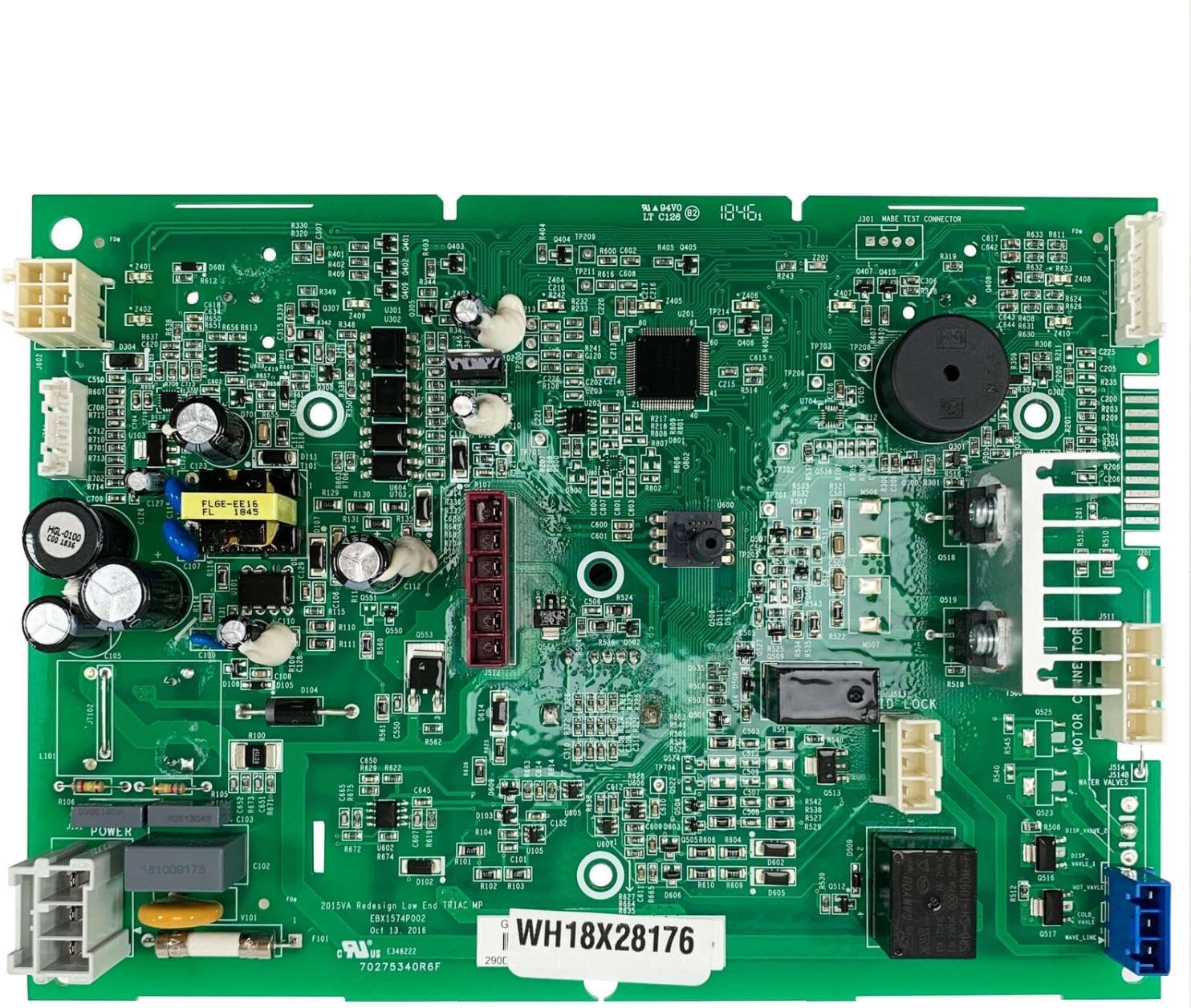
Image: The replacement electronic control board for Hotpoint washers. This board manages the washer's cycles and functions.
- വാഷിംഗ് മെഷീൻ തയ്യാറാക്കുക: Disconnect the washer from the power supply by unplugging it. Turn off the water supply valves to the washer.
- നിയന്ത്രണ പാനലിലേക്ക് പ്രവേശിക്കുക: Depending on your model, you may need to remove screws from the rear of the top panel or lift the console to access the control board. Carefully follow your washer's specific disassembly procedure.
- Locate the Old Control Board: Identify the existing electronic control board. It will have multiple wire harnesses connected to it.
- പ്രമാണ കണക്ഷനുകൾ: Before disconnecting anything, take clear photos of all wire connections to the old board. This will serve as a reference for reconnecting the new board. Label wires if necessary.
- വയറിംഗ് വിച്ഛേദിക്കുക: Carefully disconnect all wire harnesses and connectors from the old control board. Be gentle to avoid damaging the connectors or wires.
- പഴയ ബോർഡ് നീക്കം ചെയ്യുക: Unscrew or unclip the old control board from its mounting brackets. Set it aside.
- പുതിയ ബോർഡ് ഇൻസ്റ്റാൾ ചെയ്യുക: Position the new electronic control board in the same location as the old one. Secure it with the screws or clips previously removed.
- വയറിംഗ് വീണ്ടും ബന്ധിപ്പിക്കുക: Using your photos and labels as a guide, carefully reconnect all wire harnesses and connectors to the new control board. Ensure each connection is secure and correctly seated.
- Reassemble the Washer: Reattach the control panel and any other components that were removed during disassembly. Secure all screws.
- Test the Washer: Reconnect the washer to the power supply and turn on the water supply. Run a short test cycle to ensure the new control board is functioning correctly and all washer operations are normal.
ട്രബിൾഷൂട്ടിംഗ്
If you encounter issues after installing the new control board, refer to the table below for common problems and potential solutions.
| ലക്ഷണം | സാധ്യമായ കാരണം | പരിഹാരം |
|---|---|---|
| Washer does not power on. | Loose power connection, faulty outlet, or incorrect board installation. | Check power cord, test outlet, re-verify all board connections. |
| Washer starts but stops unexpectedly. | Incorrect wiring, sensor issue, or board malfunction. | Review wiring diagram, check for error codes, or consult a technician. |
| Specific cycles or functions do not work. | Incorrect wiring to specific components, or a faulty new board. | Double-check connections for the affected functions. |
| പിശക് കോഡുകൾ പ്രദർശിപ്പിച്ചു. | Indicates a specific problem detected by the control board. | Consult your washer's user manual for error code definitions and troubleshooting steps. |
If troubleshooting steps do not resolve the issue, it is advisable to contact a qualified appliance repair technician.
ഉൽപ്പന്ന സവിശേഷതകൾ
| ആട്രിബ്യൂട്ട് | വിശദാംശങ്ങൾ |
|---|---|
| ഭാഗം നമ്പർ | wh22x37220 |
| നിർമ്മാതാവ് | ജനറിക് |
| മാതൃരാജ്യം | യുഎസ്എ |
| അനുയോജ്യത | Hotpoint Washers HTW240ASK5WS, HTW240ASK6WS |
| നിറം | As pictured (Green circuit board) |
വാറൻ്റിയും പിന്തുണയും
For any questions regarding the compatibility, installation, or performance of this electronic control board, please contact the seller or manufacturer directly. Refer to your purchase documentation for specific warranty information.
The seller typically aims to resolve any issues within 24 hours. Always provide your product model number and purchase details when seeking support.
Ask a question about this manual
Ask about setup, troubleshooting, compatibility, parts, safety, or missing instructions. Manuals+ will review the question and use this page’s manual context to help answer it.