
ആമുഖം
Thank you for choosing the TIQLAB 55x28 Inch Electric Standing Desk. This manual provides detailed instructions for assembly, operation, and maintenance to ensure safe and efficient use of your new adjustable height desk. This desk is designed to offer a versatile workspace, allowing you to switch between sitting and standing positions for improved comfort and productivity.
പ്രധാനപ്പെട്ട സുരക്ഷാ വിവരങ്ങൾ
അസംബ്ലി ചെയ്യുന്നതിനും ഉപയോഗിക്കുന്നതിനും മുമ്പ് എല്ലാ സുരക്ഷാ മുന്നറിയിപ്പുകളും നിർദ്ദേശങ്ങളും ശ്രദ്ധാപൂർവ്വം വായിക്കുക. ഈ നിർദ്ദേശങ്ങൾ പാലിക്കുന്നതിൽ പരാജയപ്പെടുന്നത് ഉൽപ്പന്നത്തിന് പരിക്കോ കേടുപാടുകളോ ഉണ്ടാക്കാൻ കാരണമായേക്കാം.
- മേശ ടിപ്പിംഗ് തടയാൻ ശരിയായി നങ്കൂരമിട്ടിട്ടുണ്ടെന്ന് ഉറപ്പാക്കുക.
- Do not exceed the maximum static load capacity of 176 lbs (80 kg).
- Make sure the desk is stable when adjusted to different heights.
- ജോലി സമയത്ത് കുട്ടികളെയും വളർത്തുമൃഗങ്ങളെയും മേശയിൽ നിന്ന് അകറ്റി നിർത്തുക.
- Ensure no obstructions are present in the desk's path during height adjustment.
- മേശപ്പുറത്ത് ഇരിക്കുകയോ നിൽക്കുകയോ ചെയ്യരുത്.
- വൃത്തിയാക്കുന്നതിനോ പരിപാലിക്കുന്നതിനോ മുമ്പായി വൈദ്യുതി വിച്ഛേദിക്കുക.
പാക്കേജ് ഉള്ളടക്കം
അസംബ്ലി ആരംഭിക്കുന്നതിന് മുമ്പ്, എല്ലാ ഭാഗങ്ങളും നിലവിലുണ്ടെന്നും കേടുപാടുകൾ സംഭവിച്ചിട്ടില്ലെന്നും ഉറപ്പാക്കുക. ഏതെങ്കിലും ഭാഗങ്ങൾ നഷ്ടപ്പെട്ടിട്ടുണ്ടെങ്കിലോ കേടുപാടുകൾ സംഭവിച്ചിട്ടുണ്ടെങ്കിലോ, ദയവായി ഉപഭോക്തൃ പിന്തുണയുമായി ബന്ധപ്പെടുക.
- Desk tabletop (splice board)
- Electric lifting columns (legs)
- Desk feet
- LED ഡിസ്പ്ലേയുള്ള നിയന്ത്രണ പാനൽ
- പവർ അഡാപ്റ്ററും കേബിളും
- Four fabric drawers
- Storage shelf components
- Assembly hardware (screws, bolts, specialized L-shaped Allen wrench)
- ഇൻസ്ട്രക്ഷൻ മാനുവൽ
അസംബ്ലി നിർദ്ദേശങ്ങൾ
Assembly typically takes approximately 60 minutes. It is recommended to have two people for certain steps. Follow the step-by-step instructions provided in the included assembly guide. All necessary tools, including a specialized L-shaped Allen wrench, are supplied.
- ഘടകങ്ങൾ അൺപാക്ക് ചെയ്യുക: പാക്കേജിംഗിൽ നിന്ന് എല്ലാ ഭാഗങ്ങളും ശ്രദ്ധാപൂർവ്വം നീക്കം ചെയ്ത് പോറലുകൾ ഉണ്ടാകാതിരിക്കാൻ വൃത്തിയുള്ളതും മൃദുവായതുമായ ഒരു പ്രതലത്തിൽ വയ്ക്കുക.
- Attach Lifting Columns: Secure the electric lifting columns to the tabletop using the provided screws. Ensure they are oriented correctly.
- Install Desk Feet: Attach the desk feet to the bottom of the lifting columns.
- Assemble Storage Shelf: Construct the storage shelf and attach it to the main desk frame.
- ഡ്രോയറുകൾ തിരുകുക: Place the four fabric drawers into their designated slots within the storage compartments.
- ഇലക്ട്രോണിക്സ് ബന്ധിപ്പിക്കുക: Connect the control panel and power adapter to the motor and power supply according to the wiring diagram in the separate assembly guide.
- കേബിൾ മാനേജുമെന്റ്: Organize and secure all cables to prevent entanglement during height adjustments.
- അന്തിമ പരിശോധന: Before plugging in, ensure all screws are tightened and connections are secure.

Image: Fully assembled TIQLAB standing desk in a home office environment.
പ്രവർത്തന നിർദ്ദേശങ്ങൾ
നിയന്ത്രണ പാനൽ പ്രവർത്തനങ്ങൾ

Image: Close-up of the desk's control panel, highlighting its features.
- മുകളിലേക്കും താഴേക്കുമുള്ള അമ്പടയാളങ്ങൾ: അമർത്തിപ്പിടിക്കുക Up or താഴേക്ക് arrow buttons to adjust the desk height. Release the button to stop at the desired height.
- LED Screen Display: നിലവിലെ മേശയുടെ ഉയരം ഇഞ്ചിൽ കാണിക്കുന്നു.
- മെമ്മറി പ്രീസെറ്റുകൾ (1, 2, 3):
- നിങ്ങൾക്ക് ആവശ്യമുള്ള ഉയരത്തിലേക്ക് ഡെസ്ക് ക്രമീകരിക്കുക.
- അമർത്തുക "എം" button (or similar memory set button) once. The LED display will flash.
- Within 3 seconds, press the desired preset button (1, 2, അല്ലെങ്കിൽ 3) to save the current height.
- To recall a saved height, simply press the corresponding preset button (1, 2, അല്ലെങ്കിൽ 3). ഡെസ്ക് സ്വയമേവ സംരക്ഷിച്ച സ്ഥാനത്തേക്ക് നീങ്ങും.
- ആൻറി കൊളിഷൻ ടെക്നോളജി: The desk is equipped with an anti-collision feature that automatically stops and slightly reverses movement if it encounters an obstruction during height adjustment.
ഡ്രോയർ ഉപയോഗം

ചിത്രം: വിശദമായത് view ഡെസ്കിന്റെ സംയോജിത സംഭരണ പരിഹാരങ്ങളിൽ.
The desk includes four fabric drawers for organized storage of office supplies, documents, and personal items. Simply pull the fabric handle to open and push to close. The open compartments above the main desk surface and between the drawers provide additional space for monitors, books, and other accessories.
ഫീച്ചറുകൾ
- ക്രമീകരിക്കാവുന്ന ഉയരം: Electric sit-stand functionality with a height range from 28.3 inches to 47.2 inches.
- സംയോജിത സംഭരണം: Four spacious fabric drawers and additional open storage compartments for organization.
- എർഗണോമിക് ഡിസൈൻ: Promotes healthier posture and reduces strain by allowing seamless transitions between sitting and standing.
- ശാന്തമായ പ്രവർത്തനം: The electric motor operates at less than 45dB, ensuring a quiet working environment.

Image: Visual representation of the desk's low noise operation.
- ശക്തമായ സ്ഥിരത: Constructed with multi-layer steel for enhanced durability and stability, supporting a maximum static load of 176 lbs (80 kg).

Image: Diagram illustrating the robust multi-layer steel frame.
- വിശാലമായ വർക്ക് ഉപരിതലം: The 55x28 inch desktop provides ample space for multiple monitors, laptops, and other work essentials.

Image: Comparison of desk surface depth, highlighting the TIQLAB desk's larger area.
സ്പെസിഫിക്കേഷനുകൾ
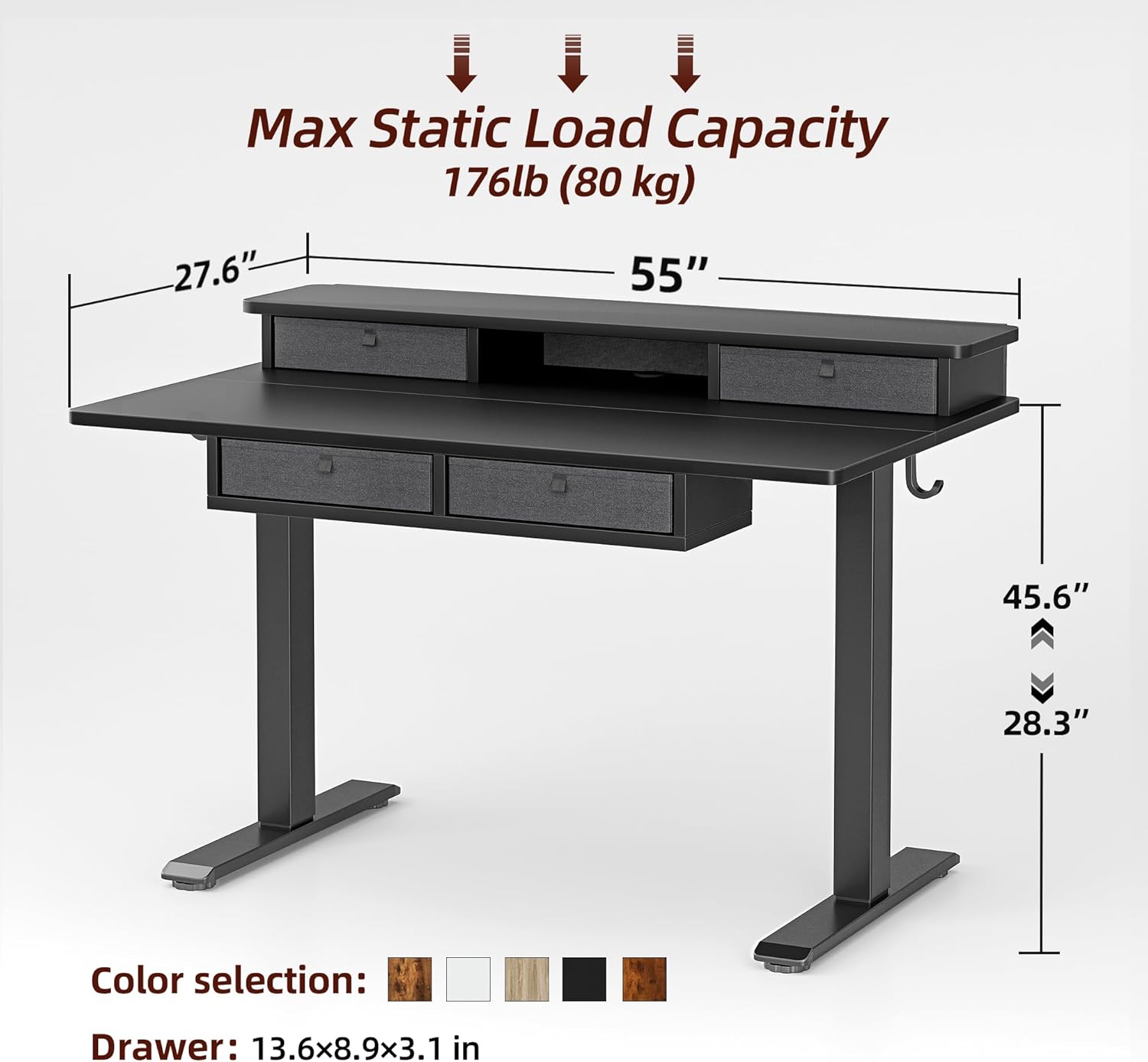
Image: Dimensional drawing of the TIQLAB standing desk with key measurements and load capacity.
| ആട്രിബ്യൂട്ട് | വിശദാംശങ്ങൾ |
|---|---|
| ബ്രാൻഡ് | TIQLAB |
| മോഡൽ | B0F1N6S1TM |
| Desktop Dimensions (W x D) | 55" x 28" |
| കുറഞ്ഞ ഉയരം | 28.3 ഇഞ്ച് |
| പരമാവധി ഉയരം | 47.2 ഇഞ്ച് |
| ടേബിൾടോപ്പ് കനം | 1 ഇഞ്ച് |
| Max Static Load Capacity | 176 പൗണ്ട് (80 കി.ഗ്രാം) |
| ഡ്രോയറുകളുടെ എണ്ണം | 4 |
| ഷെൽഫുകളുടെ എണ്ണം | 1 (storage shelf) |
| അടിസ്ഥാന മെറ്റീരിയൽ | Electric (metal frame) |
| മികച്ച മെറ്റീരിയൽ തരം | എഞ്ചിനീയറിംഗ് വുഡ് |
| നിറം | കറുപ്പ് |
| ആവശ്യമായ അസംബ്ലി | അതെ |
| എല്ലാ അസംബ്ലി ഉപകരണങ്ങളും ഉൾപ്പെടുന്നു | അതെ |
മെയിൻ്റനൻസ്
- വൃത്തിയാക്കൽ: മേശയുടെ പ്രതലങ്ങൾ മൃദുവായ, ഡി-ടച്ച് ഉപയോഗിച്ച് തുടയ്ക്കുക.amp cloth. Avoid harsh chemicals or abrasive cleaners. For the fabric drawers, spot clean with a mild detergent if necessary.
- പരിശോധന: എല്ലാ സ്ക്രൂകളും കണക്ഷനുകളും ഇറുകിയതാണെന്ന് ഉറപ്പാക്കാൻ ഇടയ്ക്കിടെ പരിശോധിക്കുക. ആവശ്യമെങ്കിൽ വീണ്ടും മുറുക്കുക.
- കേബിൾ മാനേജുമെന്റ്: Ensure power cables and other cords are not pinched or tangled, especially during height adjustments.
- മോട്ടോർ കെയർ: The electric motor is designed for long-term use and requires no special maintenance. Avoid spilling liquids on the control panel or motor components.
ട്രബിൾഷൂട്ടിംഗ്
| പ്രശ്നം | സാധ്യമായ കാരണം / പരിഹാരം |
|---|---|
| ഡെസ്ക് അനങ്ങുന്നില്ല. |
|
| Desk moves unevenly or makes unusual noises |
|
| Anti-collision feature triggers frequently |
|
| LED display shows an error code |
|
If you encounter issues not listed here or if the problem persists, please contact TIQLAB customer support.
ഉപഭോക്തൃ പിന്തുണയും വാറൻ്റിയും
For any questions, technical assistance, or warranty claims, please contact TIQLAB customer support. Refer to your purchase documentation for specific warranty terms and contact information.
Typical support options include:
- Online support portal
- ഇമെയിൽ പിന്തുണ
- ഫോൺ പിന്തുണ
Please have your product model number (B0F1N6S1TM) and purchase date ready when contacting support.