
1. ആമുഖം
This manual provides detailed instructions for the setup, operation, and maintenance of your ATTACK SHARK X11 Wireless Gaming Mouse and X60 HE Magnetic Switch Gaming Keyboard Combo. Please read this manual thoroughly before using the product to ensure optimal performance and longevity.
2. പാക്കേജ് ഉള്ളടക്കം
നിങ്ങളുടെ പാക്കേജിൽ എല്ലാ ഇനങ്ങളും ഉണ്ടെന്ന് ഉറപ്പാക്കുക:
- ATTACK SHARK X60 HE Magnetic Switch Gaming Keyboard
- ഷാർക്ക് X11 വയർലെസ് ഗെയിമിംഗ് മൗസ് അറ്റാക്ക് ചെയ്യുക
- USB-C to USB-A Cable (for charging and wired connection)
- 2.4GHz USB Receiver Dongle
- RGB Charging Dock for X11 Mouse
- ഉപയോക്തൃ മാനുവൽ (ഈ പ്രമാണം)

3. ഉൽപ്പന്നം കഴിഞ്ഞുview
3.1. ATTACK SHARK X60 HE Keyboard
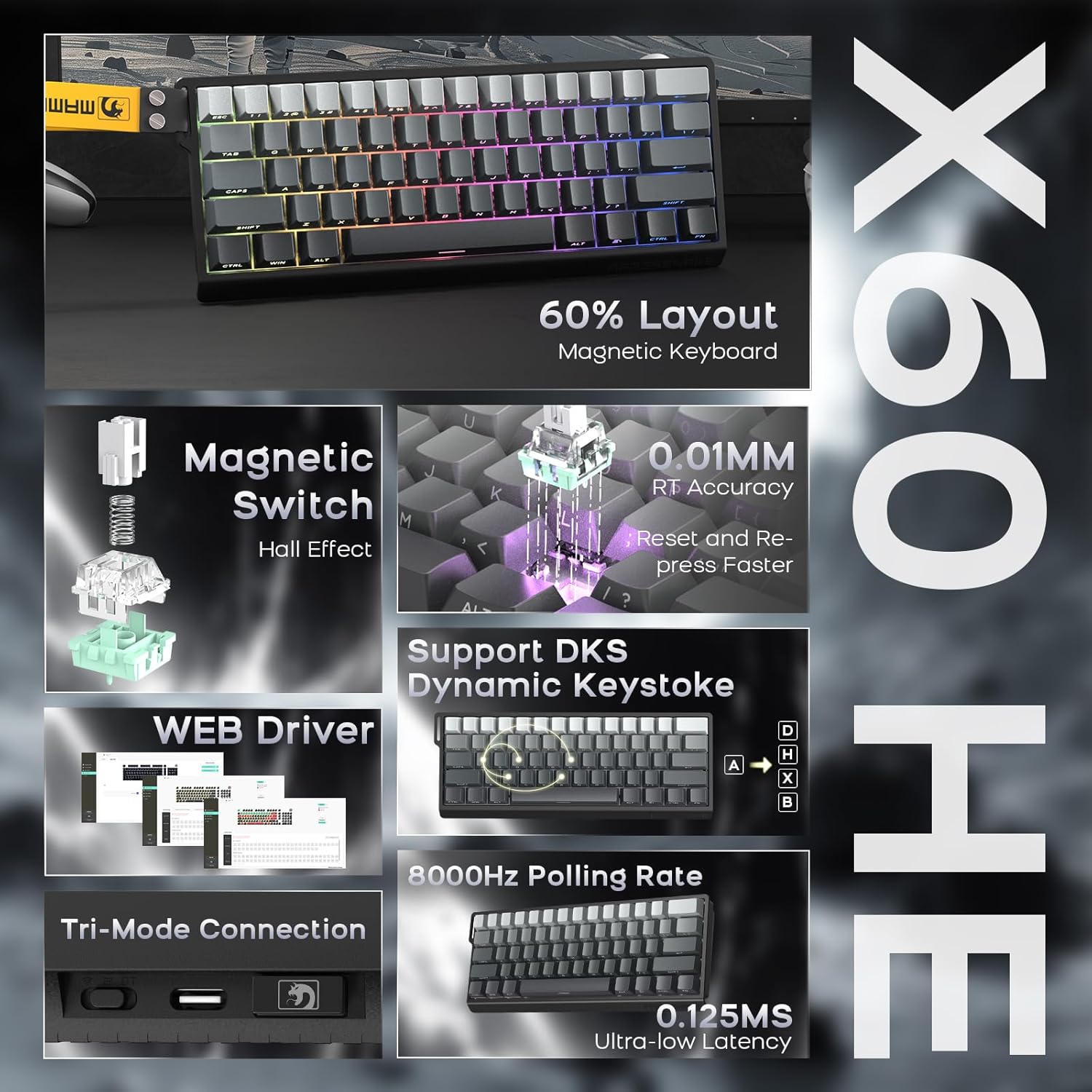
The X60 HE is a 60% layout magnetic switch keyboard designed for high-performance gaming. It features Hall effect switches with adjustable actuation points, rapid trigger functionality, and an 8000Hz polling rate for ultra-low latency response.
- മാഗ്നറ്റിക് സ്വിച്ചുകൾ: Hall effect switches with adjustable actuation from 0.1mm to 3.2mm.
- റാപ്പിഡ് ട്രിഗർ: Enables faster key resets and re-presses.
- 8000Hz പോളിംഗ് നിരക്ക്: Provides 0.125ms response time in wired mode.
- ഡൈനാമിക് കീസ്ട്രോക്ക് (DKS): Supports advanced key functionalities.
- ട്രൈ-മോഡ് കണക്റ്റിവിറ്റി: USB-C wired, 2.4GHz wireless, and Bluetooth.
- RGB ബാക്ക്ലൈറ്റിംഗ്: Customizable 16.8 million color RGB effects.
- ഹോട്ട്-സ്വാപ്പബിൾ: Allows switch replacement without soldering.
- ബാറ്ററി: ഇന്റഗ്രേറ്റഡ് 4000mAh റീചാർജ് ചെയ്യാവുന്ന ബാറ്ററി.

3.2. ATTACK SHARK X11 Mouse
The X11 is a lightweight wireless gaming mouse equipped with a high-precision PAW3311 optical sensor and tri-mode connectivity. It features a magnetic charging dock that also functions as a 2.4GHz wireless receiver hub.
- സെൻസർ: PAW3311 optical sensor.
- DPI: Up to 22,000 DPI with 6 adjustable levels.
- പോളിംഗ് നിരക്ക്: 1000 ഹെർട്സ്.
- ഭാരം: Approximately 62g for effortless control.
- സ്വിച്ചുകൾ: HUYU switches with 20 million+ click lifespan.
- ട്രൈ-മോഡ് കണക്റ്റിവിറ്റി: USB-C wired, 2.4GHz wireless, and Bluetooth.
- ചാർജിംഗ്: Magnetic fast charging via RGB dock.
- ബാറ്ററി ലൈഫ്: Up to 65 hours of interval usage.


4. സജ്ജീകരണം
4.1. പ്രാരംഭ ചാർജിംഗ്
Before first use, it is recommended to fully charge both the keyboard and mouse.
- കീബോർഡ്: Connect the USB-C cable to the keyboard and a power source (e.g., computer USB port, USB wall adapter).
- മൗസ്: Place the X11 mouse onto its RGB charging dock. Connect the USB-C cable to the charging dock and a power source. The dock will also serve as the 2.4GHz wireless receiver hub.

4.2. കണക്റ്റിവിറ്റി മോഡുകൾ
Both the X60 HE keyboard and X11 mouse support three connection modes: 2.4GHz wireless, Bluetooth, and USB-C wired.

4.2.1. 2.4GHz വയർലെസ് മോഡ്
- കീബോർഡ്: Ensure the keyboard is in 2.4GHz mode (check indicator light). Plug the 2.4GHz USB receiver dongle into an available USB port on your computer.
- മൗസ്: The 2.4GHz USB receiver dongle is integrated into the RGB charging dock. Connect the charging dock to your computer via the USB-C cable. Ensure the mouse is in 2.4GHz mode.
4.2.2. ബ്ലൂടൂത്ത് മോഡ്
- കീബോർഡ്: Switch the keyboard to Bluetooth mode. Activate Bluetooth on your device (computer, tablet, etc.) and search for available devices. Select "ATTACK SHARK X60 HE" to pair.
- മൗസ്: Switch the mouse to Bluetooth mode. On your device, search for and select "ATTACK SHARK X11" to pair. The X11 mouse supports connecting to two Bluetooth devices (BT1/BT2) and can be switched between them.
4.2.3. USB-C വയേർഡ് മോഡ്
- കീബോർഡ്: Connect the USB-C cable directly from the keyboard to your computer. The keyboard will automatically switch to wired mode and begin charging.
- മൗസ്: Connect the USB-C cable directly from the mouse to your computer. The mouse will automatically switch to wired mode and begin charging.
5. ഓപ്പറേഷൻ
5.1. X60 HE Keyboard Functions
- ക്രമീകരിക്കാവുന്ന ആക്ച്വേഷൻ പോയിന്റ്: Use the dedicated software (web driver) to customize the actuation distance of each magnetic switch from 0.1mm to 3.2mm.
- റാപ്പിഡ് ട്രിഗർ: This feature allows keys to activate and deactivate based on movement rather than a fixed point, enabling faster repeated inputs. Configure via the web ഡ്രൈവർ.
- ഡൈനാമിക് കീസ്ട്രോക്ക് (DKS): Assign up to four different actions to a single keypress based on how far the key is pressed.
- RGB ബാക്ക്ലൈറ്റിംഗ്: Cycle through various preset RGB lighting effects using keyboard shortcuts (refer to the keyboard's specific function key combinations) or customize extensively via the web ഡ്രൈവർ.
- Web ഡ്രൈവർ: ആക്സസ് ചെയ്യുക web- ഡ്രൈവർ അടിസ്ഥാനമാക്കിയുള്ളത് www.gmk.top for advanced customization of key functions, actuation points, DKS, macros, and lighting effects.

5.2. X11 Mouse Functions
- DPI ക്രമീകരണം: The mouse features a DPI button (usually on the bottom or top) to cycle through 6 preset DPI levels: 800, 1600, 2400, 3200, 5000, and 22000 DPI.
- Tri-Mode Switching: Use the switch on the bottom of the mouse to select between 2.4GHz, Bluetooth (BT1/BT2), and wired modes.
- RGB ചാർജിംഗ് ഡോക്ക്: The dock provides magnetic charging and features customizable RGB lighting. It also acts as the 2.4GHz receiver.
- X11 Driver Software: Download the dedicated X11 driver software for advanced customization, including button remapping, macro creation, DPI fine-tuning, polling rate adjustment, and RGB lighting control.

6. പരിപാലനം
Proper maintenance ensures the longevity and performance of your gaming combo.
- വൃത്തിയാക്കൽ: കീബോർഡും മൗസും തുടയ്ക്കാൻ മൃദുവായതും ഉണങ്ങിയതുമായ തുണി ഉപയോഗിക്കുക. കഠിനമായ അഴുക്കിന്, അല്പം ഡി.amp cloth with mild soap can be used, ensuring no liquid enters the devices. Use compressed air to clear debris from between keycaps.
- ബാറ്ററി കെയർ: Avoid fully discharging the batteries frequently. For optimal battery health, charge the devices when the battery level is low, but avoid leaving them plugged in for extended periods after reaching full charge.
- സംഭരണം: ഉപകരണങ്ങൾ നേരിട്ട് സൂര്യപ്രകാശം ഏൽക്കാത്തതും ഉയർന്ന താപനില ഏൽക്കാത്തതുമായ തണുത്തതും വരണ്ടതുമായ സ്ഥലത്ത് സൂക്ഷിക്കുക.
7. പ്രശ്നപരിഹാരം
നിങ്ങൾക്ക് പ്രശ്നങ്ങൾ നേരിടുകയാണെങ്കിൽ, ഇനിപ്പറയുന്ന പൊതുവായ പരിഹാരങ്ങൾ പരിശോധിക്കുക:
| പ്രശ്നം | സാധ്യമായ പരിഹാരം |
|---|---|
| Device not connecting wirelessly |
|
| ലാഗ് അല്ലെങ്കിൽ ഇൻപുട്ട് കാലതാമസം |
|
| RGB ലൈറ്റിംഗ് പ്രവർത്തിക്കുന്നില്ല |
|
| Keyboard keys not responding |
|
If the problem persists, please contact ATTACK SHARK customer support.
8 സ്പെസിഫിക്കേഷനുകൾ
8.1. ATTACK SHARK X60 HE Keyboard
- സ്വിച്ച് തരം: Hall Effect Magnetic Switches (Linear)
- ആക്ച്വേഷൻ പോയിൻ്റ്: Adjustable 0.1mm - 3.2mm (via software)
- പോളിംഗ് നിരക്ക്: 8000Hz (Wired), 1000Hz (2.4GHz Wireless/Bluetooth)
- കണക്റ്റിവിറ്റി: യുഎസ്ബി-സി വയേർഡ്, 2.4GHz വയർലെസ്, ബ്ലൂടൂത്ത്
- ബാറ്ററി: 4000mAh റീചാർജ് ചെയ്യാവുന്നത്
- പ്രത്യേക സവിശേഷതകൾ: Rapid Trigger, Dynamic Keystroke (DKS), RGB Backlighting, Hot-Swappable
8.2. ATTACK SHARK X11 Mouse
- സെൻസർ: PAW3311 ഒപ്റ്റിക്കൽ സെൻസർ
- DPI: Up to 22,000 (6 adjustable levels: 800/1600/2400/3200/5000/22000)
- പോളിംഗ് നിരക്ക്: 1000Hz
- ഭാരം: ഏകദേശം 62 ഗ്രാം
- സ്വിച്ചുകൾ: HUYU (20 Million+ Clicks)
- കണക്റ്റിവിറ്റി: യുഎസ്ബി-സി വയേർഡ്, 2.4GHz വയർലെസ്, ബ്ലൂടൂത്ത്
- ബാറ്ററി ലൈഫ്: Up to 65 hours (interval usage)
- ചാർജിംഗ്: Magnetic Fast Charging Dock (with RGB)
8.3 പൊതു സവിശേഷതകൾ
- പാക്കേജ് അളവുകൾ: 14.75 x 7 x 4.75 ഇഞ്ച്
- ഇനത്തിൻ്റെ ഭാരം: 2.94 പൗണ്ട്
- അനുയോജ്യമായ ഉപകരണങ്ങൾ: Personal Computer, Laptop, Tablet (Windows, macOS, Switch, Xbox, PlayStation)
- നിർമ്മാതാവ്: അറ്റാക്ക് സ്രാവ്
9. വാറൻ്റിയും പിന്തുണയും
For warranty information or technical support, please contact the seller or visit the official ATTACK SHARK webസൈറ്റ്. വാങ്ങിയതിന്റെ തെളിവായി നിങ്ങളുടെ വാങ്ങൽ രസീത് സൂക്ഷിക്കുക.
വിൽപ്പനക്കാരൻ: ATTACK SHARK US
ഉദ്യോഗസ്ഥൻ Webസൈറ്റ്: ആമസോണിലെ അറ്റാക്ക് ഷാർക്ക് സ്റ്റോർ