
ആമുഖം
വാങ്ങിയതിന് നന്ദി.asing the EBTOOLS Portable AM FM SW Shortwave Radio. This device offers versatile listening options, including AM, FM, and Shortwave radio bands, Bluetooth connectivity, and playback from USB drives or storage cards. Designed for portability and clear sound, this radio is suitable for home, outdoor, and travel use. This manual provides detailed instructions for setup, operation, maintenance, and troubleshooting to ensure optimal performance and longevity of your radio.
സുരക്ഷാ വിവരങ്ങൾ
- മഴ, ഈർപ്പം, അല്ലെങ്കിൽ തീവ്രമായ താപനില എന്നിവയിൽ റേഡിയോ തുറന്നുകാട്ടരുത്.
- യൂണിറ്റ് ഡിസ്അസംബ്ലിംഗ് ചെയ്യുന്നത് ഒഴിവാക്കുക. എല്ലാ സേവനങ്ങളും യോഗ്യതയുള്ള ഉദ്യോഗസ്ഥരെ ഏൽപ്പിക്കുക.
- ശക്തമായ കാന്തികക്ഷേത്രങ്ങളിൽ നിന്ന് റേഡിയോ അകറ്റി നിർത്തുക.
- Use only the provided charging cable or a compatible Type-C cable for charging.
- വെൻ്റിലേഷൻ ഓപ്പണിംഗുകൾ തടയരുത്.
പാക്കേജ് ഉള്ളടക്കം
പാക്കേജിൽ ഇനിപ്പറയുന്ന ഇനങ്ങൾ ഉണ്ടോ എന്ന് പരിശോധിക്കുക:
- 1 x Portable Radio (Model MK-178BT)
- 1 x ഉപയോക്തൃ മാനുവൽ
- 1 x ലാനിയാർഡ്
- 1 x ചാർജിംഗ് കേബിൾ (ടൈപ്പ്-സി)

Image: The EBTOOLS Portable Radio shown with its included lanyard and Type-C charging cable.
ഉൽപ്പന്നം കഴിഞ്ഞുview
നിങ്ങളുടെ റേഡിയോയുടെ വിവിധ ഭാഗങ്ങളും നിയന്ത്രണങ്ങളും പരിചയപ്പെടുക.
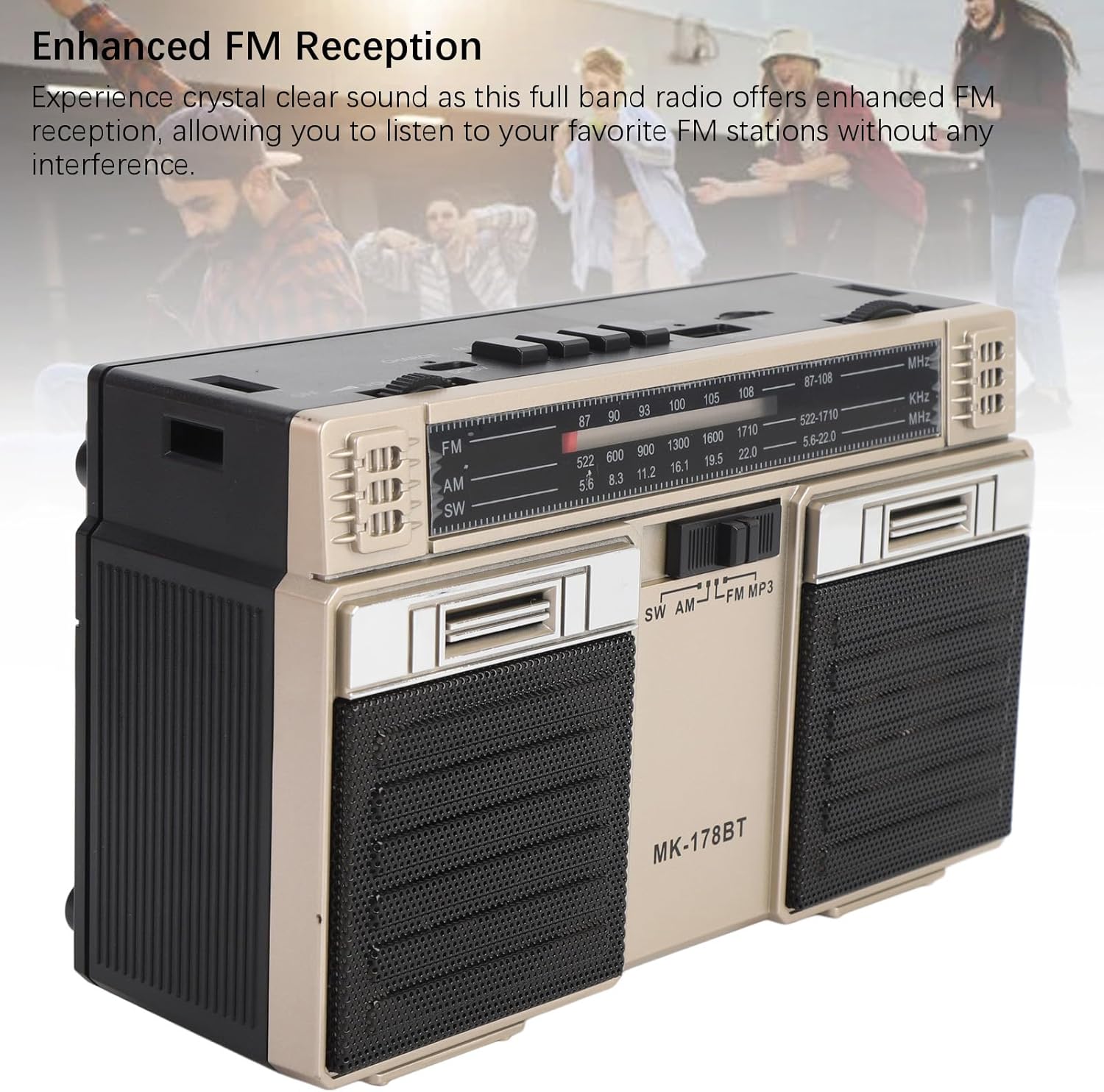
ചിത്രം: മുൻഭാഗം view of the radio, highlighting the dual speakers and the frequency display panel.
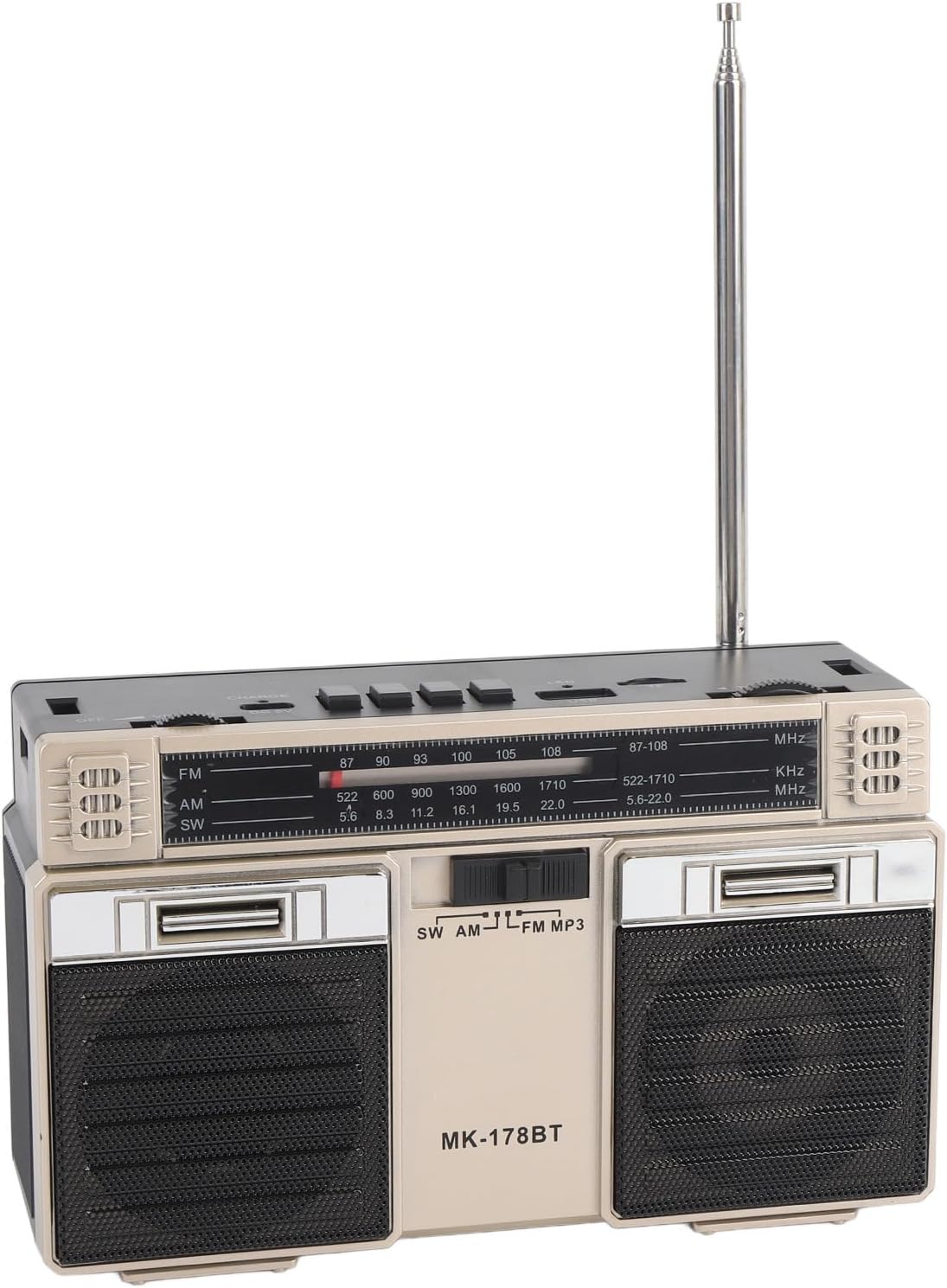
ചിത്രം: മുകളിൽ view of the radio, detailing the power switch, volume knob, mode/playback controls, charging port, LED indicator, USB port, and TF card slot.

ചിത്രം: ഒരു ക്ലോസ്-അപ്പ് view of the tuning knob, USB port, and TF (Micro SD) card slot, located on the top panel of the radio.
പ്രധാന നിയന്ത്രണങ്ങൾ:
- ഓഫ്/ഓൺ സ്വിച്ച്: Located on the top left, controls power.
- വോളിയം നോബ്: ഓഡിയോ ഔട്ട്പുട്ട് ലെവൽ ക്രമീകരിക്കുന്നു.
- CHARGE (DC 5V) Port: Type-C port for battery charging.
- M/* Button: Mode selection / Bluetooth pairing.
- ◀◀ / ►► Buttons: Previous/Next track in media modes, or fine-tuning in radio modes.
- ►█ Button: Play/Pause for media playback.
- LED സൂചകം: Shows charging status or mode.
- TF സ്ലോട്ട്: For Micro SD (storage) cards.
- USB സ്ലോട്ട്: യുഎസ്ബി ഡ്രൈവുകൾക്ക്.
- ട്യൂണിംഗ് നോബ്: റേഡിയോ ഫ്രീക്വൻസി ക്രമീകരിക്കുന്നു.
- ആൻ്റിന: മെച്ചപ്പെട്ട റേഡിയോ സ്വീകരണത്തിനായി നീട്ടാവുന്നതാണ്.
സജ്ജമാക്കുക
1 ബാറ്ററി ചാർജ് ചെയ്യുന്നു
- Connect the provided Type-C charging cable to the CHARGE (DC 5V) port on the radio.
- കേബിളിന്റെ മറ്റേ അറ്റം ഒരു സാധാരണ USB പവർ അഡാപ്റ്ററുമായി (ഉൾപ്പെടുത്തിയിട്ടില്ല) അല്ലെങ്കിൽ ഒരു കമ്പ്യൂട്ടർ USB പോർട്ടുമായി ബന്ധിപ്പിക്കുക.
- The LED indicator will illuminate during charging. It will change color or turn off once fully charged.
- ഒരു ഫുൾ ചാർജ് 18 മണിക്കൂർ വരെ ബാറ്ററി ലൈഫ് നൽകുന്നു.
2. പവർ ഓൺ/ഓഫ്
- To power on the radio, slide the ഓഫ്/ഓൺ 'ഓൺ' സ്ഥാനത്തേക്ക് മാറുക.
- To power off, slide the switch back to the 'OFF' position.
പ്രവർത്തന നിർദ്ദേശങ്ങൾ
1. ഒരു മോഡ് തിരഞ്ഞെടുക്കൽ
അമർത്തുക M/* button repeatedly to cycle through the available modes: FM, AM, SW, Bluetooth, USB, and TF Card (if inserted).
2. Radio Operation (FM/AM/SW)
- ഒപ്റ്റിമൽ റിസപ്ഷനായി, പ്രത്യേകിച്ച് FM, SW ബാൻഡുകൾക്ക്, ടെലിസ്കോപ്പിക് ആന്റിന നീട്ടുക.
- Select the desired radio band (FM, AM, or SW) using the M/* ബട്ടൺ.
- പതുക്കെ തിരിക്കുക ട്യൂണിംഗ് knob to scan for stations. The frequency will be displayed on the front panel.
- ക്രമീകരിക്കുക വോളിയം knob to your preferred listening level.
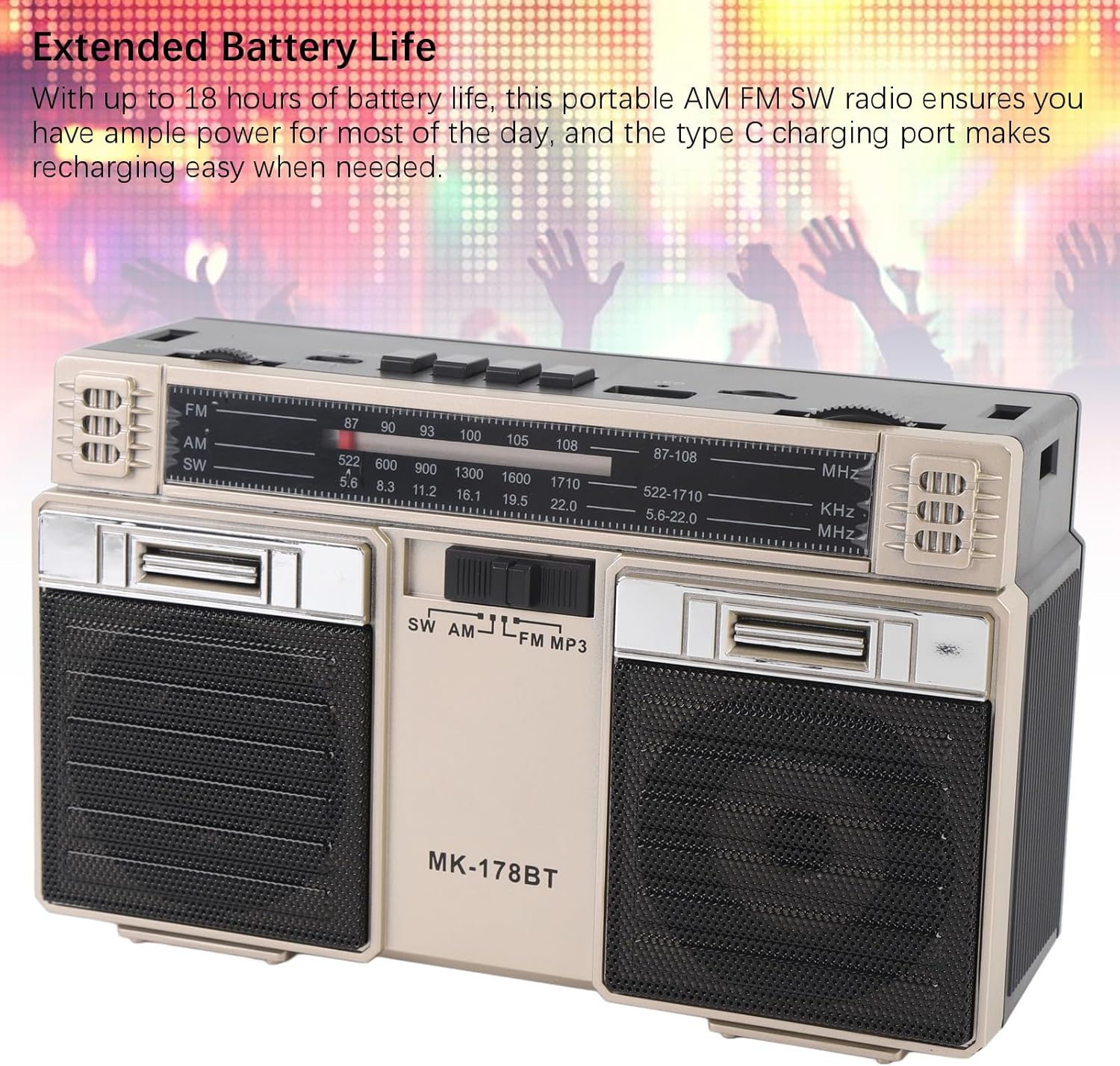
Image: The radio with its telescopic antenna fully extended, demonstrating optimal setup for radio reception.
3. ബ്ലൂടൂത്ത് പ്രവർത്തനം
- അമർത്തുക M/* button until the radio enters Bluetooth mode (an audible prompt or indicator may confirm this).
- നിങ്ങളുടെ ബ്ലൂടൂത്ത് പ്രാപ്തമാക്കിയ ഉപകരണത്തിൽ (ഉദാ: സ്മാർട്ട്ഫോൺ, ടാബ്ലെറ്റ്), ലഭ്യമായ ബ്ലൂടൂത്ത് ഉപകരണങ്ങൾക്കായി തിരയുക.
- Select "MK-178BT" (or similar name) from the list to pair.
- Once paired, you can stream audio from your device to the radio. Use the ►█, ◀◀, ഒപ്പം ►► പ്ലേബാക്ക് നിയന്ത്രിക്കുന്നതിനുള്ള ബട്ടണുകൾ.
4. USB/Storage Card Playback
- ഒരു USB ഡ്രൈവ് ഇതിലേക്ക് ചേർക്കുക യുഎസ്ബി സ്ലോട്ട് or a Micro SD (TF) card into the ടിഎഫ് സ്ലോട്ട്.
- The radio should automatically switch to USB or TF card mode. If not, press the M/* ശരിയായ മോഡ് തിരഞ്ഞെടുക്കാൻ ബട്ടൺ.
- The radio will begin playing audio fileചേർത്ത സംഭരണ ഉപകരണത്തിൽ നിന്നുള്ള s.
- ഉപയോഗിക്കുക ►█ button to play/pause, and the ◀◀ / ►► ട്രാക്കുകൾ ഒഴിവാക്കാനുള്ള ബട്ടണുകൾ.
മെയിൻ്റനൻസ്
1. വൃത്തിയാക്കൽ
- റേഡിയോയുടെ പുറംഭാഗം മൃദുവായതും ഉണങ്ങിയതുമായ തുണി ഉപയോഗിച്ച് തുടയ്ക്കുക.
- അബ്രാസീവ് ക്ലീനറുകളോ, ലായകങ്ങളോ, ശക്തമായ രാസവസ്തുക്കളോ ഉപയോഗിക്കരുത്.
2. ബാറ്ററി പരിചരണം
- ആദ്യ ഉപയോഗത്തിന് മുമ്പ് ബാറ്ററി പൂർണ്ണമായും ചാർജ് ചെയ്യുക.
- ബാറ്ററിയുടെ ആയുസ്സ് വർദ്ധിപ്പിക്കുന്നതിന് ഇടയ്ക്കിടെ ബാറ്ററി പൂർണ്ണമായും കളയുന്നത് ഒഴിവാക്കുക.
- If storing the radio for an extended period, charge it to about 50% every few months.
3. സംഭരണം
- നേരിട്ടുള്ള സൂര്യപ്രകാശത്തിൽ നിന്നും തീവ്രമായ താപനിലയിൽ നിന്നും അകന്ന്, തണുത്തതും വരണ്ടതുമായ സ്ഥലത്ത് റേഡിയോ സൂക്ഷിക്കുക.
- പൊടിയിൽ നിന്നും ഈർപ്പത്തിൽ നിന്നും അകറ്റി നിർത്തുക.
ട്രബിൾഷൂട്ടിംഗ്
| പ്രശ്നം | സാധ്യമായ കാരണം | പരിഹാരം |
|---|---|---|
| റേഡിയോ ഓൺ ചെയ്യുന്നില്ല. | ബാറ്ററി തീർന്നു. പവർ സ്വിച്ച് ഓഫാണ്. | Charge the battery. Ensure the power switch is in the 'ON' position. |
| മോശം റേഡിയോ സ്വീകരണം. | ആന്റിന നീട്ടിയിട്ടില്ല. ദുർബലമായ സിഗ്നൽ ഏരിയ. ഇടപെടൽ. | Fully extend the telescopic antenna. Try repositioning the radio. Move away from electronic devices causing interference. |
| ബ്ലൂടൂത്ത് കണക്റ്റ് ചെയ്യുന്നില്ല. | Radio not in Bluetooth mode. Device not discoverable. Already paired with another device. | Ensure radio is in Bluetooth mode. Make sure your device's Bluetooth is on and discoverable. Disconnect from other devices. |
| USB/TF കാർഡ് പ്ലേ ചെയ്യുന്നില്ല. | Incorrect mode selected. Incompatible file format. Corrupted storage device. | അമർത്തുക M/* to select USB/TF mode. Ensure audio files are in a compatible format (e.g., MP3). Try a different USB drive or TF card. |
| ശബ്ദമില്ല അല്ലെങ്കിൽ കുറഞ്ഞ ശബ്ദമില്ല. | Volume too low. Mute activated (if applicable). | വർദ്ധിപ്പിക്കുക വോളിയം knob. Check if the connected Bluetooth device's volume is also up. |
സ്പെസിഫിക്കേഷനുകൾ
- മോഡൽ നമ്പർ: MK-178BT (Internal SKU: EBTOOLSshukg7o0ny-12)
- മെറ്റീരിയൽ: എബിഎസ്
- FM ഫ്രീക്വൻസി റേഞ്ച്: 87 മുതൽ 108 MHz വരെ
- AM ഫ്രീക്വൻസി ശ്രേണി: 522 മുതൽ 1710 KHz വരെ
- SW ഫ്രീക്വൻസി ശ്രേണി: 5.6 മുതൽ 22 MHz വരെ
- Storage Card/Small Memory Card Support: Maximum 32GB (not included)
- ബിൽറ്റ്-ഇൻ ബാറ്ററി: 1200 എംഎഎച്ച് ലി-പോളിമർ
- ഊർജ്ജ സ്രോതസ്സ്: ബാറ്ററി പവർ (ടൈപ്പ്-സി ചാർജിംഗ്)
- കണക്റ്റിവിറ്റി ടെക്നോളജി: ബ്ലൂടൂത്ത്
- ഉൽപ്പന്ന അളവുകൾ: 7.48 x 4.72 x 3.14 ഇഞ്ച് (19 x 12 x 8 സെ.മീ)
- ഇനത്തിൻ്റെ ഭാരം: 1.35 പൗണ്ട് (0.61 കി.ഗ്രാം)
- പ്രത്യേക സവിശേഷതകൾ: Portable, Bluetooth, Rechargeable
വാറൻ്റിയും പിന്തുണയും
For warranty information or technical support, please refer to the purchase platform or contact EBTOOLS customer service directly. Keep your purchase receipt as proof of purchase.