
1. പ്രധാന സുരക്ഷാ നിർദ്ദേശങ്ങൾ
Please read all instructions carefully before using this product and retain them for future reference. Adhere to all warnings and follow all instructions.
- ഊർജ്ജ സ്രോതസ്സ്: യൂണിറ്റിനൊപ്പം നൽകിയിരിക്കുന്ന പവർ അഡാപ്റ്റർ മാത്രം ഉപയോഗിക്കുക. വോളിയം ഉറപ്പാക്കുകtagഇ നിങ്ങളുടെ പ്രാദേശിക വൈദ്യുതി വിതരണവുമായി പൊരുത്തപ്പെടുന്നു.
- ജലവും ഈർപ്പവും: യൂണിറ്റിൽ മഴ, ഈർപ്പം, ദ്രാവകങ്ങൾ എന്നിവ ഏൽക്കരുത്. പാത്രങ്ങൾ പോലുള്ള ദ്രാവകങ്ങൾ നിറച്ച വസ്തുക്കൾ യൂണിറ്റിൽ വയ്ക്കരുത്.
- ചൂട്: റേഡിയേറ്ററുകൾ, ഹീറ്റ് രജിസ്റ്ററുകൾ, സ്റ്റൗകൾ അല്ലെങ്കിൽ മറ്റ് ഉപകരണങ്ങൾ (ഉൾപ്പെടെ) പോലുള്ള താപ സ്രോതസ്സുകൾക്ക് സമീപം യൂണിറ്റ് സ്ഥാപിക്കരുത്. ampലൈഫയറുകൾ) ചൂട് ഉത്പാദിപ്പിക്കുന്നത്.
- വെൻ്റിലേഷൻ: ശരിയായ വായുസഞ്ചാരം ഉറപ്പാക്കുക. വായുസഞ്ചാര ദ്വാരങ്ങളൊന്നും തടയരുത്.
- വൃത്തിയാക്കൽ: ഉണങ്ങിയ തുണി ഉപയോഗിച്ച് മാത്രം വൃത്തിയാക്കുക.
- സേവനം: ഈ ഉൽപ്പന്നം സ്വയം സേവിക്കാൻ ശ്രമിക്കരുത്. യോഗ്യതയുള്ള സേവന ഉദ്യോഗസ്ഥർക്ക് എല്ലാ സേവനങ്ങളും റഫർ ചെയ്യുക.
- സ്റ്റൈലസ് കെയർ: Handle the stylus carefully to avoid damage. A damaged stylus can harm records and produce poor sound quality.
2. ഉൽപ്പന്നം കഴിഞ്ഞുview
The FYDEE A7 Vinyl Record Player is designed for an enjoyable audio experience, combining classic vinyl playback with modern connectivity options.
2.1 പ്രധാന ഘടകങ്ങൾ

This image displays a top-down view of the FYDEE A7 Record Player, highlighting key components such as the 45 RPM adapter, lift lever, tone arm, auto-stop switch, speed selector, and stylus. These parts are essential for proper record playback.

This image shows the rear panel of the FYDEE A7 Record Player, clearly labeling the RCA output and AUX input ports. These ports allow for connection to external audio systems and other audio sources.
- ടേൺടേബിൾ പ്ലാറ്റർ: വിനൈൽ റെക്കോർഡിനെ പിന്തുണയ്ക്കുന്നു.
- ടോണെർം: സ്റ്റൈലസ് പിടിച്ച് റെക്കോർഡ് ഗ്രൂവുകൾ ട്രാക്ക് ചെയ്യുന്നു.
- സ്റ്റൈലസ് (സൂചി): റെക്കോർഡിൽ നിന്നുള്ള ഓഡിയോ വിവരങ്ങൾ വായിക്കുന്നു.
- ക er ണ്ടർവെയ്റ്റ്: Adjusts the tracking force of the tonearm.
- സ്പീഡ് സെലക്ടർ: Allows selection of 33, 45, or 78 RPM.
- Auto-Stop Switch: Engages or disengages the automatic stop function.
- പൊടി കവർ: Protects the turntable from dust.
- ബിൽറ്റ്-ഇൻ സ്റ്റീരിയോ സ്പീക്കറുകൾ: സംയോജിത ഓഡിയോ ഔട്ട്പുട്ട് നൽകുന്നു.
- മോഡ് നോബ്: Selects between LP (vinyl playback), BT (Bluetooth receiving), and TX (Bluetooth transmission).
- വോളിയം നോബ്: ഓഡിയോ ഔട്ട്പുട്ട് ലെവൽ നിയന്ത്രിക്കുന്നു.
- ആർസിഎ putട്ട്പുട്ട്: ബാഹ്യ ഉപകരണങ്ങളുമായി ബന്ധിപ്പിക്കുന്നതിന് ampലൈഫറുകൾ അല്ലെങ്കിൽ പവർ സ്പീക്കറുകൾ.
- AUX ഇൻപുട്ട്: ബാഹ്യ ഓഡിയോ ഉപകരണങ്ങൾ ബന്ധിപ്പിക്കുന്നതിന്.
- ബ്ലൂടൂത്ത് 5.4: Supports both receiving audio from a device and transmitting audio to a Bluetooth speaker.
3. സജ്ജീകരണം
3.1 അൺപാക്കിംഗും പ്ലേസ്മെന്റും
- റെക്കോർഡ് പ്ലെയർ അതിന്റെ പാക്കേജിംഗിൽ നിന്ന് ശ്രദ്ധാപൂർവ്വം നീക്കം ചെയ്യുക.
- നേരിട്ടുള്ള സൂര്യപ്രകാശം, താപ സ്രോതസ്സുകൾ, അമിതമായ പൊടി അല്ലെങ്കിൽ വൈബ്രേഷനുകൾ എന്നിവയിൽ നിന്ന് അകലെ സ്ഥിരതയുള്ളതും നിരപ്പായതുമായ ഒരു പ്രതലത്തിൽ യൂണിറ്റ് സ്ഥാപിക്കുക.
3.2 Dust Cover Installation
The removable dust cover helps protect your turntable. Align the hinges of the dust cover with the slots at the back of the record player and gently push down until it clicks into place.
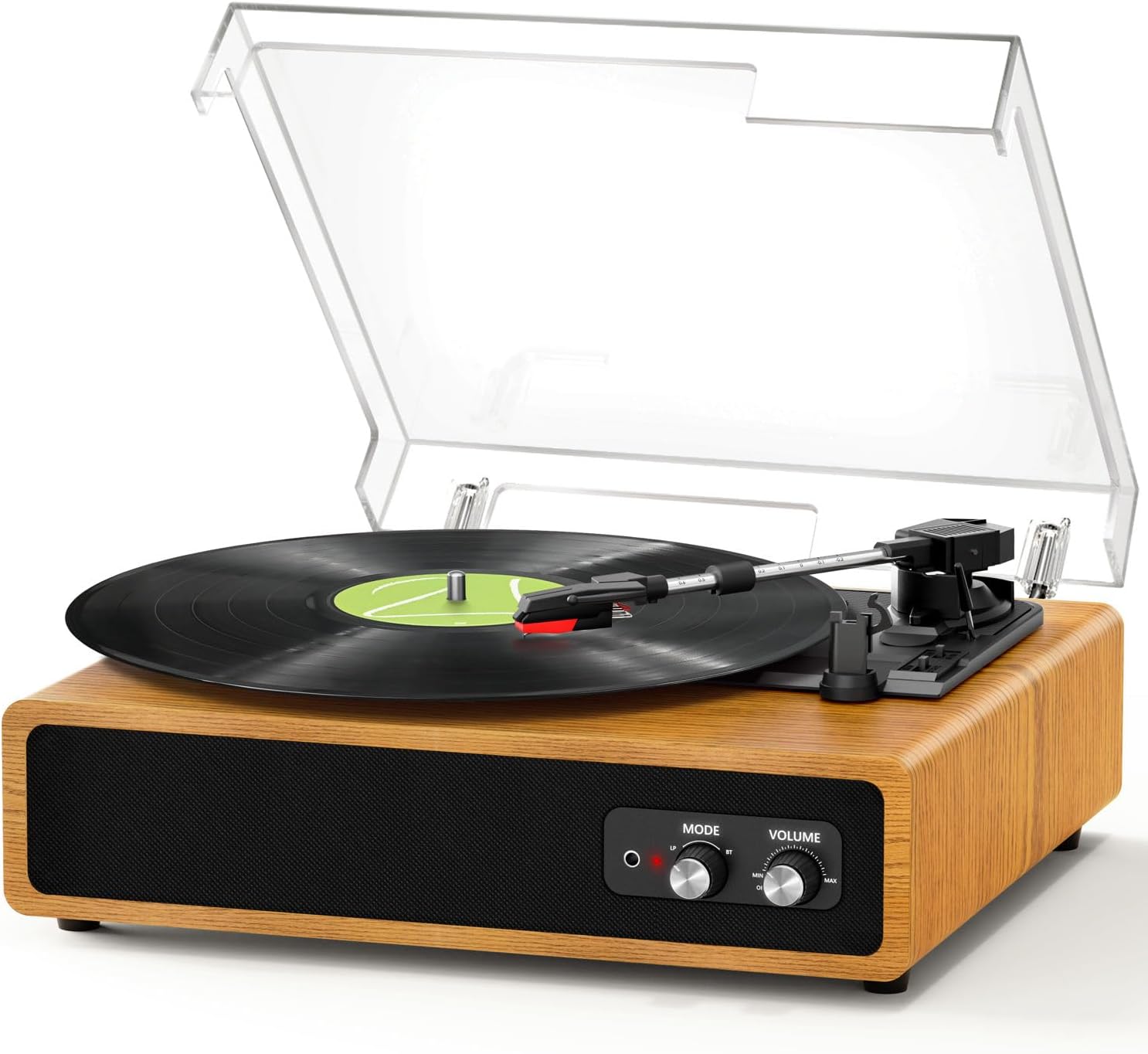
This image shows the FYDEE A7 Record Player with its clear dust cover properly installed, protecting the platter and tonearm.
3.3 പവർ കണക്ഷൻ
- Connect the supplied 5V 1A power adapter to the DC 5V port on the back of the record player.
- ഒരു മതിൽ let ട്ട്ലെറ്റിലേക്ക് അഡാപ്റ്റർ പ്ലഗ് ചെയ്യുക.
3.4 Tonearm Balance and Tracking Force Adjustment
The counterweight allows for fine-tuning the tracking force, which is crucial for optimal sound and to prevent record wear and skipping.
- സ്റ്റൈലസ് പ്രൊട്ടക്ടർ നീക്കം ചെയ്യുക.
- ടോൺആം അതിന്റെ വിശ്രമത്തിൽ നിന്ന് സൌമ്യമായി വിടുക.
- Rotate the counterweight at the rear of the tonearm until the tonearm is balanced and floats horizontally.
- Once balanced, return the tonearm to its rest.
- Rotate the counterweight to set the recommended tracking force (refer to stylus manufacturer's specifications, typically 2-3 grams for most standard cartridges).
4. ഓപ്പറേഷൻ
4.1 ഒരു വിനൈൽ റെക്കോർഡ് പ്ലേ ചെയ്യുന്നു
- പൊടി കവർ തുറക്കുക.
- Place a vinyl record on the turntable platter. If playing a 7-inch single, use the included 45 RPM adapter.
- സ്പീഡ് സെലക്ടർ സ്വിച്ച് ഉപയോഗിച്ച് ഉചിതമായ വേഗത (33, 45, അല്ലെങ്കിൽ 78 RPM) തിരഞ്ഞെടുക്കുക.
- Turn the volume knob clockwise to power on the unit and adjust to a low volume.
- Lift the tonearm using the lift lever.
- Move the tonearm over the desired starting point of the record.
- Gently lower the tonearm onto the record using the lift lever. The platter will begin to spin.
- Adjust the volume to your preferred listening level.
- At the end of the record, if the auto-stop function is enabled, the platter will stop spinning. Manually return the tonearm to its rest.
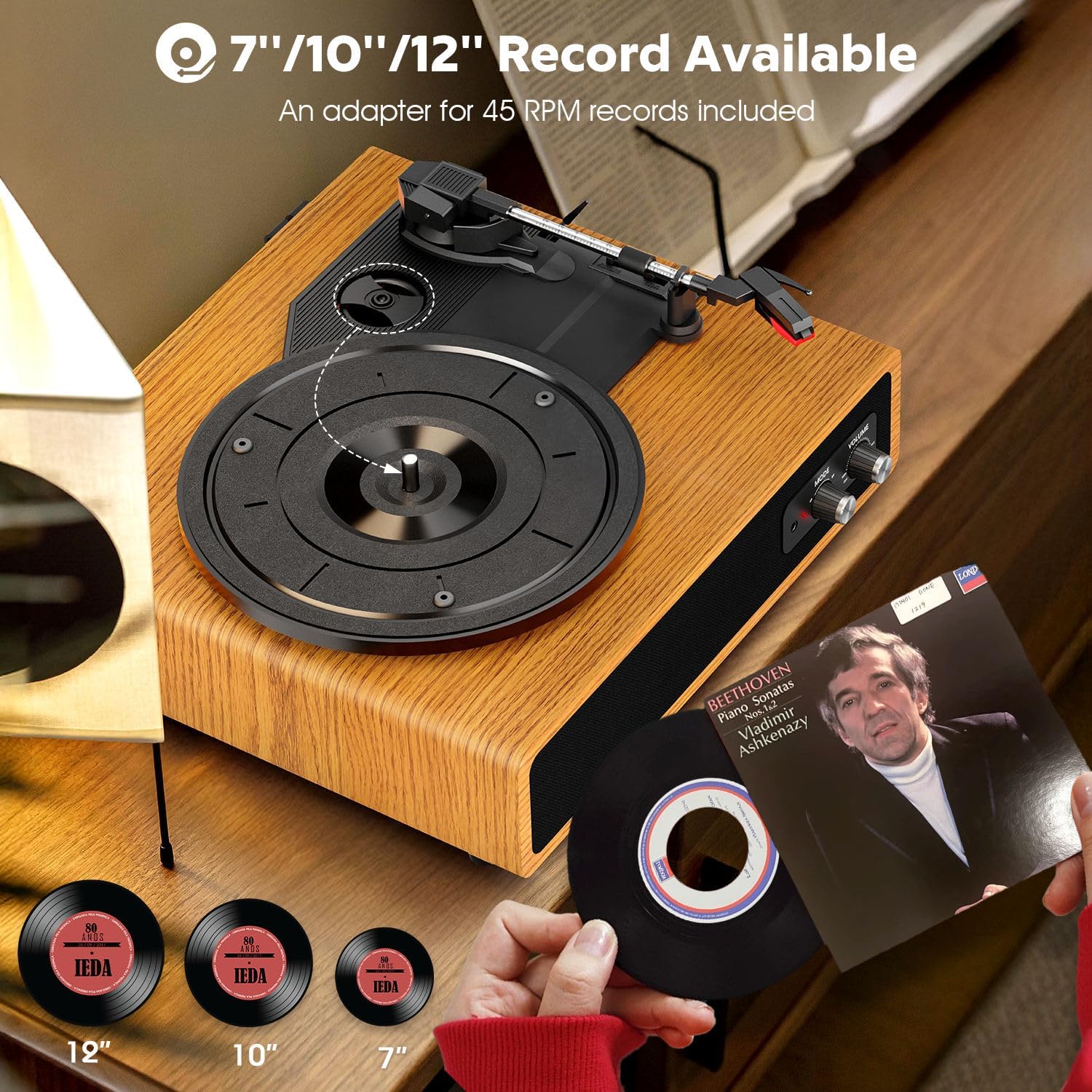
This image illustrates the FYDEE A7 Record Player's ability to play 7-inch, 10-inch, and 12-inch vinyl records. The 45 RPM adapter is shown for smaller records.
4.2 Bluetooth Receiving Mode (BT Input)
This mode allows you to stream audio from your smartphone or other Bluetooth-enabled device to the record player's built-in speakers.
- Turn on the record player by rotating the volume knob clockwise.
- Set the Mode knob to 'BT'. The indicator light will flash blue, indicating it's in pairing mode.
- On your smartphone or Bluetooth device, enable Bluetooth and search for 'A7' in the list of available devices.
- Select 'A7' to pair. Once connected, the blue indicator light will stop flashing and remain solid.
- You can now play music from your device through the record player's speakers. Adjust volume using the record player's volume knob or your device's volume controls.
This video demonstrates how to connect a smartphone to the FYDEE A7 Record Player via Bluetooth, allowing audio playback through the player's speakers. It shows the pairing process and volume control.
4.3 Bluetooth Transmission Mode (BT Output)
This mode allows you to transmit audio from vinyl record playback to an external Bluetooth speaker or headphones.
- Turn on the record player by rotating the volume knob clockwise.
- Place a vinyl record on the platter and begin playback as described in section 4.1.
- Set the Mode knob to 'TX'. The indicator light will flash red, indicating it's in transmission pairing mode.
- നിങ്ങളുടെ ബാഹ്യ ബ്ലൂടൂത്ത് സ്പീക്കറോ ഹെഡ്ഫോണുകളോ ജോടിയാക്കൽ മോഡിലാണെന്ന് ഉറപ്പാക്കുക.
- The record player will automatically search for and connect to the nearest available Bluetooth audio device. Once connected, the red indicator light will stop flashing and remain solid.
- Audio from the vinyl record will now play through your external Bluetooth device. Adjust volume on the external device.
This video illustrates how to transmit audio from the FYDEE A7 Record Player to an external Bluetooth speaker. It shows the process of setting the player to transmission mode and connecting to a Bluetooth speaker for vinyl playback.
4.4 Using RCA Output
Connect the record player to an external amplifier or powered speakers using an RCA cable (red for right channel, white for left channel) plugged into the 'OUT' ports on the back of the unit.
4.5 AUX ഇൻപുട്ട് ഉപയോഗിക്കുന്നു
Connect an external audio source (e.g., MP3 player, smartphone) to the 'AUX IN' port on the back of the unit using a 3.5mm audio cable. Set the Mode knob to 'LP' for AUX input playback.
5. പരിപാലനം
5.1 യൂണിറ്റ് വൃത്തിയാക്കൽ
- മൃദുവായതും ഉണങ്ങിയതുമായ തുണി ഉപയോഗിച്ച് പൊടി കവറും കാബിനറ്റും തുടയ്ക്കുക.
- കഠിനമായ രാസവസ്തുക്കളോ ഉരച്ചിലുകൾ ഉപയോഗിക്കരുത്.
- For the stylus, use a soft brush and gently brush from back to front to remove dust.
5.2 സ്റ്റൈലസ് മാറ്റിസ്ഥാപിക്കൽ
The stylus is a consumable part and will wear out over time. Replace it after approximately 300-500 hours of playback or if you notice a degradation in sound quality.
- പഴയ സ്റ്റൈലസ് കാട്രിഡ്ജ് നീക്കം ചെയ്യാൻ സൌമ്യമായി താഴേക്കും മുന്നോട്ടും വലിക്കുക.
- Align the new stylus cartridge and push it upwards and backwards until it clicks into place.
- Re-balance the tonearm if necessary.
6. പ്രശ്നപരിഹാരം
- ശക്തിയില്ല: Ensure the power adapter is securely connected to both the unit and a working power outlet. Check if the volume knob is turned on.
- ശബ്ദമില്ല: Verify the volume is turned up. If using external speakers, ensure they are properly connected and powered on. If using Bluetooth, confirm successful pairing.
- റെക്കോർഡുകൾ ഒഴിവാക്കുന്നു: Check if the record is clean and free of dust or debris. Ensure the record player is on a stable, level surface. Adjust the tonearm counterweight to the correct tracking force.
- ബ്ലൂടൂത്ത് കണക്ഷൻ പ്രശ്നങ്ങൾ: Ensure the record player is in the correct Bluetooth mode (BT for receiving, TX for transmitting). Make sure the other Bluetooth device is in pairing mode and within range. Try restarting both devices.
- വികലമായ ശബ്ദം: Check the stylus for damage or wear. Ensure the record is clean. Verify the tonearm tracking force is correctly set.
7 സ്പെസിഫിക്കേഷനുകൾ
| ഫീച്ചർ | സ്പെസിഫിക്കേഷൻ |
|---|---|
| ബ്രാൻഡ് | FYDEE |
| മോഡൽ | A7 |
| വേഗത | 33/45/78 ആർപിഎം |
| കണക്റ്റിവിറ്റി | Dual Bluetooth 5.4 (Input & Output), RCA Output, AUX Input, 3.5mm Headphone Jack |
| സ്പീക്കറുകൾ | Built-in Stereo Speakers (Dual 3W) |
| ഫീച്ചറുകൾ | Adjustable Counterweight, Auto-Stop Function, Dust Cover |
| മെറ്റീരിയൽ | മരം |
| പവർ ഉറവിടം | AC (110 Volts), 5V 1A Adapter |
| അളവുകൾ | 37.5 x 33 x 18 സെ.മീ |
| ഭാരം | 2.68 കി.ഗ്രാം |
8. വാറൻ്റിയും പിന്തുണയും
This product comes with a 365-day worry-free warranty and lifetime customer support. For any questions, issues, or warranty claims, please contact FYDEE customer service at the contact information provided with your purchase or on the official FYDEE webസൈറ്റ്.