
1. ആമുഖം
This manual provides detailed instructions for the ATTACK SHARK X68PRO HE Mechanical Wireless Gaming Keyboard and the ATTACK SHARK X3 Wireless Gaming Mouse Combo. Please read this manual carefully before using the products to ensure proper functionality and to maximize your gaming experience.
2. ഉൽപ്പന്നം കഴിഞ്ഞുview
2.1 ATTACK SHARK X68PRO HE Keyboard
The X68PRO HE is a 60% layout mechanical gaming keyboard featuring Hall Effect magnetic switches, an 8000Hz polling rate, and multi-mode connectivity. It is designed for high-performance gaming with adjustable actuation and rapid trigger capabilities.

Image: ATTACK SHARK X68PRO HE Keyboard. This image displays the keyboard's overall design, highlighting its BT/2.4G/Wired 3 modes connection, magnetic switches, 0.01mm RT accuracy, DKS support, full RGB backlit, PBT keycaps, MAC/WIN compatibility, and web driver. Dimensions are shown as 12.80 inches length, 4.645 inches width, 1.57 inches height, and a weight of 0.78 KG.
പ്രധാന സവിശേഷതകൾ:
- 8000Hz പോളിംഗ് നിരക്ക്: Ensures ultra-low 0.125ms latency in wired mode for instant keystroke registration.
- ഹാൾ ഇഫക്റ്റ് മാഗ്നറ്റിക് സ്വിച്ചുകൾ: Self-developed switches with adjustable actuation from 0.1mm to 3.4mm, offering 0.01mm sensitivity.
- റാപ്പിഡ് ട്രിഗർ: Eliminates debounce delay, allowing keys to reset instantly for faster, more precise movements.
- Dual-Action Key Function: Assign two different actions to a single key based on pressure.
- ഒതുക്കമുള്ള 60% ലേഔട്ട്: Space-saving design with an aircraft-grade anodized aluminum frame.
- കണക്റ്റിവിറ്റി: Supports Bluetooth, 2.4GHz wireless, and wired (USB-C) connections.
- RGB ബാക്ക്ലൈറ്റിംഗ്: Full RGB with multiple lighting effects.
- പിബിടി കീക്യാപ്പുകൾ: Durable, side-engraved PBT keycaps.
- Web ഡ്രൈവർ: Customizable settings via a dedicated web ഡ്രൈവർ.

Image: Keyboard highlighting 8000Hz Polling Rate. This image emphasizes the keyboard's lightning-fast response with an 8000Hz polling rate in wired mode and ultra-low 0.125ms latency.

Image: Linear Magnetic Switch. This image provides a close-up of the linear magnetic switch, detailing its specifications: Total Travel 3.8±0.3mm, Operation Force 40±5gf, Initial Magnetic Flux 95±15GS, Bottom Magnetic Flux 580±50GS, and a Lifespan of 100 Million clicks.

Image: Gasket Structure. This diagram illustrates the internal gasket structure of the keyboard, showing components such as side engraving PBT keycaps, thick rubber top case, ATTACK SHARK magnetic switch, aluminum alloy plate, PORON foam, PCB positioning board, custom silicone mold, and thick rubber bottom case.
2.2 ATTACK SHARK X3 Mouse
The X3 is an ultra-lightweight wireless gaming mouse equipped with a Pixart PAW3395 optical sensor and Kailh GM8.0 switches. It offers tri-mode connectivity and high DPI settings for precise control.

Image: ATTACK SHARK X3 Mouse. This image presents the X3 mouse in red, along with its USB receiver, highlighting its ultra-lightweight design, tri-mode connectivity, PixArt PAW 3395 sensor, up to 26000 DPI, and Kailh GM 8.0 switches.
പ്രധാന സവിശേഷതകൾ:
- Pixart PAW3395 Sensor: Flagship optical sensor with 6-level adjustable DPI (800/1600/2400/3200/5000/26000), 650 IPS tracking speed, 1000Hz response speed, and 50G acceleration.
- Kailh GM8.0 Switches: High-end micro switches with an 80 million click lifespan, providing crisp clicks and fast rebound.
- TTC Encoder: Scroll wheel encoder for precise positioning.
- വളരെ ഭാരം കുറഞ്ഞ ഡിസൈൻ: Weighs approximately 49g for effortless action.
- ട്രൈ-മോഡ് കണക്റ്റിവിറ്റി: Supports 2.4GHz wireless, Bluetooth 5.0, and wired (USB-C) connections.

Image: Kailh GM 8.0 Switches & TTC Encoder. This image shows a cutaway view of the mouse, highlighting the Kailh GM 8.0 switches with an 80 million click lifespan and the TTC encoder for well-defined scroll steps, designed to eliminate unintended double clicks.

Image: Ultra-Light Design. This image illustrates the lightweight nature of the X3 mouse, stating it weighs only 49±4g (1.72oz).
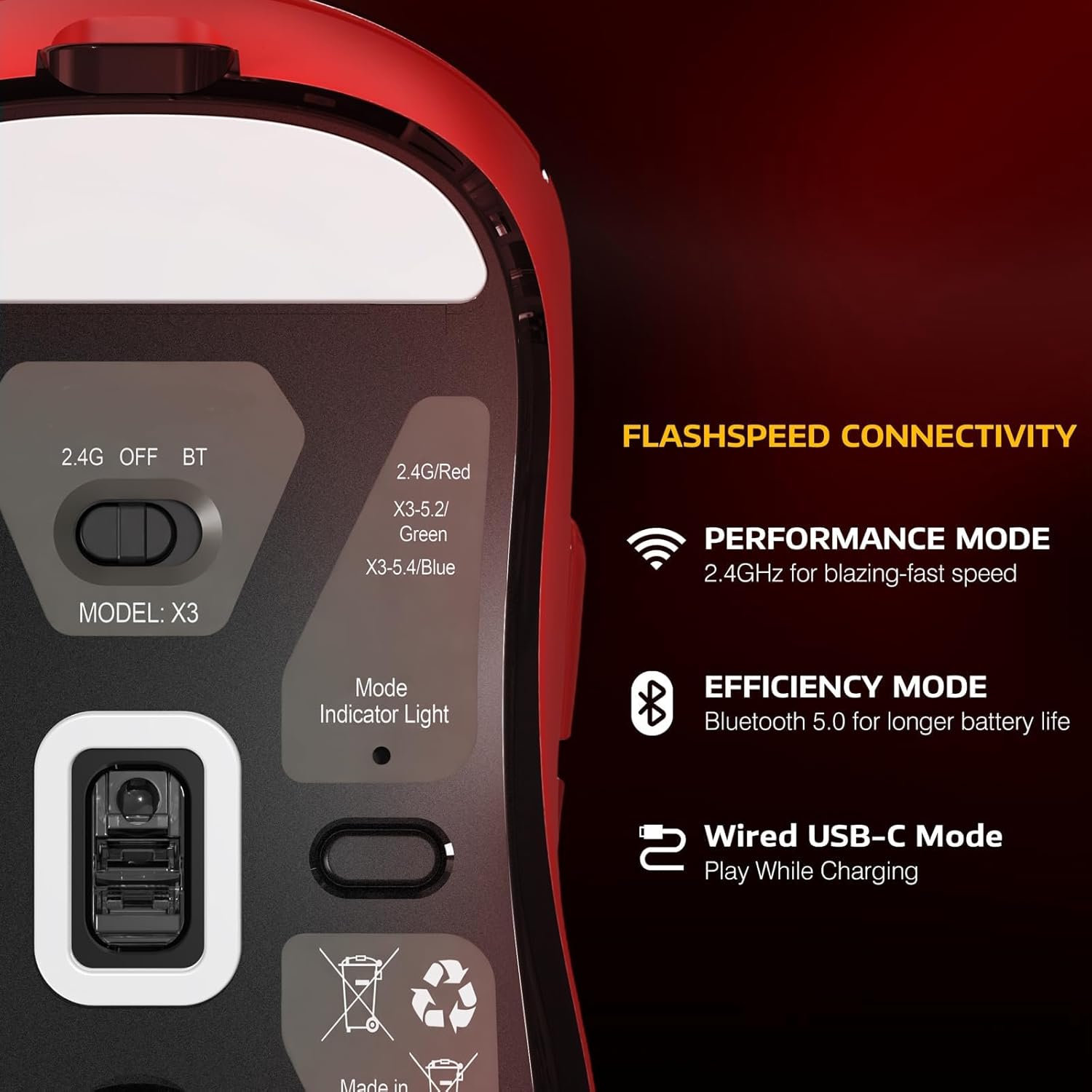
Image: Flashspeed Connectivity. This image shows the bottom of the X3 mouse, detailing its connectivity options: a switch for 2.4G, OFF, and BT modes, and a mode indicator light. It also describes Performance Mode (2.4GHz for blazing-fast speed), Efficiency Mode (Bluetooth 5.0 for longer battery life), and Wired USB-C Mode (play while charging).
3. സജ്ജീകരണ നിർദ്ദേശങ്ങൾ
3.1 Connecting the Keyboard (X68PRO HE)
- വയർഡ് മോഡ്: Connect the provided USB-C cable from the keyboard to an available USB port on your computer. The keyboard will be recognized automatically.
- 2.4GHz വയർലെസ് മോഡ്:
- 2.4GHz യുഎസ്ബി റിസീവർ കണ്ടെത്തുക.
- നിങ്ങളുടെ കമ്പ്യൂട്ടറിൽ ലഭ്യമായ USB പോർട്ടിലേക്ക് റിസീവർ പ്ലഗ് ചെയ്യുക.
- കീബോർഡിൽ, മോഡ് സെലക്ടർ '2.4G' ലേക്ക് മാറ്റുക. കീബോർഡ് യാന്ത്രികമായി കണക്റ്റ് ചെയ്യണം.
- ബ്ലൂടൂത്ത് മോഡ്:
- കീബോർഡിന്റെ മോഡ് സെലക്ടർ 'BT' ലേക്ക് മാറ്റുക.
- നിങ്ങളുടെ കമ്പ്യൂട്ടറിലോ ഉപകരണത്തിലോ, Bluetooth പ്രവർത്തനക്ഷമമാക്കി പുതിയ ഉപകരണങ്ങൾക്കായി തിരയുക.
- Select 'ATTACK SHARK X68PRO HE' from the list of available devices to pair.
3.2 Connecting the Mouse (X3)
- വയർഡ് മോഡ്: Connect the provided USB-C cable from the mouse to an available USB port on your computer. The mouse will function immediately and charge simultaneously.
- 2.4GHz വയർലെസ് മോഡ്:
- Locate the 2.4GHz USB receiver (usually stored in a compartment on the mouse's underside).
- നിങ്ങളുടെ കമ്പ്യൂട്ടറിൽ ലഭ്യമായ USB പോർട്ടിലേക്ക് റിസീവർ പ്ലഗ് ചെയ്യുക.
- On the mouse's underside, switch the mode selector to '2.4G'. The mouse should connect automatically.
- ബ്ലൂടൂത്ത് മോഡ്:
- On the mouse's underside, switch the mode selector to 'BT'.
- നിങ്ങളുടെ കമ്പ്യൂട്ടറിലോ ഉപകരണത്തിലോ, Bluetooth പ്രവർത്തനക്ഷമമാക്കി പുതിയ ഉപകരണങ്ങൾക്കായി തിരയുക.
- Select 'ATTACK SHARK X3' from the list of available devices to pair.
3.3 ഡ്രൈവർ ഇൻസ്റ്റലേഷൻ
For advanced customization of both the keyboard and mouse, download the official web driver from the ATTACK SHARK website. This driver allows for actuation adjustment, key remapping, macro creation, and RGB lighting control.
4. പ്രവർത്തന നിർദ്ദേശങ്ങൾ
4.1 Keyboard Operation (X68PRO HE)
- ആക്ച്വേഷൻ ക്രമീകരണം: ഉപയോഗിക്കുക web driver software to precisely adjust the actuation point of each magnetic switch from 0.1mm to 3.4mm with 0.01mm sensitivity.
- റാപ്പിഡ് ട്രിഗർ: This feature is enabled and configured via the web driver. It allows keys to register a reset immediately upon release, without needing to return to the full up position.
- Dual-Action Key Function: Configure this feature through the web driver. Assign a primary action for a light press and a secondary action for a deeper press on the same key.
- RGB ലൈറ്റിംഗ് നിയന്ത്രണം: Adjust lighting effects, brightness, and color patterns using the web driver or specific keyboard shortcuts (refer to the driver software for default key combinations).
- മോഡ് സ്വിച്ചിംഗ്: Use the physical switch on the keyboard to toggle between Wired, 2.4G, and Bluetooth modes.
- MAC/WIN Compatibility: The keyboard supports both operating systems. Use the web driver to switch layouts or specific key functions if needed.
4.2 Mouse Operation (X3)
- DPI ക്രമീകരണം: The mouse features 6 adjustable DPI levels (800/1600/2400/3200/5000/26000). Use the dedicated DPI button (usually located behind the scroll wheel) to cycle through these settings. The current DPI level may be indicated by an LED color or pattern.
- മോഡ് സ്വിച്ചിംഗ്: Use the physical switch on the underside of the mouse to select between 2.4G, OFF, and Bluetooth modes.
- ചാർജിംഗ്: Connect the mouse to your computer using the USB-C cable to charge. The mouse can be used in wired mode while charging.
- ബാറ്ററി സൂചകം: The mouse typically has an LED indicator that shows battery status (e.g., blinking for low battery, solid for charging, off for full charge).
5. പരിപാലനം
- വൃത്തിയാക്കൽ: Use a soft, dry cloth to wipe down the keyboard and mouse. For deeper cleaning, use a cotton swab lightly dampഎത്തിപ്പെടാൻ പ്രയാസമുള്ള സ്ഥലങ്ങളിൽ ഐസോപ്രോപൈൽ ആൽക്കഹോൾ ചേർത്തിരിക്കുന്നു. അമിതമായ ഈർപ്പം ഒഴിവാക്കുക.
- കീക്യാപ്പ് നീക്കംചെയ്യൽ (കീബോർഡ്): Keycaps can be carefully removed using a keycap puller for cleaning or replacement. Be gentle to avoid damaging the switches.
- ബാറ്ററി കെയർ: For wireless devices, avoid fully discharging the battery frequently. Charge regularly. If storing for an extended period, charge the battery to about 50% to prolong its lifespan.
- സംഭരണം: ഉപകരണങ്ങൾ നേരിട്ട് സൂര്യപ്രകാശം ഏൽക്കാത്തതും ഉയർന്ന താപനില ഏൽക്കാത്തതുമായ തണുത്തതും വരണ്ടതുമായ സ്ഥലത്ത് സൂക്ഷിക്കുക.
6. പ്രശ്നപരിഹാരം
6.1 കീബോർഡ് ട്രബിൾഷൂട്ടിംഗ്
- കീബോർഡ് പ്രതികരിക്കുന്നില്ല:
- Ensure the keyboard is charged if in wireless mode.
- Check the mode switch (Wired/2.4G/BT) is set correctly.
- 2.4G-ക്ക്, USB റിസീവർ സുരക്ഷിതമായി പ്ലഗ് ഇൻ ചെയ്തിട്ടുണ്ടെന്ന് ഉറപ്പാക്കുക.
- For Bluetooth, ensure it's paired correctly and your device's Bluetooth is active. Try re-pairing.
- Try connecting in wired mode to rule out wireless issues.
- രജിസ്റ്റർ ചെയ്യാത്തതോ ഇരട്ട ടൈപ്പ് ചെയ്യാത്തതോ ആയ കീകൾ:
- Check for debris under the keycap.
- If using Rapid Trigger, ensure settings in the web driver are appropriate for your use.
- Consider resetting keyboard settings via the web ഡ്രൈവർ.
- RGB ലൈറ്റിംഗ് പ്രവർത്തിക്കുന്നില്ല:
- Ensure lighting is enabled in the web ഡ്രൈവർ.
- തെളിച്ച ക്രമീകരണങ്ങൾ പരിശോധിക്കുക.
6.2 മൗസ് ട്രബിൾഷൂട്ടിംഗ്
- Mouse not moving or erratic cursor:
- Ensure the mouse is charged if in wireless mode.
- Check the mode switch (2.4G/BT) is set correctly.
- 2.4G-ക്ക്, USB റിസീവർ സുരക്ഷിതമായി പ്ലഗ് ഇൻ ചെയ്തിട്ടുണ്ടെന്ന് ഉറപ്പാക്കുക.
- For Bluetooth, ensure it's paired correctly and your device's Bluetooth is active. Try re-pairing.
- മൗസിന്റെ അടിവശത്തുള്ള ഒപ്റ്റിക്കൽ സെൻസർ വൃത്തിയാക്കുക.
- Try connecting in wired mode.
- DPI മാറുന്നില്ല:
- Ensure the DPI button is functioning.
- Check if any software is overriding DPI settings.
- കണക്റ്റിവിറ്റി പ്രശ്നങ്ങൾ:
- Ensure the mouse is within range of the receiver/Bluetooth device.
- മറ്റ് വയർലെസ് ഉപകരണങ്ങളിൽ നിന്നുള്ള ഇടപെടൽ ഒഴിവാക്കുക.
7 സ്പെസിഫിക്കേഷനുകൾ
7.1 ATTACK SHARK X68PRO HE Keyboard
- പോളിംഗ് നിരക്ക്: 8000Hz (Wired Mode)
- ലേറ്റൻസി: 0.125മി.എസ്
- സ്വിച്ചുകൾ: ഹാൾ ഇഫക്റ്റ് മാഗ്നറ്റിക് സ്വിച്ചുകൾ
- ആക്ച്വേഷൻ ക്രമീകരണം: 0.1mm - 3.4mm (0.01mm സെൻസിറ്റിവിറ്റി)
- ലേഔട്ട്: 60%
- ഫ്രെയിം മെറ്റീരിയൽ: Aircraft-grade Anodized Aluminum
- കീക്യാപ്പുകൾ: Side-Engraved PBT
- കണക്റ്റിവിറ്റി: ബ്ലൂടൂത്ത്, 2.4GHz വയർലെസ്, USB-C വയേർഡ്
- ബാക്ക്ലൈറ്റിംഗ്: പൂർണ്ണ ആർജിബി
- ഓപ്പറേറ്റിംഗ് സിസ്റ്റം അനുയോജ്യത: വിൻഡോസ്, മാകോസ്
- അളവുകൾ: ഏകദേശം 12.80 x 4.645 x 1.57 ഇഞ്ച്
- ഭാരം: Approximately 0.78 KG
7.2 ATTACK SHARK X3 Mouse
- സെൻസർ: Pixart PAW3395 Optical Sensor
- DPI: 800/1600/2400/3200/5000/26000 (Adjustable)
- ട്രാക്കിംഗ് വേഗത: 650 ഐ.പി.എസ്
- പ്രതികരണ വേഗത: 1000Hz
- ത്വരണം: 50G
- സ്വിച്ചുകൾ: Kailh GM8.0 Micro Switches (80 Million Clicks Lifespan)
- എൻകോഡർ: TTC Scroll Wheel Encoder
- ഭാരം: ഏകദേശം 49 ഗ്രാം
- കണക്റ്റിവിറ്റി: ബ്ലൂടൂത്ത് 5.0, 2.4GHz വയർലെസ്, USB-C വയേർഡ്
- ഓപ്പറേറ്റിംഗ് സിസ്റ്റം അനുയോജ്യത: വിൻഡോസ്, മാകോസ്, ലിനക്സ്
8. വാറൻ്റിയും പിന്തുണയും
ATTACK SHARK products typically come with a limited manufacturer's warranty. Please refer to the warranty card included with your product or visit the official ATTACK SHARK website for detailed warranty terms and conditions. For technical support, driver downloads, or further assistance, please visit the ATTACK SHARK support page or contact their customer service.
ഉദ്യോഗസ്ഥൻ Webസൈറ്റ്: www.attackshark.com (www.attackshark.com) എന്ന വെബ്സൈറ്റ് സന്ദർശിക്കുക. (ഉദാampലിങ്ക്, ദയവായി യഥാർത്ഥമാണോ എന്ന് പരിശോധിക്കുക. webസൈറ്റ്)