
1. ആമുഖം
This manual provides detailed instructions for the installation, operation, and maintenance of your GIGABYTE B550M DS3H AC R2 motherboard. This micro-ATX motherboard is designed to support AMD Ryzen 5000, 4000, and 3000 series CPUs on the AM4 socket, offering a robust platform for various computing needs. Please read this manual thoroughly before beginning installation to ensure proper setup and functionality.
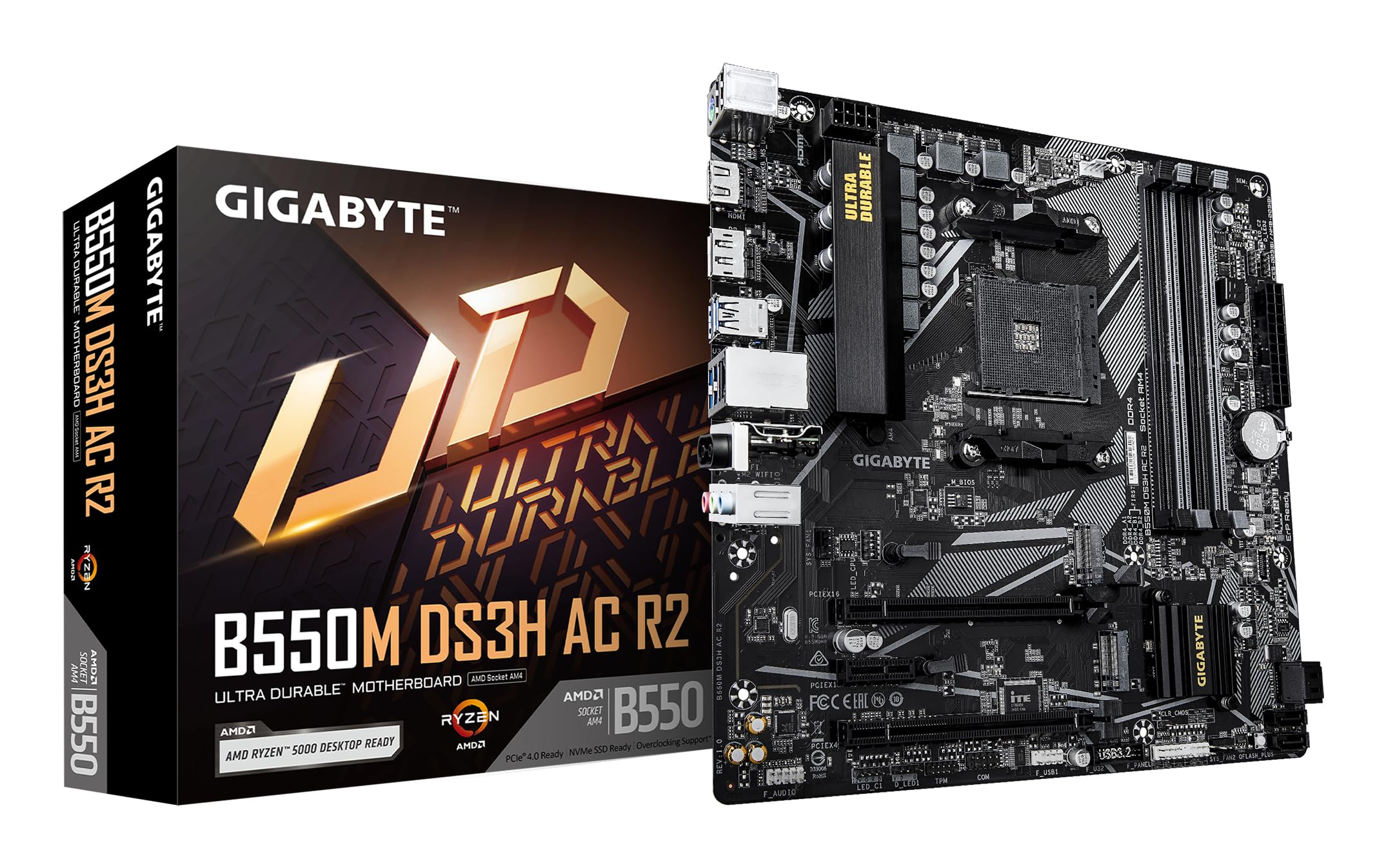
ചിത്രം 1.1: മുകളിൽ നിന്ന് താഴേക്ക് view of the GIGABYTE B550M DS3H AC R2 Motherboard, showcasing its layout including the CPU socket, DIMM slots, and various connectors.
2 പ്രധാന സവിശേഷതകൾ
- AMD B550 ചിപ്സെറ്റ്: Supports AMD Ryzen 5000, 4000, and 3000 series CPUs with AM4 socket.
- High-Speed DDR4 Memory: Dual-channel support for up to 4733MHz (O.C.) across 4 DIMM slots.
- Advanced Storage Options: Includes one PCIe 4.0 M.2 slot and one PCIe 3.0 M.2 slot, alongside PCIe slots for graphics and expansion.
- സംയോജിത കണക്റ്റിവിറ്റി: Features Wi-Fi 5, Bluetooth 5.0, and 1GbE LAN for reliable network connections.
- Flexible Display Outputs: Equipped with HDMI and DisplayPort for multi-monitor configurations.
- സ്മാർട്ട് കൂളിംഗ് സിസ്റ്റം: Smart Fan 6 with multiple temperature sensors ensures efficient thermal management.
- ക്യു-ഫ്ലാഷ് പ്ലസ്: Allows BIOS updates without the need for CPU, memory, or graphics card installation.
3. സജ്ജീകരണവും ഇൻസ്റ്റാളേഷനും
3.1 സിപിയു ഇൻസ്റ്റലേഷൻ
- സിപിയു സോക്കറ്റ് ലിവർ തുറന്ന നിലയിലാണെന്ന് ഉറപ്പാക്കുക.
- Carefully align the triangular mark on the AMD Ryzen CPU with the mark on the AM4 socket.
- നിർബന്ധിച്ച് അമർത്താതെ സിപിയു സോക്കറ്റിൽ സൌമ്യമായി വയ്ക്കുക.
- സിപിയു സുരക്ഷിതമാക്കാൻ ലിവർ താഴ്ത്തുക.
- നിർമ്മാതാവിന്റെ നിർദ്ദേശങ്ങൾക്കനുസൃതമായി സിപിയു കൂളർ ഇൻസ്റ്റാൾ ചെയ്യുക.
3.2 മെമ്മറി (റാം) ഇൻസ്റ്റലേഷൻ
- DIMM സ്ലോട്ടുകളുടെ രണ്ടറ്റത്തും ക്ലിപ്പുകൾ തുറക്കുക.
- DIMM സ്ലോട്ടിലെ കീ ഉപയോഗിച്ച് DDR4 മെമ്മറി മൊഡ്യൂളിലെ നോച്ച് വിന്യസിക്കുക.
- Insert the memory module firmly until the clips snap into place. For dual-channel operation, refer to the motherboard manual for recommended slot configurations.
3.3 സ്റ്റോറേജ് ഡിവൈസ് ഇൻസ്റ്റലേഷൻ
This motherboard supports both M.2 NVMe SSDs and SATA drives.
- M.2 SSD: Locate the M.2 slots (one PCIe 4.0, one PCIe 3.0). Insert the M.2 SSD at an angle and secure it with the provided screw.
- SATA ഡ്രൈവുകൾ: Connect SATA data cables from your SSDs/HDDs to the SATA ports on the motherboard. Connect power cables from your power supply to the drives.
3.4 എക്സ്പാൻഷൻ കാർഡ് ഇൻസ്റ്റാളേഷൻ
Install your graphics card or other PCIe expansion cards into the appropriate PCIe slots. Ensure they are seated firmly and secured with the case screw.
3.5 പവർ കണക്ഷനുകൾ
- നിങ്ങളുടെ പവർ സപ്ലൈയിൽ നിന്ന് മദർബോർഡിലേക്ക് 24-പിൻ ATX മെയിൻ പവർ കണക്ടർ ബന്ധിപ്പിക്കുക.
- 8-പിൻ ATX 12V CPU പവർ കണക്ടർ മദർബോർഡുമായി ബന്ധിപ്പിക്കുക.
3.6 പിൻഭാഗത്തെ I/O പാനൽ ഓവർview

Figure 3.1: The rear I/O panel of the GIGABYTE B550M DS3H AC R2 motherboard, showing various ports including USB, HDMI, DisplayPort, LAN, and audio jacks.
The rear I/O panel provides connectivity for external devices. It includes USB 2.0, USB 3.2 Gen 1, HDMI, DisplayPort, 1GbE LAN, Wi-Fi antenna connectors, and audio jacks. Refer to the detailed diagram in the physical manual for specific port identification.
4. പ്രവർത്തന നിർദ്ദേശങ്ങൾ
4.1 ബയോസ് സജ്ജീകരണം
The BIOS (Basic Input/Output System) is firmware that initializes hardware during the booting process. To enter BIOS Setup, press the DEL key during the Power-On Self-Test (POST). Here you can configure system settings, boot order, and monitor hardware status.
4.2 ക്യു-ഫ്ലാഷ് പ്ലസ്
സിപിയു, മെമ്മറി അല്ലെങ്കിൽ ഗ്രാഫിക്സ് കാർഡ് ഇൻസ്റ്റാൾ ചെയ്യാതെ തന്നെ ബയോസ് അപ്ഡേറ്റ് ചെയ്യാൻ Q-Flash Plus നിങ്ങളെ അനുവദിക്കുന്നു. ഏറ്റവും പുതിയ ബയോസ് ഡൗൺലോഡ് ചെയ്യുക. file GIGABYTE-ൽ നിന്ന് website, rename it to GIGABYTE.bin, save it to a USB flash drive, and insert it into the designated Q-Flash Plus USB port. Press the Q-Flash Plus button to initiate the update.
4.3 ഡ്രൈവർ ഇൻസ്റ്റലേഷൻ
After installing your operating system, install the necessary drivers for the motherboard chipset, audio, LAN, Wi-Fi, and other integrated components. These drivers are typically provided on a support DVD or can be downloaded from the official GIGABYTE webസൈറ്റ്.
5. പരിപാലനം
5.1 വൃത്തിയാക്കൽ
Regularly clean your computer's interior to prevent dust buildup, which can lead to overheating and reduced performance. Use compressed air to remove dust from components, especially heatsinks and fans. Ensure the system is powered off and unplugged before cleaning.
5.2 ബയോസ് അപ്ഡേറ്റുകൾ
ഇടയ്ക്കിടെ GIGABYTE പരിശോധിക്കുക website for BIOS updates. Updates can improve system stability, add support for new hardware, or fix known issues. Follow the instructions provided by GIGABYTE carefully when performing a BIOS update.
5.3 Smart Fan 6
Utilize the Smart Fan 6 utility in the BIOS or GIGABYTE's software to monitor system temperatures and adjust fan speeds. Proper fan configuration helps maintain optimal operating temperatures and extends component lifespan.
6. പ്രശ്നപരിഹാരം
- സിസ്റ്റം ബൂട്ട് ചെയ്യുന്നതിൽ പരാജയപ്പെടുന്നു: Check all power connections (24-pin ATX, 8-pin CPU), ensure RAM modules are properly seated, and verify the CPU is correctly installed. Try clearing the CMOS.
- ഡിസ്പ്ലേ ഔട്ട്പുട്ട് ഇല്ല: Confirm the graphics card is fully seated in its PCIe slot and connected to power (if required). Ensure your monitor cable is connected to the graphics card, not the motherboard's integrated graphics ports (unless using an APU).
- പെരിഫറൽ പ്രശ്നങ്ങൾ: If USB devices or other peripherals are not working, ensure drivers are installed and check BIOS settings for port enablement.
- സിസ്റ്റം അസ്ഥിരത/ക്രാഷുകൾ: This can be caused by outdated drivers, overheating, or faulty hardware. Update drivers, monitor temperatures, and test components individually if possible.
- ബയോസ് അപ്ഡേറ്റ് പരാജയം: If a BIOS update fails, use the Q-Flash Plus feature to recover the BIOS.
7 സ്പെസിഫിക്കേഷനുകൾ
| ഫീച്ചർ | സ്പെസിഫിക്കേഷൻ |
|---|---|
| ബ്രാൻഡ് | ജിഗാബൈറ്റ് |
| മോഡലിൻ്റെ പേര് | B550M DS3H എസി R2 |
| സിപിയു സോക്കറ്റ് | സോക്കറ്റ് AM4 |
| അനുയോജ്യമായ പ്രോസസ്സറുകൾ | എഎംഡി റൈസൺ 3000 സീരീസ്, എഎംഡി റൈസൺ 4000 സീരീസ്, എഎംഡി റൈസൺ 5000 സീരീസ് |
| ചിപ്സെറ്റ് തരം | എഎംഡി ബി550 |
| റാം മെമ്മറി ടെക്നോളജി | DDR4 |
| മെമ്മറി ക്ലോക്ക് സ്പീഡ് | Up to 4733 MHz (O.C.) |
| മെമ്മറി സ്ലോട്ടുകൾ ലഭ്യമാണ് | 4 |
| റാം മെമ്മറി പരമാവധി വലുപ്പം | 128 ജിബി |
| ഗ്രാഫിക്സ് കാർഡ് ഇൻ്റർഫേസ് | പിസിഐ എക്സ്പ്രസ് 4.0 |
| Total PCIe Ports | 1 (PCIe 4.0 x16 for GPU) + other PCIe slots |
| M.2 സ്ലോട്ടുകൾ | 1x പിസിഐഇ 4.0 എം.2, 1x പിസിഐഇ 3.0 എം.2 |
| Total SATA Ports | 4 |
| വയർലെസ് കണക്റ്റിവിറ്റി | വൈ-ഫൈ 5, ബ്ലൂടൂത്ത് 5.0 |
| ലാൻ | 1GbE ലാൻ |
| മൊത്തം USB പോർട്ടുകൾ | 6 (പിൻ I/O) + ഇന്റേണൽ ഹെഡറുകൾ |
| ഔട്ട്പുട്ടുകൾ പ്രദർശിപ്പിക്കുക | 1x HDMI, 1x ഡിസ്പ്ലേ പോർട്ട് |
| ഫോം ഫാക്ടർ | മൈക്രോ എടിഎക്സ് |
| ഇനത്തിൻ്റെ അളവുകൾ L x W x H | 24.4L x 24.4W x 3.5H സെൻ്റീമീറ്റർ |
| ഇനത്തിൻ്റെ ഭാരം | 980 ഗ്രാം |
8. വാറൻ്റി വിവരങ്ങൾ
The GIGABYTE B550M DS3H AC R2 motherboard comes with a 3-YEAR Manufacturer Warranty. Please retain your proof of purchase for warranty claims. For detailed terms and conditions, refer to the official GIGABYTE warranty policy available on their webസൈറ്റ്.
9. പിന്തുണയും സമ്പർക്കവും
സാങ്കേതിക പിന്തുണ, ഡ്രൈവർ ഡൗൺലോഡുകൾ, ബയോസ് അപ്ഡേറ്റുകൾ, കൂടുതൽ ഉൽപ്പന്ന വിവരങ്ങൾ എന്നിവയ്ക്കായി, ദയവായി ഔദ്യോഗിക GIGABYTE സന്ദർശിക്കുക. website. You can also contact GIGABYTE customer service for assistance.
നിർമ്മാതാവിനെ ബന്ധപ്പെടാനുള്ള വിവരങ്ങൾ:
GIGABYTE Technology (India) Pvt. Ltd.
Unit No. 807 & 808, 8th Floor, Naman Midtown B-Wing,
Elphinstone Road, Mumbai – 400013, India
For the most up-to-date contact details and support resources, please refer to the GIGABYTE official webസൈറ്റ്: www.gigabyte.com