
CORBOBO HERO 84HE
Aula Hero 84 HE Mechanical Gaming Keyboard User Manual
Model: HERO 84HE
ആമുഖം
Welcome to the user manual for the Aula Hero 84 HE Mechanical Gaming Keyboard. This high-performance keyboard features advanced Hall Effect magnetic switches, an ultra-fast 8000Hz polling rate, and a compact 75% layout designed for both gaming and productivity. This manual provides detailed instructions on setting up, operating, maintaining, and troubleshooting your keyboard to ensure optimal performance and longevity.

Image: The Aula Hero 84 HE mechanical gaming keyboard, showcasing അതിന്റെ ഒതുക്കമുള്ള 75% ലേഔട്ടും ഊർജ്ജസ്വലമായ RGB ബാക്ക്ലൈറ്റിംഗും.
സജ്ജമാക്കുക
പാക്കേജ് ഉള്ളടക്കം
തുടരുന്നതിന് മുമ്പ്, പാക്കേജിൽ എല്ലാ ഇനങ്ങളും ഉണ്ടെന്ന് ഉറപ്പാക്കുക:
- കീബോർഡ് x 1
- ഉപയോക്തൃ മാനുവൽ x 1
- USB-C കേബിൾ x 1
- കീക്യാപ്പ് പുള്ളർ x 1
കീബോർഡ് ബന്ധിപ്പിക്കുന്നു
The Aula Hero 84 HE keyboard connects via a USB-C cable.
- Locate the USB-C port on the left side of the keyboard.
- നൽകിയിരിക്കുന്ന USB-C കേബിളിന്റെ ഒരറ്റം കീബോർഡിന്റെ USB-C പോർട്ടുമായി ബന്ധിപ്പിക്കുക.
- Connect the other end of the USB-C cable to an available USB port on your computer (PC or Mac).
- നിങ്ങളുടെ ഓപ്പറേറ്റിംഗ് സിസ്റ്റം കീബോർഡ് യാന്ത്രികമായി തിരിച്ചറിയും.
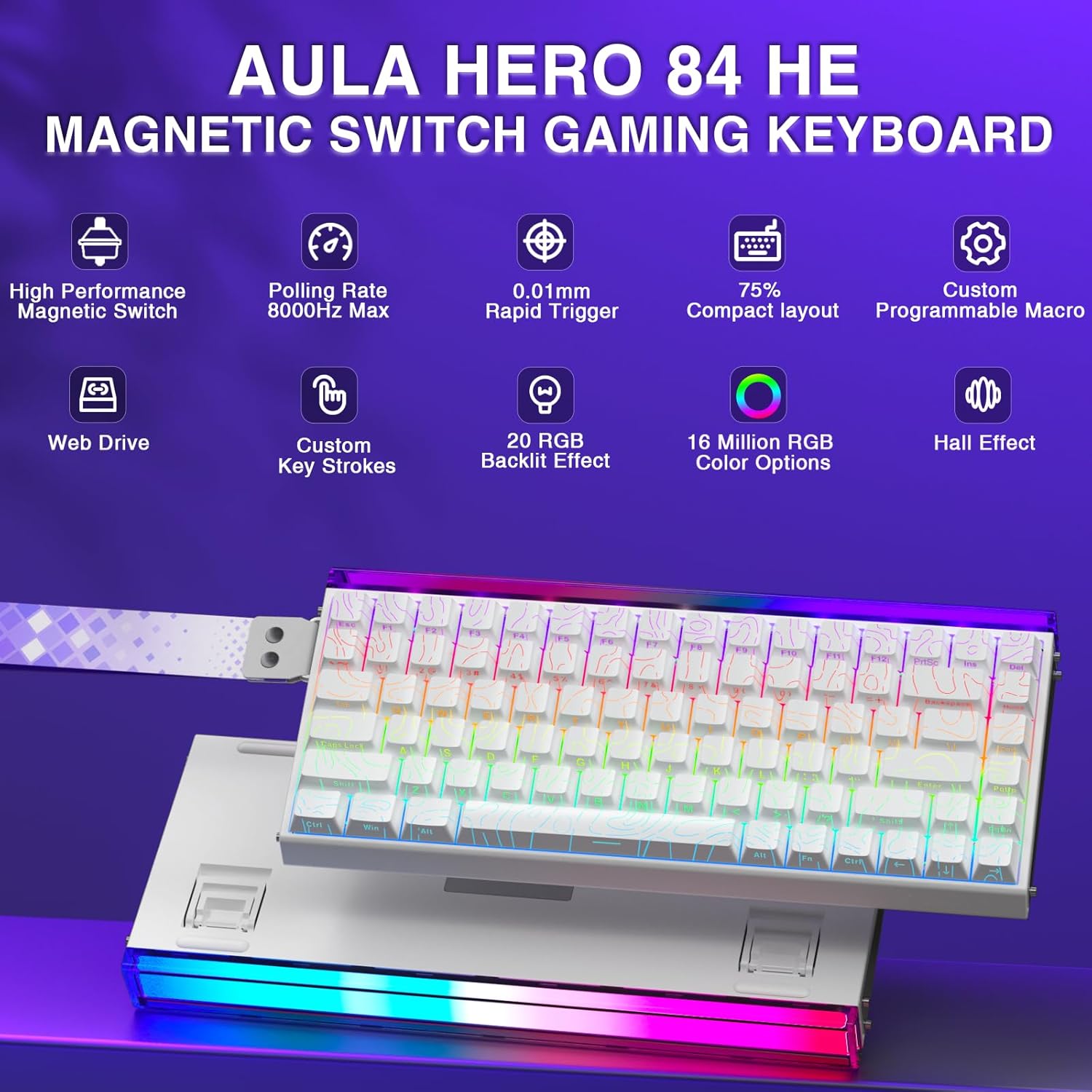
Image: The Aula Hero 84 HE keyboard connected to a laptop via its USB-C cable, demonstrating its compact size suitable for various setups.
Web-Based Driver Setup
The Aula Hero 84 HE utilizes a convenient web-based driver for customization, eliminating the need for software installation.
- എ തുറക്കുക web നിങ്ങളുടെ കമ്പ്യൂട്ടറിലെ ബ്രൗസർ.
- Navigate to the official driver URL: bit.ly/m/AULA.
- ന് webpage, select "HERO 68/84 HE" from the available options.
- You can now customize key mappings, create macros, adjust lighting effects, and more directly from your browser.
Image: A screenshot of the Aula web-based driver interface, highlighting the selection for "HERO 68/84 HE" to access customization options.
പ്രവർത്തന നിർദ്ദേശങ്ങൾ
പ്രധാന സവിശേഷതകൾ
- ഹാൾ ഇഫക്റ്റ് മാഗ്നറ്റിക് സ്വിച്ചുകൾ: The HERO 84 HE features advanced Hall Effect technology, offering an ultra-low actuation distance adjustable from 0.01mm to 3.4mm. This allows for rapid trigger functionality, enabling faster response times and precise control in gaming.

Image: A detailed diagram illustrating the adjustable actuation range of the Hall Effect magnetic switches, from 0.01mm to 3.4mm.
- 8000Hz പോളിംഗ് നിരക്ക്: Experience near-instantaneous response times with an 8000Hz polling rate, ensuring every keystroke is registered with extreme precision.

Image: Visual representation highlighting the 8000Hz keyboard polling rate and 0.125ms key delay for ultra-fast response.
- Compact 75% Design: The space-saving 75% layout retains essential function keys while reducing overall size, making it ideal for gaming, work, and travel.

Image: The Aula Hero 84 HE keyboard demonstrating its compact 75% design with 84 keys, emphasizing its space-saving benefits.
- Versatile RGB Lighting System: The keyboard features a full RGB backlighting system with multiple preset effects and 16 million color options. The top-mounted light box supports independent control for personalized lighting setups.

Image: A visual guide to the RGB lighting effects and control key combinations for the Aula Hero 84 HE keyboard, including lightbox settings.
- Hot-Swappable PBT Keycaps: Easily replace keyboard switches and keycaps to meet personalized needs. The PBT keycaps offer high wear resistance and a comfortable feel.

Image: The Aula Hero 84 HE keyboard with a section revealing its hot-swappable switches and durable PBT double-shot keycaps.
Programmable Keys and Macros
The Aula Hero 84 HE is fully programmable, allowing you to map shortcuts and macros using the web-അധിഷ്ഠിത ഡ്രൈവർ.
- ഡൈനാമിക് കീസ്ട്രോക്ക് (DKS): Modify current buttons to bind 1 to 4 functions based on press degree.
- Press and Hold/Click (M1): A single button can achieve two functions; pressing and holding performs one, clicking performs another.
- Switching Switch (TGL): Continuously trigger when clicked, and press and hold to trigger normally.
- PRCS (BOCD function): Binds two buttons; the pressed button later forces release of the previous button, triggering one button at a time.
- Quick Trigger Function (RT): Dynamically adjusts trigger stroke and reset stroke based on your intention to press or release.
- Real-time Detection: Visualize magnetic switch travel calibration.
ആക്സസ് ചെയ്യുക web-based driver (bit.ly/m/AULA) to configure these advanced settings.

Image: A screenshot of the web-based driver interface, demonstrating the comprehensive options for fully programmable key mapping, shortcuts, and macros.
ഫംഗ്ഷൻ കീ കോമ്പിനേഷനുകൾ
The keyboard includes various function key combinations for quick adjustments:
- എഫ്എൻ + ഇസഡ്: Switch lightbox speed.
- FN + INS: Switch lightbox mode.
- FN + C: Switch lightbox brightness.
- എഫ്എൻ + എക്സ്: Switch lightbox color.
- FN + I: തെളിച്ചം വർദ്ധിപ്പിക്കുക.
- FN + K: തെളിച്ചം കുറയ്ക്കുക.
- FN + DEL: Switch light effect color.
- FN + PGUP: ലൈറ്റിംഗ് ഇഫക്റ്റുകൾ മാറുക.
- FN + Space (hold for 5 seconds): Restore keyboard default settings.
- FN + V: പ്രോയിലേക്ക് മാറുകfile 1.
- FN + B: പ്രോയിലേക്ക് മാറുകfile 2.
- FN + N: പ്രോയിലേക്ക് മാറുകfile 3.
മെയിൻ്റനൻസ്
Proper maintenance ensures the longevity and optimal performance of your Aula Hero 84 HE keyboard.
- കീക്യാപ്പുകൾ വൃത്തിയാക്കൽ: ഒരു സോഫ്റ്റ് ഉപയോഗിക്കുക, ഡിamp cloth to wipe down the keycaps. For deeper cleaning, use the provided keycap puller to remove keycaps and clean them with mild soap and water. Ensure they are completely dry before reattaching.
- കീബോർഡ് ബോഡി വൃത്തിയാക്കൽ: Use a dry, lint-free cloth to wipe the keyboard body. Avoid using harsh chemicals or abrasive materials.
- പൊടി നീക്കം: കീക്യാപ്പുകൾക്കും സ്വിച്ചുകൾക്കുമിടയിലുള്ള പൊടിയും അവശിഷ്ടങ്ങളും നീക്കം ചെയ്യാൻ കംപ്രസ് ചെയ്ത വായു ഉപയോഗിക്കുക.
- സംഭരണം: ദീർഘനേരം ഉപയോഗിക്കാത്തപ്പോൾ, കീബോർഡ് നേരിട്ട് സൂര്യപ്രകാശം ഏൽക്കാത്തതും ഉയർന്ന താപനില ഏൽക്കാത്തതുമായ വരണ്ടതും തണുത്തതുമായ സ്ഥലത്ത് സൂക്ഷിക്കുക.
ട്രബിൾഷൂട്ടിംഗ്
If you encounter issues with your Aula Hero 84 HE keyboard, refer to the following common troubleshooting steps:
- കീബോർഡ് പ്രതികരിക്കുന്നില്ല:
- USB-C കേബിൾ കീബോർഡിലേക്കും കമ്പ്യൂട്ടറിലേക്കും സുരക്ഷിതമായി ബന്ധിപ്പിച്ചിട്ടുണ്ടെന്ന് ഉറപ്പാക്കുക.
- നിങ്ങളുടെ കമ്പ്യൂട്ടറിലെ മറ്റൊരു USB പോർട്ടിലേക്ക് കീബോർഡ് ബന്ധിപ്പിക്കാൻ ശ്രമിക്കുക.
- നിങ്ങളുടെ കമ്പ്യൂട്ടർ പുനരാരംഭിക്കുക.
- If the issue persists, try connecting the keyboard to another computer to rule out a computer-specific problem.
- കീകൾ രജിസ്റ്റർ ചെയ്യുന്നില്ല അല്ലെങ്കിൽ പറ്റിപ്പിടിക്കുന്നില്ല:
- Check for any physical obstructions or debris under the keycap. Use compressed air to clear.
- If a specific key is not working, try hot-swapping the switch with a known working switch from another key to determine if the switch itself is faulty.
- കീക്യാപ്പ് സ്വിച്ചിൽ ശരിയായി സ്ഥാപിച്ചിട്ടുണ്ടെന്ന് ഉറപ്പാക്കുക.
- അമർത്തിപ്പിടിച്ച് ഫാക്ടറി റീസെറ്റ് നടത്തുക. FN + സ്പേസ് 5 സെക്കൻഡ് നേരത്തേക്ക്.
- RGB ലൈറ്റിംഗ് പ്രശ്നങ്ങൾ:
- കീബോർഡ് ശരിയായി ബന്ധിപ്പിച്ചിട്ടുണ്ടെന്നും വൈദ്യുതി ലഭിക്കുന്നുണ്ടെന്നും ഉറപ്പാക്കുക.
- Use the FN key combinations (e.g., FN + I/K for brightness, FN + PGUP for effects) to adjust lighting.
- ആക്സസ് ചെയ്യുക web-based driver to verify and adjust lighting settings.
- Perform a factory reset (FN + Space for 5 seconds).
- Software/Driver Issues (Web-Based):
- നിങ്ങളുടെ ഉറപ്പാക്കുക web browser is up to date.
- നിങ്ങളുടെ ബ്രൗസറിന്റെ കാഷെയും കുക്കികളും മായ്ക്കുക.
- ആക്സസ് ചെയ്യാൻ ശ്രമിക്കുക web-based driver from a different browser.
- നിങ്ങളുടെ ഇന്റർനെറ്റ് കണക്ഷൻ പരിശോധിക്കുക.
സ്പെസിഫിക്കേഷനുകൾ
| ഫീച്ചർ | വിശദാംശങ്ങൾ |
|---|---|
| ഉൽപ്പന്ന അളവുകൾ | 12.6 x 5.47 x 1.67 ഇഞ്ച് (32.0 x 13.9 x 4.2 സെ.മീ) |
| ഇനത്തിൻ്റെ ഭാരം | 2.57 പൗണ്ട് (1.17 കി.ഗ്രാം) |
| നിർമ്മാതാവ് | ഔല |
| മോഡൽ നമ്പർ | HERO 84HE |
| കണക്റ്റിവിറ്റി ടെക്നോളജി | USB-C |
| കീബോർഡ് വിവരണം | Magnetic Switches Hall Effect Keyboard |
| ശുപാർശ ചെയ്യുന്ന ഉപയോഗങ്ങൾ | ഗെയിമിംഗ് |
| പ്രത്യേക സവിശേഷതകൾ | Backlit, Hall Effect Keyboard, Hot-Swappable, Mechanical Gaming keyboard, Programmable Keys |
| നിറം | White (RGB Backlighting) |
| പോളിംഗ് നിരക്ക് | 8000Hz |
| ആക്ച്വേഷൻ ദൂരം | 0.01 എംഎം മുതൽ 3.4 എംഎം വരെ ക്രമീകരിക്കാം |
വാറൻ്റിയും ഉപഭോക്തൃ പിന്തുണയും
CORBOBO is committed to your satisfaction.
- വാറൻ്റി: The Aula Hero 84 HE keyboard comes with a 2-year limited warranty covering manufacturing defects and hardware malfunctions under normal use. This warranty does not cover damage caused by misuse, unauthorized modifications, or normal wear and tear.
- ഉപഭോക്തൃ പിന്തുണ: For any questions, technical assistance, or warranty claims regarding your HERO 84 HE keyboard, please contact CORBOBO customer support. We aim to respond to all inquiries within 24 hours.
- ബന്ധപ്പെടാനുള്ള വിവരങ്ങൾ: Please refer to the contact details provided on the official CORBOBO webസൈറ്റ് അല്ലെങ്കിൽ നിങ്ങളുടെ വാങ്ങൽ ഡോക്യുമെന്റേഷൻ.
Ask a question about this manual
Ask about setup, troubleshooting, compatibility, parts, safety, or missing instructions. Manuals+ will review the question and use this page’s manual context to help answer it.