
Tuya Smart WiFi Video Doorbell
Tuya Smart WiFi Video Doorbell User Manual
Model: Tuya Smart WiFi Video Doorbell
1. ആമുഖം
This manual provides comprehensive instructions for the installation, operation, and maintenance of your Tuya Smart WiFi Video Doorbell. Please read this manual thoroughly before using the product to ensure proper functionality and safety.
The Tuya Smart WiFi Video Doorbell is designed to enhance your home security with features such as 1080P/3MP video, two-way audio, PIR motion detection, and remote access via smartphone applications.
2. ഉൽപ്പന്ന സവിശേഷതകൾ
- 4.3-inch high-definition LCD screen for clear indoor viewing.
- 1080P (2MP) or 3MP (2304×1296 Pixels) video resolution options.
- Built-in 5000mAh rechargeable lithium battery for extended standby time (up to 6 months).
- PIR motion detection with automatic capture and alarm notifications.
- Two-way audio communication with noise cancellation.
- Infrared (IR) LEDs for clear night vision.
- Support for multiple mobile applications: Tuya, Smart Life, YCC365 Plus, iCam365.
- Local storage via TF card (up to 128GB, FAT32 format required) and cloud storage function.
- Quick access via app, waking up within 3 seconds and responding within 1 second.
- Easy installation with WiFi connection, no complex wiring required.
3. പാക്കേജ് ഉള്ളടക്കം
താഴെ ലിസ്റ്റ് ചെയ്തിരിക്കുന്ന എല്ലാ ഇനങ്ങളും നിങ്ങളുടെ പാക്കേജിൽ ഉൾപ്പെടുത്തിയിട്ടുണ്ടെന്ന് ഉറപ്പാക്കുക. ഏതെങ്കിലും ഇനങ്ങൾ നഷ്ടപ്പെട്ടിട്ടുണ്ടെങ്കിലോ കേടായിട്ടുണ്ടെങ്കിലോ, ദയവായി ഉപഭോക്തൃ പിന്തുണയുമായി ബന്ധപ്പെടുക.
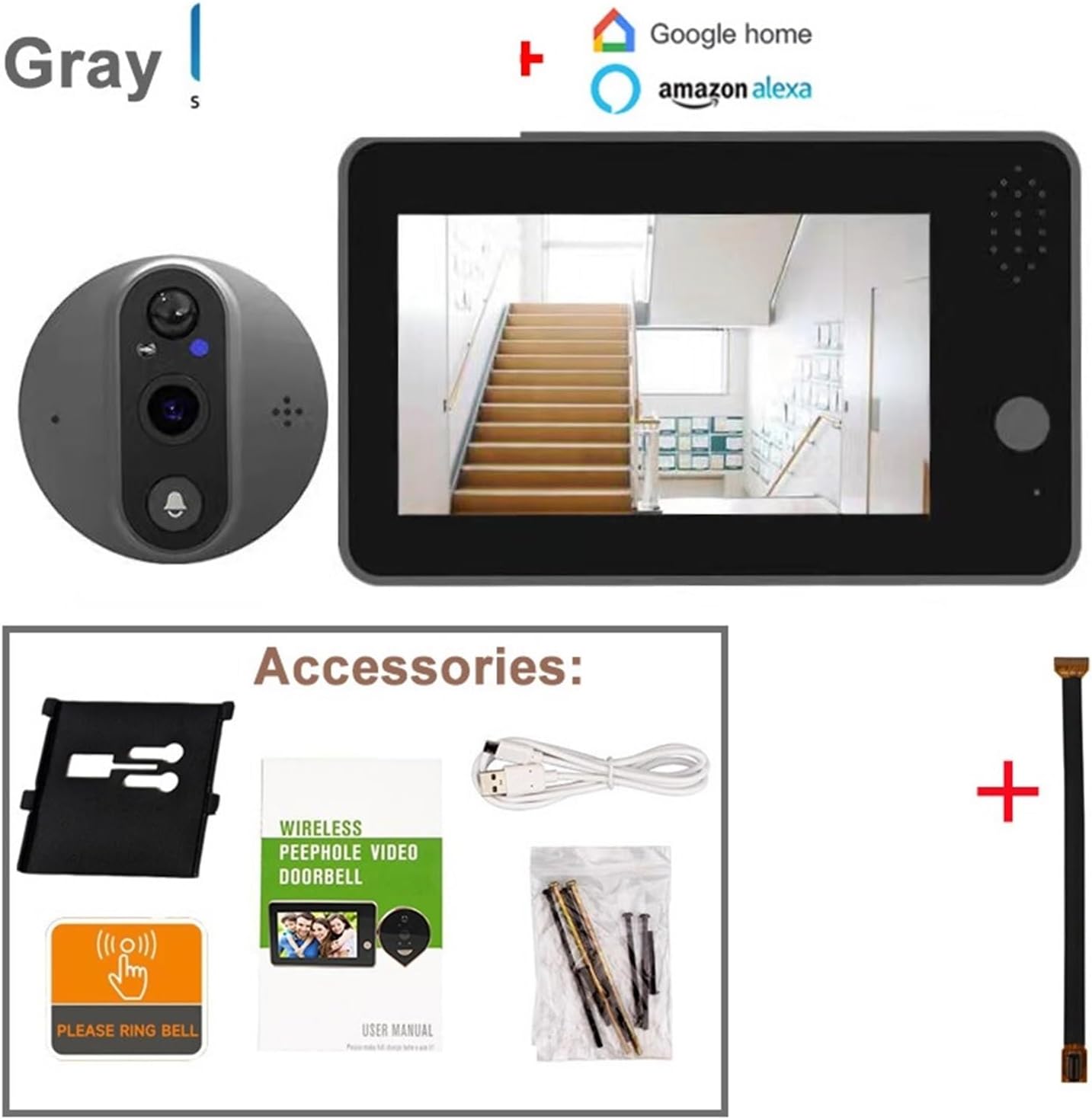
Image: The package includes the indoor monitor, outdoor doorbell unit, mounting bracket, USB charging cable, screws, a 'Please Ring Bell' sticker, and the user manual. An extension cable is also shown.
- Indoor Monitor Unit (with 4.3-inch LCD)
- Outdoor Doorbell Unit (Peephole Camera)
- മൌണ്ടിംഗ് ബ്രാക്കറ്റ്
- യുഎസ്ബി ചാർജിംഗ് കേബിൾ
- മൗണ്ടിംഗ് സ്ക്രൂകളും ആങ്കറുകളും
- "Please Ring Bell" Sticker
- ഉപയോക്തൃ മാനുവൽ
- Extension Cable (for connecting indoor and outdoor units)
4. ഉൽപ്പന്നം കഴിഞ്ഞുview അളവുകളും
Familiarize yourself with the components and dimensions of your video doorbell system.

Image: This diagram shows the indoor monitor with its screen, button, and speaker. The outdoor unit displays the PIR motion detector, speaker, microphone, IR lamp, and doorbell button. Dimensions for both units are provided, indicating the indoor monitor is approximately 137mm x 84mm x 20mm, and the outdoor unit is 67mm x 67mm x 15mm with a 55mm peephole extension.
Indoor Monitor Unit:
- 4.3 inch LED Screen: തത്സമയം പ്രദർശിപ്പിക്കുന്നു view റെക്കോർഡ് ചെയ്ത ഫൂtage.
- Screen Button: For navigation and selection.
- സ്പീക്കർ: For two-way audio and alerts.
- Micro SD / TF Card Slot: For local video storage (supports up to 128GB, FAT32 format).
- മൈക്രോ യുഎസ്ബി പോർട്ട്: ബിൽറ്റ്-ഇൻ ബാറ്ററി ചാർജ് ചെയ്യുന്നതിന്.
- പവർ ഓൺ/ഓഫ് സ്വിച്ച്: ഉപകരണം ഓണാക്കാനോ ഓഫാക്കാനോ.
Outdoor Doorbell Unit:
- PIR Motion Detect Sensor: മനുഷ്യന്റെ ചലനങ്ങൾ തിരിച്ചറിയുന്നു.
- സ്പീക്കർ: ടു-വേ ഓഡിയോയ്ക്ക്.
- എംഐസി (മൈക്രോഫോൺ): ടു-വേ ഓഡിയോയ്ക്ക്.
- ഐആർ എൽamp: രാത്രി കാഴ്ചയ്ക്കായി ഇൻഫ്രാറെഡ് ലൈറ്റുകൾ.
- ഡോർബെൽ ബട്ടൺ: Activates the doorbell and initiates a call.
5. ഇൻസ്റ്റാളേഷൻ ഗൈഡ്
Follow these steps carefully to install your Tuya Smart WiFi Video Doorbell.
5.1 അനുയോജ്യതാ പരിശോധന
- The doorbell is suitable for door thicknesses between 40 മില്ലീമീറ്ററും 120 മില്ലീമീറ്ററും.
- The peephole diameter should be between 16 മില്ലീമീറ്ററും 50 മില്ലീമീറ്ററും.
- The cable installation length is 11 സെ.മീ.
- ഇതിന് അനുയോജ്യമല്ല: double doors, doors with small windows or steel mesh, soft-packed doors, or doors without existing peepholes (a peephole must be drilled if none exists).
5.2 ഫിസിക്കൽ ഇൻസ്റ്റലേഷൻ
- Remove Existing Peephole: Carefully unscrew and remove your current peephole viewer from the door.
- Insert Outdoor Unit: Insert the cable of the outdoor doorbell unit through the peephole hole from the outside of the door. Ensure the unit is flush against the door.
- മൗണ്ടിംഗ് ബ്രാക്കറ്റ് ഘടിപ്പിക്കുക: From the inside of the door, thread the mounting bracket onto the cable. Secure it with the provided screws, ensuring it is tight and stable.
- Connect Indoor Monitor: Connect the cable from the outdoor unit to the corresponding port on the back of the indoor monitor.
- Mount Indoor Monitor: Slide the indoor monitor onto the mounting bracket until it clicks securely into place.
5.3 Initial Power Up and Charging

Image: This image highlights the built-in 5000mAh rechargeable lithium battery, emphasizing its low power consumption and power-saving design, allowing for a standby time of approximately 3 months on a single charge.
The device comes with a built-in 5000mAh lithium battery. Before first use, fully charge the device using the provided USB cable and a standard USB power adapter (not included).
- Connect the USB cable to the Micro USB port on the indoor monitor.
- മറ്റേ അറ്റം യുഎസ്ബി പവർ സ്രോതസ്സിലേക്ക് ബന്ധിപ്പിക്കുക.
- ചാർജിംഗ് ഇൻഡിക്കേറ്റർ ചാർജിംഗ് സ്റ്റാറ്റസ് കാണിക്കും.
- A full charge can last up to 6 months under normal usage conditions.
6. ആപ്പ് സജ്ജീകരണവും വൈഫൈ കണക്ഷനും
To utilize the smart features, you need to connect the doorbell to your home WiFi network and set it up with a compatible mobile application.

Image: This graphic illustrates the doorbell's compatibility with various mobile applications including YCC365 Plus, Tuya, iCam365, and Smart Life. It also visually represents the two-way audio feature, allowing users to communicate with visitors remotely.
- അപ്ലിക്കേഷൻ ഡൗൺലോഡുചെയ്യുക: Download and install one of the compatible applications: തുയ സ്മാർട്ട്, സ്മാർട്ട് ലൈഫ്, YCC365 പ്ലസ്, അല്ലെങ്കിൽ iCam365 നിങ്ങളുടെ സ്മാർട്ട്ഫോണിന്റെ ആപ്പ് സ്റ്റോറിൽ നിന്ന് (Android-നുള്ള Google Play Store, iOS-നുള്ള Apple App Store).
- രജിസ്റ്റർ ചെയ്യുക/ലോഗിൻ ചെയ്യുക: ആപ്പ് തുറന്ന് ഒരു പുതിയ അക്കൗണ്ട് രജിസ്റ്റർ ചെയ്യുക അല്ലെങ്കിൽ നിങ്ങൾക്ക് ഇതിനകം അക്കൗണ്ട് ഉണ്ടെങ്കിൽ ലോഗിൻ ചെയ്യുക.
- ഉപകരണം ചേർക്കുക: Follow the in-app instructions to add a new device. Select "Video Doorbell" or "Smart Camera" category.
- വൈഫൈ കണക്ഷൻ:
- The doorbell only supports 2.4GHz വൈഫൈ നെറ്റ്വർക്കുകൾ. It is not compatible with 5GHz WiFi.
- If your router broadcasts both 2.4GHz and 5GHz networks, temporarily disable the 5GHz network during the initial setup process.
- Enter your 2.4GHz WiFi network name (SSID) and password when prompted by the app.
- The app will guide you through connecting the doorbell to WiFi, often involving scanning a QR code displayed on your phone screen with the doorbell camera.
- സജ്ജീകരണം പൂർത്തിയാക്കുക: Once connected, you can name your device and configure additional settings within the app. You can re-enable your 5GHz WiFi network after successful connection.
7. പ്രവർത്തന നിർദ്ദേശങ്ങൾ
7.1 തത്സമയം View ഒപ്പം ടു-വേ ഓഡിയോയും

Image: This image displays the complete video doorbell system, featuring the outdoor peephole camera unit and the indoor monitor. The monitor's screen shows a live feed, demonstrating its function as a door viewer.
- ഇൻഡോർ മോണിറ്റർ: Press the screen button on the indoor monitor to view the live feed from the outdoor camera.
- മൊബൈൽ ആപ്പ്: Open the connected app on your smartphone. Select your doorbell device to access the live view.
- ടു-വേ ഓഡിയോ: ലൈവിൽ ആയിരിക്കുമ്പോൾ view or during a doorbell call, use the microphone icon in the app or on the indoor monitor (if available) to speak with the visitor. The doorbell's built-in speaker will transmit your voice, and its microphone will capture the visitor's response.
7.2 Doorbell Call Function
- When a visitor presses the doorbell button on the outdoor unit, the indoor monitor will ring and display the live view.
- Simultaneously, a notification will be sent to your connected smartphone app.
- You can answer the call from either the indoor monitor or your smartphone to engage in two-way communication.
7.3 പിഐആർ മോഷൻ ഡിറ്റക്ഷൻ

Image: This image details the Smart PIR Motion Detection feature, showing detection ranges (low sensitivity at 0.5m, middle at 1.5m, high at 3m). It also highlights the HD Night Vision with 3 high-power IR LED lights and the 3MP HD camera resolution.
- The built-in PIR sensor detects human movement near your door.
- Upon detection, the doorbell will automatically capture a picture or record a video clip.
- An alarm notification will be pushed to your mobile phone.
- You can adjust the sensitivity of the PIR detection (low, middle, high) within the app settings to minimize false alarms.
7.4 നൈറ്റ് വിഷൻ
- The doorbell is equipped with 2 or 3 high-power IR LEDs and a built-in IR-CUT filter.
- It automatically switches between day and night modes, providing clear visibility even in low-light or dark conditions.
8. സംഭരണവും പ്ലേബാക്കും

Image: This graphic illustrates the two primary storage options: Micro TF Card for local video data and Cloud Storage Service. It notes that the Micro TF card needs to be purchased separately and that recorded videos can be viewed on the mobile app or exported to a computer, but not directly on the device's screen.
8.1 TF Card Storage (Local)
- The device supports a Micro TF card up to 128GB (not included).
- പ്രധാനപ്പെട്ടത്: The TF card must be formatted to FAT32. For cards above 64GB, you may need to convert the format on your computer.
- Insert the TF card into the designated slot on the indoor monitor.
- Recorded videos (from doorbell presses or motion detection) will be saved to the TF card.
- TF card videos can be played back directly on the mobile app or exported to a computer for viewing. They cannot be played back on the device's screen.
8.2 Cloud Storage (Optional)
- The doorbell supports cloud storage functionality. This service typically requires a subscription through the app.
- Cloud storage provides a secure backup of your video recordings.
- Tuya app supports 30-day cycle storage of cloud image messages. YCC365 Plus/iCam365 typically support 3 days of cloud storage.
- Cloud videos can be played back directly from the app.
8.3 പ്ലേബാക്ക്
- Access recorded videos through the "Playback" or "History" section within your chosen mobile application.
- നിങ്ങൾക്ക് കഴിയും view historical records and abnormal situation captures at any time.
9. പരിപാലനവും പരിചരണവും
- വൃത്തിയാക്കൽ: Use a soft, dry cloth to clean the indoor monitor and outdoor unit. Do not use abrasive cleaners or solvents.
- ബാറ്ററി: Recharge the battery when the low battery indicator appears. Avoid completely draining the battery frequently to prolong its lifespan.
- ഫേംവെയർ അപ്ഡേറ്റുകൾ: Periodically check the app for firmware updates for your doorbell. Updates can improve performance and add new features.
- പ്രവർത്തന താപനില: Ensure the device operates within its specified temperature range to prevent damage.
10. പ്രശ്നപരിഹാരം
| പ്രശ്നം | സാധ്യമായ കാരണം | പരിഹാരം |
|---|---|---|
| ഉപകരണം ഓണാകില്ല. | ബാറ്ററി തീർന്നു. | യുഎസ്ബി കേബിൾ ഉപയോഗിച്ച് ഉപകരണം ചാർജ് ചെയ്യുക. |
| വൈഫൈയിലേക്ക് കണക്റ്റുചെയ്യാൻ കഴിയുന്നില്ല. | Incorrect WiFi band (5GHz). വൈഫൈ പാസ്വേഡ് തെറ്റാണ്. ദുർബലമായ വൈഫൈ സിഗ്നൽ. | Ensure you are connecting to a 2.4GHz WiFi network. Temporarily disable 5GHz on your router during setup. Double-check password. Move router closer or use a WiFi extender. |
| ഫോണിൽ അറിയിപ്പുകളൊന്നുമില്ല. | App notifications disabled. ആപ്പ് പശ്ചാത്തലത്തിൽ പ്രവർത്തിക്കുന്നില്ല. നെറ്റ്വർക്ക് പ്രശ്നങ്ങൾ. | Check app notification settings on your phone. Ensure app has necessary permissions. Verify internet connection. |
| PIR motion detection is too sensitive/not sensitive enough. | PIR സെൻസിറ്റിവിറ്റി ക്രമീകരണം. | Adjust PIR sensitivity (low, middle, high) in the app settings. |
| TF card not recognized or recording. | Incorrect format. Card full or faulty. | Ensure TF card is FAT32 formatted. Try reformatting or using a different card. |
| മോശം വീഡിയോ നിലവാരം. | ലെൻസിന്റെ തടസ്സം. Low light conditions. Network bandwidth. | Clean the camera lens. Ensure IR LEDs are not obstructed. Check your internet speed. |
11 സ്പെസിഫിക്കേഷനുകൾ
| ഫീച്ചർ | വിശദാംശങ്ങൾ |
|---|---|
| LCD ഡിസ്പ്ലേ വലിപ്പം | 4.3 ഇഞ്ച് |
| Image Sensor Solution | OV9712 CMOS Sensor + Hi3518E SoC |
| ഫോക്കൽ ലെങ്ത് | 1.7 മി.മീ |
| ന്റെ ആംഗിൾ View | 120 degrees wide angle |
| ഓഡിയോ | Built-in microphone & speaker, 2-way audio with noise cancellation |
| വീഡിയോ കംപ്രഷൻ | H.265 |
| റെസലൂഷൻ | 1920*1080P@25fps (2MP) or 2304x1296 (3MP) depending on model variant |
| സ്ട്രീം ചെയ്യുക | Double stream |
| ബാറ്ററി | ബിൽറ്റ്-ഇൻ 5000mAh ലിഥിയം ബാറ്ററി |
| സംഭരണം | Max 128GB TF card (FAT32 format), Cloud storage |
| വൈഫൈ | 2.4GHz മാത്രം |
| വാതിലിന്റെ കനം അനുയോജ്യത | 40-120 മി.മീ |
| Peephole Diameter Compatibility | 16-50 മി.മീ |
| നിർമ്മാതാവ് | YUD5DAS |
| മാതൃരാജ്യം | ചൈന |
12. വാറൻ്റിയും പിന്തുണയും
വാറന്റി വിവരങ്ങൾക്കും സാങ്കേതിക പിന്തുണയ്ക്കും, നിങ്ങളുടെ റീട്ടെയിലർ അല്ലെങ്കിൽ നിർമ്മാതാവിന്റെ ഉദ്യോഗസ്ഥൻ നൽകിയ കോൺടാക്റ്റ് വിശദാംശങ്ങൾ പരിശോധിക്കുക. webസൈറ്റ്. വാങ്ങിയതിന്റെ തെളിവായി നിങ്ങളുടെ വാങ്ങൽ രസീത് സൂക്ഷിക്കുക.
Manufacturer: YUD5DAS
Ask a question about this manual
Ask about setup, troubleshooting, compatibility, parts, safety, or missing instructions. Manuals+ will review the question and use this page’s manual context to help answer it.