
R10
WiFi Video Peephole Doorbell Viewer ക്യാമറ ഉപയോക്തൃ മാനുവൽ
മോഡൽ: R10
ആമുഖം
Thank you for choosing the Generic WiFi Video Peephole Doorbell Viewer Camera. This device provides enhanced home security by allowing you to monitor your doorstep, communicate with visitors, and record events directly from your smartphone or the integrated display. This manual will guide you through the installation, operation, and maintenance of your new peephole doorbell system.
സുരക്ഷാ വിവരങ്ങൾ
- ഉപകരണത്തെ തീവ്രമായ താപനില, നേരിട്ടുള്ള സൂര്യപ്രകാശം അല്ലെങ്കിൽ അമിതമായ ഈർപ്പം എന്നിവയ്ക്ക് വിധേയമാക്കരുത്.
- Use only the specified power supply and charging methods.
- ഉപകരണം കുട്ടികൾക്ക് ലഭ്യമാകാതെ സൂക്ഷിക്കുക.
- ഉപകരണം സ്വയം വേർപെടുത്താനോ നന്നാക്കാനോ ശ്രമിക്കരുത്. സേവനത്തിനായി യോഗ്യതയുള്ള ഉദ്യോഗസ്ഥരെ ബന്ധപ്പെടുക.
- പ്രവർത്തന സമയത്ത് ഉപകരണത്തിന് ചുറ്റും ശരിയായ വായുസഞ്ചാരം ഉറപ്പാക്കുക.
പാക്കേജ് ഉള്ളടക്കം
എല്ലാ ഇനങ്ങളും ഉണ്ടെന്ന് ഉറപ്പാക്കാൻ പാക്കേജ് ഉള്ളടക്കങ്ങൾ പരിശോധിക്കുക:
- Peephole Doorbell Camera (Outdoor Unit)
- 4.3-inch TFT Color LCD Screen (Indoor Unit)
- മൌണ്ടിംഗ് ബ്രാക്കറ്റ്
- സ്ക്രൂകളും ഫാസ്റ്റനറുകളും
- യുഎസ്ബി ചാർജിംഗ് കേബിൾ
- ഉപയോക്തൃ മാനുവൽ (ഈ പ്രമാണം)
- Optional: Micro SD Card (if purchased with the device)
ഉൽപ്പന്നം കഴിഞ്ഞുview
Familiarize yourself with the components of your WiFi Video Peephole Doorbell Viewer Camera.
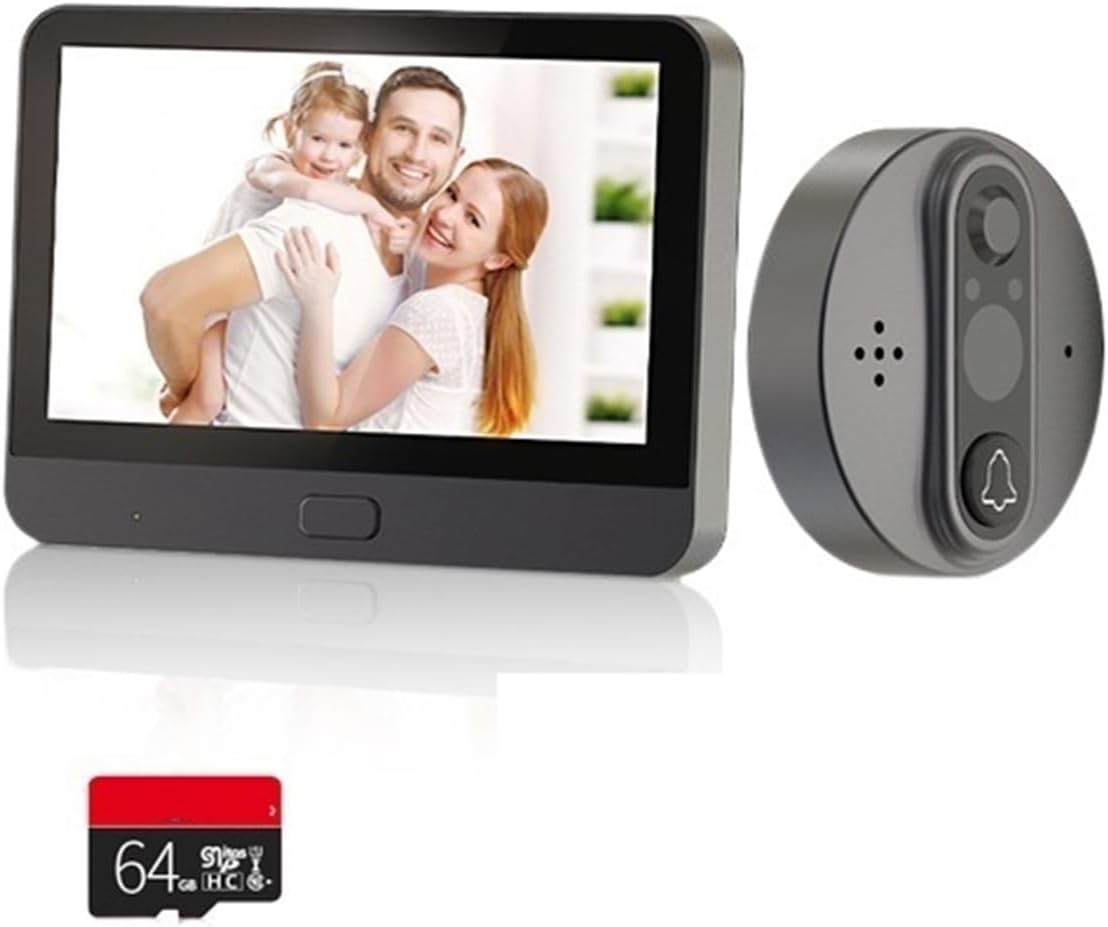
Image: The complete WiFi Video Peephole Doorbell system, showing the outdoor camera unit, the indoor display monitor, and an optional 64GB Micro SD card.

Image: An illustrative diagram highlighting key features such as 2-way audio, low power consumption, video recording, automatic wake-up, HD imaging, motion detection, and night vision capabilities.
ഇൻഡോർ യൂണിറ്റ് (മോണിറ്റർ)
- 4.3-inch TFT LCD Screen: തത്സമയം പ്രദർശിപ്പിക്കുന്നു view from the outdoor camera.
- പവർ ബട്ടൺ: Turns the device on/off and wakes up the screen.
- മൈക്രോ എസ്ഡി കാർഡ് സ്ലോട്ട്: For local storage of recorded videos and photos (supports up to 128GB).
- ചാർജിംഗ് പോർട്ട്: USB port for charging the built-in 5000mAh lithium-ion battery.
Outdoor Unit (Camera)
- HD Camera Lens: Captures video and images (1 Million/2 Million pixels, 120-degree wide angle).
- പിഐആർ മോഷൻ സെൻസർ: Detects movement outside the door.
- ഇൻഫ്രാറെഡ് (IR) ലൈറ്റുകൾ: For night vision functionality.
- ഡോർബെൽ ബട്ടൺ: Activates the indoor monitor and sends notifications.
- മൈക്രോഫോണും സ്പീക്കറും: ടു-വേ ഓഡിയോ ആശയവിനിമയത്തിന്.
സജ്ജീകരണവും ഇൻസ്റ്റാളേഷനും
1. പ്രീ-ഇൻസ്റ്റലേഷൻ പരിശോധനകൾ
- വാതിൽ കനം: നിങ്ങളുടെ വാതിലിന്റെ കനം 35mm നും 130mm നും ഇടയിലാണെന്ന് ഉറപ്പാക്കുക.
- Peephole Diameter: Ensure your existing peephole diameter is between 15mm and 60mm.
- ബാറ്ററി ചാർജ് ചെയ്യുക: Fully charge the indoor unit's built-in battery before installation.

Image: Detailed dimensions of both the indoor display unit (132.80mm x 95.00mm x 17.00mm) and the outdoor camera unit (58.00mm x 58.00mm x 20.00mm), crucial for installation planning.
2. ഫിസിക്കൽ ഇൻസ്റ്റലേഷൻ
- Remove your existing peephole from the door.
- Insert the outdoor camera unit through the peephole from the outside of the door. Ensure the camera is facing straight forward.
- From the inside of the door, attach the mounting bracket to the outdoor unit's threaded tube. Secure it firmly with the provided screws.
- Connect the cable from the outdoor unit to the corresponding port on the indoor monitor unit.
- Align the indoor monitor unit with the mounting bracket and slide it down to secure it in place.
3. ആപ്പ് ഇൻസ്റ്റാളേഷനും ജോടിയാക്കലും
The device supports "Watch Home" or "Tuya Smart" APP. Download one of these apps from your smartphone's app store (Google Play Store for Android, Apple App Store for iOS).
- Open the chosen app and register for an account if you don't have one.
- Follow the in-app instructions to add a new device. Select "Video Doorbell" or "Smart Camera" category.
- Power on the indoor monitor unit. The device will enter pairing mode (usually indicated by a flashing light or prompt on the screen).
- Connect your smartphone to a 2.4GHz Wi-Fi network (5GHz networks are not supported).
- Enter your Wi-Fi password in the app. The app will generate a QR code.
- Hold your smartphone with the QR code in front of the outdoor camera lens until you hear a confirmation sound from the doorbell.
- Once paired, you can name your device in the app and begin using its smart features.
പ്രവർത്തന നിർദ്ദേശങ്ങൾ
1. അടിസ്ഥാന പ്രവർത്തനം
- തത്സമയം View: Press the power button on the indoor unit to wake up the screen and view തത്സമയംtage from the outdoor camera. You can also access live view മൊബൈൽ ആപ്പ് വഴി.
- ടു-വേ ഇന്റർകോം: When a visitor presses the doorbell button, the indoor unit will ring, and your smartphone will receive a notification. You can answer the call from either the indoor unit or the app to speak with the visitor.
- ഫോട്ടോ/വീഡിയോ റെക്കോർഡിംഗ്: The device automatically records video when motion is detected or the doorbell is pressed. You can also manually capture photos or record videos from the live view interface on the indoor unit or app. Recordings are saved to the Micro SD card (if installed) or cloud service (if subscribed).
2. മോഷൻ ഡിറ്റക്ഷൻ
The built-in PIR motion sensor detects movement outside your door. When motion is detected, the device will:
- Automatically record a video clip.
- Send an alarm notification to your linked mobile app.
You can adjust the motion sensor sensitivity (low, middle, high) within the mobile app settings to minimize false alarms.

Image: Illustrates the 24-hour Wi-Fi connection monitoring capability, showing an alarm notification on a smartphone, indicating enhanced security and real-time alerts.
3. നൈറ്റ് വിഷൻ
The device is equipped with infrared (IR) lights that automatically activate in low-light conditions, providing clear black-and-white video footage പൂർണ്ണ ഇരുട്ടിൽ പോലും.

Image: A visual comparison demonstrating the doorbell's 120-degree wide-angle view during both day and night, alongside a smartphone display showing a visitor notification.
4. Sharing Device Access
You can share access to your doorbell with up to 4 other mobile app users, allowing family members to view the outdoor situation and receive notifications.
- In the mobile app, navigate to the device settings.
- Look for the "Share Device" or "Device Sharing" option.
- Enter the account details (e.g., email or phone number) of the person you wish to share with. They must also have an account on the same app.
- The invited user will receive a notification and can accept the invitation to gain access.

Image: Depicts various individuals and families simultaneously viewing the doorbell's live feed on their mobile phones, showcasing the convenient device sharing functionality.
മെയിൻ്റനൻസ്
1. ബാറ്ററി ചാർജിംഗ്
The indoor unit has a built-in 5000mAh rechargeable lithium-ion battery. Under normal use (3-5 times a day), it provides approximately 30 days of standby time. The mobile app will provide real-time reminders when the battery power is less than 5%, indicating it's time to recharge.
- Connect the provided USB charging cable to the charging port on the indoor unit.
- USB കേബിളിന്റെ മറ്റേ അറ്റം ഒരു സാധാരണ USB പവർ അഡാപ്റ്ററുമായി (ഉൾപ്പെടുത്തിയിട്ടില്ല) അല്ലെങ്കിൽ ഒരു കമ്പ്യൂട്ടർ USB പോർട്ടുമായി ബന്ധിപ്പിക്കുക.
- The charging indicator light (if present) will show charging status.
2. വൃത്തിയാക്കൽ
To ensure optimal performance, periodically clean the camera lens and the display screen.
- Use a soft, dry, lint-free cloth to gently wipe the camera lens and screen.
- Do not use liquid cleaners, aerosols, or abrasive solvents.
ട്രബിൾഷൂട്ടിംഗ്
| പ്രശ്നം | സാധ്യമായ കാരണം | പരിഹാരം |
|---|---|---|
| ഉപകരണം ഓണാകില്ല. | കുറഞ്ഞ ബാറ്ററി. | Charge the indoor unit's battery for several hours. |
| Wi-Fi-ലേക്ക് കണക്റ്റ് ചെയ്യാൻ കഴിയില്ല. | Incorrect Wi-Fi password; 5GHz Wi-Fi network; too far from router. | Ensure correct 2.4GHz Wi-Fi password. Move closer to router. Restart router and device. |
| ചലന കണ്ടെത്തൽ അലേർട്ടുകളൊന്നുമില്ല. | Motion detection disabled; sensitivity too low; network issues. | Enable motion detection in app settings. Increase sensitivity. Check Wi-Fi connection. |
| മോശം വീഡിയോ നിലവാരം. | Dirty camera lens; poor lighting; weak Wi-Fi signal. | Clean the camera lens. Ensure adequate lighting. Improve Wi-Fi signal strength. |
| App cannot link device (low battery). | Battery power is critically low (less than 5%). | Immediately charge the indoor unit. The app will regain connection once sufficient power is restored. |
സ്പെസിഫിക്കേഷനുകൾ
| വൈദ്യുതി വിതരണം | Rechargeable 5000mAh lithium-ion battery (built-in) |
| ക്യാമറ റെസല്യൂഷൻ | HD 1 Million pixels / FHD 2 Million pixels |
| ഡിസ്പ്ലേ റെസല്യൂഷൻ | 1280 x 720 |
| ക്യാമറ View ആംഗിൾ | 120 ഡിഗ്രി |
| ഡിസ്പ്ലേ സ്ക്രീൻ | 4.3 ഇഞ്ച് ടിഎഫ്ടി കളർ എൽസിഡി സ്ക്രീൻ |
| അനുയോജ്യമായ APP | Watch Home / Tuya Smart |
| Motion Sensor Reaction Time | 1 to 3 seconds delay (high sensitivity) |
| ഫോട്ടോ ഫോർമാറ്റ് | ജെ.പി.ജി |
| വീഡിയോ ഫോർമാറ്റ് | .avi (requires TF card or cloud service) |
| മെമ്മറി കാർഡ് പിന്തുണ | Up to 128GB (Micro SD) |
| Motion Sensor Detect Distance | ഏകദേശം 2 മീറ്റർ |
| വാതിലിന്റെ കനം അനുയോജ്യത | 35mm - 130mm |
| Peephole Diameter Compatibility | 15mm - 60mm |
| പ്രവർത്തന താപനില | -20°C മുതൽ 55°C വരെ (-4°F മുതൽ 131°F വരെ) |
| മോഡൽ നിറം | R10 |
| നിർമ്മാതാവ് | YUD5DAS |
| മാതൃരാജ്യം | ചൈന |
വാറൻ്റിയും പിന്തുണയും
വാറൻ്റി വിവരങ്ങൾ
ഈ ഉൽപ്പന്നം എ 3 മാസ വാറൻ്റി from the date of purchase. The warranty covers manufacturing defects and malfunctions under normal use. It does not cover damage caused by misuse, accidents, unauthorized modifications, or improper installation.
ഉപഭോക്തൃ പിന്തുണ
If you encounter any issues or have questions regarding your WiFi Video Peephole Doorbell Viewer Camera, please contact your retailer or the manufacturer's customer support. Please have your product model (R10) and purchase details ready when contacting support.
കൂടുതൽ സഹായത്തിന്, നിങ്ങൾക്ക് ഔദ്യോഗിക വിലാസം റഫർ ചെയ്യാം website of the "Watch Home" or "Tuya Smart" app for FAQs and community support.
Ask a question about this manual
Ask about setup, troubleshooting, compatibility, parts, safety, or missing instructions. Manuals+ will review the question and use this page’s manual context to help answer it.