
B0F2MJDMR7
Door Peephole Camera Wireless WiFi Doorbell User Manual
Model: B0F2MJDMR7
ഉൽപ്പന്നം കഴിഞ്ഞുview
This wireless WiFi doorbell system provides enhanced security for your home, featuring a peephole camera, an indoor display unit, and smart app integration. It allows for remote monitoring, two-way audio communication, and motion detection.

Figure 1: Main components of the Door Peephole Camera system, including the indoor monitor, outdoor peephole unit, and a 128GB memory card.
പ്രധാന സവിശേഷതകൾ:
- വയർലെസ് കണക്റ്റിവിറ്റി: 2.4G WiFi for remote monitoring via Tuya/Smart Life App.
- ഹൈ-ഡെഫനിഷൻ ക്യാമറ: 2 Million pixels (1280x720 resolution) with a 121-degree wide-angle lens.
- ഇൻഡോർ ഡിസ്പ്ലേ: 4.3-inch TFT color LCD screen.
- മോഷൻ ഡിറ്റക്ഷൻ (PIR): Automatically records video upon detecting movement, with adjustable sensitivity.
- രാത്രി കാഴ്ച: Automatic switching between day and night modes using infrared detection.
- ടു-വേ ഓഡിയോ: Communicate with visitors through the app.
- പ്രാദേശിക സംഭരണം: Supports up to 128GB memory card for photo and video recording.
- വോയ്സ് അസിസ്റ്റൻ്റ് ഇൻ്റഗ്രേഷൻ: Compatible with Alexa and Google Assistant for doorbell press announcements.

Figure 2: Visual representation of the doorbell camera's key features, including 2.4G Wi-Fi, 2 Million Pixels, Night Vision, PIR Motion Detection, 121° Wide Angle, and Photo/Video Record capabilities.
സജ്ജീകരണവും ഇൻസ്റ്റാളേഷനും
1. പ്രീ-ഇൻസ്റ്റലേഷൻ ചെക്ക്:
- നിങ്ങളുടെ വാതിലിന്റെ കനം 35-90 മില്ലിമീറ്ററിൽ ഉണ്ടെന്ന് ഉറപ്പാക്കുക.
- Verify your existing peephole diameter is between 17-65mm.
- Confirm you have a stable 2.4GHz Wi-Fi network available at the installation location.
2. ഉപകരണം ചാർജ് ചെയ്യുന്നു:
The device comes with a built-in 5000mAh rechargeable lithium-ion battery. Fully charge the device before initial use. A full charge typically provides about 30 days of standby time with normal use (3-5 activations per day). The app will notify you when the battery level drops below 5%.
3. ഭൗതിക ഇൻസ്റ്റാളേഷൻ:
- Remove Existing Peephole: Carefully unscrew and remove your current peephole from the door.
- Insert Outdoor Unit: Thread the cable of the outdoor peephole camera unit through the peephole hole from the outside of the door. Position the outdoor unit flush against the door.
- Mount Indoor Monitor: On the inside of the door, connect the cable from the outdoor unit to the designated port on the indoor monitor. Secure the indoor monitor to the door using the provided mounting bracket and screws. Ensure the unit is stable and the cable is not pinched.
4. App Setup (Tuya / Smart Life):
- അപ്ലിക്കേഷൻ ഡൗൺലോഡുചെയ്യുക: Download and install the "Tuya Smart" or "Smart Life" app from your mobile device's app store (Google Play Store for Android, Apple App Store for iOS).
- രജിസ്റ്റർ ചെയ്യുക/ലോഗിൻ ചെയ്യുക: ആപ്പ് തുറന്ന് ഒരു പുതിയ അക്കൗണ്ട് രജിസ്റ്റർ ചെയ്യുക അല്ലെങ്കിൽ നിങ്ങൾക്ക് ഇതിനകം അക്കൗണ്ട് ഉണ്ടെങ്കിൽ ലോഗിൻ ചെയ്യുക.
- ഉപകരണം ചേർക്കുക: Follow the in-app instructions to add a new device. Select "Video Surveillance" or "Smart Doorbell" from the device list.
- വൈഫൈയിലേക്ക് കണക്റ്റുചെയ്യുക: Power on the doorbell camera. The app will guide you through connecting the device to your 2.4GHz Wi-Fi network. This usually involves putting the device into pairing mode and entering your Wi-Fi password.
- കോൺഫിഗറേഷൻ: Once connected, you can name your device and configure settings such as motion detection sensitivity, notification preferences, and recording options.
പ്രവർത്തന നിർദ്ദേശങ്ങൾ
Viewലൈവ് ഫീഡിനെ പിന്തുണയ്ക്കുന്നു:
- ഇൻഡോർ മോണിറ്റർ: Press the button on the indoor monitor to view the live feed from the outdoor camera.
- മൊബൈൽ ആപ്പ്: Open the Tuya Smart or Smart Life app, select your doorbell device, and tap to view തത്സമയ ഫീഡ് വിദൂരമായി.

Figure 3: The mobile application interface demonstrating 2.4G WiFi connection monitoring, allowing remote conversation and peace of mind.
മോഷൻ ഡിറ്റക്ഷൻ (PIR):
The doorbell camera features Passive Infrared (PIR) motion detection. When motion is detected within approximately 3 meters, the device will automatically record video and send a notification to your mobile app.
- സംവേദനക്ഷമത ക്രമീകരിക്കുക: In the app settings, you can adjust the motion sensor reaction time to low, medium, or high sensitivity. High sensitivity may have a 1-3 second delay.

Figure 4: Illustration of PIR Motion Detection, showing the doorbell recording automatically when motion is detected, and a mobile notification being received.
രാത്രി കാഴ്ച:
The camera automatically switches to night vision mode in low-light conditions using infrared detection, ensuring clear visibility even at night.
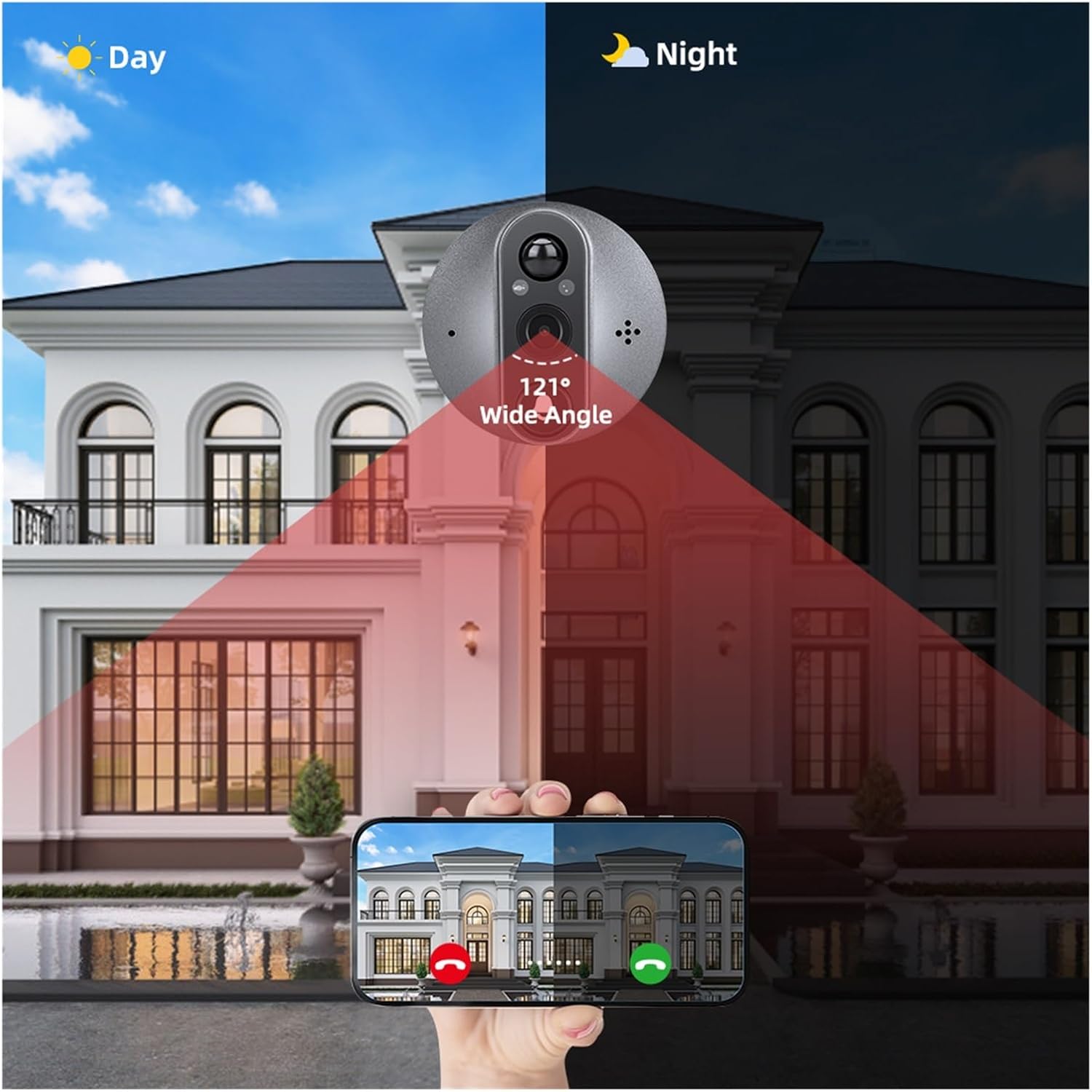
Figure 5: A comparison demonstrating the automatic switching between day and night vision modes, highlighting the 121° wide-angle view in both conditions.
ടു-വേ ഓഡിയോ:
When a visitor presses the doorbell or motion is detected, you can use the app to engage in two-way audio communication with them.

Figure 6: Depiction of the two-way audio feature, allowing users to reply to visitors remotely via their smartphone.
വോയ്സ് അസിസ്റ്റൻ്റ് ഇൻ്റഗ്രേഷൻ:
The doorbell supports integration with Amazon Alexa and Google Assistant. When someone presses the doorbell, your connected voice assistant device can announce "Someone at the smart doorbell" (or similar, depending on your device name).

Figure 7: An illustration showing the doorbell's compatibility with Alexa and Google Assistant, enabling voice announcements when the doorbell is pressed.
റെക്കോർഡിംഗും പ്ലേബാക്കും:
The device records photos and videos to a memory card (up to 128GB). You can access recorded footage through the mobile app's playback or gallery section.
മെയിൻ്റനൻസ്
- വൃത്തിയാക്കൽ: Gently wipe the camera lens and display screen with a soft, dry cloth. Avoid using abrasive cleaners or solvents.
- ബാറ്ററി ചാർജിംഗ്: Recharge the built-in battery promptly when the low battery alert is received. Use the provided charging cable.
- ഫേംവെയർ അപ്ഡേറ്റുകൾ: Periodically check the Tuya/Smart Life app for any available firmware updates for your device. Keeping the firmware updated ensures optimal performance and security.
- മെമ്മറി കാർഡ് മാനേജ്മെന്റ്: പതിവായി റീview രേഖപ്പെടുത്തി footage and delete unnecessary files to free up space on the memory card. Consider backing up important recordings.
ട്രബിൾഷൂട്ടിംഗ്
പൊതുവായ പ്രശ്നങ്ങളും പരിഹാരങ്ങളും:
- ഉപകരണം വൈഫൈയിലേക്ക് കണക്റ്റുചെയ്യുന്നില്ല:
- നിങ്ങളുടെ വൈഫൈ നെറ്റ്വർക്ക് 2.4GHz ആണെന്ന് ഉറപ്പാക്കുക. ഈ ഉപകരണം 5GHz വൈഫൈ പിന്തുണയ്ക്കുന്നില്ല.
- ഇൻസ്റ്റലേഷൻ സ്ഥലത്ത് വൈ-ഫൈ സിഗ്നൽ ശക്തി പരിശോധിക്കുക.
- ആപ്പിൽ നൽകിയ വൈഫൈ പാസ്വേഡ് ശരിയാണോ എന്ന് പരിശോധിക്കുക.
- Restart your Wi-Fi router and the doorbell device.
- Poor video quality or blurry images:
- മൃദുവായ തുണി ഉപയോഗിച്ച് ക്യാമറ ലെൻസ് വൃത്തിയാക്കുക.
- Ensure adequate lighting. Night vision should activate automatically in low light.
- നിങ്ങളുടെ വൈഫൈ കണക്ഷൻ വേഗത പരിശോധിക്കുക. ദുർബലമായ സിഗ്നൽ സ്ട്രീമിംഗ് ഗുണനിലവാരത്തെ ബാധിച്ചേക്കാം.
- ചലന കണ്ടെത്തൽ പ്രവർത്തിക്കുന്നില്ല അല്ലെങ്കിൽ വളരെ സെൻസിറ്റീവ്:
- Adjust the PIR motion detection sensitivity in the Tuya/Smart Life app settings.
- Ensure there are no obstructions blocking the sensor's view.
- ആപ്പിൽ മോഷൻ ഡിറ്റക്ഷൻ ഫീച്ചർ പ്രവർത്തനക്ഷമമാക്കിയിട്ടുണ്ടോയെന്ന് പരിശോധിക്കുക.
- ബാറ്ററി വേഗത്തിൽ തീർന്നു:
- Frequent motion detection events or live view access will consume more battery. Adjust sensitivity if needed.
- ഉപകരണം പൂർണ്ണമായി ചാർജ്ജ് ചെയ്തിട്ടുണ്ടെന്ന് ഉറപ്പാക്കുക.
- ഉയർന്ന താപനില ബാറ്ററി പ്രകടനത്തെ ബാധിച്ചേക്കാം.
- ഓഡിയോ ഇല്ല അല്ലെങ്കിൽ മോശം ഓഡിയോ നിലവാരം:
- ആപ്പിൽ മൈക്രോഫോണും സ്പീക്കർ ക്രമീകരണങ്ങളും പരിശോധിക്കുക.
- Ensure there are no physical obstructions blocking the microphone or speaker on the outdoor unit.
- Verify your mobile device's volume settings.
സ്പെസിഫിക്കേഷനുകൾ
| ഫീച്ചർ | വിശദാംശങ്ങൾ |
|---|---|
| ബ്രാൻഡ് | ജനറിക് |
| മോഡൽ | B0F2MJDMR7 |
| വൈദ്യുതി വിതരണം | Built-in 5000mAh Rechargeable Lithium-Ion Battery |
| ക്യാമറ റെസല്യൂഷൻ | 2 Million Pixels (1280 x 720) |
| ക്യാമറ View ആംഗിൾ | 121 Degrees Wide Angle |
| ഡിസ്പ്ലേ സ്ക്രീൻ | 4.3 ഇഞ്ച് ടിഎഫ്ടി കളർ എൽസിഡി |
| അനുയോജ്യമായ ആപ്പ് | തുയ സ്മാർട്ട് / സ്മാർട്ട് ലൈഫ് |
| മോഷൻ സെൻസർ കണ്ടെത്തൽ ദൂരം | ഏകദേശം. 3 മീറ്റർ |
| ഫോട്ടോ ഫോർമാറ്റ് | ജെ.പി.ജി |
| മെമ്മറി കാർഡ് പിന്തുണ | 128 ജിബി വരെ |
| വാതിലിന്റെ കനം അനുയോജ്യത | 35-90 മി.മീ |
| Peephole Diameter Compatibility | 17-65 മി.മീ |
| പ്രവർത്തന താപനില | -20°C മുതൽ 55°C വരെ (-4°F മുതൽ 131°F വരെ) |
വാറൻ്റി വിവരങ്ങൾ
ഈ ഉൽപ്പന്നം എ 3 മാസ വാറൻ്റി വാങ്ങിയ തീയതി മുതൽ. സാധാരണ ഉപയോഗത്തിലുള്ള നിർമ്മാണ വൈകല്യങ്ങളും തകരാറുകളും ഈ വാറന്റി ഉൾക്കൊള്ളുന്നു. ദുരുപയോഗം, അപകടങ്ങൾ, അനധികൃത പരിഷ്കാരങ്ങൾ അല്ലെങ്കിൽ അനുചിതമായ ഇൻസ്റ്റാളേഷൻ എന്നിവ മൂലമുണ്ടാകുന്ന നാശനഷ്ടങ്ങൾക്ക് ഇത് പരിരക്ഷ നൽകുന്നില്ല.
വാറൻ്റി ക്ലെയിമുകൾക്കായി നിങ്ങളുടെ വാങ്ങിയതിൻ്റെ തെളിവ് സൂക്ഷിക്കുക.
പിന്തുണ
For technical assistance, troubleshooting, or warranty inquiries, please contact the seller or manufacturer through the platform where the product was purchased.
Manufacturer: YUD5DAS
ആപ്പുമായി ബന്ധപ്പെട്ട പ്രശ്നങ്ങൾക്ക്, Tuya Smart അല്ലെങ്കിൽ Smart Life ആപ്ലിക്കേഷനിലെ സഹായ വിഭാഗം പരിശോധിക്കുക.
Ask a question about this manual
Ask about setup, troubleshooting, compatibility, parts, safety, or missing instructions. Manuals+ will review the question and use this page’s manual context to help answer it.