
3588B6-2S
Civhomy Replacement 3588B6-2S Battery User Manual
Model: 3588B6-2S
ആമുഖം
This user manual provides essential information for the safe and effective use of your Civhomy Replacement 3588B6-2S Li-ion Battery. Please read this manual thoroughly before installation and operation, and retain it for future reference. This battery is designed as a replacement for compatible Gateway laptop models.
ഉൽപ്പന്നം കഴിഞ്ഞുview
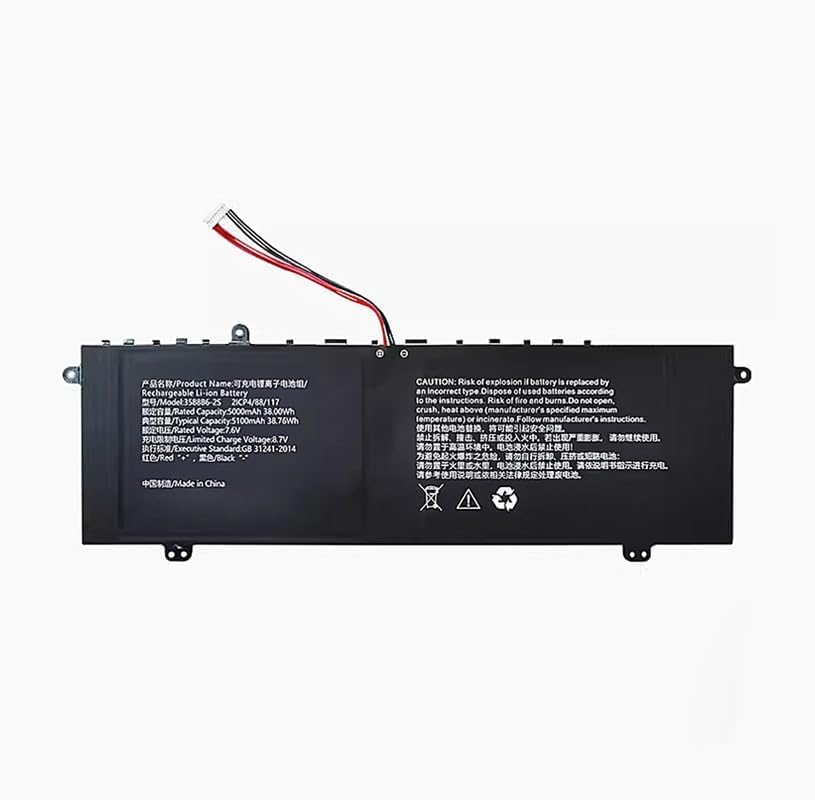
This image displays the Civhomy Replacement 3588B6-2S Li-ion battery. The battery is black with a white connector and red and black wires. The label on the battery provides product name, model number (3588B6-2S, 2ICP4/88/117), rated and typical capacities (5000mAh/38.00Wh, 5100mAh/38.76Wh), rated voltage (7.6V), limited charge voltage (8.7V), executive standard (GB 31241-2014), and wire color coding (Red '+', Black '-'). A prominent warning section in English and Chinese advises on safe handling, disposal, and risks associated with incorrect use.
The Civhomy 3588B6-2S is a high-quality replacement Li-ion battery designed for specific Gateway laptop models. It features a 7.6V rated voltage and a 5000mAh (38Wh) rated capacity, with a typical capacity of 5100mAh (38.76Wh). The battery is equipped with a 10-pin, 7-line connector for proper integration.
സുരക്ഷാ വിവരങ്ങളും മുൻകരുതലുകളും
Your safety is paramount. Please adhere to the following safety guidelines to prevent injury, damage, or fire.
- സ്ഫോടന സാധ്യത: Replacing the battery with an incorrect type may lead to an explosion. Always use the specified replacement battery.
- നീക്കം ചെയ്യൽ: Dispose of used batteries according to local regulations and manufacturer's instructions. Improper disposal can be hazardous.
- Fire and Burns: This battery poses a risk of fire and burns if mishandled. Do not open, crush, or heat the battery above the manufacturer's specified maximum temperature. Do not incinerate.
- ശാരീരിക ക്ഷതം: Do not disassemble, impact, squeeze, or short-circuit the battery. If the battery appears severely swollen, discontinue use immediately.
- താപനില എക്സ്പോഷർ: Do not expose the battery to high-temperature environments.
- വാട്ടർ എക്സ്പോഷർ: ബാറ്ററി വെള്ളത്തിൽ മുക്കിയിട്ടുണ്ടെങ്കിൽ അത് ഉപയോഗിക്കരുത്.
- ചാർജിംഗ്: Always charge the battery according to the instructions provided in this manual and by your device manufacturer.
- അനുയോജ്യത: Before purchase and installation, ensure all technical specifications and the model number match your device's requirements.
സജ്ജീകരണവും ഇൻസ്റ്റാളേഷനും
Installation of the replacement battery typically involves opening your laptop's casing. It is recommended that this procedure be performed by a qualified technician if you are not comfortable with internal hardware installation.
- പവർ ഓഫാക്കി വിച്ഛേദിക്കുക: Ensure your laptop is completely powered off and disconnected from all power sources, including the AC adapter.
- ഡിസ്ചാർജ് സ്റ്റാറ്റിക് വൈദ്യുതി: Before handling internal components, discharge any static electricity from your body by touching a grounded metal object.
- ബാറ്ററി കമ്പാർട്ട്മെന്റ് ആക്സസ് ചെയ്യുക: Carefully open your laptop's back cover or access panel to locate the existing battery. Refer to your laptop's specific service manual for detailed instructions on accessing the battery.
- പഴയ ബാറ്ററി വിച്ഛേദിക്കുക: Gently disconnect the old battery's connector from the motherboard. Note the orientation of the connector and wires (Red '+' and Black '-').
- പഴയ ബാറ്ററി നീക്കം ചെയ്യുക: Unscrew any retaining screws holding the old battery in place and carefully remove it.
- പുതിയ ബാറ്ററി സ്ഥാപിക്കുക: Place the new Civhomy 3588B6-2S battery into the compartment, ensuring it aligns correctly with the screw holes. Secure it with the retaining screws.
- പുതിയ ബാറ്ററി ബന്ധിപ്പിക്കുക: Carefully connect the new battery's 10-pin, 7-line connector to the corresponding port on the motherboard, ensuring a firm and correct connection.
- ലാപ്ടോപ്പ് വീണ്ടും കൂട്ടിച്ചേർക്കുക: Replace the laptop's back cover or access panel and secure it.
- പ്രാരംഭ ചാർജ്: Connect your laptop to the AC adapter and allow the new battery to fully charge before its first use.
കുറിപ്പ്: Always refer to your specific laptop model's service manual for precise disassembly and reassembly instructions.
പ്രവർത്തന നിർദ്ദേശങ്ങൾ
Once installed, the Civhomy 3588B6-2S battery operates like your original laptop battery. Follow these general guidelines for optimal performance:
- ആദ്യ ഉപയോഗം: For the first use, it is recommended to fully charge the battery, then discharge it to about 10-15%, and then fully recharge it. This helps calibrate the battery's charge indicator.
- പതിവ് ചാർജിംഗ്: Charge the battery using your laptop's original or a compatible AC adapter. Avoid using unapproved chargers.
- ആഴത്തിലുള്ള ഡിസ്ചാർജ് ഒഴിവാക്കുക: While Li-ion batteries do not suffer from "memory effect," frequent deep discharges (letting the battery run to 0%) can reduce its lifespan. Try to recharge before the battery level drops too low.
- താപനില: Operate your laptop within normal room temperatures. Extreme cold or heat can negatively affect battery performance and lifespan.
മെയിൻ്റനൻസ്
ശരിയായ അറ്റകുറ്റപ്പണി നിങ്ങളുടെ ബാറ്ററിയുടെ ആയുസ്സ് വർദ്ധിപ്പിക്കും:
- സംഭരണം: If storing the battery for an extended period, ensure it is charged to about 50-60% and stored in a cool, dry place. Avoid storing fully charged or fully discharged batteries.
- വൃത്തിയാക്കൽ: ബാറ്ററി കോൺടാക്റ്റുകൾ വൃത്തിയായി സൂക്ഷിക്കുക. പൊടിയോ അവശിഷ്ടങ്ങളോ തുടച്ചുമാറ്റാൻ ഉണങ്ങിയതും മൃദുവായതുമായ തുണി ഉപയോഗിക്കുക.
- ശാരീരിക സമ്മർദ്ദം ഒഴിവാക്കുക: Do not drop, bend, or apply excessive pressure to the battery.
- സോഫ്റ്റ്വെയർ അപ്ഡേറ്റുകൾ: Keep your laptop's operating system and drivers updated, as power management software can impact battery performance.
ട്രബിൾഷൂട്ടിംഗ്
If you encounter issues with your Civhomy 3588B6-2S battery, consider the following:
| പ്രശ്നം | സാധ്യമായ കാരണം | പരിഹാരം |
|---|---|---|
| ബാറ്ററി ചാർജ് ചെയ്യുന്നില്ല. | Loose connection, faulty charger, software issue, or battery defect. |
|
| Battery not detected. | Incorrect installation, driver issue, or battery defect. |
|
| ചെറിയ ബാറ്ററി ലൈഫ്. | High power consumption, background processes, or battery degradation. |
|
| Battery swelling. | Internal cell failure, overcharging, or manufacturing defect. | ഉപയോഗം ഉടനടി നിർത്തുക. Remove the battery carefully if safe to do so, and dispose of it properly according to local regulations. Do not attempt to puncture or repair a swollen battery. |
If troubleshooting steps do not resolve the issue, contact the seller or a qualified technician for further assistance.
സ്പെസിഫിക്കേഷനുകൾ
| ഫീച്ചർ | വിശദാംശങ്ങൾ |
|---|---|
| ഉൽപ്പന്നത്തിൻ്റെ പേര് | റീചാർജ് ചെയ്യാവുന്ന ലി-അയൺ ബാറ്ററി |
| മോഡൽ നമ്പർ | 3588B6-2S, 2ICP4/88/117 |
| Compatible Part Number | 3588B6-2S, 3576127P-2S1P |
| അനുയോജ്യമായ മോഡലുകൾ | Gateway GWNC21524-BL BK GR RD |
| റേറ്റുചെയ്ത ശേഷി | 5000mAh / 38.00Wh |
| സാധാരണ ശേഷി | 5100mAh / 38.76Wh |
| റേറ്റുചെയ്ത വോളിയംtage | 7.6V |
| ലിമിറ്റഡ് ചാർജ് വോളിയംtage | 8.7V |
| കണക്റ്റർ തരം | 10 Pins, 7 Lines |
| ബാറ്ററി സെൽ കോമ്പോസിഷൻ | ലിഥിയം പോളിമർ (ലി-അയൺ) |
| എക്സിക്യൂട്ടീവ് സ്റ്റാൻഡേർഡ് | GB 31241-2014 |
| നിർമ്മാതാവ് | Shenzhen Wenxin Technology Co.,Ltd |
| ഉത്ഭവം | ചൈനയിൽ നിർമ്മിച്ചത് |
Ask a question about this manual
Ask about setup, troubleshooting, compatibility, parts, safety, or missing instructions. Manuals+ will review the question and use this page’s manual context to help answer it.