
1 സുരക്ഷാ വിവരങ്ങൾ
Please read this entire manual before assembling or operating the MERACH Elliptical Trainer. Keep this manual for future reference. Failure to follow these instructions could result in injury or damage to the product.
- Ensure all parts are present and in good condition before assembly.
- Place the elliptical on a flat, stable surface with adequate clearance around it.
- പ്രവർത്തന സമയത്ത് ഉപകരണങ്ങളിൽ നിന്ന് കുട്ടികളെയും വളർത്തുമൃഗങ്ങളെയും അകറ്റി നിർത്തുക.
- The maximum user weight capacity for this elliptical is 150 കി.ഗ്രാം.
- ഏതെങ്കിലും പുതിയ വ്യായാമ പരിപാടി ആരംഭിക്കുന്നതിന് മുമ്പ് ഒരു ഡോക്ടറെ സമീപിക്കുക.
- ഉചിതമായ വ്യായാമ വസ്ത്രങ്ങളും പാദരക്ഷകളും ധരിക്കുക.
- നിങ്ങൾക്ക് ക്ഷീണം, തലകറക്കം, അല്ലെങ്കിൽ വേദന അനുഭവപ്പെടുകയാണെങ്കിൽ ഉടൻ വ്യായാമം നിർത്തുക.
- This product is certified according to CE and RoHS standards, ensuring mechanical stability and safety.
2. ഉൽപ്പന്നം കഴിഞ്ഞുview
The MERACH MR-E33B4-EU Elliptical Trainer is designed for effective cardiovascular workouts at home. It features a silent magnetic resistance system, an LCD monitor, and Bluetooth connectivity for interactive training.
പ്രധാന സവിശേഷതകൾ:
- 42 cm Stride Length: Provides a natural and fluid motion, suitable for users up to 1.93 m (6'4").
- 16 Levels of Magnetic Resistance: Allows for varied intensity workouts, from beginner to advanced.
- നിശബ്ദ പ്രവർത്തനം: Magnetic braking system ensures quiet pedaling, typically below 20 dB.
- LCD മോണിറ്റർ: Displays real-time data including time, speed, distance, calories burned, and heart rate.
- ബ്ലൂടൂത്ത് കണക്റ്റിവിറ്റി: Compatible with the MERACH App and KINOMAP for personalized programs and interactive training.
- Integrated Pulse Sensors: For real-time heart rate monitoring.
- കരുത്തുറ്റ സ്റ്റീൽ ഫ്രെയിം: Supports users up to 150 kg (330 lbs).
- കോംപാക്റ്റ് ഡിസൈൻ: Dimensions of 101 cm (L) × 58 cm (W) × 155.8 cm (H) with transport wheels for easy movement.
ഘടകങ്ങൾ:
- Main Frame with Flywheel and Resistance Mechanism
- Handlebars (Fixed and Moving)
- പെഡലുകൾ
- LCD കൺസോൾ
- Stabilizers and Transport Wheels
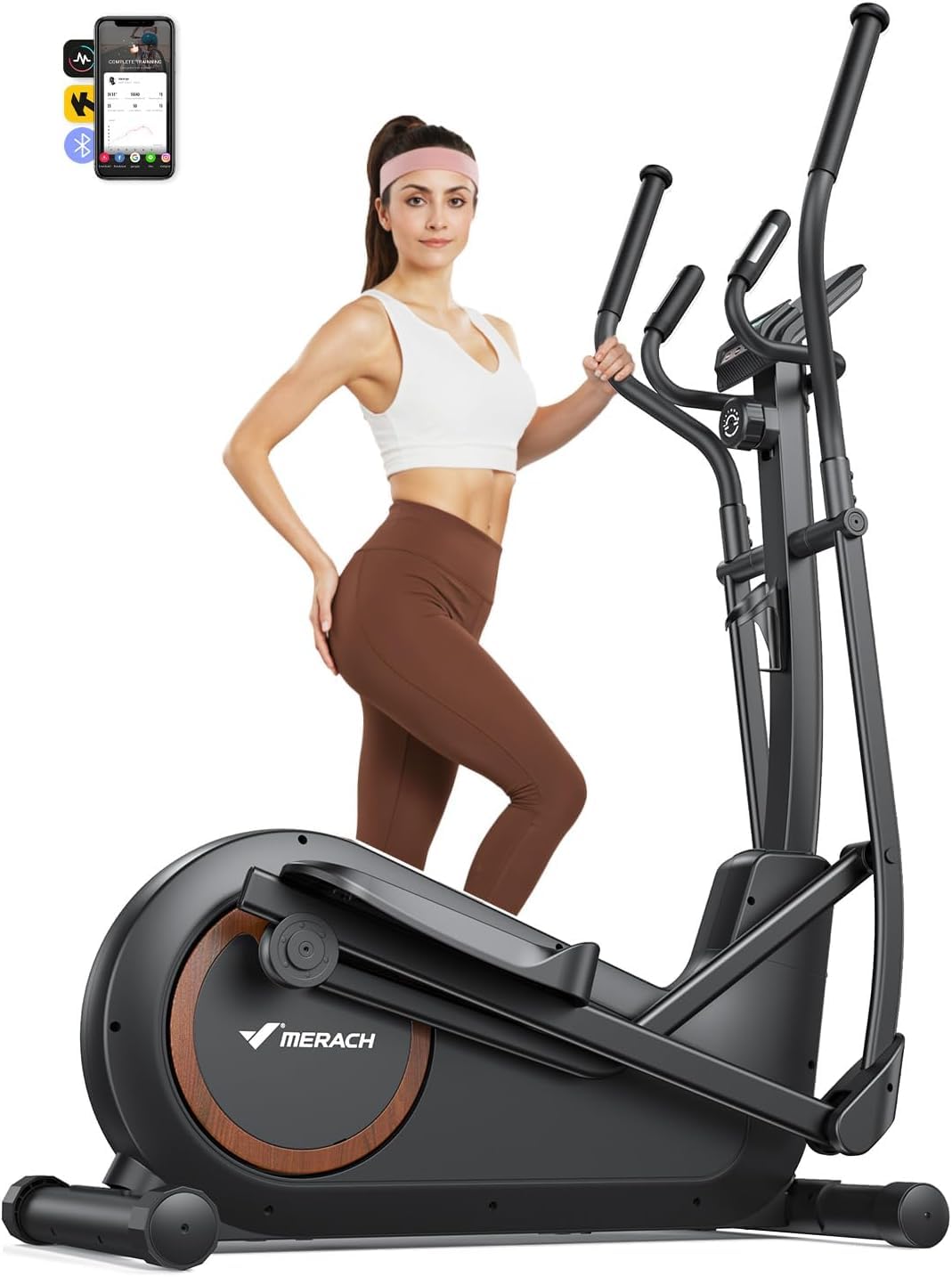
Image 2.1: The MERACH Elliptical Trainer MR-E33B4-EU.

Image 2.2: Elliptical trainer highlighting 42 cm stride length and compact dimensions (101 cm length).

Image 2.3: Close-up of the MERACH elliptical's silent magnetic resistance system, indicating quiet operation below 18dB and 16 resistance levels.
3. സജ്ജീകരണവും അസംബ്ലിയും
The MERACH Elliptical Trainer comes 80% pre-assembled, allowing for quick setup. Most users can complete assembly in under 20 minutes using the included tools and following the instructions.
അസംബ്ലി ഘട്ടങ്ങൾ:
- ഘടകങ്ങൾ അൺപാക്ക് ചെയ്യുക: പാക്കേജിംഗിൽ നിന്ന് എല്ലാ ഭാഗങ്ങളും ശ്രദ്ധാപൂർവ്വം നീക്കം ചെയ്യുക. പാക്കിംഗ് ലിസ്റ്റിൽ പട്ടികപ്പെടുത്തിയിരിക്കുന്ന എല്ലാ ഘടകങ്ങളും നിലവിലുണ്ടെന്ന് പരിശോധിക്കുക.
- സ്റ്റെബിലൈസറുകൾ ഘടിപ്പിക്കുക: Secure the front and rear stabilizers to the main frame using the provided bolts and tools.
- പെഡലുകൾ ഇൻസ്റ്റാൾ ചെയ്യുക: Attach the left and right pedals to their respective crank arms. Note the 'L' and 'R' markings.
- ഹാൻഡിൽബാറുകൾ ബന്ധിപ്പിക്കുക: Mount the moving handlebars and fixed handlebars to the main frame, ensuring all connections are secure.
- Connect Console Cables: Carefully connect the console cables from the main frame to the LCD monitor.
- Mount LCD Console: Secure the LCD console to the console post.
- അന്തിമ പരിശോധനകൾ: Ensure all bolts and nuts are tightened. Test the movement of the pedals and handlebars for smooth operation.
For detailed visual guidance, refer to the installation video provided by MERACH.

Image 3.1: A user assembling the elliptical trainer, demonstrating the ease of setup with included tools.

Image 3.2: Graphic illustrating the 90% pre-assembled status and quick installation process.
4. പ്രവർത്തന നിർദ്ദേശങ്ങൾ
Operating your MERACH Elliptical Trainer is straightforward. Follow these steps to begin your workout.
4.1. ആരംഭിക്കുന്നു
- Step onto the pedals, gripping the fixed or moving handlebars for balance.
- Begin pedaling in a smooth, elliptical motion.
- The LCD monitor will automatically activate and display your workout data.
4.2. Using the LCD Monitor
The integrated LCD monitor provides essential workout metrics:
- സമയം: നിങ്ങളുടെ വ്യായാമത്തിന്റെ ദൈർഘ്യം.
- വേഗത: Current speed in km/h or mph.
- ദൂരം: വ്യായാമ വേളയിൽ സഞ്ചരിച്ച ആകെ ദൂരം.
- കലോറികൾ: കണക്കാക്കിയ കലോറികൾ കത്തിച്ചു.
- ഹൃദയമിടിപ്പ്: Your pulse, detected by the hand pulse sensors on the fixed handlebars.
4.3. പ്രതിരോധം ക്രമീകരിക്കൽ
The elliptical features 16 levels of magnetic resistance. To adjust the intensity:
- Locate the resistance adjustment knob, typically found below the console.
- Turn the knob clockwise to increase resistance (higher intensity).
- Turn the knob counter-clockwise to decrease resistance (lower intensity).

Image 4.1: Visual representation of the 16 adjustable resistance levels, suitable for various fitness goals.
4.4. Using the MERACH App & Bluetooth Connectivity
Enhance your workout experience by connecting your elliptical to the MERACH App or KINOMAP via Bluetooth.
- ആപ്പ് ഡൗൺലോഡ് ചെയ്യുക: ഇതിനായി തിരയുക "MERACH" or "KINOMAP" in your device's app store (available on Apple App Store and Google Play).
- ബ്ലൂടൂത്ത് പ്രവർത്തനക്ഷമമാക്കുക: നിങ്ങളുടെ സ്മാർട്ട്ഫോണിലോ ടാബ്ലെറ്റിലോ ബ്ലൂടൂത്ത് പ്രവർത്തനക്ഷമമാക്കിയിട്ടുണ്ടെന്ന് ഉറപ്പാക്കുക.
- ഉപകരണം ജോടിയാക്കുക: Open the app and follow the on-screen instructions to pair with your MERACH Elliptical Trainer.
- സവിശേഷതകൾ പര്യവേക്ഷണം ചെയ്യുക: Access personalized training programs, real-time workout tracking, interactive routes, and connect with other fitness devices like Apple Watch or Garmin.

Image 4.2: User interacting with the MERACH fitness app while using the elliptical, showing real-time data and virtual routes.

Image 4.3: Screenshot of the MERACH App interface, demonstrating personalized training plans and activity data tracking.
5. പരിപാലനം
Regular maintenance ensures the longevity and optimal performance of your MERACH Elliptical Trainer.
5.1. വൃത്തിയാക്കൽ
- Wipe down the elliptical with a damp ഓരോ ഉപയോഗത്തിനു ശേഷവും വിയർപ്പും പൊടിയും നീക്കം ചെയ്യാൻ തുണി ഉപയോഗിക്കുക.
- Avoid using abrasive cleaners or solvents, as these can damage the finish and electronic components.
- Keep the LCD monitor dry and clean.
5.2. Inspection and Tightening
- Periodically check all bolts, nuts, and moving parts for tightness.
- Tighten any loose fasteners to prevent noise and ensure stability. This is particularly important for components that experience frequent movement.
- Inspect the pedals, handlebars, and frame for any signs of wear or damage. Contact customer support if you notice any issues.
5.3. ലൂബ്രിക്കേഷൻ
- While the magnetic resistance system is generally maintenance-free, occasionally check the pivot points and joints for smooth operation.
- If any squeaking or friction occurs, apply a small amount of silicone-based lubricant to the affected areas. Avoid oil-based lubricants.
6. പ്രശ്നപരിഹാരം
നിങ്ങളുടെ എലിപ്റ്റിക്കൽ പരിശീലകനുമായി ബന്ധപ്പെട്ട് നിങ്ങൾ നേരിട്ടേക്കാവുന്ന പൊതുവായ പ്രശ്നങ്ങളെ ഈ വിഭാഗം അഭിസംബോധന ചെയ്യുന്നു.
| പ്രശ്നം | സാധ്യമായ കാരണം | പരിഹാരം |
|---|---|---|
| Elliptical is noisy or unstable during use. | അയഞ്ഞ ബോൾട്ടുകൾ അല്ലെങ്കിൽ അസമമായ പ്രതലം. | Check and tighten all assembly bolts. Ensure the elliptical is on a level surface; adjust stabilizers if necessary. |
| LCD monitor is not displaying data. | Loose cable connection or depleted batteries (if applicable). | Check all cable connections to the console. Replace batteries in the console if it is battery-powered. |
| Resistance adjustment is not working. | Cable disconnection or internal mechanism issue. | Ensure the resistance cable is properly connected. If the issue persists, contact customer support. |
| Bluetooth app cannot connect to the elliptical. | Bluetooth not enabled, app not updated, or interference. | Ensure Bluetooth is active on your device. Update the MERACH App to the latest version. Restart both the elliptical (if possible) and your device. Try pairing again. |
| Heart rate sensor is inaccurate or not working. | Improper hand placement or sensor malfunction. | Ensure both hands are firmly gripping the pulse sensors. Skin contact must be consistent. If the problem continues, contact support. |
If you encounter a problem not listed here or if the suggested solutions do not resolve the issue, please contact MERACH customer support for assistance.
7 സ്പെസിഫിക്കേഷനുകൾ
| ഫീച്ചർ | വിശദാംശങ്ങൾ |
|---|---|
| മോഡലിൻ്റെ പേര് | എംആർ-ഇ33ബി4-ഇയു |
| ബ്രാൻഡ് | മെറാക്ക് |
| ഉൽപ്പന്ന അളവുകൾ (L x W x H) | 149 സെ.മീ x 57 സെ.മീ x 165 സെ.മീ (58.7 x 22.4 x 65 ഇഞ്ച്) |
| ഉൽപ്പന്ന ഭാരം | 52 കി.ഗ്രാം (114.6 പൗണ്ട്) |
| പരമാവധി ഉപയോക്തൃ ഭാരം | 150 കി.ഗ്രാം (330 പൗണ്ട്) |
| സ്ട്രൈഡ് നീളം | 42 സെ.മീ (16.5 ഇഞ്ച്) |
| പ്രതിരോധ സംവിധാനം | കാന്തിക |
| പ്രതിരോധ നിലകളുടെ എണ്ണം | 16 |
| മെറ്റീരിയൽ | ലോഹം |
| ഡിസ്പ്ലേ തരം | എൽസിഡി മോണിറ്റർ |
| കണക്റ്റിവിറ്റി | Bluetooth (MERACH App, KINOMAP compatible) |
| ഉൾപ്പെടുത്തിയ ഇനങ്ങൾ | Elliptical Trainer x1, User Manual x1 |
8. വാറണ്ടിയും പിന്തുണയും
MERACH is committed to providing high-quality products and excellent customer service.
8.1. വാറൻ്റി വിവരങ്ങൾ
Your MERACH Elliptical Trainer is covered by a manufacturer's warranty. Please refer to the warranty card included in your package or visit the official MERACH webനിങ്ങളുടെ ഉൽപ്പന്നത്തിന്റെ വാറന്റി കാലയളവും കവറേജും സംബന്ധിച്ച നിർദ്ദിഷ്ട നിബന്ധനകൾക്കും വ്യവസ്ഥകൾക്കും സൈറ്റ് സന്ദർശിക്കുക.
8.2. ഉപഭോക്തൃ പിന്തുണ
MERACH offers lifetime technical support and fast, reliable customer service in Europe. If you have any questions regarding assembly, operation, maintenance, or require assistance with accessories, please do not hesitate to contact us.
ബന്ധപ്പെടാനുള്ള വിവരങ്ങൾ:
- For support, please visit the MERACH official webസൈറ്റ് അല്ലെങ്കിൽ നിങ്ങളുടെ ഉൽപ്പന്ന പാക്കേജിംഗിൽ നൽകിയിരിക്കുന്ന കോൺടാക്റ്റ് വിശദാംശങ്ങൾ പരിശോധിക്കുക.
- You can also reach out to the seller, MERACH Direct EU, through your Amazon purchase history for assistance.