
Powkiddy X35H
Powkiddy X35H Retro Handheld Game Console User Manual
Model: X35H | Brand: Powkiddy
ആമുഖം
This manual provides detailed instructions for the Powkiddy X35H Retro Handheld Game Console. It covers essential information regarding device setup, operation, maintenance, and technical specifications to ensure optimal use of your console.
സുരക്ഷാ വിവരങ്ങൾ
Please read the following safety guidelines carefully before using the device:
- 3 വയസ്സിന് താഴെയുള്ള കുട്ടികൾക്ക് ഉപകരണം ലഭ്യമാകാതെ സൂക്ഷിക്കുക.
- തീവ്രമായ ഊഷ്മാവ്, നേരിട്ടുള്ള സൂര്യപ്രകാശം അല്ലെങ്കിൽ ഉയർന്ന ആർദ്രത എന്നിവയിലേക്ക് ഉപകരണം എക്സ്പോഷർ ചെയ്യുന്നത് ഒഴിവാക്കുക.
- ഉപകരണം ഡിസ്അസംബ്ലിംഗ് ചെയ്യാനോ പരിഷ്ക്കരിക്കാനോ ശ്രമിക്കരുത്, കാരണം ഇത് വാറന്റി അസാധുവാക്കുകയും കേടുപാടുകൾ വരുത്തുകയും ചെയ്തേക്കാം.
- ചാർജ് ചെയ്യുന്നതിന് നൽകിയിരിക്കുന്ന USB-C കേബിൾ മാത്രം ഉപയോഗിക്കുക.
- If the device becomes unusually hot during use or charging, discontinue use immediately.
സജ്ജമാക്കുക
പാക്കേജ് ഉള്ളടക്കം
പാക്കേജിൽ എല്ലാ ഇനങ്ങളും ഉണ്ടെന്ന് ഉറപ്പാക്കുക:
- Powkiddy X35H Console ×1
- 64GB TF Card (preloaded) ×1
- USB-C കേബിൾ × 1
- Pre-Applied Screen Protector ×1
- ദ്രുത ആരംഭ ഗൈഡ് × 1

Image: Contents included in the Powkiddy X35H package, showing the console, TF card, USB-C cable, screen protector, and quick start guide.
ഉപകരണം കഴിഞ്ഞുview
കൺസോളിന്റെ ലേഔട്ടും നിയന്ത്രണങ്ങളും സ്വയം പരിചയപ്പെടുത്തുക.
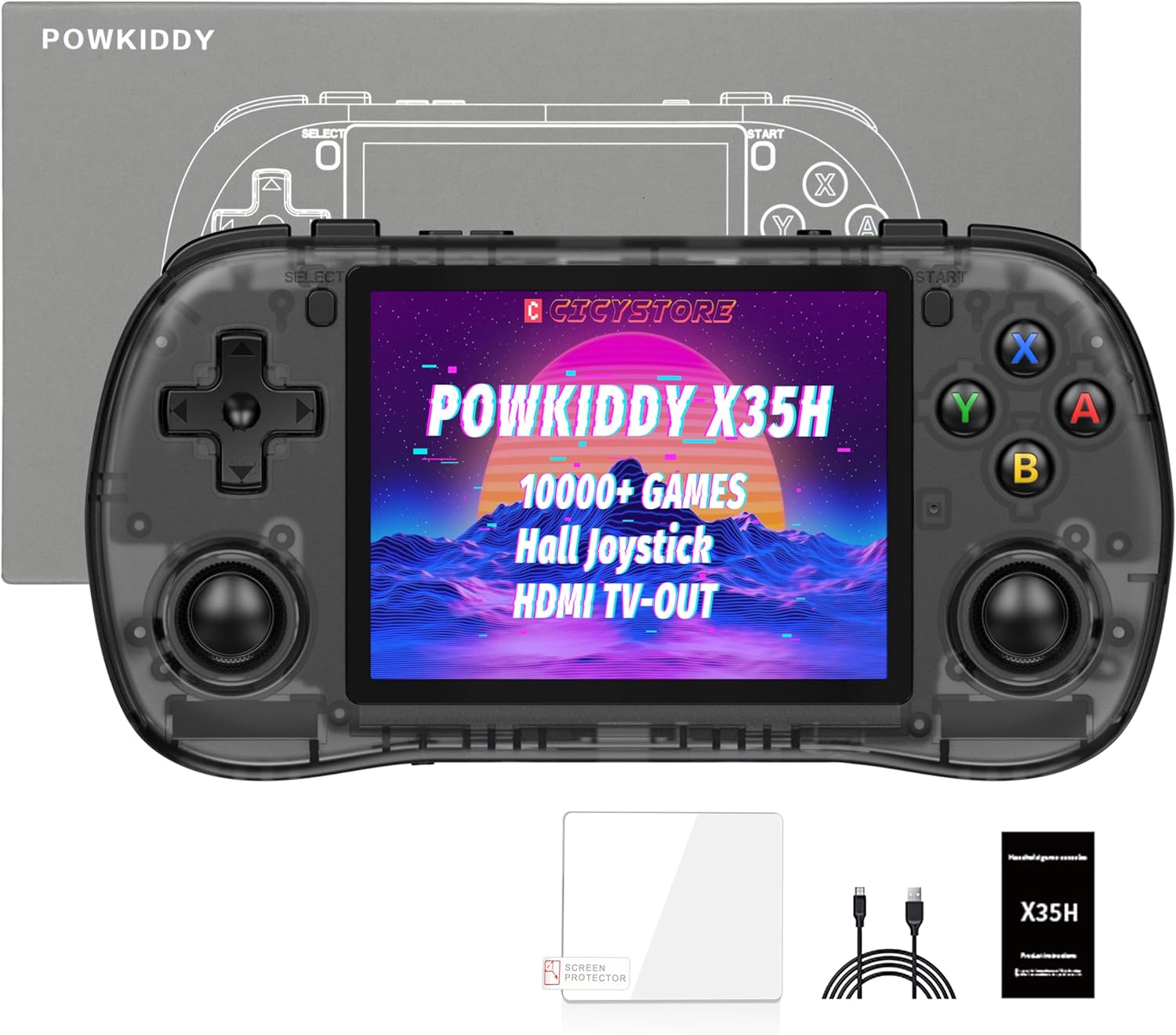
ചിത്രം: മുൻഭാഗം view of the Powkiddy X35H console, displaying the screen, D-pad, Hall effect joysticks, action buttons (A, B, X, Y), Start, Select buttons, and shoulder buttons.
The console features a 3.5-inch IPS screen, a D-pad, two Hall effect joysticks, four action buttons (A, B, X, Y), Start and Select buttons, and shoulder buttons for comprehensive control during gameplay.
പ്രാരംഭ പവർ-അപ്പും ചാർജിംഗും
- ചാർജിംഗ്: Connect the provided USB-C cable to the console's charging port and a compatible USB power adapter (not included). A full charge typically takes approximately 3 hours. The console features a 3000mAh battery, offering 4-6 hours of playtime depending on the game type.
- TF കാർഡ് ഉൾപ്പെടുത്തൽ: The console includes dual TF card slots. The 64GB TF card with preloaded games should be inserted into the designated slot. Ensure it is inserted correctly until it clicks into place.
- പവർ ഓൺ/ഓഫ്: Press and hold the power button (usually located on the side or top of the console) for a few seconds to turn the device on or off.
പ്രവർത്തന നിർദ്ദേശങ്ങൾ
Navigation and Game Selection
- ഉപയോഗിക്കുക ഡി-പാഡ് or Hall effect joysticks to navigate through the console's menu and game lists.
- അമർത്തുക ഒരു ബട്ടൺ to confirm selections and the ബി ബട്ടൺ തിരികെ പോകാൻ.
- The console comes preloaded with games spanning 26 retro systems. Browse through the system categories to find your desired game.

Image: Screen displaying a list of popular emulators supported by the Powkiddy X35H, including PSP, N64, PS, DC, SATURN, FBA, NEOGEO, MAME, CPS1, CPS2, CPS3, GB, GBA, GBC, FC, SFC, MD, WSC, NGP, OPENBOR, PORTS, NDS, PCE, and ATARI 2600.
The console supports a wide range of emulators, allowing access to various classic gaming platforms. Note that due to chip limitations, not all games across all emulators may be fully compatible.
ഗെയിംപ്ലേ സവിശേഷതകൾ
- Save States: Most emulators support save states, allowing you to save your progress at any point in a game. Refer to the in-emulator menu for specific save/load functions.
- Fast-Forward: Some emulators offer a fast-forward function to speed up gameplay, useful for grinding or skipping cutscenes.
- ഹാൾ ഇഫക്റ്റ് ജോയ്സ്റ്റിക്കുകൾ: The console is equipped with Hall effect joysticks, designed for precision and durability, minimizing drift over time.

ചിത്രം: ക്ലോസ്-അപ്പ് view of a Hall effect joystick component next to the Powkiddy X35H console, highlighting its professional-grade design for sensitive and drift-free operation.
HDMI TV Output
To connect your Powkiddy X35H to an external display:
- Locate the HDMI output port on the console.
- Connect an HDMI cable (not included) from the console to your TV or monitor.
- Switch your TV's input source to the corresponding HDMI port. The console's display should mirror on the external screen.

Image: The Powkiddy X35H console connected via an HDMI cable to a large television screen, displaying a racing game. This illustrates the HD TV connection feature.
ഓഡിയോ ഔട്ട്പുട്ട്
The console supports 3.5mm stereo headphones for private listening. Simply plug your headphones into the designated audio jack.

Image: The Powkiddy X35H console shown with a music note and video reel icon, indicating support for music and video playback, and a 3.5mm headphone jack.
മെയിൻ്റനൻസ്
- വൃത്തിയാക്കൽ: Use a soft, dry cloth to clean the console's exterior. Avoid using harsh chemicals or abrasive materials. For the screen, use a microfiber cloth.
- സംഭരണം: Store the console in a cool, dry place away from direct sunlight and extreme temperatures.
- ബാറ്ററി കെയർ: To prolong battery life, avoid fully discharging the battery frequently. If storing for an extended period, charge the battery to approximately 50% before storage.
ട്രബിൾഷൂട്ടിംഗ്
- ഉപകരണം ഓണാക്കുന്നില്ല: Ensure the battery is charged. Connect the console to a power source and try again. If the issue persists, try holding the power button for a longer duration (e.g., 10-15 seconds) for a hard reset.
- Games not loading or freezing:
- Verify that the TF card is properly inserted.
- Some games may not be fully compatible due to emulator or hardware limitations. Try a different game or emulator if available.
- കളി ഉറപ്പാക്കുക file കേടായിട്ടില്ല.
- Display issues (no image on TV via HDMI):
- രണ്ട് അറ്റത്തും HDMI കേബിൾ കണക്ഷൻ പരിശോധിക്കുക.
- നിങ്ങളുടെ ടിവി ശരിയായ HDMI ഇൻപുട്ട് ഉറവിടത്തിലേക്ക് സജ്ജീകരിച്ചിട്ടുണ്ടെന്ന് ഉറപ്പാക്കുക.
- Try a different HDMI cable or TV if possible.
- മോശം ബാറ്ററി ലൈഫ്:
- Battery life varies based on game complexity (2D vs. 3D games).
- Ensure the console is fully charged before use.
- പവർ ലാഭിക്കാൻ സ്ക്രീൻ തെളിച്ചം കുറയ്ക്കുക.
സ്പെസിഫിക്കേഷനുകൾ
| ഫീച്ചർ | വിശദാംശങ്ങൾ |
|---|---|
| മോഡൽ | X35H |
| സ്ക്രീൻ വലിപ്പം | 3.5 ഇഞ്ച് ഐ.പി.എസ് |
| സ്ക്രീൻ റെസല്യൂഷൻ | 640x480 |
| പ്രോസസ്സർ | Rock-chips RK3566, Quad-core ARM Cortex-A55, 1.8GHz |
| ജിപിയു | ARM മാലി- G52 |
| റാം | LPDDR4 1GB |
| ആന്തരിക സംഭരണം | 64GB (TF Card included) |
| വികസിപ്പിക്കാവുന്ന സംഭരണം | Dual TF Card Slots, up to 256GB |
| ബാറ്ററി | 3000mAh Polymer Lithium-ion |
| ബാറ്ററി ലൈഫ് | 4-6 മണിക്കൂർ (ഏകദേശം) |
| ചാർജിംഗ് പോർട്ട് | USB-C |
| ഓഡിയോ ഔട്ട്പുട്ട് | 3.5 എംഎം ഹെഡ്ഫോൺ ജാക്ക് |
| വീഡിയോ ഔട്ട്പുട്ട് | HDMI TV-Out |
| കൺട്രോളർ തരം | Joystick, Button Control (Hall effect joysticks) |
| ഉൽപ്പന്ന അളവുകൾ | 5.19 x 3.03 x 0.87 ഇഞ്ച് |
| ഇനത്തിൻ്റെ ഭാരം | 11.2 ഔൺസ് |
| മെറ്റീരിയൽ | പ്ലാസ്റ്റിക് |

Image: Diagram highlighting the 3.5-inch IPS HD screen of the Powkiddy X35H, noting its 640x480 resolution and HD filter for clearer images.

Image: Illustration of the Rock-chips RK3566 processor, detailing its Quad-core ARM Cortex-A55 architecture, 1.8GHz CPU clock speed, LPDDR4 1GB RAM, and ARM Mali-G52 GPU.

Image: Graphic depicting the 3000mAh polymer lithium-ion battery, emphasizing its energy-saving and low consumption features, along with Type-C convenient charging.
വാറൻ്റി വിവരങ്ങൾ
For warranty details, please refer to the documentation included with your purchase or contact the seller directly. Standard warranty terms typically cover manufacturing defects for a limited period from the date of purchase.
പിന്തുണ
If you encounter any issues not covered in this manual or require further assistance, please contact the seller or manufacturer's customer support. Refer to your purchase documentation for contact information.
Ask a question about this manual
Ask about setup, troubleshooting, compatibility, parts, safety, or missing instructions. Manuals+ will review the question and use this page’s manual context to help answer it.