
1. ആമുഖം
The BORUIT EV20 is a compact and versatile Everyday Carry (EDC) flashlight designed for various applications, from outdoor adventures to daily tasks. It features a powerful main light, a 365nm UV light, and a multi-color RGB side light, all housed in a durable, waterproof aluminum body. This manual provides detailed instructions for the safe and effective use of your EV20 flashlight.
2. ഉൽപ്പന്ന സവിശേഷതകൾ
- Super Bright Main Light: Delivers up to 1100 lumens with a 365nm UV light option and a beam distance of 100 meters. Features a memory function for convenience.
- Versatile RGB Side Light: Equipped with 14 RGB LEDs offering white, red, green, blue, orange, yellow, ice blue, and pink light. Includes dynamic modes such as breathing, streamline, dropflow, and rainbow.
- കാര്യക്ഷമമായ പവർ മാനേജ്മെൻ്റ്: Built-in 1000mAh rechargeable battery with USB-C fast charging, fully recharging in approximately 2 hours. Provides up to 50 hours of runtime in low white-light mode and over 100 hours in RGB modes. Features an intelligent power indicator.
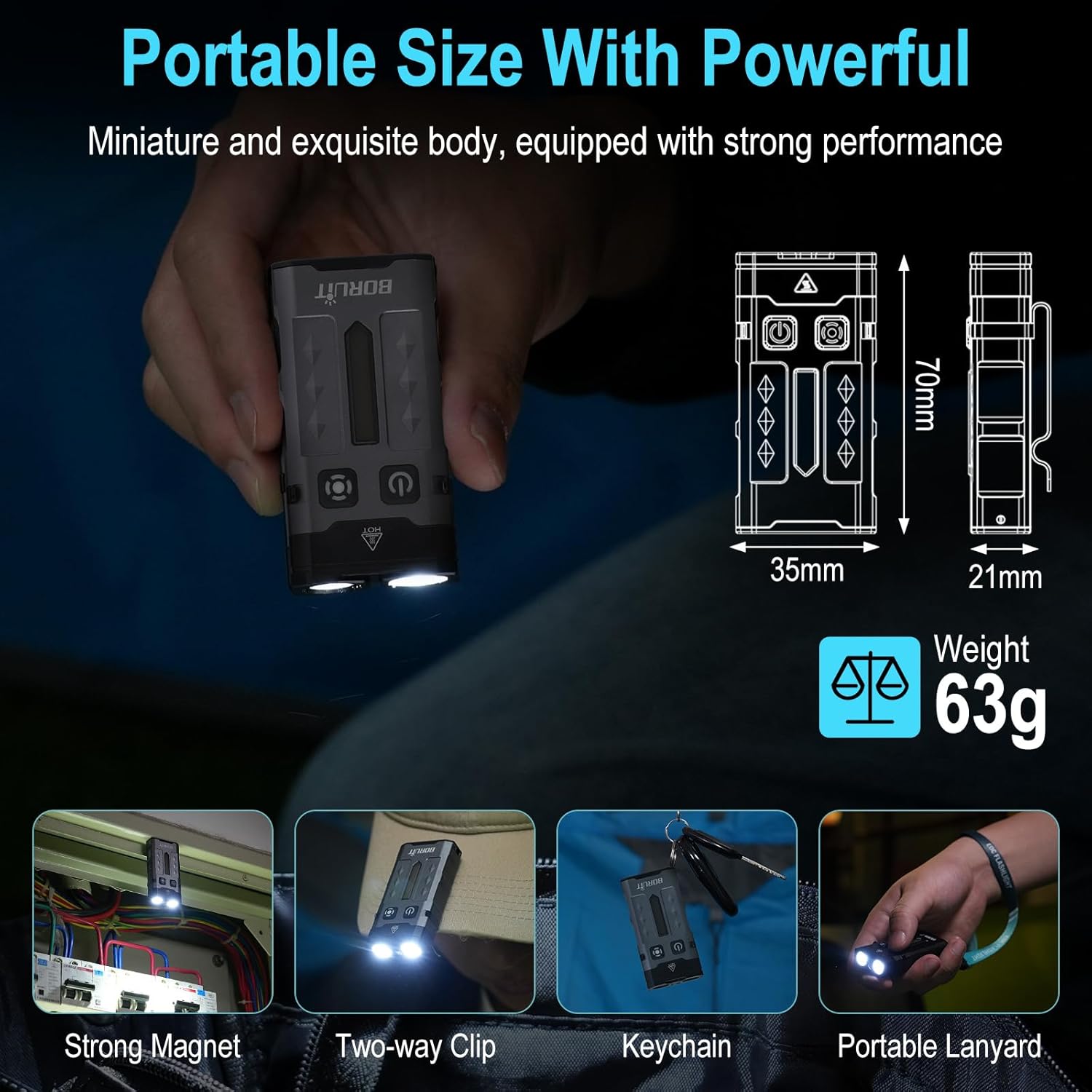
- Portable & Hands-Free Design: Includes a magnetic tail cap for attachment to metal surfaces, a two-way back clip for securing to hats, pockets, or backpacks, and comes with a keychain and lanyard for easy carrying.
- നീണ്ടുനിൽക്കുന്ന നിർമ്മാണം: Lightweight at only 63g, made from sturdy aluminum alloy, and rated IP66 waterproof for reliability in various conditions. Offers 1-meter anti-fall protection.
3. പാക്കേജ് ഉള്ളടക്കം
പാക്കേജിൽ എല്ലാ ഇനങ്ങളും ഉണ്ടെന്ന് ഉറപ്പാക്കുക:
- 1 x BORUIT EV20 Flashlight
- 1 x യുഎസ്ബി-സി ചാർജിംഗ് കേബിൾ
- 1 x കീചെയിൻ
- 1 x ലാനിയാർഡ്

4 സ്പെസിഫിക്കേഷനുകൾ
| ഫീച്ചർ | സ്പെസിഫിക്കേഷൻ |
|---|---|
| വെളുത്ത തെളിച്ചം | 1100 ല്യൂമൻസ് (പരമാവധി) |
| പ്രകാശ സ്രോതസ്സ് തരം | LED (White, 365nm UV, RGB) |
| മെറ്റീരിയൽ | അലുമിനിയം അലോയ് |
| ഉൽപ്പന്ന അളവുകൾ | 2.76"D x 1.38"W x 0.82"H (70mm x 35mm x 21mm) |
| ഇനത്തിൻ്റെ ഭാരം | 2.2 ഔൺസ് (63 ഗ്രാം) |
| ബാറ്ററി ശേഷി | 1000mAh ലിഥിയം അയൺ (ഉൾപ്പെടുത്തിയത്) |
| ജല പ്രതിരോധ നില | IP66 വാട്ടർപ്രൂഫ് |
| Max. Beam Distance | 100 മീറ്റർ |
| Drop Height Resistance | 1 മീറ്റർ |
| ചാർജിംഗ് പോർട്ട് | USB-C |

5. സജ്ജീകരണവും ചാർജിംഗും
Before first use, fully charge the flashlight. The BORUIT EV20 features a built-in 1000mAh battery and supports USB-C fast charging.
ചാർജിംഗ് നിർദ്ദേശങ്ങൾ:
- Locate the USB-C charging port on the side of the flashlight.
- Connect the provided USB-C cable to the flashlight and a compatible USB power source (e.g., wall adapter, computer USB port).
- The intelligent power indicator on the flashlight will show the charging status: a red light flash indicates charging, and a green light indicates a full charge.
- സാധാരണയായി പൂർണ്ണമായി ചാർജ് ചെയ്യാൻ ഏകദേശം 2 മണിക്കൂർ എടുക്കും.
6. പ്രവർത്തന നിർദ്ദേശങ്ങൾ
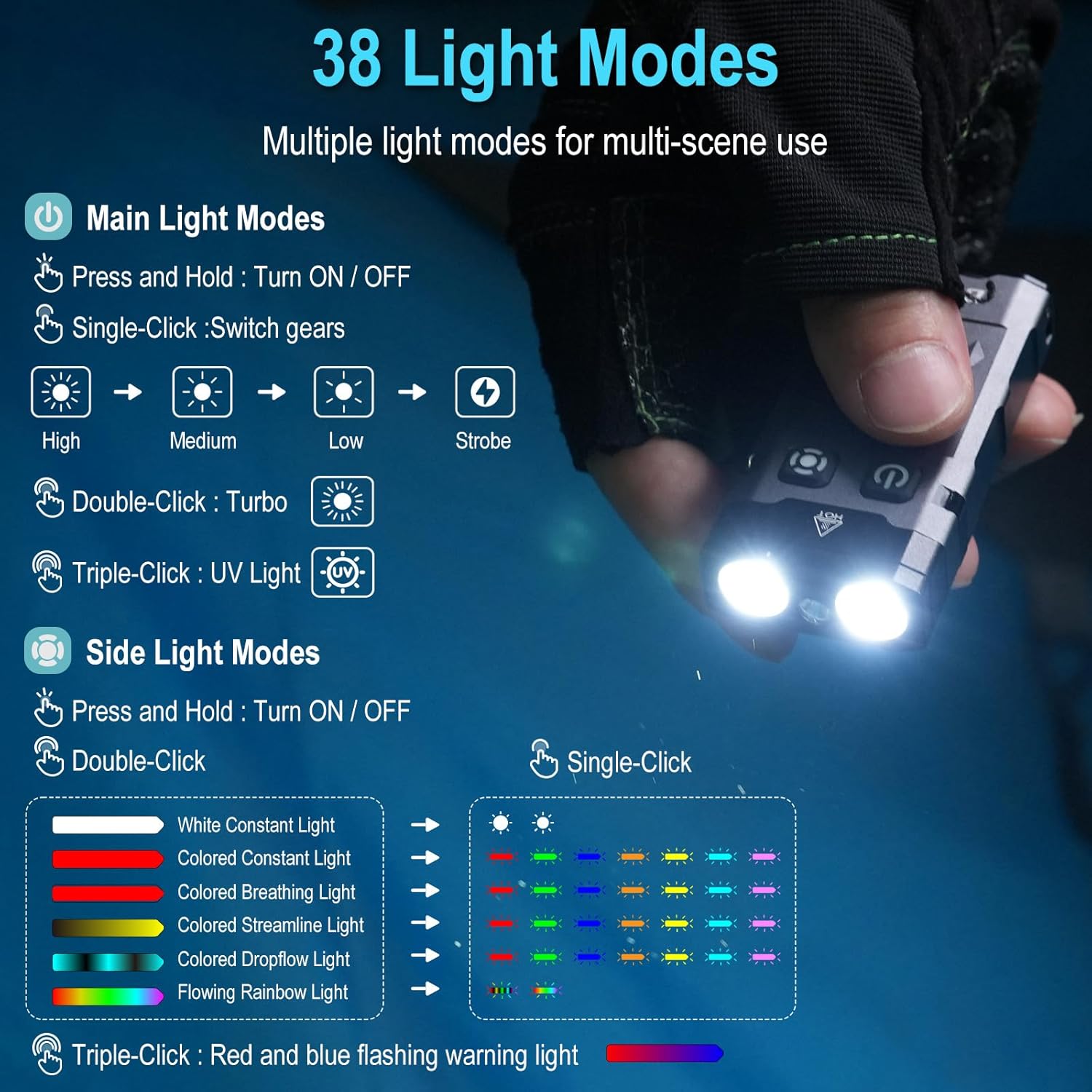
The BORUIT EV20 features two main buttons: the Power Button (left) and the Mode Button (right).

6.1. Main Light Modes (Front LEDs)
- ഓൺ/ഓഫ് ചെയ്യുക: പവർ ബട്ടൺ അമർത്തിപ്പിടിക്കുക.
- സൈക്കിൾ തെളിച്ചം: With the main light ON, single-click the Power Button to cycle through High, Medium, Low, and Strobe modes. The flashlight has a memory function and will return to the last used mode.
- ടർബോ മോഡ്: Double-click the Power Button for maximum brightness (1100 lumens).
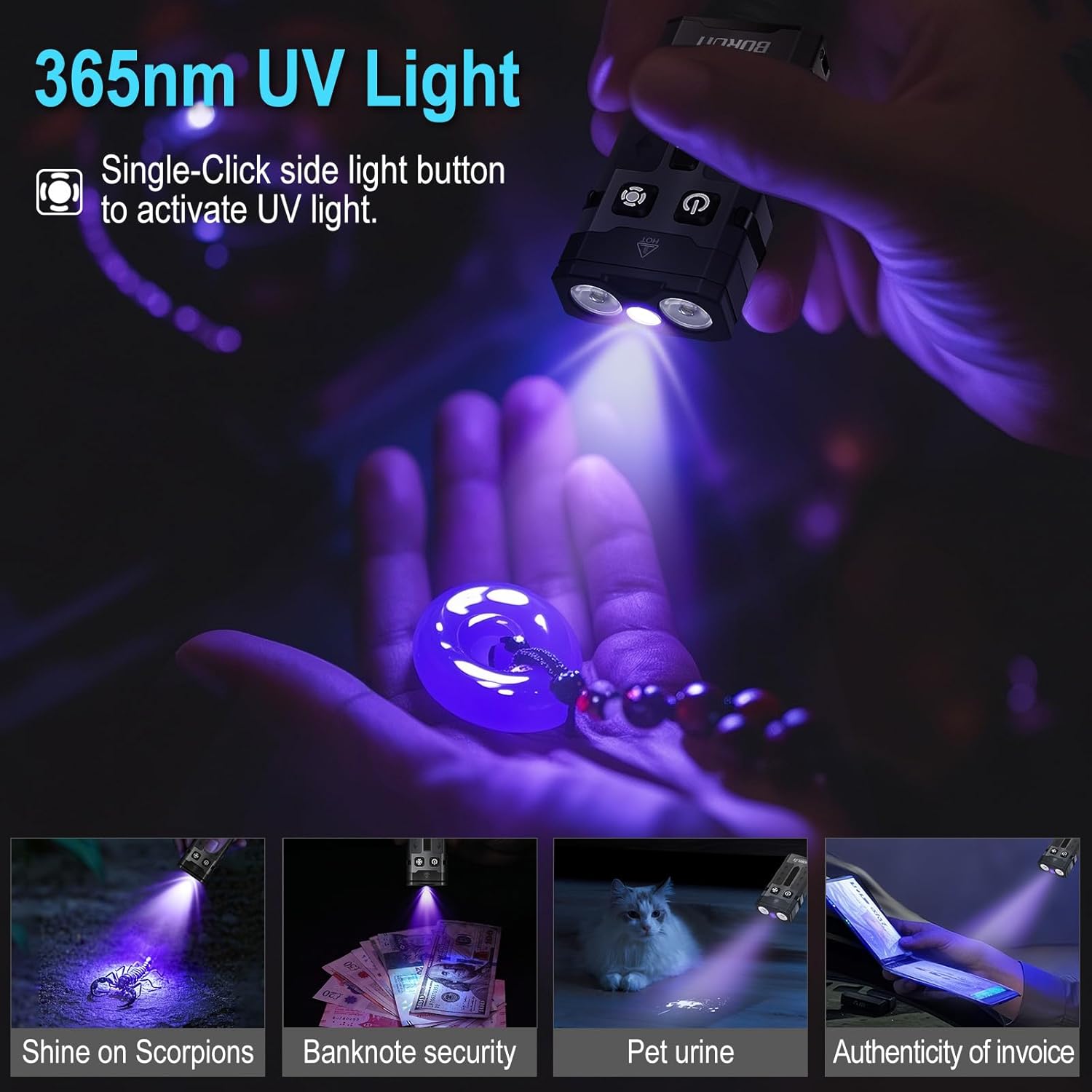
- യുവി ലൈറ്റ് മോഡ്: Triple-click the Power Button to activate the 365nm UV light.
6.2. Side Light Modes (RGB LEDs)
- ഓൺ/ഓഫ് ചെയ്യുക: മോഡ് ബട്ടൺ അമർത്തിപ്പിടിക്കുക.
- White Constant Light: Double-click the Mode Button to activate white constant light. Single-click to switch between High and Low brightness.
- Colored Constant Light: After activating white constant light, double-click the Mode Button again to enter colored constant light mode. Single-click to cycle through Red, Green, Blue, Orange, Yellow, Cyan, and Purple.
- Dynamic RGB Modes: From colored constant light mode, double-click the Mode Button to cycle through Colored Breathing Light, Colored Streamline Light, Colored Dropflow Light, and Flowing Rainbow Light (single-click to adjust speed).
- Red and Blue Flashing Warning Light: Triple-click the Mode Button to activate the red and blue flashing warning light.

7. പരിപാലനം
To ensure the longevity and optimal performance of your BORUIT EV20 flashlight, follow these maintenance guidelines:
- വൃത്തിയാക്കൽ: Wipe the flashlight with a clean, soft cloth. For stubborn dirt, use a damp തുണി. ഉരച്ചിലുകളുള്ള ക്ലീനറുകളോ ലായകങ്ങളോ ഉപയോഗിക്കരുത്.
- സംഭരണം: Store the flashlight in a cool, dry place away from direct sunlight and extreme temperatures. If storing for an extended period, charge the battery every 3-6 months to maintain battery health.
- ജല പ്രതിരോധം: While IP66 waterproof, avoid prolonged submersion. Ensure the USB-C port cover is securely closed to prevent water ingress.
8 സുരക്ഷാ വിവരങ്ങൾ
ഇനിപ്പറയുന്ന സുരക്ഷാ മുൻകരുതലുകൾ വായിച്ച് പാലിക്കുക:
- നേത്ര സുരക്ഷ: Do not shine the flashlight directly into eyes or at other people or animals. The high lumen output can cause temporary vision impairment or permanent eye damage.
- ചൂട്: The flashlight may become warm during prolonged use, especially in Turbo mode. This is normal. Avoid touching the hot surface for extended periods.
- കുട്ടികൾ: കുട്ടികൾക്ക് ലഭ്യമാകാതെ സൂക്ഷിക്കുക.
- ബാറ്ററി: Do not attempt to disassemble or replace the built-in battery. Do not expose the battery to fire or extreme heat.
- യുവി ലൈറ്റ്: Avoid prolonged direct exposure to the 365nm UV light.
9. പ്രശ്നപരിഹാരം
If you encounter issues with your BORUIT EV20 flashlight, refer to the following common solutions:
- ഫ്ലാഷ്ലൈറ്റ് ഓണാകുന്നില്ല: Ensure the battery is charged. Connect to a USB-C power source and check the charging indicator.
- Light Output is Dim: ബാറ്ററി ചാർജ് കുറവായിരിക്കാം. ഫ്ലാഷ്ലൈറ്റ് റീചാർജ് ചെയ്യുക.
- ചാർജിംഗ് പ്രവർത്തിക്കുന്നില്ല: Check the USB-C cable and power source. Ensure the cable is properly connected to both the flashlight and the power adapter. Try a different cable or power source.
- ബട്ടണുകൾ പ്രതികരിക്കുന്നില്ല: Ensure the flashlight is not in lockout mode (if applicable, refer to specific product documentation for lockout features). Try a soft reset by fully discharging and then recharging the battery.
പ്രശ്നം നിലനിൽക്കുകയാണെങ്കിൽ, ദയവായി ഉപഭോക്തൃ പിന്തുണയുമായി ബന്ധപ്പെടുക.
10. വാറൻ്റിയും പിന്തുണയും
BORUIT provides a 30 ദിവസത്തെ പണം തിരികെ നൽകാനുള്ള ഗ്യാരണ്ടി കൂടാതെ എ 1 വർഷത്തെ വാറൻ്റി for the EV20 flashlight. This warranty covers manufacturing defects and issues arising from normal use.
For warranty claims, technical support, or any questions regarding your product, please contact the seller or BORUIT customer service through the platform where you purchased the item. Please have your purchase details ready to expedite the support process.