
1. ഉൽപ്പന്നം കഴിഞ്ഞുview
The TRN Black Pearl is a portable Hi-Fi digital audio decoder and headphone amplifier designed to enhance your audio experience. It features dual CS43131 DAC chips, supporting high-resolution audio formats up to PCM 384kHz/32bit and DSD256. With both 3.5mm single-ended and 4.4mm balanced outputs, it offers versatile connectivity for various headphones and devices.
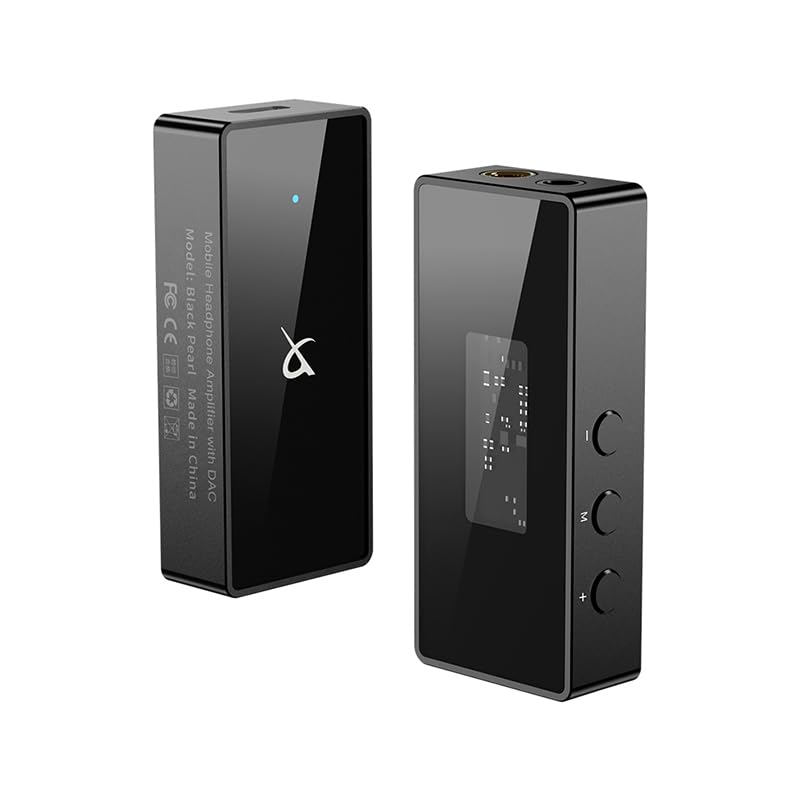
ചിത്രം 1.1: മുന്നിലും പിന്നിലും views of the TRN Black Pearl DAC, showcasing its compact design and rear labeling.
പ്രധാന സവിശേഷതകൾ:
- Dual DAC Chip: Equipped with two low-power, high-performance CS43131 DAC decoding chips for superior audio quality.
- ഉയർന്ന മിഴിവുള്ള ഓഡിയോ പിന്തുണ: Capable of in-depth analysis, supporting PCM up to 384kHz/32bit and DSD64/DSD128/DSD256.
- റെക്കോർഡിംഗ് പ്രവർത്തനം: Supports recording, allowing capture of more audio details for a clearer sound experience.
- ഡ്യുവൽ ഔട്ട്പുട്ട് പോർട്ടുകൾ: Features both 3.5mm single-ended and 4.4mm balanced headphone output jacks for wide compatibility.
- മൾട്ടി-ഫംഗ്ഷൻ ബട്ടണുകൾ: Simple and intuitive controls for easy operation.
- 8-Band EQ Adjustment: Supports WALK PLAY APP EQ linkage for flexible sound customization.

Figure 1.2: Visual representation of the TRN Black Pearl's core features, including its dual DAC, high-resolution audio support, and versatile outputs.
2. പാക്കേജ് ഉള്ളടക്കം
അൺബോക്സിംഗ് ചെയ്യുമ്പോൾ, എല്ലാ ഇനങ്ങളും നല്ല നിലയിലാണെന്നും ലഭ്യമാണെന്നും ഉറപ്പാക്കാൻ പാക്കേജ് ഉള്ളടക്കങ്ങൾ പരിശോധിക്കുക.
- TRN Black Pearl Portable Hi-Fi Digital Audio Decoder
- USB Type-C Cable (for connection to source device)

Figure 2.1: The TRN Black Pearl device and its accompanying USB Type-C cable, as typically found in the product packaging.
3. സജ്ജീകരണ ഗൈഡ്
Follow these steps to set up your TRN Black Pearl DAC:
- ഉറവിട ഉപകരണത്തിലേക്ക് കണക്റ്റുചെയ്യുക: Use the provided USB Type-C cable to connect the TRN Black Pearl to your audio source device (e.g., smartphone, tablet, computer). The Black Pearl is compatible with devices supporting USB Audio Class 2.0.
- ഹെഡ്ഫോണുകൾ ബന്ധിപ്പിക്കുക:
- For standard headphones, plug your 3.5mm headphone jack into the 3.5mm output port on the TRN Black Pearl.
- For balanced headphones, plug your 4.4mm balanced headphone jack into the 4.4mm output port.
- പവർ ഓൺ: The device typically powers on automatically when connected to a compatible source device. The indicator light will illuminate.
- ഡ്രൈവർ ഇൻസ്റ്റാളേഷൻ (ആവശ്യമെങ്കിൽ): For some computer operating systems, you may need to install specific drivers. Refer to the manufacturer's webഏറ്റവും പുതിയ ഡ്രൈവർ ഡൗൺലോഡുകൾക്കായുള്ള സൈറ്റ്.

Figure 3.1: The dual output interface of the TRN Black Pearl, featuring both 3.5mm and 4.4mm jacks for wide headphone compatibility.
4. പ്രവർത്തന നിർദ്ദേശങ്ങൾ
4.1. ഇൻഡിക്കേറ്റർ ലൈറ്റ് സ്റ്റാറ്റസ്
The TRN Black Pearl features a three-color indicator light to show its current operational status:
- നീല വെളിച്ചം: Indicates standby mode or PCM audio playback.
- ഗ്രീൻ ലൈറ്റ്: Indicates PCM audio playback at higher sample നിരക്കുകൾ.
- ചുവന്ന വെളിച്ചം: DSD ഓഡിയോ പ്ലേബാക്ക് സൂചിപ്പിക്കുന്നു.

Figure 4.1: The TRN Black Pearl displaying a red indicator light, which signifies DSD audio playback.
4.2. Multi-Function Buttons
The device is equipped with multi-function buttons for controlling playback and volume. Specific functions may vary slightly depending on the connected source device and application.
- വോളിയം കൂട്ടുക/താഴ്ത്തുക: ഔട്ട്പുട്ട് വോളിയം ക്രമീകരിക്കുക.
- പ്ലേ/താൽക്കാലികമായി നിർത്തുക: ഓഡിയോ പ്ലേബാക്ക് നിയന്ത്രിക്കുക.
- ട്രാക്ക് ഒഴിവാക്കുക: Navigate between audio tracks.

ചിത്രം 4.2: വശം view of the TRN Black Pearl, highlighting the multi-function buttons for volume and playback control.
4.3. Recording and Calling
The TRN Black Pearl supports recording and calling functions when connected to compatible devices and applications. This allows for clear voice communication and audio capture.

Figure 4.3: The TRN Black Pearl connected to a smartphone, demonstrating its capability for recording and making calls.
5. പരിപാലനം
To ensure the longevity and optimal performance of your TRN Black Pearl, follow these maintenance guidelines:
- വൃത്തിയാക്കൽ: Use a soft, dry, lint-free cloth to clean the exterior of the device. Avoid using abrasive cleaners, solvents, or strong chemicals, as they may damage the finish or internal components.
- സംഭരണം: When not in use, store the device in a cool, dry place away from direct sunlight, extreme temperatures, and high humidity.
- കൈകാര്യം ചെയ്യൽ: Handle the device with care. Avoid dropping it or subjecting it to strong impacts, which can damage internal circuitry.
- കണക്റ്റിവിറ്റി: Always grasp the plug, not the cable, when connecting or disconnecting the USB or headphone cables to prevent damage to the connectors or ports.
6. പ്രശ്നപരിഹാരം
If you encounter issues with your TRN Black Pearl, refer to the following common troubleshooting steps:
| പ്രശ്നം | സാധ്യമായ കാരണം | പരിഹാരം |
|---|---|---|
| ശബ്ദ ഔട്ട്പുട്ട് ഇല്ല. |
|
|
| Indicator light not on. |
|
|
| വികലമായ ശബ്ദം. |
|
|
7 സ്പെസിഫിക്കേഷനുകൾ
Detailed technical specifications for the TRN Black Pearl Portable Hi-Fi Digital Audio Decoder:
| പരാമീറ്റർ | മൂല്യം |
|---|---|
| DAC ചിപ്പ് | ഡ്യുവൽ CS43131 |
| USB തരം | ടൈപ്പ്-സി USB2.0 |
| പിസിഎം പിന്തുണ | 384kHz/32bit വരെ |
| ഡിഎസ്ഡി പിന്തുണ | DSD64, DSD128, DSD256 |
| അളവുകൾ | 57mm x 23mm x 13mm |
| ഭാരം | Approx. 25g (Cable not included) |
| ഇൻഡിക്കേറ്റർ ഇളം നിറങ്ങൾ | Blue (Standby/PCM), Green (PCM), Red (DSD) |
| Output Level (32Ω load) | 4.4mm: 320mW, 3.5mm: 125mW |
| DNR (600Ω load) | 4.4mm: 130dB@4Vrms, 3.5mm: 125dB@2Vrms |
| SNR (600Ω load) | 4.4mm: 130dB@4Vrms, 3.5mm: 125dB@2Vrms |
| THD+N (600Ω load) | 4.4mm: -110dB@2Vrms, 3.5mm: -110dB@1Vrms |
| ഓപ്പറേറ്റിംഗ് വോളിയംtage | 4.5വി - 5.25വി |
| ആകെ ഹാർമോണിക് ഡിസ്റ്റോർഷൻ | -108dB (RL=32Ω single end, 100mW) |
| ഹെഡ്ഫോണുകൾ ജാക്ക് | 3.5 എംഎം ജാക്ക്, 4.4 എംഎം ജാക്ക് |
| കണക്റ്റിവിറ്റി ടെക്നോളജി | വയർഡ് |
| അനുയോജ്യമായ ഉപകരണങ്ങൾ | Devices with 3.5mm or 4.4mm headphone jacks, Android devices |
| ഫ്രീക്വൻസി റേഞ്ച് | 20Hz - 384kHz |
8. വാറൻ്റിയും പിന്തുണയും
For warranty information and technical support, please refer to the official LEAUDIO webസൈറ്റിൽ ബന്ധപ്പെടുകയോ അവരുടെ ഉപഭോക്തൃ സേവനവുമായി നേരിട്ട് ബന്ധപ്പെടുകയോ ചെയ്യുക. ഏതെങ്കിലും വാറന്റി ക്ലെയിമുകൾക്ക് വാങ്ങിയതിന്റെ തെളിവായി നിങ്ങളുടെ വാങ്ങൽ രസീത് സൂക്ഷിക്കുക.
For the most up-to-date information regarding drivers, firmware updates, and frequently asked questions, please visit the manufacturer's support page.