
Element Element 2023
Element 43" Frameless 4K UHD HDR XUMO TV User Manual
Model: Element 2023
1. ആമുഖം
This manual provides essential information for setting up, operating, and maintaining your Element 43-inch Frameless 4K UHD HDR XUMO TV. Please read it thoroughly before using your television to ensure proper functionality and safety.
The Element XUMO TV offers a breathtaking viewing experience with its 4K Ultra HD resolution, delivering clear and detailed images. Enhanced color and contrast are provided by Dolby Vision and HDR technology, ensuring an immersive experience even in dark scenes. Dolby Audio contributes to superior sound quality for movies and games. A 120Hz effective refresh rate ensures smooth motion during fast-paced content.

ചിത്രം 1.1: മുൻഭാഗം view of the Element 43" XUMO TV.
2. ബോക്സിൽ എന്താണുള്ളത്?
എല്ലാ ഇനങ്ങളും ഉണ്ടെന്ന് ഉറപ്പാക്കാൻ നിങ്ങളുടെ പാക്കേജിന്റെ ഉള്ളടക്കങ്ങൾ പരിശോധിക്കുക:
- 1 Element Xumo TV 43"
- 1 Xumo TV remote control (batteries included)
- 1 ദ്രുത ആരംഭ ഗൈഡ്
- 1 TV stand + hardware
3. സജ്ജീകരണം
3.1 അൺപാക്കിംഗ്
- ടിവി അതിന്റെ പാക്കേജിംഗിൽ നിന്ന് ശ്രദ്ധാപൂർവ്വം നീക്കം ചെയ്യുക. ടെലിവിഷന്റെ വലിപ്പവും ഭാരവും കാരണം ഈ ഘട്ടത്തിനായി രണ്ട് പേർ ഉണ്ടായിരിക്കുന്നതാണ് നല്ലത്.
- പോറലുകൾ ഉണ്ടാകാതിരിക്കാൻ ടിവി സ്ക്രീൻ-ഡൗൺ മൃദുവായതും പരന്നതുമായ ഒരു പ്രതലത്തിൽ വയ്ക്കുക.
- എല്ലാ സംരക്ഷണ ഫിലിമുകളും പാക്കേജിംഗ് വസ്തുക്കളും നീക്കം ചെയ്യുക.
3.2 സ്റ്റാൻഡ് അറ്റാച്ചുചെയ്യുന്നു
ടിവി സ്റ്റാൻഡ് അറ്റാച്ചുചെയ്യാൻ:
- ഇടതും വലതും നിൽക്കുന്ന കാലുകൾ തിരിച്ചറിയുക.
- ടിവിയുടെ അടിയിലുള്ള അനുബന്ധ സ്ക്രൂ ദ്വാരങ്ങൾ ഉപയോഗിച്ച് ഓരോ സ്റ്റാൻഡ് കാലും വിന്യസിക്കുക.
- Secure the stand legs using the provided hardware (screws). Do not overtighten.
- സ്ഥിരതയുള്ളതും നിരപ്പായതുമായ പ്രതലത്തിൽ ടിവി അതിന്റെ നേരായ സ്ഥാനത്തേക്ക് ശ്രദ്ധാപൂർവ്വം ഉയർത്തുക.
3.3 പെരിഫറലുകൾ ബന്ധിപ്പിക്കുന്നു
Connect your external devices (e.g., cable box, gaming console, Blu-ray player) to the appropriate ports on the back of the TV. Refer to the Quick Start Guide for port locations.
3.4 പ്രാരംഭ പവർ ഓൺ
- പവർ കോർഡ് ടിവിയിലേക്കും പിന്നീട് ഒരു വാൾ ഔട്ട്ലെറ്റിലേക്കും പ്ലഗ് ചെയ്യുക.
- റിമോട്ട് കൺട്രോളിലോ ടിവിയിലോ പവർ ബട്ടൺ അമർത്തുക.
- Follow the on-screen instructions to complete the initial setup, including network connection and channel scanning.
4. പ്രവർത്തന നിർദ്ദേശങ്ങൾ
4.1 വിദൂര നിയന്ത്രണ പ്രവർത്തനങ്ങൾ
The included XUMO TV remote control allows you to navigate the TV's features. It includes an advanced voice remote function for easy content search.
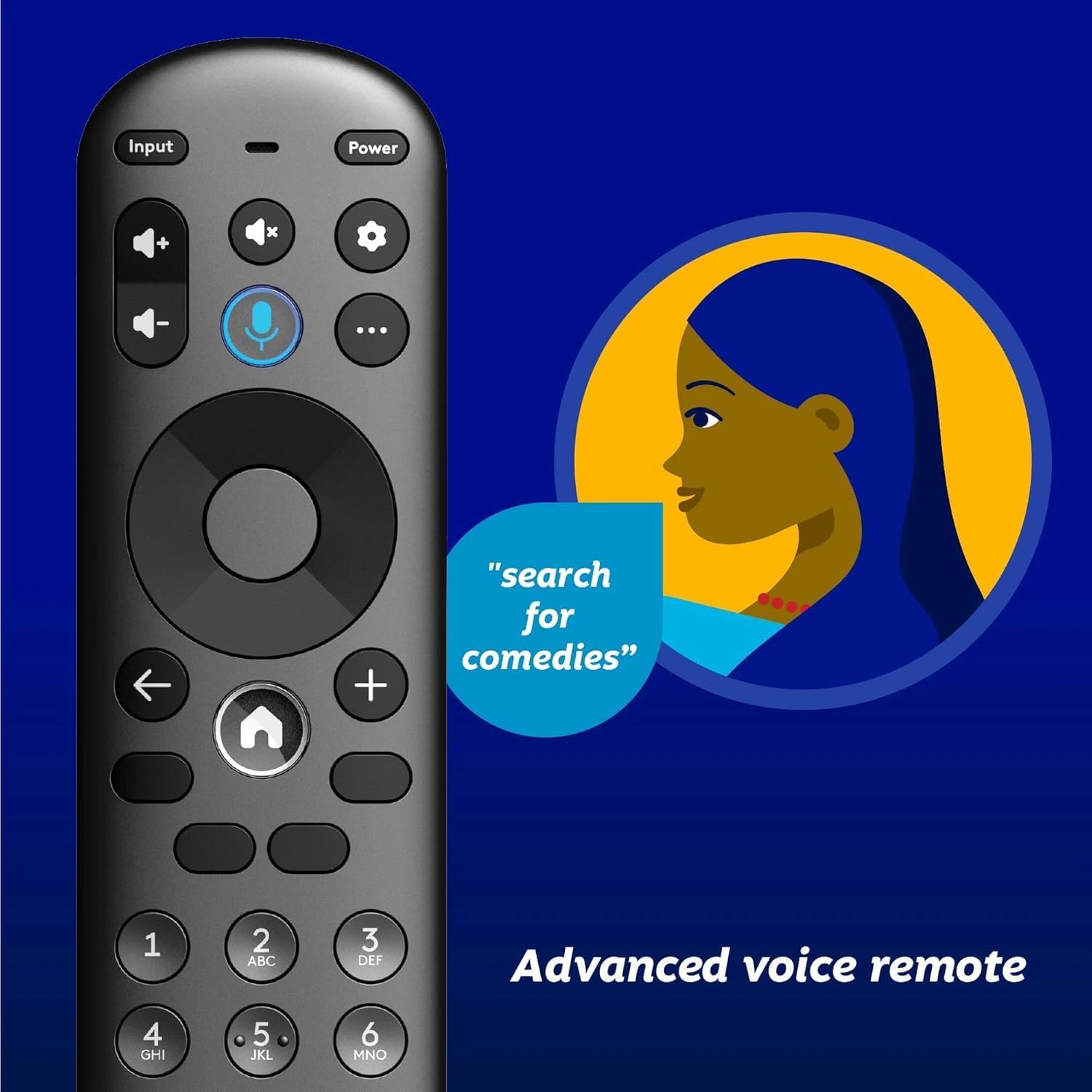
Image 4.1: Element XUMO TV advanced voice remote control.
- ശക്തി: ടിവി ഓണാക്കുകയോ ഓഫാക്കുകയോ ചെയ്യുന്നു.
- ഇൻപുട്ട്: ഇൻപുട്ട് ഉറവിടം (HDMI, AV, മുതലായവ) തിരഞ്ഞെടുക്കുന്നു.
- വോയ്സ് ബട്ടൺ: Activates voice commands for searching content or controlling the TV.
- നാവിഗേഷൻ പാഡ്: മെനുകളിലൂടെ നീങ്ങാനും ഓപ്ഷനുകൾ തിരഞ്ഞെടുക്കാനും ഉപയോഗിക്കുന്നു.
- ഹോം ബട്ടണ്: Returns to the XUMO TV home screen.
- വോളിയം +/-: വോളിയം ലെവൽ ക്രമീകരിക്കുന്നു.
- ചാനൽ +/-: ടിവി ചാനലുകൾ മാറ്റുന്നു.
4.2 Smart TV Features (XUMO)
Your Element TV features a built-in XUMO TV experience, providing access to over 250 pre-loaded apps and streaming services.

Image 4.2: XUMO TV smart interface with streaming applications.
- സ്ട്രീമിംഗ് ആപ്പുകൾ: Access thousands of movies, TV shows, and music from platforms like Netflix, YouTube, Disney+, Prime Video, Peacock, and more.
- തത്സമയ ചാനലുകൾ: Explore over 750 free live channels, including news, sports, and kids' programming, from Xumo Play, Tubi, Pluto TV, and others.
- വ്യക്തിഗതമാക്കിയ ഉള്ളടക്കം: The XUMO interface is designed to help you stream easily, bringing together content in one simple view.
4.3 കണക്റ്റിവിറ്റി
- വൈഫൈ: ഇന്റർനെറ്റ് ആക്സസിനും സ്ട്രീമിംഗിനും നിങ്ങളുടെ ഹോം വയർലെസ് നെറ്റ്വർക്കിലേക്ക് കണക്റ്റുചെയ്യുക.
- ബ്ലൂടൂത്ത്: Easily pair your TV with compatible Bluetooth devices such as speakers, headphones, or game controllers.
- Apple AirPlay & Home: Mirror your smartphone, iPad, or Mac screen to the TV, stream media, and control your TV directly from Apple devices.
5. പരിപാലനം
5.1 സ്ക്രീൻ വൃത്തിയാക്കൽ
- ടിവി ഓഫാക്കി പവർ ഔട്ട്ലെറ്റിൽ നിന്ന് അൺപ്ലഗ് ചെയ്യുക.
- മൃദുവായതും ഉണങ്ങിയതും ലിന്റ് രഹിതവുമായ ഒരു തുണി ഉപയോഗിച്ച് സ്ക്രീൻ സൌമ്യമായി തുടയ്ക്കുക.
- കഠിനമായ അടയാളങ്ങൾക്ക്, നേരിയ dampവെള്ളം അല്ലെങ്കിൽ ഒരു പ്രത്യേക സ്ക്രീൻ ക്ലീനർ ഉപയോഗിച്ച് തുണിയിൽ തളിക്കുക (സ്ക്രീനിൽ നേരിട്ട് സ്പ്രേ ചെയ്യരുത്).
- കഠിനമായ രാസവസ്തുക്കൾ, അബ്രാസീവ്സുകൾ, അല്ലെങ്കിൽ ആൽക്കഹോൾ അടിസ്ഥാനമാക്കിയുള്ള ക്ലീനറുകൾ എന്നിവ ഉപയോഗിക്കുന്നത് ഒഴിവാക്കുക.
5.2 പൊതു പരിചരണം
- ടിവി നേരിട്ട് സൂര്യപ്രകാശം, താപ സ്രോതസ്സുകൾ, അമിതമായ പൊടി എന്നിവയിൽ നിന്ന് അകറ്റി നിർത്തുക.
- അമിതമായി ചൂടാകുന്നത് തടയാൻ ടിവിക്ക് ചുറ്റും ശരിയായ വായുസഞ്ചാരം ഉറപ്പാക്കുക.
- ടിവിയുടെ മുകളിൽ ഭാരമുള്ള വസ്തുക്കൾ വയ്ക്കരുത്.
6. പ്രശ്നപരിഹാരം
നിങ്ങളുടെ ടിവിയിൽ പ്രശ്നങ്ങൾ നേരിടുകയാണെങ്കിൽ, ഇനിപ്പറയുന്ന പൊതുവായ പ്രശ്നങ്ങളും പരിഹാരങ്ങളും പരിശോധിക്കുക:
- ശക്തിയില്ല:
- ടിവിയിലും പ്രവർത്തിക്കുന്ന ഒരു ഇലക്ട്രിക്കൽ ഔട്ട്ലെറ്റിലും പവർ കോർഡ് സുരക്ഷിതമായി പ്ലഗ് ചെയ്തിട്ടുണ്ടെന്ന് ഉറപ്പാക്കുക.
- മറ്റൊരു ഉപകരണം പ്ലഗ് ഇൻ ചെയ്ത് ഔട്ട്ലെറ്റ് പ്രവർത്തനക്ഷമമാണോ എന്ന് പരിശോധിക്കുക.
- റിമോട്ടിൽ മാത്രമല്ല, ടിവിയിലെ പവർ ബട്ടൺ കൂടി അമർത്തി നോക്കൂ.
- No Picture, But Has Sound:
- ശരിയായ ഇൻപുട്ട് ഉറവിടം തിരഞ്ഞെടുത്തിട്ടുണ്ടെന്ന് ഉറപ്പാക്കുക (ഉദാ. HDMI 1, AV).
- ടിവിക്കും ബാഹ്യ ഉപകരണങ്ങൾക്കും ഇടയിലുള്ള എല്ലാ കേബിൾ കണക്ഷനുകളും പരിശോധിക്കുക.
- ടിവിയും കണക്റ്റുചെയ്തിരിക്കുന്ന എല്ലാ ഉപകരണങ്ങളും പുനരാരംഭിക്കുക.
- No Sound, But Has Picture:
- വോളിയം ലെവൽ പരിശോധിച്ച് ടിവി നിശബ്ദമാക്കിയിട്ടില്ലെന്ന് ഉറപ്പാക്കുക.
- ബാഹ്യ സ്പീക്കറുകൾ ഉപയോഗിക്കുകയാണെങ്കിൽ, അവ ശരിയായി ബന്ധിപ്പിച്ചിട്ടുണ്ടെന്നും പവർ ഓൺ ചെയ്തിട്ടുണ്ടെന്നും ഉറപ്പാക്കുക.
- ടിവി മെനുവിൽ ഓഡിയോ ഔട്ട്പുട്ട് ക്രമീകരണങ്ങൾ പരിശോധിക്കുക.
- റിമോട്ട് കൺട്രോൾ പ്രവർത്തിക്കുന്നില്ല:
- റിമോട്ട് കൺട്രോളിൽ ബാറ്ററികൾ മാറ്റിസ്ഥാപിക്കുക.
- റിമോട്ടിനും ടിവിയുടെ ഐആർ സെൻസറിനും ഇടയിൽ തടസ്സങ്ങളൊന്നുമില്ലെന്ന് ഉറപ്പാക്കുക.
- Re-pair the remote if it's a Bluetooth remote (refer to the Quick Start Guide for pairing instructions).
- നെറ്റ്വർക്ക് കണക്ഷൻ പ്രശ്നങ്ങൾ:
- നിങ്ങളുടെ വൈഫൈ റൂട്ടറും മോഡവും പുനരാരംഭിക്കുക.
- Check the Wi-Fi settings on the TV to ensure it's connected to the correct network.
- If possible, try connecting the TV to the internet via an Ethernet cable.
7 സ്പെസിഫിക്കേഷനുകൾ
Key technical specifications for the Element 43" Frameless 4K UHD HDR XUMO TV:
| ഫീച്ചർ | വിവരണം |
|---|---|
| ബ്രാൻഡ് നാമം | ഘടകം |
| മോഡലിൻ്റെ പേര് | ഘടകം 2023 |
| സ്ക്രീൻ വലിപ്പം | 43 ഇഞ്ച് (110 സെ.മീ) |
| ഡിസ്പ്ലേ ടെക്നോളജി | എൽഇഡി |
| റെസലൂഷൻ | 4K അൾട്രാ എച്ച്.ഡി |
| പ്രത്യേക സവിശേഷതകൾ | 4K High Definition, HDR (High Dynamic Range), Vibrant Colors, 60 Hz, Dolby Vision, HDR10+ |
| ഫലപ്രദമായ പുതുക്കൽ നിരക്ക് | 120Hz |
| ഓഡിയോ ടെക്നോളജി | ഡോൾബി ഓഡിയോ |
| പിന്തുണയ്ക്കുന്ന ഇന്റർനെറ്റ് സേവനങ്ങൾ | Netflix, Prime Video, Max, Disney Plus, YouTube TV, Paramount+, Apple TV+, Crunchyroll, Xumo Play, Tubi, Pluto TV |
| കണക്റ്റിവിറ്റി ടെക്നോളജി | Wired, Wireless (Wi-Fi, Bluetooth, Apple AirPlay) |
| വീക്ഷണാനുപാതം | 16:9 |
| ഇനത്തിൻ്റെ ഭാരം | 22 പൗണ്ട് |
| ഉൽപ്പന്ന അളവുകൾ | 3.3 x 37 x 225 ഇഞ്ച് |
7.1 ചിത്ര ഗുണനിലവാര സവിശേഷതകൾ

Image 7.1: Dolby Vision technology enhances highlights and darks for superior contrast.

Image 7.2: 120Hz Effective Refresh Rate for smooth motion.

Image 7.3: 4K resolution delivers vivid colors and remarkable detail.
8. വാറൻ്റിയും പിന്തുണയും
This product is an Amazon Renewed item. Amazon Renewed products are backed by the Amazon Renewed Guarantee. This means your purchase is eligible for a replacement or refund within 90 days of receipt if it does not work as expected.
For specific warranty details or support inquiries, please refer to the documentation provided with your Amazon Renewed purchase or visit the Amazon Renewed support page.
Ask a question about this manual
Ask about setup, troubleshooting, compatibility, parts, safety, or missing instructions. Manuals+ will review the question and use this page’s manual context to help answer it.