
1. ആമുഖം
This manual provides comprehensive instructions for the installation, operation, and maintenance of your SASKATE HY368 Digital Programmable Heating Thermostat. This device is designed to offer precise temperature control for your home, featuring remote control, app control, voice control, and energy-saving functionalities. Please read this manual carefully before installation and use to ensure optimal performance and safety.
2. പാക്കേജ് ഉള്ളടക്കം
പാക്കേജ് തുറക്കുമ്പോൾ, ഇനിപ്പറയുന്ന എല്ലാ ഘടകങ്ങളും ഉണ്ടെന്ന് ദയവായി ഉറപ്പാക്കുക:
- 1 x HY368 Thermostat Valve
- 5 x Accessory Connectors (various sizes for compatibility)
- 1 x സ്ക്രൂ
- 1 നട്ട്
- 1 x ഉപയോക്തൃ മാനുവൽ (ഈ പ്രമാണം)

Image: All components included in the SASKATE HY368 package, showing the thermostat valve, various accessory connectors, screw, and nut.
3 സ്പെസിഫിക്കേഷനുകൾ
| ഫീച്ചർ | സ്പെസിഫിക്കേഷൻ |
|---|---|
| മോഡൽ | HY368 |
| മെറ്റീരിയൽ | എബിഎസ് |
| താപനില പരിധി | 5-35℃ |
| താപനില അളക്കൽ പിശക് | 0.5℃ |
| ഇൻസ്റ്റലേഷൻ തരം | Rotating valve installation |
| വൈദ്യുതി വിതരണം | 2 x AA ബാറ്ററി (ഉൾപ്പെടുത്തിയിട്ടില്ല) |
| ശബ്ദ നിയന്ത്രണം | അതെ |

Image: Dimensions of the SASKATE HY368 thermostat, showing a height of 90mm (3.54in), top diameter of 52mm (2.05in), and base diameter of 38mm (1.5in).
4. സജ്ജീകരണവും ഇൻസ്റ്റാളേഷനും
The SASKATE HY368 thermostat is designed for rotating valve installation. Ensure you have the correct valve connector for your heating system.
4.1 ബാറ്ററി ഇൻസ്റ്റാളേഷൻ
- Gently twist and remove the top cover of the thermostat.
- Insert 2 AA batteries into the battery compartment, observing the correct polarity (+/-). Batteries are not included.
- Replace the top cover, ensuring it clicks securely into place.
4.2 Valve Installation
- Identify the existing thermostatic radiator valve (TRV) on your radiator.
- Remove the old TRV head.
- Select the appropriate accessory connector from the package that matches your radiator valve.
- Attach the selected connector to the radiator valve.
- Screw the SASKATE HY368 thermostat onto the connector until it is firmly secured. Ensure the thermostat is oriented correctly for display visibility.
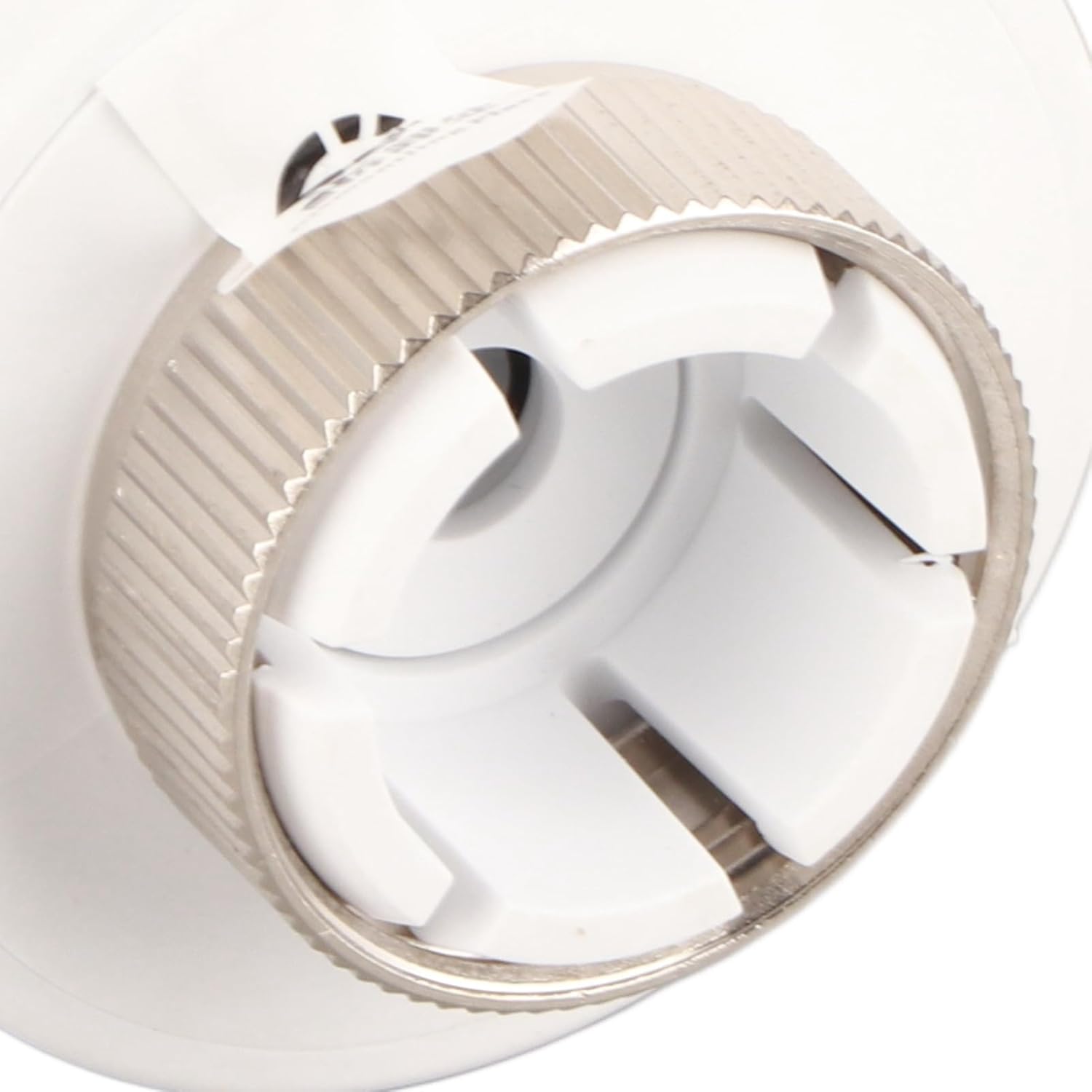
ചിത്രം: ഒരു ക്ലോസ്-അപ്പ് view of the rotating valve connector on the SASKATE HY368 thermostat, illustrating the mechanism for attachment to a radiator valve.
5. പ്രവർത്തന നിർദ്ദേശങ്ങൾ
The HY368 thermostat offers both manual and automatic control modes, with a temperature control range of 5-35℃ and an accuracy of 0.5℃.
5.1 മാനുവൽ താപനില ക്രമീകരണം
Rotate the thermostat body to manually adjust the desired temperature. The current temperature setting will be displayed on the screen.
5.2 ആപ്പ് നിയന്ത്രണം
The thermostat supports remote control via a mobile application. Download the designated app (refer to the quick start guide or packaging for app name) and follow the in-app instructions to pair your device. Once paired, you can conveniently set and monitor room temperature from your smartphone.
5.3 ശബ്ദ നിയന്ത്രണം
The HY368 is compatible with various voice control devices. After setting up app control, link your thermostat to your preferred voice assistant (e.g., Amazon Alexa, Google Assistant) through their respective applications. You can then use voice commands to adjust the temperature.
6. Working Modes and Programming
The thermostat allows for flexible scheduling to meet your heating needs throughout the week.
6.1 Programming Periods
You can set the temperature for up to 5 distinct periods within a day. This allows for customized heating schedules based on your daily routine.
6.2 Weekly Modes
Choose from three available programming modes for the week:
- 5+2 Mode: Separate programming for weekdays (Monday-Friday) and weekends (Saturday-Sunday).
- 6+1 Mode: Separate programming for working days (Monday-Saturday) and Sunday.
- 7-Day Mode: Individual programming for each day of the week (Monday-Sunday).
Refer to the app or device interface for detailed instructions on setting up these programming modes.
7. ഊർജ്ജ സംരക്ഷണ സവിശേഷതകൾ
The SASKATE HY368 thermostat incorporates features designed to help reduce energy consumption.
- കുറഞ്ഞ വൈദ്യുതി ഉപഭോഗം: The device is powered by batteries and designed for minimal power usage.
- Open Window/Door Detection: If the thermostat detects an open window or door (via connected sensors or significant temperature drop), the associated mobile application will send you a message, prompting you to turn off the heating to prevent energy waste.
- ആൻ്റി-ഫ്രീസിംഗ് പ്രവർത്തനം: The thermostat includes an anti-freezing function to protect your pipes during cold periods by maintaining a minimum temperature.
8. പരിപാലനം
To ensure the longevity and optimal performance of your SASKATE HY368 thermostat, follow these maintenance guidelines:
- വൃത്തിയാക്കൽ: മൃദുവായതും ഉണങ്ങിയതുമായ തുണി ഉപയോഗിച്ച് തെർമോസ്റ്റാറ്റിന്റെ പുറംഭാഗം തുടയ്ക്കുക. അബ്രസീവ് ക്ലീനറുകളോ ലായകങ്ങളോ ഉപയോഗിക്കരുത്.
- ബാറ്ററി മാറ്റിസ്ഥാപിക്കൽ: When the battery indicator appears on the display, replace both AA batteries promptly to avoid interruption of service.
- തടസ്സങ്ങൾ ഒഴിവാക്കുക: Ensure that the thermostat is not covered by curtains or furniture, as this can affect its temperature readings.
9. പ്രശ്നപരിഹാരം
If you encounter issues with your SASKATE HY368 thermostat, please refer to the following common solutions:
- തെർമോസ്റ്റാറ്റ് പ്രതികരിക്കുന്നില്ല: ബാറ്ററികൾ ശരിയായി ഇൻസ്റ്റാൾ ചെയ്തിട്ടുണ്ടോ എന്നും ആവശ്യത്തിന് ചാർജ് ഉണ്ടോ എന്നും പരിശോധിക്കുക. ആവശ്യമെങ്കിൽ ബാറ്ററികൾ മാറ്റിസ്ഥാപിക്കുക.
- തെറ്റായ താപനില വായന: തെർമോസ്റ്റാറ്റിന് അതിന്റെ സെൻസറിനെ ബാധിച്ചേക്കാവുന്ന നേരിട്ടുള്ള സൂര്യപ്രകാശം, ഡ്രാഫ്റ്റുകൾ അല്ലെങ്കിൽ താപ സ്രോതസ്സുകൾ എന്നിവ ഏൽക്കുന്നില്ലെന്ന് ഉറപ്പാക്കുക.
- ആപ്പ് കണക്റ്റിവിറ്റി പ്രശ്നങ്ങൾ: Verify your home Wi-Fi network is active and the thermostat is within range. Restart your router and the thermostat if needed. Ensure the app is updated to the latest version.
- ശബ്ദ നിയന്ത്രണം പ്രവർത്തിക്കുന്നില്ല: Confirm that the thermostat is correctly linked to your voice assistant account and that your voice commands are clear and precise.
- ചൂടാക്കൽ ഓൺ/ഓഫ് ചെയ്യുന്നില്ല: Check the valve installation to ensure it is securely attached and not obstructed. Verify the set temperature is above/below the current room temperature as required.
If problems persist, please contact SASKATE customer support for further assistance.
10. വാറൻ്റിയും പിന്തുണയും
For warranty information and customer support, please refer to the warranty card included with your product or visit the official SASKATE webസൈറ്റ്. ഏതെങ്കിലും വാറന്റി ക്ലെയിമുകൾക്ക് വാങ്ങിയതിന്റെ തെളിവായി നിങ്ങളുടെ വാങ്ങൽ രസീത് സൂക്ഷിക്കുക.