
1. ആമുഖം
Thank you for choosing the Acekool 12,000 BTUs Portable Air Conditioner. This appliance is designed to provide efficient cooling, dehumidification, and fan functions for indoor spaces up to 550 square feet. Please read this manual thoroughly before operation to ensure proper use, maintenance, and safety.
2. സുരക്ഷാ നിർദ്ദേശങ്ങൾ
തീ, വൈദ്യുതാഘാതം അല്ലെങ്കിൽ പരിക്കുകൾ എന്നിവ കുറയ്ക്കുന്നതിന് വൈദ്യുത ഉപകരണങ്ങൾ ഉപയോഗിക്കുമ്പോൾ എല്ലായ്പ്പോഴും അടിസ്ഥാന സുരക്ഷാ മുൻകരുതലുകൾ പാലിക്കുക.
- ഉപകരണം ഉപയോഗിക്കുന്നതിന് മുമ്പ് എല്ലാ നിർദ്ദേശങ്ങളും വായിക്കുക.
- വൈദ്യുതി വിതരണം വോള്യവുമായി പൊരുത്തപ്പെടുന്നുണ്ടെന്ന് ഉറപ്പാക്കുകtagഇ റേറ്റിംഗ് ലേബലിൽ വ്യക്തമാക്കിയിരിക്കുന്നു.
- കേടായ ചരടോ പ്ലഗോ ഉപയോഗിച്ച് യൂണിറ്റ് പ്രവർത്തിപ്പിക്കരുത്.
- Do not block air outlets or inlets. Maintain at least 20 inches of clearance around the unit.
- എയർ ഇൻലെറ്റുകളിലേക്കോ ഔട്ട്ലെറ്റുകളിലേക്കോ വിരലുകളോ വിദേശ വസ്തുക്കളോ തിരുകരുത്.
- യൂണിറ്റ് എപ്പോഴും പരന്നതും സ്ഥിരതയുള്ളതുമായ ഒരു പ്രതലത്തിൽ സ്ഥാപിക്കുക.
- വൃത്തിയാക്കുന്നതിനോ സർവീസ് ചെയ്യുന്നതിനോ മുമ്പ് യൂണിറ്റ് അൺപ്ലഗ് ചെയ്യുക.
- കുളിമുറികൾ അല്ലെങ്കിൽ അലക്കു മുറികൾ പോലുള്ള നനഞ്ഞ അന്തരീക്ഷത്തിൽ യൂണിറ്റ് ഉപയോഗിക്കരുത്.
- യൂണിറ്റ് ചൂട് സ്രോതസ്സുകളിൽ നിന്നും നേരിട്ട് സൂര്യപ്രകാശത്തിൽ നിന്നും അകറ്റി നിർത്തുക.
- ഈ ഉപകരണം, അവരുടെ സുരക്ഷയ്ക്ക് ഉത്തരവാദിയായ ഒരു വ്യക്തി ഉപകരണത്തിൻ്റെ ഉപയോഗത്തെ സംബന്ധിച്ച മേൽനോട്ടമോ നിർദ്ദേശമോ നൽകിയിട്ടില്ലെങ്കിൽ, ശാരീരികമോ ഇന്ദ്രിയപരമോ മാനസികമോ ആയ കഴിവുകൾ കുറഞ്ഞതോ അനുഭവത്തിൻ്റെയും അറിവിൻ്റെയും അഭാവം ഉള്ള വ്യക്തികൾക്ക് (കുട്ടികൾ ഉൾപ്പെടെ) ഉപയോഗിക്കാൻ ഉദ്ദേശിച്ചുള്ളതല്ല.
3. ഉൽപ്പന്നം കഴിഞ്ഞുview
3.1 യൂണിറ്റ് ഘടകങ്ങൾ
നിങ്ങളുടെ പോർട്ടബിൾ എയർ കണ്ടീഷണറിന്റെ പ്രധാന ഭാഗങ്ങളുമായി പരിചയപ്പെടുക.

ചിത്രം 3.1: മുൻഭാഗം view of the Acekool Portable Air Conditioner, showing the main unit with its sleek design and air outlet at the top.
ചിത്രം 3.2: മുകളിൽ view of the Acekool Portable Air Conditioner, highlighting the control panel and the adjustable air louvers.

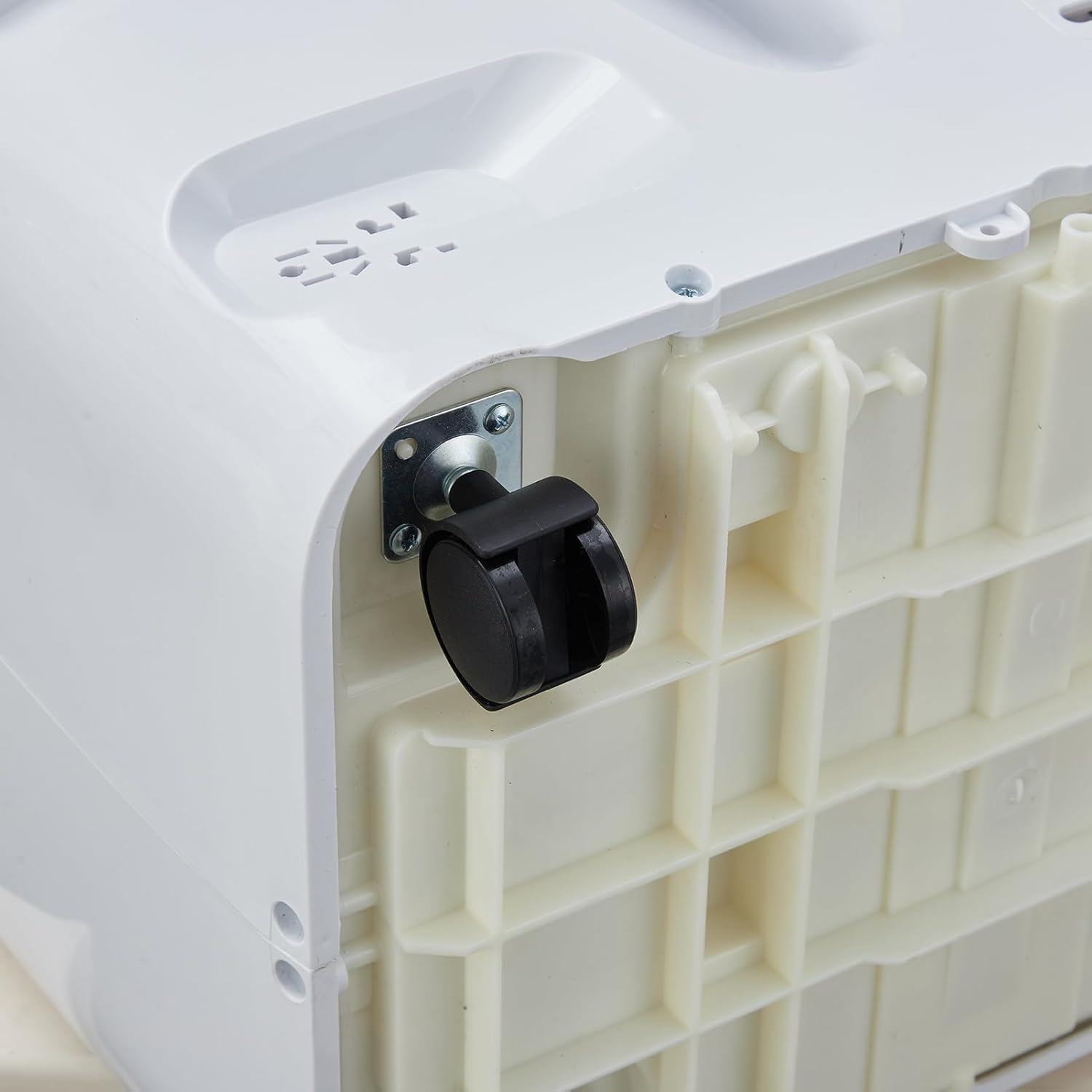
ചിത്രം 3.3: ക്ലോസപ്പ് view of a 360-degree swivel caster wheel on the base of the portable air conditioner, facilitating easy movement.
3.2 നിയന്ത്രണ പാനൽ
The control panel is located on the top of the unit. It features buttons for power, mode selection, temperature adjustment, fan speed, and timer settings. An LED display shows the current temperature and settings.
3.3 വിദൂര നിയന്ത്രണം
The remote control allows you to operate all functions of the air conditioner from a distance. It includes buttons for Power, Mode, Temperature Up/Down, Fan Speed, Sleep, and Timer. Ensure batteries are correctly inserted.
4. സജ്ജീകരണവും ഇൻസ്റ്റാളേഷനും
Proper installation is crucial for the efficient operation of your portable air conditioner. The unit comes with a window kit for exhaust ventilation.
4.1 അൺപാക്കിംഗ്
Carefully remove the air conditioner and all accessories from the packaging. Retain the packaging for future storage or transport. Check for any damage during transit.
4.2 വിൻഡോ കിറ്റ് ഇൻസ്റ്റാളേഷൻ
The window kit is designed for most standard vertical and horizontal sliding windows. It includes a slider bracket, exhaust hose, inlet and outlet hoses, and locking screws.
- Adjust the slider bracket to fit your window opening. Secure it with the provided locking screws.
- Connect the exhaust hose to the exhaust outlet on the back of the air conditioner. Twist clockwise to secure.
- എക്സ്ഹോസ്റ്റ് ഹോസിന്റെ മറ്റേ അറ്റം വിൻഡോ കിറ്റ് അഡാപ്റ്ററുമായി ഘടിപ്പിക്കുക.
- എക്സ്ഹോസ്റ്റ് ഹോസ് നീട്ടിയിട്ടുണ്ടെന്നും വളഞ്ഞിട്ടില്ലെന്നും ഉറപ്പാക്കിക്കൊണ്ട് യൂണിറ്റ് ജനാലയ്ക്ക് സമീപം വയ്ക്കുക.
ചിത്രം 4.1: വശം view of the Acekool Portable Air Conditioner, showing the flexible exhaust hose connected to the rear of the unit.

Figure 4.2: The Acekool Portable Air Conditioner positioned in a room, with its exhaust hose properly installed in a window using the provided window kit.
4.3 പവർ കണക്ഷൻ
പവർ കോർഡ് ഒരു ഗ്രൗണ്ടഡ് ഇലക്ട്രിക്കൽ ഔട്ട്ലെറ്റിലേക്ക് പ്ലഗ് ചെയ്യുക. ഔട്ട്ലെറ്റ് യൂണിറ്റിന്റെ ഇലക്ട്രിക്കൽ ആവശ്യകതകൾ നിറവേറ്റുന്നുണ്ടെന്ന് ഉറപ്പാക്കുക.
5. പ്രവർത്തന നിർദ്ദേശങ്ങൾ
Your Acekool Portable Air Conditioner offers three primary operating modes: Cool, Dehumidifier, and Fan.
5.1 പവർ ഓൺ/ഓഫ്
അമർത്തുക പവർ യൂണിറ്റ് ഓണാക്കാനോ ഓഫാക്കാനോ കൺട്രോൾ പാനലിലോ റിമോട്ട് കൺട്രോളിലോ ഉള്ള ബട്ടൺ.
5.2 മോഡ് തിരഞ്ഞെടുക്കൽ
അമർത്തുക മോഡ് ലഭ്യമായ മോഡുകളിലൂടെ സൈക്കിൾ ചെയ്യാൻ ബട്ടൺ ആവർത്തിച്ച് അമർത്തുക:
- രസകരമായ മോഡ്: Provides powerful cooling. Set your desired temperature between 59°F and 88°F using the temperature adjustment buttons.
- ഡീഹ്യൂമിഡിഫയർ മോഡ്: Removes excess moisture from the air, up to 60 pints per day. The fan speed is fixed in this mode.
- ഫാൻ മോഡ്: Circulates air without cooling. You can select different fan speeds.
- സ്മാർട്ട് മോഡ്: The unit automatically adjusts between Cool mode and Fan mode based on the room temperature to optimize energy efficiency.
5.3 താപനില ക്രമീകരണം
കൂൾ മോഡിൽ, ഉപയോഗിക്കുക UP ഒപ്പം താഴേക്ക് arrow buttons to set your desired temperature. The temperature range is 59°F to 88°F.
5.4 ഫാൻ വേഗത
അമർത്തുക ഫാൻ സ്പീഡ് button to select between Low, Medium, and High fan speeds. This function is available in Cool and Fan modes.
5.5 സ്ലീപ്പ് മോഡ്
സജീവമാക്കുക ഉറങ്ങുക mode for quiet operation and energy saving during nighttime. In this mode, the unit maintains an optimal temperature at a low fan speed, gradually increasing the set temperature by 1°F after 30 minutes and another 1°F after another 30 minutes, then maintaining this temperature for 7 hours before returning to the original setting.
5.6 ടൈമർ പ്രവർത്തനം
The 24-hour timer allows you to set the unit to turn on or off automatically after a specified period. Press the ടൈമർ button and use the temperature adjustment buttons to set the desired hours.
6. പരിപാലനവും പരിചരണവും
പതിവ് അറ്റകുറ്റപ്പണികൾ മികച്ച പ്രകടനം ഉറപ്പാക്കുകയും നിങ്ങളുടെ എയർ കണ്ടീഷണറിന്റെ ആയുസ്സ് വർദ്ധിപ്പിക്കുകയും ചെയ്യുന്നു.
6.1 ഫിൽട്ടർ ക്ലീനിംഗ്
ഉപയോഗവും വായുവിന്റെ ഗുണനിലവാരവും അനുസരിച്ച് എയർ ഫിൽറ്റർ രണ്ടാഴ്ച കൂടുമ്പോഴോ അതിലധികമോ തവണ വൃത്തിയാക്കണം.
- പവർ ഔട്ട്ലെറ്റിൽ നിന്ന് യൂണിറ്റ് അൺപ്ലഗ് ചെയ്യുക.
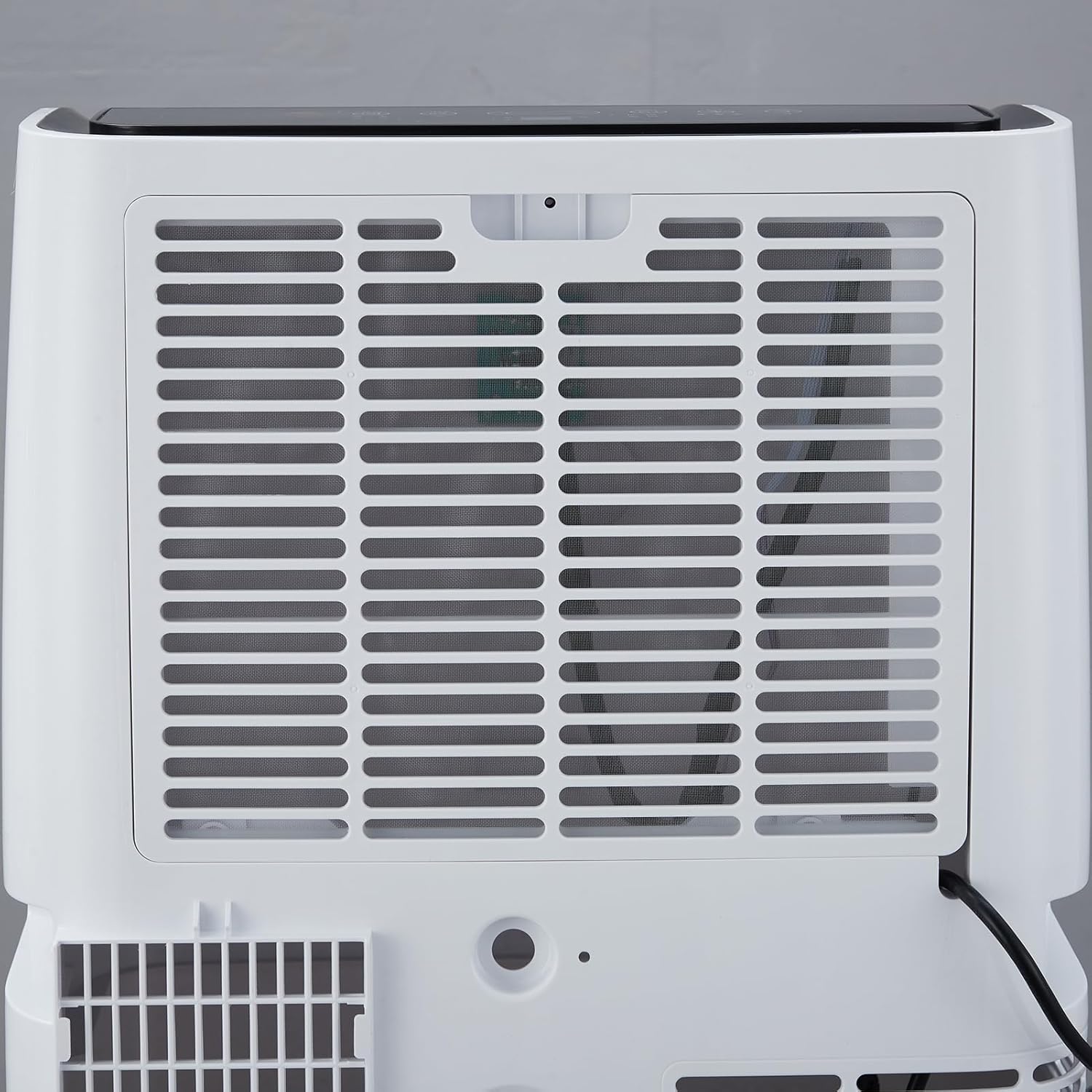
- Locate the air filter on the rear of the unit.
- സൌമ്യമായി പുറത്തെടുത്ത് ഫിൽട്ടർ നീക്കം ചെയ്യുക.
- ഫിൽട്ടർ ചൂടുള്ള, സോപ്പ് വെള്ളത്തിൽ കഴുകുക. നന്നായി കഴുകിയ ശേഷം വീണ്ടും ഇടുന്നതിനുമുമ്പ് പൂർണ്ണമായും വായുവിൽ ഉണങ്ങാൻ അനുവദിക്കുക.
- യൂണിറ്റിൽ ഡ്രൈ ഫിൽറ്റർ വീണ്ടും ഇൻസ്റ്റാൾ ചെയ്യുക.

ചിത്രം 6.1: പിൻഭാഗം view of the Acekool Portable Air Conditioner, showing the removable air filter grille for easy access and cleaning.
6.2 വാട്ടർ ഡ്രെയിനേജ്
The unit has a self-evaporation system, but in high humidity conditions, excess water may accumulate. The unit will indicate when drainage is needed.
- യൂണിറ്റ് അൺപ്ലഗ് ചെയ്യുക.
- യൂണിറ്റിന്റെ താഴെയുള്ള പിൻഭാഗത്തുള്ള ഡ്രെയിൻ പോർട്ടിനടിയിൽ ഒരു ആഴം കുറഞ്ഞ പാൻ അല്ലെങ്കിൽ ട്രേ വയ്ക്കുക.
- വെള്ളം പുറത്തേക്ക് ഒഴുകാൻ അനുവദിക്കുന്നതിന് ഡ്രെയിൻ പ്ലഗ് നീക്കം ചെയ്യുക.
- വെള്ളം വറ്റിക്കഴിഞ്ഞാൽ, ഡ്രെയിൻ പ്ലഗ് സുരക്ഷിതമായി മാറ്റിസ്ഥാപിക്കുക.
6.3 സംഭരണം
When storing the unit for an extended period, ensure it is completely drained and the filter is clean and dry. Store it in a cool, dry place, preferably in its original packaging.
7. പ്രശ്നപരിഹാരം
പൊതുവായ പ്രശ്നങ്ങളും അവയുടെ പരിഹാരങ്ങളും അറിയാൻ താഴെയുള്ള പട്ടിക കാണുക.
| പ്രശ്നം | സാധ്യമായ കാരണം | പരിഹാരം |
|---|---|---|
| യൂണിറ്റ് ഓണാക്കുന്നില്ല | വൈദ്യുതി ഇല്ല; പവർ കോർഡ് പ്ലഗ് ഇൻ ചെയ്തിട്ടില്ല; സർക്യൂട്ട് ബ്രേക്കർ ട്രിപ്പ് ചെയ്തു. | പവർ ഔട്ട്ലെറ്റ് പരിശോധിക്കുക; പ്ലഗ് പൂർണ്ണമായും ചേർത്തിട്ടുണ്ടെന്ന് ഉറപ്പാക്കുക; സർക്യൂട്ട് ബ്രേക്കർ പുനഃസജ്ജമാക്കുക. |
| യൂണിറ്റ് ഫലപ്രദമായി തണുക്കുന്നില്ല. | Air filter is dirty; Room size too large; Doors/windows open; Exhaust hose blocked or improperly installed; Temperature setting too high. | Clean air filter; Ensure room size is within specifications; Close all doors and windows; Check exhaust hose for kinks or blockages; Lower the set temperature. |
| യൂണിറ്റ് ശബ്ദമയമാണ് | Unit not on a level surface; Air filter dirty; Foreign object in fan. | Place unit on a flat, stable surface; Clean air filter; Turn off and unplug unit, then check for obstructions. |
| വെള്ളം ചോർച്ച | Drain plug not securely closed; Unit tilted; High humidity causing excess condensation. | Ensure drain plug is tightly closed; Place unit on a level surface; Drain the unit if the water tank is full. |
8 സാങ്കേതിക സവിശേഷതകൾ
| സ്പെസിഫിക്കേഷൻ | മൂല്യം |
|---|---|
| മോഡൽ നമ്പർ | FDP35-3034R3 |
| കൂളിംഗ് പവർ | 12,000 ബി.ടി.യു |
| കവറേജ് ഏരിയ | 550 ചതുരശ്ര അടി വരെ. |
| വാല്യംtage | 115V |
| വാട്ട്tage | 1200 വാട്ട്സ് |
| നിർജ്ജലീകരണ ശേഷി | 60 പൈന്റ് / ദിവസം |
| ശബ്ദ നില | 51 ഡി.ബി |
| ഉൽപ്പന്ന അളവുകൾ (D x W x H) | 18.5" x 15.35" x 35.24" |
| ഇനത്തിൻ്റെ ഭാരം | 75.8 പൗണ്ട് |
| താപനില പരിധി | 59°F - 88°F |
9. വാറൻ്റി വിവരങ്ങൾ
Acekool products are manufactured to the highest quality standards. This product is covered by a limited warranty against defects in materials and workmanship from the date of purchase. Please refer to the warranty card included with your product for specific terms and conditions. Keep your proof of purchase for warranty claims.
10. ഉപഭോക്തൃ പിന്തുണ
If you have any questions, require technical assistance, or need to make a warranty claim, please contact Acekool customer support.
- Webസൈറ്റ്: Visit the official Acekool webപതിവുചോദ്യങ്ങൾക്കും പിന്തുണാ ഉറവിടങ്ങൾക്കുമുള്ള സൈറ്റ്.
- ഇമെയിൽ: ഉപഭോക്തൃ സേവന ഇമെയിലിനായി നിങ്ങളുടെ ഉൽപ്പന്ന പാക്കേജിംഗ് അല്ലെങ്കിൽ വാറന്റി കാർഡ് പരിശോധിക്കുക.
- ഫോൺ: Refer to your product packaging or warranty card for customer service phone number.
Please have your model number (FDP35-3034R3) and purchase date ready when contacting support.